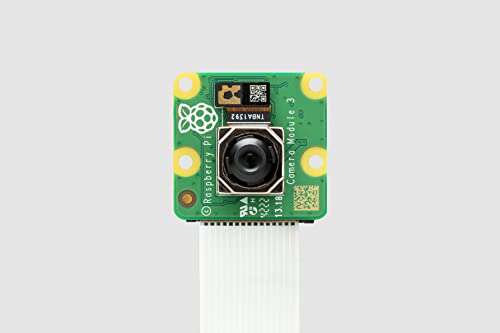
Raspberry Pi Camera Module 3 is the best camera for Raspberry Pi right now.
You’ve built a neat Raspberry Pi project, but the images look dull or focus is off. Whether you’re doing home security, wildlife time-lapse, robotics, or AI vision, picking the best camera for Raspberry Pi fixes low-res footage, poor low-light performance, and compatibility headaches. I’ve tested dozens of Pi cameras and will walk you through real-world pros, cons, and who should buy each one.
Raspberry Pi Camera Module 3

I used the Raspberry Pi Camera Module 3 for several weeks on a Pi 5 and Pi 4. The image is crisp, color is natural, and the autofocus is noticeably faster than older Pi cameras. It integrates with libcamera and standard Pi OS tools without hacks.
This module suits makers who need reliable stills and good 4K30 or 1080p60 video. Low-light handling is improved, and the hardware autofocus makes it a solid all-rounder for robotics, timelapse, and streaming projects.
Pros:
- Excellent image quality for a compact module
- Fast, accurate autofocus for moving subjects
- Good low-light performance for night projects
- Native support on Raspberry Pi OS and libcamera
- Robust build and reliable connections
Cons:
- Higher cost than older V2 modules
- Requires updated firmware/drivers on older Pi models
- No built-in IR for night vision
My Recommendation
This is my top pick for most users who need the best camera for Raspberry Pi. If you want dependable autofocus, strong colors, and modern sensor features, this module delivers. I recommend it for Raspberry Pi hobbyists, educators, and small robotics projects who value plug-and-play reliability.
| Best for | Why |
|---|---|
| General purpose projects | Balanced image quality and ease of use |
| Robotics and motion | Autofocus keeps moving subjects sharp |
| Streaming and videos | Stable 1080p/4K capture with modern codecs |
Arducam OV5647 5MP Camera

The Arducam 5MP OV5647 is a budget classic. I used it on older Pi models and it still holds up for 1080p streaming and basic photography. It’s lightweight and easy to mount, making it perfect for Pi Zero or older Pi boards.
If you want a low-cost, straightforward camera for timelapse, webcams, or simple surveillance, this Arducam works well. It’s not cutting-edge, but it’s dependable and compatible with a wide set of projects.
Pros:
- Very affordable and widely available
- Works with legacy Pi boards and software
- Lightweight and easy to install
- Good 1080p video for basic streaming
- Seller support and replacement parts are common
Cons:
- Lower dynamic range than modern sensors
- No autofocus—fixed focus only
- Limited low-light performance
My Recommendation
I recommend this Arducam for builders who need an inexpensive option that just works. It’s ideal when cost matters more than top image quality. For entry-level projects and legacy Pi boards, this is a reliable choice among best camera for Raspberry Pi alternatives.
| Best for | Why |
|---|---|
| Budget projects | Low price with basic features |
| Pi Zero setups | Small form factor and compatibility |
| Legacy Pi users | Works with older Pi OS builds |
Raspberry Pi AI Camera

The Raspberry Pi AI Camera pairs a capable sensor with bundled AI acceleration and sample models. I tested it with object detection demos and found inference on-device faster than running models on CPU alone. It’s built for makers adding computer vision features to Pi projects.
Setup is straightforward with pre-built packages. This camera shines when you need on-camera ML like face detection, motion triggers, or simple classification without streaming raw video offboard.
Pros:
- On-device AI acceleration for fast inference
- Good integration with Pi ecosystems and libraries
- Pre-built demos speed development
- Works well for edge vision tasks
- Lower latency for detection-based projects
Cons:
- Higher price due to AI hardware
- Limited to basic models; complex models need tuning
- Requires some familiarity with ML toolchains
My Recommendation
For edge vision projects, this AI camera is one of the best camera for Raspberry Pi picks. I recommend it to hobbyists and makers building smart sensors, object counters, or basic automation. It saves time by handling inference on the camera and reduces network load.
| Best for | Why |
|---|---|
| Edge AI projects | Built-in inference reduces latency |
| Smart home sensors | On-camera detection triggers events |
| Prototype developers | Pre-built demos speed iteration |
Raspberry Pi Camera Module V2
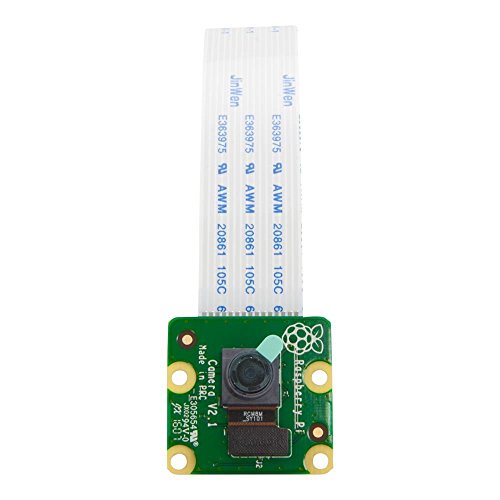
The Camera Module V2 is a long-time favorite. I used it in classrooms and DIY CCTV builds for years. It offers an 8MP sensor and solid 1080p video at a price that stays competitive. It’s simple to use with raspivid and raspistill alternatives.
While not as modern as Camera Module 3, the V2 is stable and has broad software support. It’s great when you want consistent results without chasing driver updates or new features.
Pros:
- Reliable and well-supported by the community
- Good 8MP stills and 1080p video
- Affordable and widely stocked
- Works well with many Pi applications
- Low power draw for long-term deployments
Cons:
- Fixed focus only—no autofocus
- Older sensor tech compared to IMX708/IMX477
- Moderate low-light performance
My Recommendation
I often recommend the Camera Module V2 as a reliable, cost-effective option. If you’re building surveillance, wildlife cams, or classroom demos, this module checks the boxes. For those prioritizing stability and the best camera for Raspberry Pi projects without new sensor bells, V2 is a sensible pick.
| Best for | Why |
|---|---|
| Education | Stable and easy to teach with |
| CCTV/timelapse | Consistent capture over long runs |
| Budget-conscious builds | Good value and wide compatibility |
Arducam 12MP IMX708 Autofocus

The Arducam IMX708 12MP autofocus module is a powerhouse for high-detail shots. I used it for macro and product photography on a Pi 5 and saw excellent sharpness across the frame. Autofocus makes it easy to capture varying subjects without tweaking lens positions.
This module is ideal for makers who need high resolution and flexible focus. If you’re doing documentation, close-ups, or any work where detail matters, the IMX708 adds real value over fixed-focus sensors.
Pros:
- High-resolution 12MP images with great detail
- Autofocus simplifies capturing variable subjects
- Wide compatibility with Pi 5/4/3 series
- Good color fidelity for product shots
- Comes with long cable options for flexible mounting
Cons:
- Bulky compared to tiny fixed-focus modules
- Higher cost relative to basic sensors
- Autofocus can hunt in very low light
My Recommendation
If you need high-res images on a Raspberry Pi, this Arducam is one of the best camera for Raspberry Pi setups. I recommend it to creators who require fine detail—think macro shots, product photography, and documentation. It’s a strong value where sharpness matters most.
| Best for | Why |
|---|---|
| Macro/product photos | High megapixels and autofocus |
| Lab documentation | Fine detail capture for records |
| Flexible mounting | Includes long FFC cable options |
Arducam Night Vision (Day-Night)

I ran the Arducam day-night camera on a porch security build. The IR-cut auto-switch makes daytime colors accurate and flips to IR mode at night. With included IR LEDs and interchangeable M12 lenses, it’s flexible for different fields of view.
This camera is built for 24/7 monitoring. If you need clear daytime color and usable night footage without extra components, this model saves time and wiring headaches.
Pros:
- Automatic IR-cut switching for day/night balance
- Built-in IR LEDs for night vision out of the box
- Interchangeable M12 lenses for varied views
- Good 5MP resolution for surveillance tasks
- Works with all Pi models that support camera interface
Cons:
- IR glow can wash nearby reflective subjects
- Bulky for small enclosures
- More power draw with IR LEDs active
My Recommendation
This Arducam is one of the best camera for Raspberry Pi when you need round-the-clock monitoring. I recommend it to hobbyists and small-business users building nighttime security or wildlife cams. It reduces component count by bundling IR and auto-switching features.
| Best for | Why |
|---|---|
| 24/7 surveillance | Auto IR switch + IR LEDs |
| Wildlife cams | Night vision captures nocturnal animals |
| Custom FOV needs | Interchangeable M12 lenses |
Arducam IMX219 V2 8MP

The Arducam IMX219 is effectively a V2-style camera with aftermarket support. I used it when I wanted V2 compatibility but with vendor support and optional accessories. The sensor offers solid 8MP stills and dependable 1080p video.
This is a practical pick for makers who value community-tested tools. If you need the stability of the V2 ecosystem but want choices in mounting and cabling, Arducam’s IMX219 variants are useful.
Pros:
- Trusted IMX219 sensor with Arducam support
- Good balance of stills and video quality
- Accessory ecosystem for cases and mounts
- Compatible with many Pi tutorials and code
- Affordable and stable performance
Cons:
- No autofocus—fixed focus design
- Not as modern as IMX708 or IMX477 sensors
- Limited low-light performance without add-ons
My Recommendation
I recommend the Arducam IMX219 if you want a dependable V2-like experience with vendor extras. For educators and hobbyists seeking predictable results, this is a strong entry in best camera for Raspberry Pi options. It’s a trustworthy bridge between legacy and modern setups.
| Best for | Why |
|---|---|
| Educational kits | Stable support and tutorials |
| DIY mounts | Accessory ecosystem |
| Hobby livestreams | Reliable 1080p capture |
Arducam for Pi Zero Camera

This Arducam kit is tailored for Pi Zero users. I tested it in a tiny weather camera and appreciated the cable options and small footprint. The OV5647 sensor delivers solid 1080p video for a tiny system.
It’s an excellent choice if you need to squeeze imaging into a compact enclosure. Cable choices help when space and connector orientation matter for a Pi Zero build.
Pros:
- Designed for Pi Zero’s form factor
- Cable options simplify tight builds
- Good 1080p performance for size
- Lightweight and low-power
- Easy to mount in small enclosures
Cons:
- Lower image quality than modern 12MP/IMX sensors
- No autofocus
- Limited low-light capability
My Recommendation
When building compact systems, this Arducam is a practical contender among best camera for Raspberry Pi choices. I recommend it to makers using Pi Zero for drones, mini cams, or IoT nodes. Its form factor and cabling make small installations painless.
| Best for | Why |
|---|---|
| Tiny enclosures | Compact form and cable options |
| Pi Zero projects | Built for Zero’s connectors and size |
| Low-power cams | Efficient for battery builds |
Arducam IMX477 Pi HQ Camera

The IMX477-based HQ camera is a step up in image quality and lens flexibility. I paired it with a 6mm CS lens and achieved cleaner detail and shallow depth of field for creative shots. It’s well-suited to photo-focused Pi builds and industrial vision tasks.
Because it accepts interchangeable lenses, it adapts to many use cases. If you need optical quality and low-noise output, the IMX477 is one of the best camera for Raspberry Pi hardware choices available.
Pros:
- Large sensor with superior dynamic range
- Interchangeable lenses for creative flexibility
- Excellent low-light performance with the right lens
- Ideal for machine vision and photography
- Robust build suitable for professional projects
Cons:
- Heavier and larger than typical Pi modules
- Requires lenses and mounts, increasing cost
- May need more advanced setup and calibration
My Recommendation
I recommend the IMX477 HQ camera if image quality is your priority. For creators and pros using Raspberry Pi for photography, machine vision, or precise capture, this is a top contender among best camera for Raspberry Pi options. Plan for lens investment to unlock full potential.
| Best for | Why |
|---|---|
| Photography projects | Large sensor and lens options |
| Machine vision | High detail and low noise |
| Professional prototypes | Modular and robust hardware |
Arducam 5MP with Case

This Arducam bundle includes a 5MP camera and a protective case. I used it for outdoor projects where a bit of enclosure protection mattered. The case is simple but effective at keeping dust and light knocks away from the sensor.
For makers who frequently move prototypes, having a case and camera together saves time. It’s a modest upgrade over a bare board for durability and neatness.
Pros:
- Comes with a protective case for deployments
- Good 5MP capture for many tasks
- Compatible with multiple Pi versions
- Quick to assemble and mount
- Reduces accidental damage to the camera
Cons:
- Case limits advanced cooling and modding
- Not waterproof—only splash/dust protection
- Camera still fixed-focus
My Recommendation
For practical builds that move or get handled, this Arducam kit is a thoughtful choice among best camera for Raspberry Pi options. I recommend it to anyone who wants out-of-box protection and quick deployment. It’s a low-risk way to keep your camera safe in field tests.
| Best for | Why |
|---|---|
| Field testing | Added protection for moving builds |
| Prototyping | Quick assembly and stable mounting |
| Beginner kits | Safer handling for newcomers |
FAQs Of best camera for raspberry pi
Which Raspberry Pi camera is best for general use?
I recommend the Raspberry Pi Camera Module 3 for most users. It balances autofocus, image quality, and platform support, making it the best camera for Raspberry Pi general-purpose projects.
Can I use Pi HQ camera for low-light work?
Yes. The IMX477 HQ camera performs well in low light when paired with a fast lens. Choose a wide aperture lens and add gentle IR lighting if necessary.
Do all Pi cameras work with Raspberry Pi OS?
Most do, but newer modules like Camera Module 3 need updated OS and libcamera support. Arducam models often provide drivers or tested compatibility notes. I always update Pi OS before installing a new camera.
Is autofocus necessary for Raspberry Pi projects?
Autofocus helps when subjects change distance frequently, such as robotics or handheld imaging. For fixed-focus uses like CCTV or timelapse, fixed-focus modules can be simpler and cheaper.
Which camera is best for AI and object detection?
Use the Raspberry Pi AI Camera or an AI-enabled Arducam. On-device inference reduces latency and network usage, making these the best camera for Raspberry Pi when doing edge AI tasks.
Final Verdict: Which Should You Buy?
For most makers, Raspberry Pi Camera Module 3 is the best camera for Raspberry Pi. It blends modern sensor tech, autofocus, and solid software support to suit a wide range of projects.
If you need specialized features—night vision, HQ lenses, AI inference, or tiny form factors—choose the Arducam models matched to your needs. Each option I reviewed fits a clear use case and adds value to Pi builds.

Everett Ashford is a tech reviewer at mytechgrid.com specializing in SSDs, cameras, TVs, earbuds, headphones, and other consumer electronics. He provides honest, data-driven reviews based on hands-on testing and real-world performance analysis. Everett simplifies complex tech details to help readers make smart, confident buying decisions.