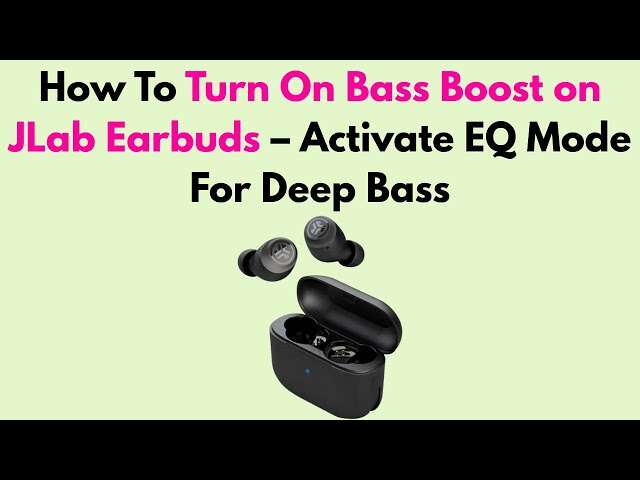
To turn on bass boost on JLab earbuds, select Bass Boost in the JLab app’s EQ settings.
JLab earbuds use the JLab app to control sound modes on many models. The exact menu can vary by model, but the usual path is simple: connect your earbuds, open the app, choose your earbuds, and select Bass Boost or a custom bass-heavy EQ. This guide explains how to turn on bass boost on JLab earbuds, what to do when the option is missing, and how to boost low tones without making music sound muddy.
What You Need Before Turning On Bass Boost
Before you adjust the equalizer, check that your earbuds and phone are ready. A stable Bluetooth connection helps the app detect the earbuds and save your sound settings.
You will usually need:
• A compatible pair of JLab Bluetooth earbuds
• An Android phone or iPhone
• The official JLab app
• The latest earbud firmware, when available
• Both earbuds charged and placed near your phone
Most newer JLab models work with the JLab app, but features differ across product lines. Some basic or older models may not support app-based EQ control. If your earbuds do not appear in the app, check the model name and compatibility details in the product guide.
It also helps to turn off other equalizers first. Your phone, music app, and streaming service may each change the sound. Several EQ controls working at once can make the final result hard to predict.

How to Turn On Bass Boost on JLab Earbuds Using the App
The JLab app is the easiest way to turn on bass boost on JLab earbuds. The labels may change slightly after an app update, but the process is usually the same.
- Open the App Store or Google Play Store.
- Search for the official JLab app.
- Install the app or update it to the newest version.
- Turn on Bluetooth on your phone.
- Put both JLab earbuds in the charging case, then remove them.
- Connect the earbuds through your phone’s Bluetooth settings.
- Open the JLab app.
- Select your connected earbud model.
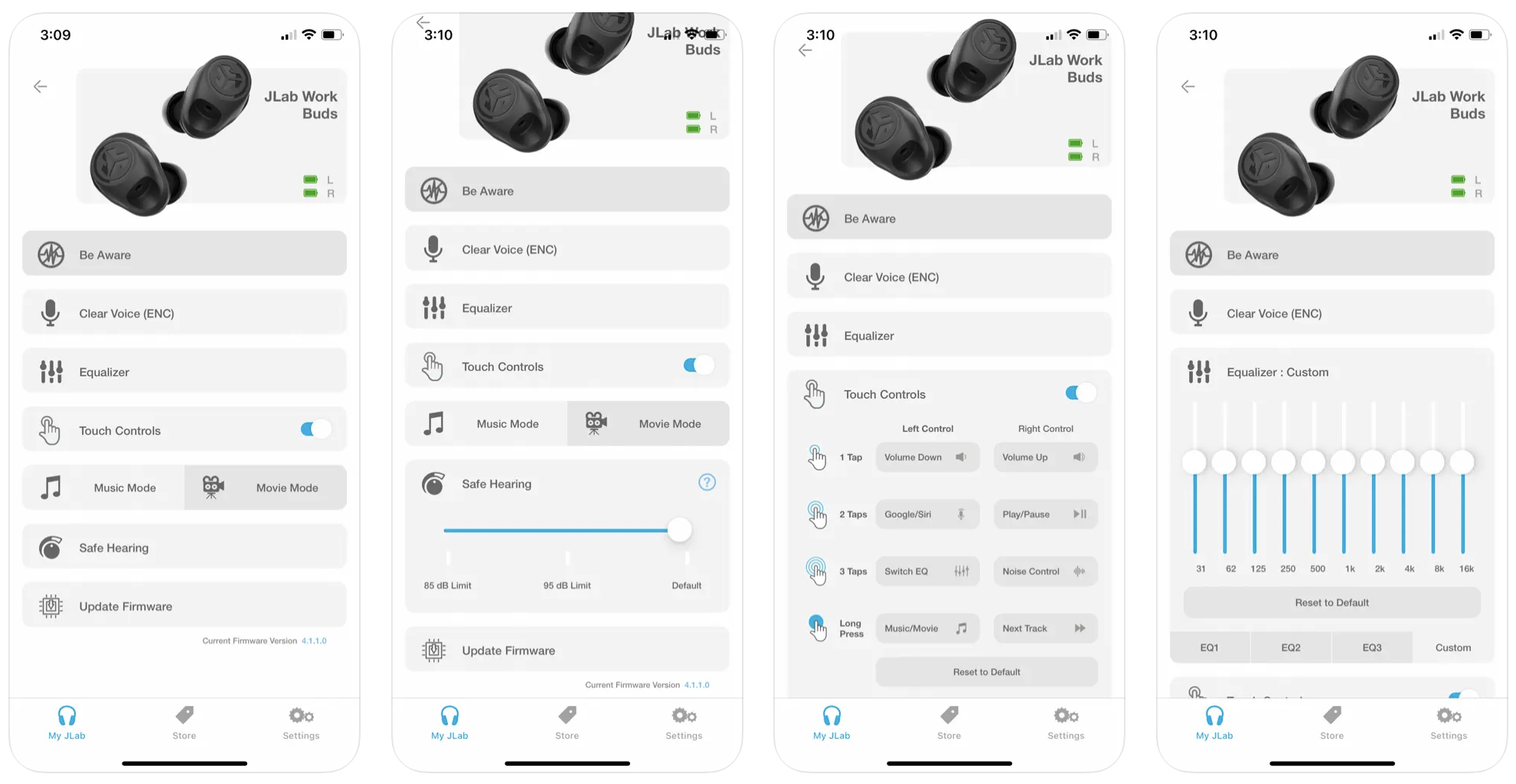
- Open the EQ, sound, or equalizer menu.
- Choose Bass Boost.
- Play music and adjust the volume to a comfortable level.
On many supported models, the app offers sound presets such as Signature, Balanced, Bass Boost, and Custom. Select Bass Boost to emphasize low frequencies. The app may save the setting to the earbuds, or it may apply the setting through the connected phone.
If you see Custom EQ instead of Bass Boost, raise the lowest frequency bands slightly. Start with a small change, such as 2 or 3 decibels. A large boost can reduce clarity and may cause distortion at high volume.
How to Turn On Bass Boost Without the JLab App
Some JLab earbuds let you change EQ modes with touch controls or physical buttons. This method depends heavily on the model, so the controls are not universal.
Try these steps:
- Remove both earbuds from the case.
- Connect them to your phone.
- Play a song with a clear bass line.
- Tap or press the control area as described in your model’s guide.
- Listen for a voice prompt or change in sound.
- Repeat the control if your model cycles through sound presets.
Some models use a touch command to cycle through EQ settings. Other models may only support EQ changes in the app. If tapping the earbuds changes play or pause instead, your model may not offer a built-in EQ shortcut.
The safest way to confirm the correct control is to check the manual for your exact model. Do not assume that a command used on JLab GO Air earbuds will work on JLab Epic Air or JBuds models. Controls can differ even between models that look similar.

How to Use the JLab Custom EQ for More Bass
Bass Boost is a preset. Custom EQ gives you more control over the sound. It works like a row of sliders that control low, middle, and high tones.
To create a bass-heavy profile:
• Raise the lowest one or two sliders by 2 to 4 decibels
• Keep the middle sliders close to their normal position
• Lower the highest sliders only if vocals or cymbals sound too sharp
• Save the profile with a clear name, such as Hip-Hop or Deep Bass
• Test the profile with several songs
Low bass gives music its deep thump. Mid-bass adds punch to drums and bass guitars. Too much mid-bass can make voices sound thick or cloudy.
A useful starting point is a gentle curve. Increase the lowest band the most, raise the next band a little less, and leave the middle bands near the center. This creates more impact without covering up speech and vocals.
Remember that an EQ cannot create bass that the earbud hardware cannot reproduce. It changes the balance of the sound, but it does not turn a small earbud into a large speaker. Your ear tip fit also has a major effect on bass.
Improve Bass With a Better Earbud Fit
A poor seal is one of the most common reasons JLab earbuds sound weak. Bass waves need a closed seal in the ear canal. If air leaks around the ear tip, low frequencies can fade quickly.
Try the following:
• Test all included ear tip sizes
• Twist each earbud gently into place
• Make sure the ear tips sit evenly in both ears
• Clean the ear tips and speaker mesh
• Check that the earbuds are not blocked by hair, glasses, or headwear
The right fit should feel secure without causing pain. A good seal often improves bass more than an extreme EQ setting. It can also reduce outside noise, which means you may not need to raise the volume as much.
When helping someone troubleshoot bass, fit should be checked before changing every sound setting. This simple step prevents the common mistake of boosting bass to compensate for a loose earbud.

Why Bass Boost May Not Work on JLab Earbuds
If you turn on bass boost but hear no change, several causes may be responsible. Start with the connection and app before assuming the earbuds are faulty.
Common causes include:
• The earbuds are connected to a different phone
• The JLab app does not support your model
• The app needs an update
• The earbud firmware is outdated
• The EQ setting was not saved
• Another app is controlling the sound
• The earbuds have a poor seal
• The music track has very little low-end sound
Close the music app, reconnect the earbuds, and open the JLab app again. Confirm that the correct model appears in the device screen. Then select Bass Boost and test the setting with a song that has a strong kick drum or bass guitar.
If the setting still does not apply, restart your phone and place the earbuds back in the case for a few seconds. You can also forget the earbuds in Bluetooth settings and pair them again. A reset may help, but use it only after trying simpler steps because it can remove saved connections.
What to Do When Your JLab Earbuds Are Missing From the App
The app may fail to find your earbuds even when they work for music. This often happens when the earbuds are connected directly to the phone before the app scans for them.
Use this order:
- Close the JLab app.
- Turn Bluetooth off, then turn it back on.
- Place the earbuds in the case.
- Remove them and wait for pairing mode.
- Open the phone’s Bluetooth menu.
- Connect to the JLab earbuds.
- Reopen the JLab app.
- Select the earbuds when they appear.
If this does not work, update the JLab app and your phone. Keep the earbuds close to the phone during setup. Also check that another nearby phone or tablet is not connected to the earbuds.
Some older JLab products do not support the full app. In that case, you may only be able to use the default sound profile or controls built into the earbuds. The model number printed on the case or charging box can help you confirm compatibility.

Best Bass Settings for Different Types of Music
The best bass setting depends on the recording and your taste. Bass Boost can sound excellent with some music but overpower other tracks.
Try these general suggestions:
• Hip-hop and electronic music: Use Bass Boost or a moderate custom boost.
• Rock: Add a small amount of bass while keeping the midrange clear.
• Pop: Use a light bass boost so vocals remain easy to hear.
• Podcasts: Use Balanced or reduce bass for clearer speech.
• Classical music: Use Balanced to preserve instruments and room detail.
• Movies: Use Bass Boost for impact, but lower it if dialogue becomes unclear.
A bass-heavy preset is not always better. Think of EQ as seasoning. A small amount can improve the meal, while too much can hide the main flavors.
For daily listening, a mild custom profile is often more useful than the strongest preset. It gives music extra weight without forcing you to change the setting for every album.
Is Bass Boost Safe for Your Hearing?
Bass boost does not automatically damage hearing. The main risk comes from listening too loudly or for too long. Stronger bass can make music feel fuller, which may tempt you to raise the volume in noisy places.
Use a comfortable listening level and take regular breaks. If music sounds harsh, your ears feel tired, or you notice ringing afterward, lower the volume and stop listening for a while.
Hearing safety guidance commonly recommends limiting loud exposure and using noise control wisely. A proper earbud fit can help because you will not need to fight outside noise with excessive volume.
Bass boost also uses more processing power on some devices, although the effect on battery life is usually small. If battery life drops suddenly, check other features such as active noise cancellation, transparency mode, and high-volume playback.

How to Reset the Sound if Bass Is Too Strong
If the sound becomes muddy, boomy, or distorted, return to a neutral setting. Open the JLab app and choose Balanced, Signature, or the default EQ profile.
You can also lower the custom EQ sliders that control low frequencies. Make one change at a time and test the same song after each adjustment. This makes it easier to identify which setting caused the problem.
Distortion may also come from high volume. Lower the phone volume first, then test the earbuds again. If distortion remains across several devices and songs, clean the earbud mesh and check for physical damage.
A useful real-world lesson is to avoid judging EQ with one song. A profile that sounds exciting on a bass-heavy track may sound dull or unclear on acoustic music. Test at least three types of music before saving a permanent setting.
Benefits and Limits of Bass Boost on JLab Earbuds
Bass boost can make earbuds more enjoyable for listeners who like a strong, warm sound. It can add energy to drums, bass lines, sound effects, and electronic tracks.
Key benefits include:
• More punch from kick drums
• Deeper sound in electronic music
• A warmer tone at moderate volume
• Better impact in action movies and games
• A more personal listening experience
There are limits, too. Bass boost cannot fix a damaged speaker, a weak Bluetooth connection, or a poor ear tip seal. It may also reduce vocal clarity and make some recordings sound crowded.
The best approach is to treat bass boost as a tool, not a permanent rule. Turn it on when it improves the music, and switch to Balanced when you need clear speech or natural instrument detail.
Frequently Asked Questions About How to Turn On Bass Boost on JLab Earbuds
How do I turn on bass boost on JLab earbuds?
Connect your earbuds to the JLab app, open the EQ menu, and select Bass Boost. If your model supports Custom EQ instead, raise the lowest frequency bands slightly and save the profile.
Why can’t I find Bass Boost in the JLab app?
Your model may use different EQ names, such as Custom, Signature, or Balanced. Older JLab earbuds may not support app-based EQ controls, so check the model’s manual and app compatibility.
Can I turn on bass boost without the JLab app?
Some JLab earbuds can cycle through EQ presets with touch controls or buttons. The exact command varies by model, and some earbuds require the app for all EQ changes.
Why does bass boost sound distorted?
The boost may be too strong, or the listening volume may be too high. Lower the EQ boost and volume, then test the earbuds with several songs.
Does bass boost use more battery?
Bass boost may use a small amount of extra processing power, but the difference is usually minor. Features such as active noise cancellation, high volume, and calls often have a larger effect on battery life.
Can better ear tips improve bass?
Yes. A firm, comfortable seal can improve low-frequency sound and reduce outside noise. Try each included ear tip size before using a stronger EQ setting.
What is the best JLab EQ setting for clear vocals?
Balanced or Signature usually keeps vocals more natural than Bass Boost. If vocals still sound dull, use Custom EQ and reduce the low-mid frequencies slightly.
Conclusion
Learning how to turn on bass boost on JLab earbuds usually takes only a few steps in the JLab app: connect the earbuds, open the EQ menu, and choose Bass Boost. If the setting is missing, check model compatibility, update the app, and try the correct touch controls for your earbuds.
A good ear tip seal matters just as much as the EQ. Start with a mild boost, test several types of music, and lower the setting if vocals become cloudy or sound begins to distort. Try these steps today, then explore the JLab app’s other sound profiles to find the setting that fits your music best.

Everett Ashford is a tech reviewer at mytechgrid.com specializing in SSDs, cameras, TVs, earbuds, headphones, and other consumer electronics. He provides honest, data-driven reviews based on hands-on testing and real-world performance analysis. Everett simplifies complex tech details to help readers make smart, confident buying decisions.