Pair, power, and wear them—then use the controls or your phone to play audio.
I have used and tested dozens of models, and I will show you exactly how to use bluetooth earbuds. This guide walks you from out-of-the-box setup to advanced tips. I blend hands-on experience with clear steps. You will learn pairing, controls, fit, sound tips, battery care, and quick fixes. Read on to make your earbuds simple and reliable every day.

Quick setup and pairing
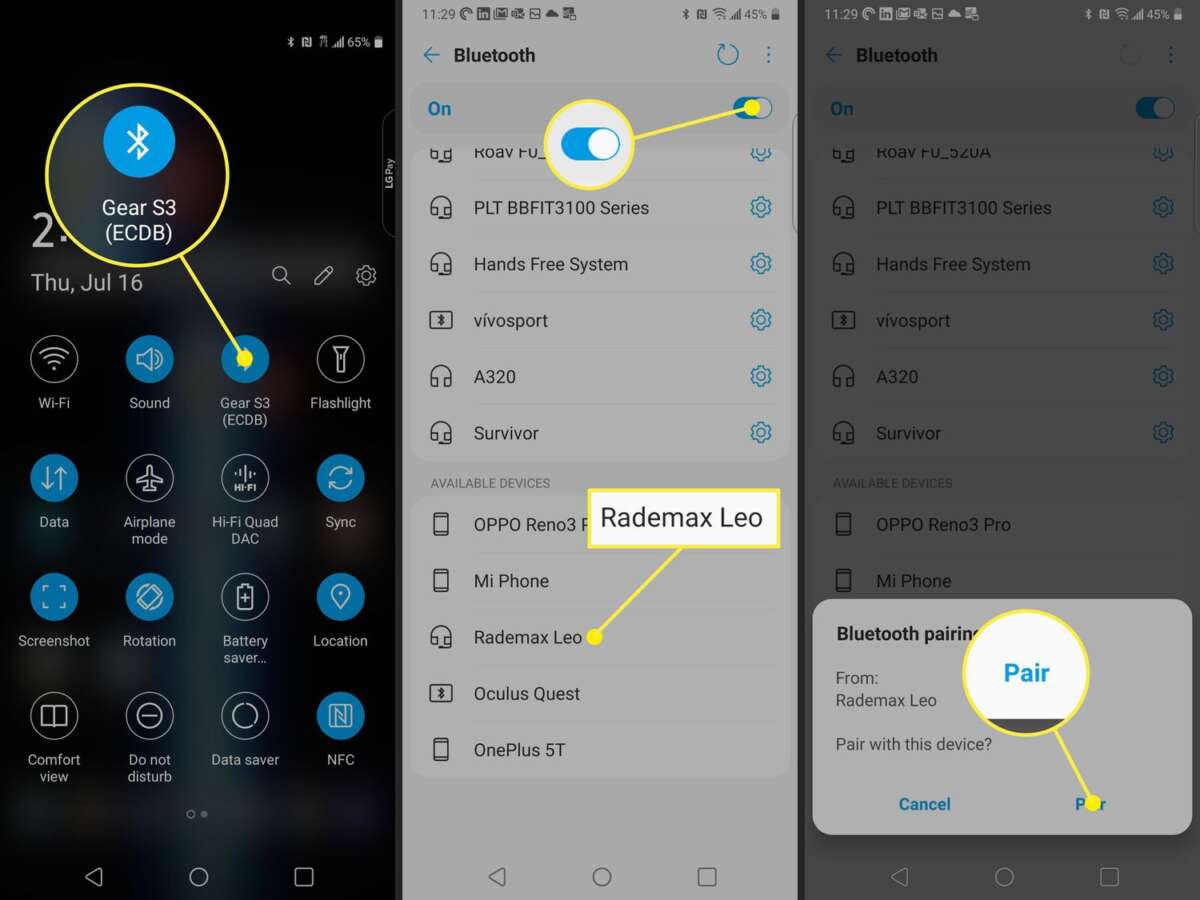
Start with charged earbuds and a phone or device. Turn on Bluetooth on your device. Open the case or press the earbuds' power button. Most models enter pairing mode automatically. If yours does not, hold the pairing button for a few seconds until a light flashes or a voice says "pairing."
To pair:
- Open your device's Bluetooth settings and find the earbud name.
- Tap the name to connect.
- Wait for confirmation or an audio prompt.
If you have a second device, turn off Bluetooth on the first device or disconnect the earbuds first. For true wireless earbuds, many phones support quick pairing by showing a pop-up. If that pop-up does not appear, pair through settings as above. After pairing, your device should reconnect automatically the next time you power the earbuds on.
How to use bluetooth earbuds while pairing with multiple devices:
- Use the earbuds' multipoint feature if supported.
- Pair to both devices one at a time in settings.
- Switch audio by selecting the earbuds in the active device's Bluetooth menu.
If pairing fails, reset the earbuds. The reset method varies by brand. Common steps:
- Put earbuds in case and hold button for 10 seconds.
- Or press and hold both earbud sensors until lights blink.
- Then re-pair to your device.
How to use bluetooth earbuds for first-time setup often sets the tone for daily use. A clean, step-by-step setup reduces headaches and improves battery life.
:max_bytes(150000):strip_icc()/A4-PairWirelessEarbudstoYourPhone-annotated-25601762007946d585c021863e02be00.jpg)
Controls and daily use
Learn the controls. Many earbuds use taps, presses, or touch gestures. Others have physical buttons. Know the layout before you wear them.
Common controls:
- Play/pause: single tap or press.
- Skip track: double tap or long press.
- Volume: swipe on the stem or use device buttons.
- Voice assistant: hold a button or use a wake word.
- Answer call: single tap; end call: single tap or press.
Use the companion app for custom controls. Apps let you remap gestures. They also offer firmware updates. Keep firmware up to date for best performance.
Tips for daily use:
- Turn off the earbuds when done to save battery.
- Use one earbud at a time if you need awareness and longer battery life.
- Keep the case charged for on-the-go top-ups.
How to use bluetooth earbuds in different contexts:
- While commuting: enable noise cancellation to block noise.
- While running: secure fit and sweat resistance matter.
- In meetings: use transparency or ambient mode to hear others.
Understanding controls makes how to use bluetooth earbuds feel natural. Practice gestures until they become second nature.

Fit, comfort, and sound tips
Proper fit improves sound and reduces dropouts. Most earbuds come with multiple ear tip sizes. Try each size until you feel a seal. The right seal boosts bass and isolates sound.
Fit tips:
- Twist the earbud into your ear for a snug lock.
- Use foam tips for a tighter seal and better passive isolation.
- Use wing tips or ear hooks if you run a lot.
Sound tips:
- Use the equalizer in the app to tune the sound.
- Turn on spatial or stereo modes if you want a wider soundstage.
- If sound is muffled, clean the mesh with a soft brush.
How to use bluetooth earbuds for exercise:
- Choose IPX-rated models for sweat and water resistance.
- Keep the case dry and clean after workouts.
- Secure fit prevents the earbuds from falling out and losing connection.
A correct fit improves comfort and ensures your earbuds deliver consistent sound. Small adjustments make a big difference.
Battery care and charging
Battery life varies by model. Typical earbuds last 4 to 10 hours per charge. The case adds extra charges. To extend battery life, follow a few simple rules.
Battery tips:
- Fully charge the case and earbuds before first use.
- Avoid full 0% discharges regularly.
- Store earbuds at about 50% charge for long-term storage.
Charging tips:
- Use the included cable or a quality USB-C charger.
- Avoid cheap chargers that provide unstable power.
- If your earbuds support wireless charging, use a certified pad.
How to use bluetooth earbuds without draining battery:
- Turn off active noise cancellation when you don’t need it.
- Lower the volume slightly; high volume uses more power.
- Close unused background apps that stream audio.
Battery health affects long-term performance. Treat lithium batteries gently to keep them healthy.

Troubleshooting common problems
If audio drops or one earbud is quiet, try these fixes. I have walked through these steps many times and they work often.
Common fixes:
- Re-seat the earbuds in the case and re-pair.
- Clean the contacts and mesh gently.
- Reset the earbuds to factory settings.
Connection issues:
- Keep the phone in the same pocket or close to the earbuds.
- Avoid interference from Wi-Fi or other Bluetooth devices.
- Update your phone's Bluetooth drivers if available.
Audio quality problems:
- Test with another device to rule out source issues.
- Disable equalizer or enhancements on the phone to compare.
- Replace ear tips if they are worn out.
If all else fails, check warranty options. Many issues are covered for a limited time. Document steps you tried before contacting support.

Advanced features and tips
Modern earbuds include handy features. Learn them to get more from your gear.
Advanced features:
- Multipoint pairing connects two devices at once.
- Hear-through or transparency lets outside sound in.
- Find-my-earbuds helps locate lost buds using a phone.
- Auto-pause senses when you remove an earbud.
Practical tips:
- Use multipoint for work and music on one set of earbuds.
- Set the voice assistant for fast hands-free control.
- Turn off auto features if they trigger by mistake.
How to use bluetooth earbuds for calls:
- Mute yourself in noisy places using the app.
- Use the earbud with the better mic as the primary for voice.
- Keep volumes at moderate levels for clear speech.
Mastering these features turns earbuds into tools, not toys. Use them to stay focused and efficient.
Personal experience and lessons learned
I have used many earbuds while commuting, running, and working. I learned three big lessons.
Lesson 1: Fit is king. I once kept switching models until I found a pair that stayed put. A good fit cut audio dropouts and improved bass.
Lesson 2: Firmware matters. An update fixed a major battery drain on one pair. Now I always check updates after buying new earbuds.
Lesson 3: Small habits help. I store my case in a pouch and clean the mesh weekly. That prevents dirt and keeps sound clear.
My mistakes taught me what to avoid. I bought cheap chargers once and saw slower charging. I left earbuds uncharged for months and shortened their battery life. Small care changes saved me time and money.
Frequently Asked Questions of how to use bluetooth earbuds
How do I pair my earbuds with my phone?
Turn on Bluetooth on your phone. Put earbuds in pairing mode and select them in Bluetooth settings. Wait for the confirmation sound or message.
Why does one earbud play quietly?
Check fit and ear tip seal. Clean the mesh and re-pair the earbuds to your device. If the issue persists, reset the earbuds.
How long should I charge my earbuds the first time?
Charge until the light shows full or the app shows 100%. This usually takes 1 to 2 hours. Avoid overcharging by unplugging when full.
Can I use one earbud at a time?
Yes. Many models support mono use for calls and longer battery life. Check your model’s manual to confirm single-ear use.
Why do my earbuds keep disconnecting?
Try moving closer to your device and remove interference sources. Update firmware and reset the earbuds if needed. If it continues, test with another device.
How do I clean earbud tips safely?
Remove the tips and wash silicone tips with mild soap and water. Dry fully before reattaching. Use a soft brush to clear debris from the mesh.
Conclusion
You now have a clear roadmap for how to use bluetooth earbuds. Start with correct pairing. Master controls and fit. Maintain battery health and clean your earbuds. Use advanced features to boost your daily life. Try the steps above and see small improvements fast. If you found this useful, share your experience or leave a comment below.

Everett Ashford is a tech reviewer at mytechgrid.com specializing in SSDs, cameras, TVs, earbuds, headphones, and other consumer electronics. He provides honest, data-driven reviews based on hands-on testing and real-world performance analysis. Everett simplifies complex tech details to help readers make smart, confident buying decisions.