Finding the best 4TB SSD for gaming PC use means balancing speed, endurance, cooling, and real-world value.
A large game library can fill a small drive fast. Modern titles often exceed 100GB, while updates, mods, recordings, and creative files add even more pressure. I prefer a 4TB SSD because it gives a gaming PC room to breathe without constant uninstalling. It also makes Windows, game launches, and file transfers feel quick and smooth. In this guide, I compare nine useful options, including fast NVMe drives, roomy SATA models, and complete gaming PCs with 4TB storage.
HP OMEN Max 45L RTX 5080 Gaming PC

The HP OMEN Max 45L is not a bare SSD, but it is a complete gaming PC with a 4TB Gen4 SSD already installed. Its Ryzen 7 9800X3D processor and GeForce RTX 5080 graphics card give it the power to run demanding games at high settings. The 64GB of DDR5 memory is also generous for gaming, streaming, and heavy multitasking. For a buyer who wants a ready-to-play system, this is a strong storage solution without the work of building a PC.
Its liquid cooling system and 1200-watt Platinum power supply fit the high-end hardware well. The large 45L chassis should also make upgrades easier than a cramped small-form-factor case. The built-in 4TB NVMe drive gives you space for Windows, a large game library, and media files. I would treat this as a full gaming PC purchase rather than a simple SSD upgrade, since its value depends on the complete hardware package.
Pros:
- Large 4TB Gen4 NVMe storage included
- Excellent Ryzen 7 9800X3D gaming processor
- Powerful RTX 5080 graphics performance
- 64GB DDR5 supports games and content work
- Liquid cooling helps manage heavy loads
- 1200W Platinum power supply leaves upgrade room
Cons:
- Costs far more than buying a 4TB SSD alone
- Large case needs plenty of desk or floor space
- Exact SSD brand and upgrade details may vary
My Recommendation
I recommend the HP OMEN Max 45L to players who need a new high-end gaming PC, not just extra storage. It suits 1440p and 4K gamers, streamers, and users who want one system for games, editing, and daily work. The 4TB drive removes the usual storage worry, while the strong CPU and GPU keep the system useful for years. If you are building from scratch, this can be a convenient way to get the best 4TB SSD for gaming PC storage together with powerful hardware. Check the current listing for the exact configuration and availability.
Skytech Legacy 4 Gaming PC With RTX 5090

The Skytech Legacy 4 is another complete desktop for buyers who want extreme gaming power and plenty of room for games. It uses a Ryzen 9 9950X3D processor with an RTX 5090, so it targets serious 4K gaming and demanding workloads. The listing should be checked carefully for its exact memory, storage, and cooling configuration before purchase. As a prebuilt system, it can save hours of part selection, assembly, and troubleshooting.
A powerful graphics card can make this PC a strong choice for high-refresh gaming, ray tracing, and large displays. The Ryzen 9 chip also gives it extra muscle for streaming, 3D work, and video production. I like the idea of pairing that class of system with a 4TB NVMe drive because modern game files grow quickly. Still, this option makes sense only when you need the whole PC, since a standalone drive offers much better storage value.
Pros:
- Flagship-level RTX 5090 graphics hardware
- High-end Ryzen 9 9950X3D processor
- Strong fit for 4K and ray-traced games
- Useful for streaming and creative workloads
- Prebuilt design avoids complex assembly
- Large storage configurations can hold many games
Cons:
- Premium price is excessive for simple storage needs
- Configuration details can change between listings
- High-power hardware needs good airflow and a suitable outlet
My Recommendation
I would choose the Skytech Legacy 4 for an enthusiast who wants maximum gaming performance in a ready-made tower. It is best for 4K players, streamers, and creators who also run demanding software. It is not my first pick for someone searching only for the best 4TB SSD for gaming PC upgrades, but it is a powerful all-in-one answer for a new build. Confirm the installed drive size and all listed parts before placing an order, as prebuilt specifications can change.
Crucial P310 4TB Gen4 NVMe SSD

The Crucial P310 is the most direct match for this guide because it is a standalone 4TB PCIe Gen4 NVMe SSD. Its advertised sequential read speed reaches up to 7,100MB/s, which is more than enough for fast game loads and quick system response. It uses the common M.2 2280 size found in many desktop PCs, laptops, and compatible handheld devices. The 4TB capacity gives you a practical balance between speed and long-term space.
In daily use, the main benefit is not a dramatic frame-rate increase. Your graphics card still controls most game performance, but the P310 can reduce load waits and make file work feel more responsive than a hard drive or older SATA disk. Crucial also includes Acronis data recovery software, which can help with cloning and migration tasks. Check your motherboard manual before buying, and use a heatsink when your system supports one and temperatures rise during long transfers.
Pros:
- Large 4TB capacity for modern game libraries
- Fast advertised Gen4 read speed up to 7,100MB/s
- Compact M.2 2280 design fits many systems
- Works with desktops, laptops, and some handheld PCs
- Includes Acronis software for migration support
- Much faster and quieter than a mechanical hard drive
Cons:
- Requires an open compatible M.2 slot
- Motherboard heatsink support may be important
- Game frame rates usually will not increase
My Recommendation
The Crucial P310 is my top practical pick for most PC gamers who want a standalone 4TB drive. It offers high Gen4 speed, broad device support, and enough capacity for a large Steam, Epic, or Xbox PC library. I especially like it for a new build or a system with an empty M.2 slot. For many buyers, this is the best 4TB SSD for gaming PC use because it focuses money on the storage upgrade rather than unrelated hardware. Check the current price, warranty terms, and your system compatibility before buying.
Fikwot FX910 4TB NVMe SSD With Heatsink

The Fikwot FX910 is a 4TB PCIe Gen4 M.2 SSD aimed at PC and PS5 users. Its listed sequential read speed reaches up to 7,000MB/s, placing it in the fast Gen4 class. The included heatsink is useful for systems that lack a built-in M.2 cover. It uses the standard 2280 shape, so installation should be familiar to anyone who has fitted an NVMe drive before.
PS5 buyers should pay close attention to the console’s clearance and heatsink requirements before installation. On a gaming PC, the extra cooling surface may help the drive stay closer to its rated performance during large downloads or file transfers. Games will load quickly, although the difference between good Gen4 drives is often small in normal play. I see the FX910 as a flexible option for a buyer who wants one spacious drive for a desktop and a compatible console.
Pros:
- 4TB capacity suits large game collections
- Fast listed read speed up to 7,000MB/s
- Heatsink is included for added thermal control
- Designed for compatible PC and PS5 use
- Standard M.2 2280 installation format
- Good choice for game storage and large downloads
Cons:
- Heatsink may conflict with some motherboard covers
- Console fit must be checked before installation
- Long-term support can be less familiar than major brands
My Recommendation
I recommend the Fikwot FX910 for gamers who want a large, fast drive with a cooler already included. It is a sensible match for a desktop without an M.2 heatsink and for users who also own a compatible PS5. Remove any conflicting motherboard cover instead of stacking heatsinks. If the price is competitive and the return policy suits you, the FX910 can be a strong value choice for the best 4TB SSD for gaming PC storage.
CLX Set Gaming PC With NVMe and Hard Drive

The CLX Set takes a different approach to storage. Instead of one 4TB SSD, it combines a 2TB NVMe M.2 SSD with a 4TB mechanical hard drive. That gives you 6TB of total space, but only the 2TB portion delivers solid-state speed. Its Core i9-14900KF, RTX 5080, 64GB DDR5 memory, and 360mm liquid cooler make it a powerful complete gaming desktop.
I would place Windows and frequently played games on the NVMe drive. The 4TB hard drive is better for recordings, backups, older games, photos, and files that do not need instant access. This setup can be useful for a content creator who needs lots of cheap space, but it is not the same as having a 4TB SSD. Buyers who specifically need the best 4TB SSD for gaming PC use should compare the cost of this full system with a standalone drive.
Pros:
- 6TB total storage across two drives
- Fast 2TB NVMe drive for active games
- Extra 4TB hard drive for archives and recordings
- Powerful RTX 5080 graphics card
- 64GB DDR5 supports demanding multitasking
- 360mm liquid cooler helps manage the CPU
Cons:
- Only 2TB of storage is solid state
- Hard drive is slower and makes some noise
- Not a direct 4TB SSD replacement
My Recommendation
The CLX Set is best for a gamer or creator who values total capacity more than all-SSD speed. It gives you a fast working drive and a roomy archive drive in one ready-made PC. I would choose it for game capture, media storage, and a large file collection. I would not call it the best 4TB SSD for gaming PC upgrade buyers, because its 4TB component is a hard drive. Still, its overall storage design can offer good value when you need a new high-performance desktop.
HP OMEN Max 45L RTX 5090 Desktop
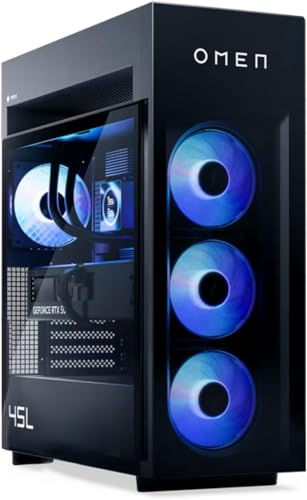
The HP OMEN Max 45L RTX 5090 desktop targets buyers who want a very powerful gaming machine with a 4TB NVMe SSD. Its Ryzen 9 9900X3D processor is designed for strong game performance, while the RTX 5090 targets demanding high-resolution play. The listed 5.5GHz boost figure is impressive, but real speed depends on the game, cooling, and system settings. This is a complete desktop, so it is not intended as a low-cost storage upgrade.
The included 4TB drive should hold a large collection of current games without forcing you to manage space every week. A spacious SSD also helps users who record gameplay or keep large creative projects close at hand. I like this type of setup for a high-end monitor because the rest of the system can keep pace with fast storage. Before purchase, confirm the exact memory, drive model, operating system, and warranty shown on the live listing.
Pros:
- Large 4TB NVMe storage included
- Flagship RTX 5090 graphics performance
- Ryzen 9 9900X3D suits high-end gaming
- Good fit for 4K and high-refresh monitors
- Ready-made system needs no assembly
- Room for games, recordings, and creative files
Cons:
- Very expensive for users who need only storage
- Large chassis may not suit small spaces
- High-end components can use more power
My Recommendation
I recommend this HP OMEN to enthusiasts who want a premium gaming PC with fast, roomy storage from day one. It is best for 4K gamers, streamers, and creators who do not want to select and install every part. The 4TB drive is a major convenience, but the graphics card and processor drive most of the cost. For a standalone search for the best 4TB SSD for gaming PC use, choose the Crucial or Fikwot instead. For a complete premium system, this OMEN deserves attention.
APC Helios GX601 4TB Gaming Desktop

The APC Helios GX601 is a high-end desktop built around a Ryzen 9 9950X3D processor and GeForce RTX 5090 graphics. It lists a 4TB NVMe SSD, 128GB of DDR5 memory, and a 1200-watt power supply. That memory capacity is far beyond what most games need, but it can help with virtual machines, video work, large projects, and heavy multitasking. Liquid cooling and built-in Wi-Fi add convenience for a powerful desk setup.
This system makes sense for a buyer who wants a workstation-grade gaming PC rather than a simple storage drive. The 4TB NVMe space can hold games and work files without the slow feel of a hard drive. I would check the case dimensions and cooling layout because powerful parts need steady airflow. As always, review the current listing for exact drive details, warranty coverage, and included accessories.
Pros:
- 4TB NVMe SSD provides substantial fast storage
- 128GB DDR5 is excellent for demanding work
- Ryzen 9 9950X3D offers high-end processing power
- RTX 5090 targets premium 4K gaming
- 1200W power supply supports powerful components
- Liquid cooling and Wi-Fi add daily convenience
Cons:
- Overkill for ordinary gaming and web use
- Premium system price may not suit most budgets
- Large, power-hungry tower needs a suitable setup
My Recommendation
I would choose the APC Helios GX601 for a professional creator, enthusiast, or gamer who wants one machine for nearly everything. Its 4TB SSD, 128GB memory, and flagship graphics make it more than a standard gaming desktop. It is not the value pick for a storage-only upgrade, but it can be an impressive long-term system. If you need the best 4TB SSD for gaming PC capacity and also need extreme computing power, this prebuilt deserves a close look.
Samsung 990 EVO Plus 2TB NVMe SSD

The Samsung 990 EVO Plus is a fast 2TB SSD rather than a 4TB model. It supports PCIe Gen4 x4 and PCIe 5.0 x2 operation, depending on the host system. Samsung lists sequential read speeds up to 7,250MB/s, which gives the drive plenty of headroom for gaming and large file transfers. The M.2 2280 format works with many modern desktops and laptops.
Two terabytes can still be enough for a focused game library, especially when you keep older titles on another drive. Samsung’s storage software and broad brand support also make setup and health checks simple. I like this model for a fast boot drive paired with a separate large game drive. It is a quality alternative, but it cannot replace a true 4TB SSD when capacity is your main goal.
Pros:
- Fast listed read speed up to 7,250MB/s
- Supports flexible Gen4 and Gen5 host connections
- Trusted Samsung software and monitoring tools
- Compact M.2 2280 design
- Good fit for Windows and frequently played games
- Useful choice for laptops and modern desktops
Cons:
- Only 2TB capacity
- May cost more per terabyte than larger drives
- Full performance depends on system support
My Recommendation
I recommend the Samsung 990 EVO Plus for gamers who want a fast, trusted 2TB boot and game drive. It is a better fit for a smaller library or a system that already has extra storage. If you are comparing the best 4TB SSD for gaming PC use, do not overlook the capacity difference. This Samsung is fast and polished, but a true 4TB model will reduce storage management and suit a large modern library much better.
Gigastone 4TB High Endurance SATA SSD

The Gigastone 4TB High Endurance SSD uses the familiar 2.5-inch SATA format. It lists speeds up to 530MB/s and includes SLC caching to help common transfers feel responsive. The drive is designed for gaming PCs, NAS use, and systems that may run for long periods. Its five-year warranty adds confidence, although warranty terms and endurance limits should always be read in the current product details.
SATA cannot match a modern Gen4 NVMe drive, but it remains useful. It works with many older desktops, laptops, and cases that lack open M.2 slots. Installation is simple: mount the drive, connect a SATA data cable and power cable, then initialize it in Windows if needed. For game storage, the Gigastone can feel much faster than a hard disk, even though NVMe remains the better choice for new high-speed builds.
Pros:
- Large 4TB capacity
- Works with many older PCs and laptops
- Up to 530MB/s SATA performance
- High-endurance design suits frequent use
- Five-year warranty offers useful support
- Quiet and cooler than a mechanical hard drive
Cons:
- Much slower than PCIe Gen4 NVMe drives
- Needs a free SATA data and power connection
- May not fit systems with only M.2 bays
My Recommendation
The Gigastone is best for upgrading an older gaming PC that has no spare NVMe slot. It gives you 4TB of quiet, simple storage without requiring a new motherboard. I would use it for a large game library, media files, or a secondary library while keeping Windows on a faster drive. For users with a free Gen4 M.2 slot, it is not the best 4TB SSD for gaming PC speed, but it can be the best fit for compatibility and value.
Fanxiang S101Q 4TB SATA SSD

The Fanxiang S101Q is a 4TB 2.5-inch SATA SSD for laptops and desktop PCs. It uses SATA III and lists speeds up to 500MB/s, which is near the practical limit of the interface. Its 7mm thickness helps it fit many laptop drive bays and standard desktop mounts. The drive is aimed at users who want a simple performance boost over a hard disk without replacing the whole system.
For gaming, the S101Q can shorten boot and loading times compared with an older mechanical drive. It also runs silently and uses less power than a hard disk. I would keep regular backups because every SSD needs a backup plan, no matter the brand or interface. This is a capacity-first choice, and buyers should compare its current price, warranty, and return policy with established SATA alternatives.
Pros:
- Roomy 4TB capacity for games and files
- Simple 2.5-inch installation
- Up to 500MB/s SATA transfer speed
- Fits many laptops and desktop PCs
- Silent operation with low vibration
- Good upgrade over a traditional hard drive
Cons:
- Slower than NVMe SSDs
- Needs SATA power and data cables
- Brand support may be less established
My Recommendation
I recommend the Fanxiang S101Q to budget-focused users with an older computer and a free 2.5-inch bay. It is useful when capacity matters more than peak benchmark speed. I would install it as a game library drive or replace a tired hard disk with it. It is not my overall best 4TB SSD for gaming PC pick, but it may be a practical low-cost choice when your hardware does not support NVMe.
How to Choose the Best 4TB SSD for Gaming PC
Choosing storage is easier when you separate capacity from speed. A 4TB SSD gives you roughly 3.6TB of usable space after formatting and system overhead, not a full 4,000GB in Windows. That is still enough for a large game library, but huge games can fill it sooner than expected. I suggest leaving at least 10 percent free so the drive can manage background work and maintain good performance.
NVMe or SATA?
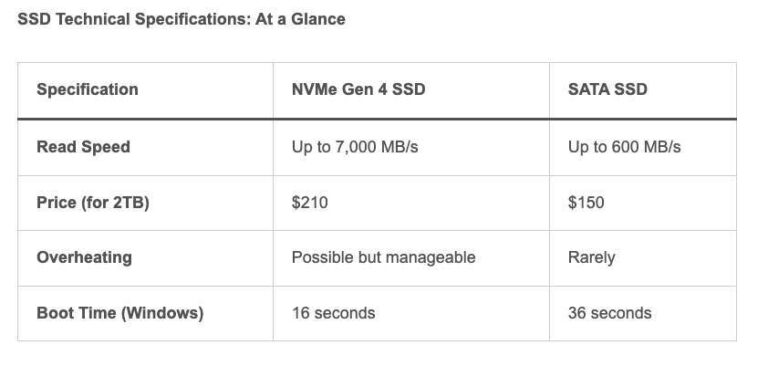
NVMe drives use the PCIe bus and fit into an M.2 slot. They offer much higher bandwidth than SATA, especially with PCIe Gen4 models. SATA SSDs use the same interface as many older hard drives and usually top out near 500 to 550MB/s. Both types improve game loading over a hard disk, but NVMe is the better match for a new gaming PC.
For most games, the difference between a good SATA SSD and a good NVMe SSD is smaller than benchmark charts suggest. The game engine, CPU, memory, and asset design also affect loading time. Newer PC features such as DirectStorage may benefit from fast NVMe storage, though support depends on the game and system. I would buy Gen4 NVMe when the motherboard supports it and the price is reasonable.
PCIe Gen4 Speed
Many of the fastest consumer Gen4 SSDs advertise sequential read speeds from about 5,000MB/s to more than 7,000MB/s. Sequential speed describes large, steady transfers. It does not predict every game load, because game loading uses a mix of small files, compressed assets, and background tasks. Random performance, firmware quality, thermals, and sustained behavior also matter.
Do not pay a huge premium for a tiny benchmark gain. A reliable 4TB Gen4 drive with good support can feel just as good in games as a costlier flagship model. I look at the total package: capacity, controller, NAND type, warranty, software, reviews, and return policy. That method gives a better answer than choosing the highest number on the box.
TLC, QLC, and NAND Type
NAND flash stores data in memory cells. TLC stores three bits per cell, while QLC stores four. TLC often offers stronger sustained write speed and endurance, but QLC can provide excellent capacity at a lower price. For game storage, QLC is not automatically bad because installing games is not the same as writing video files all day.
Large transfers can slow after a drive fills its dynamic cache. This behavior varies by model and capacity. If you frequently edit video, move huge files, or install several games at once, look for strong sustained-write results. For ordinary gaming, a roomy QLC drive can still be sensible when the price is attractive and you keep backups.
Do You Need a Heatsink?
Fast NVMe SSDs can become warm under long workloads. When temperatures climb too high, the controller may reduce speed to protect the drive. Most game sessions do not stress an SSD as heavily as a long file copy, but airflow still matters. Many desktop motherboards include an M.2 heatsink, and some drives include one in the box.
Use only one heatsink unless the manufacturer says otherwise. A motherboard cover and a drive heatsink stacked together may press against the drive or fit poorly. On a PS5, the heatsink must fit inside the console and meet its clearance needs. Always check the manual before installation.
Endurance and Warranty
SSD endurance is often shown as TBW, or terabytes written. It estimates how much data the drive can write during its rated life. A typical gamer may write far less than a drive’s TBW limit, but frequent recording, editing, and cache use can increase writes. A longer warranty and clear support policy are useful signs, but neither replaces a backup.
I recommend keeping important saves, photos, and work files on another drive or cloud service. SSDs have no moving parts, yet they can still fail from controller faults, firmware problems, power events, or simple age. Enable health monitoring when the manufacturer provides it. A few minutes of backup planning can save years of personal data.
Installation Tips
Before installing an M.2 drive, shut down the PC and switch off the power supply. Touch the metal case to reduce static, then locate the correct M.2 slot. Remove the small screw or latch, slide the drive into the connector at an angle, and press it down gently. Do not bend the drive or overtighten the screw.
After Windows starts, open Disk Management to initialize and format a new drive. Use a current motherboard BIOS and chipset driver when practical. If you clone your old boot drive, confirm that the new drive appears in the boot menu before wiping the original. A clean installation often gives the least trouble, but cloning saves time.
Storage Layout for Gaming
I like a simple layout. Put Windows and your favorite games on the fastest NVMe drive. Keep less-played games, recordings, and large installers on the 4TB drive. If you use a SATA SSD, it can work well as a secondary library while the boot drive handles daily tasks.
Do not fill the drive to the last gigabyte. A little free space helps updates, temporary files, and SSD maintenance. Steam, Xbox, and other launchers let you move games between libraries, so you do not need to reinstall every title. This small habit makes a 4TB drive feel much larger over time.
Best 4TB SSD for Gaming PC: Quick Comparison
| Best for | Why |
|---|---|
| Most PC gamers | Crucial P310 offers 4TB capacity, fast Gen4 speed, and broad M.2 support. |
| PCs without an M.2 slot | Gigastone 4TB SATA SSD installs in many older desktop and laptop systems. |
| PC and PS5 owners | Fikwot FX910 includes a heatsink and targets compatible PC and PS5 use. |
FAQs Of best 4tb ssd for gaming pc
Does a 4TB SSD improve gaming FPS?
Usually, no. An SSD mainly improves boot times, game loading, file transfers, and system response. Your graphics card, processor, and game settings control most FPS.
Is NVMe better than SATA for a gaming PC?
NVMe is faster and is usually the better choice for a modern PC with an open M.2 slot. SATA remains useful for older systems and secondary game storage.