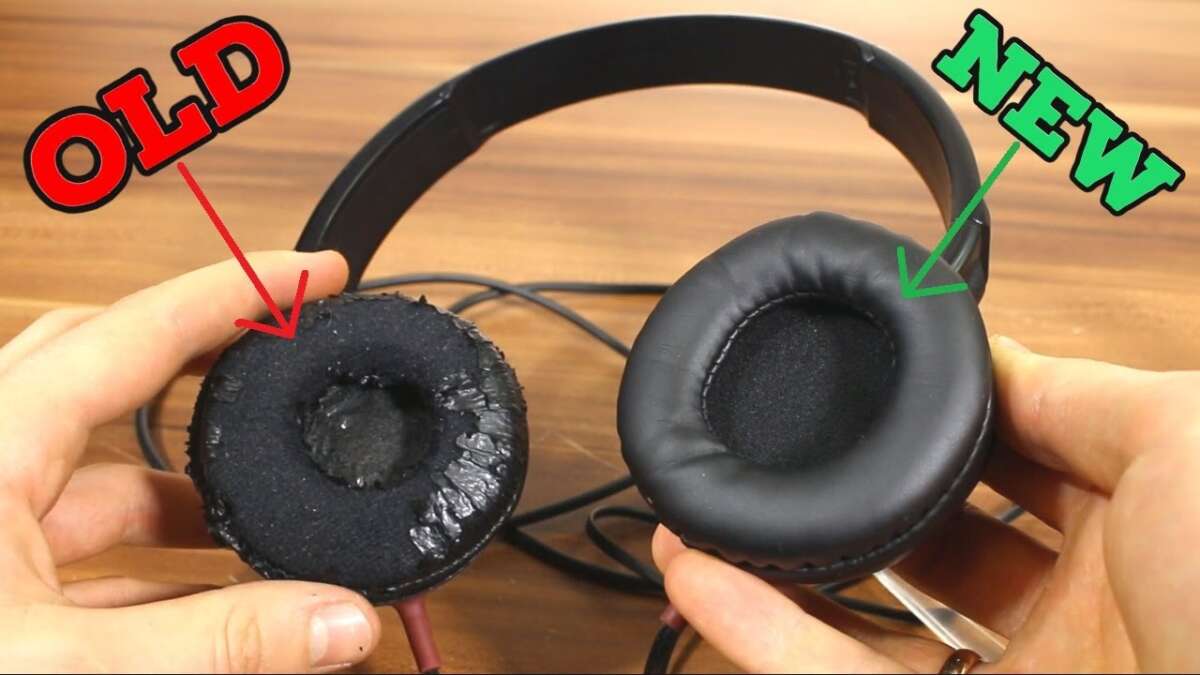
Remove the old pads, clean the ear cups, then press the new cushions firmly into place.
Learning how to replace headphone cushion pads can make old headphones feel new again. It can also improve comfort, seal, sound quality, and hygiene without the cost of buying a new set.
The process is simple, but each headphone model uses a different mounting system. This guide explains how to replace headphone cushion pads safely, choose the right replacement, avoid common mistakes, and check your headphones when the job is done.

Why Replace Headphone Cushions?
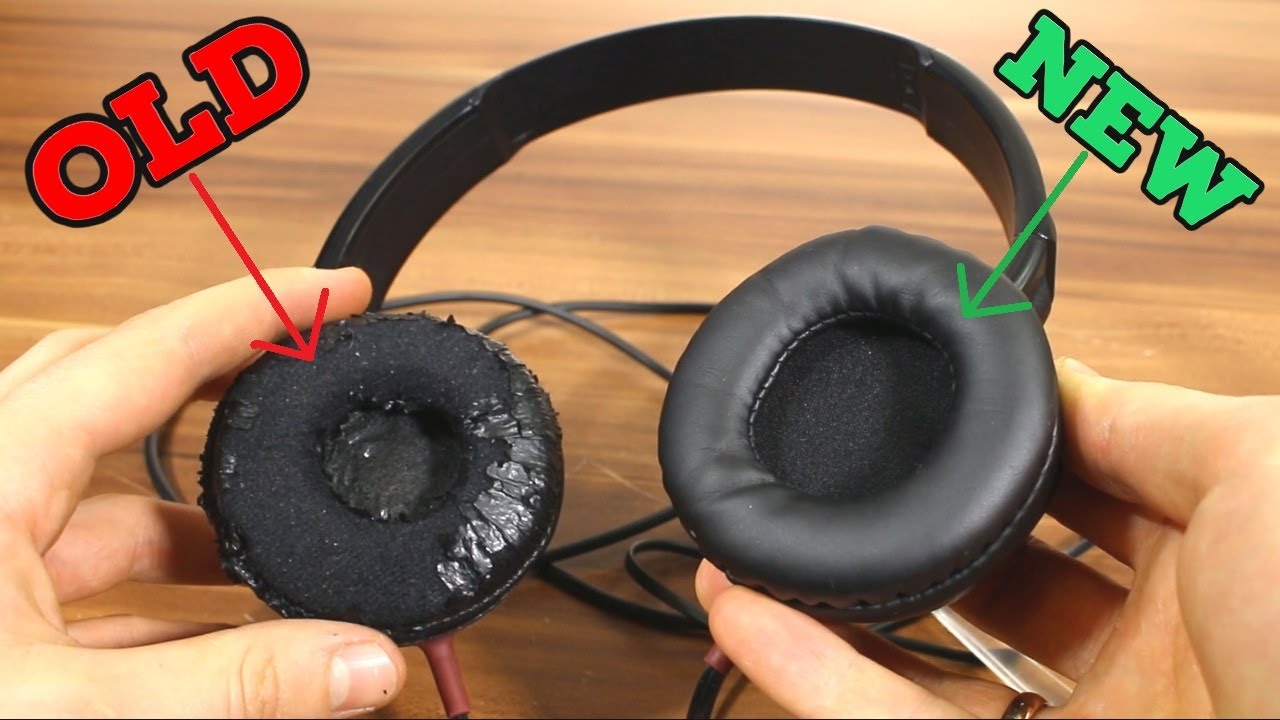
Headphone cushions, also called ear pads or earpads, wear out over time. The foam may flatten, the leather or fabric may crack, or the pad may absorb sweat and odors. Once the cushion loses its shape, the headphones may feel less comfortable and sound less balanced.
A worn cushion can also affect the seal around your ears. This matters because many over-ear and on-ear headphones rely on that seal to support bass and block outside noise.
Common signs that you need new headphone cushions include:
• Cracked, peeling, or sticky covering material
• Flattened foam that no longer springs back
• Uneven padding on one side
• A loose cushion that slips during use
• A weaker bass response or more outside noise
• Skin irritation caused by old sweat, dust, or worn material
In my experience, people often replace headphones too soon because they assume poor comfort means the headphones are failing. A fresh pair of cushions can solve the problem for a small fraction of the cost.
Check Your Headphone Model First
Before learning how to replace headphone cushion pads, identify your exact headphone model. Even two headphones from the same brand may use different pad sizes or attachment systems.
Look for the model number on the headband, inside the ear cup, beneath the cushion, or on the original box. You can also check the product page or user manual.
Record these details:
• Brand and model number
• Over-ear or on-ear design
• Cushion shape and approximate size
• Mounting method
• Left and right cushion design, if they differ
The most reliable replacement is made for your exact model. Universal cushions may fit, but they can change the ear cup seal, sound, comfort, and noise isolation.
Measure the cushion only when a model-specific replacement is not available. Measure the outer length, outer width, inner opening, and thickness. A difference of only a few millimeters can make the pad too tight or too loose.

Choose the Right Replacement Cushion
Replacement cushions come in several materials and shapes. Your choice affects comfort, heat, durability, and sound.
Common cushion materials
• Protein leather: Soft and smooth, but it may peel with heavy use or heat.
• Genuine leather: Durable and comfortable, but usually more expensive.
• Velour: Breathable and soft, though it may allow more sound to escape.
• Mesh fabric: Cool and light, but it may provide less isolation.
• Memory foam: Conforms well to your head and can improve comfort.
• Standard foam: Often affordable, but it may flatten sooner.
For warm climates or long gaming sessions, fabric or velour may feel cooler. For travel and noise isolation, a leather-style cushion often creates a stronger seal.
A thicker cushion does not always mean better comfort. It may move the drivers farther from your ears and change the sound. This can reduce bass or make vocals seem more distant. For the most predictable result, choose cushions with a shape and thickness close to the original pair.

Tools You May Need
Most people can replace headphone cushions with simple household tools. Work on a clean table so small parts do not disappear.
Gather these items:
• Replacement headphone cushions
• A clean microfiber cloth
• A plastic pry tool or old plastic card
• A small Phillips or flat screwdriver, if needed
• Cotton swabs
• A small amount of mild soap
• Rubbing alcohol, used carefully on compatible hard surfaces
Avoid sharp knives and metal tools when possible. They can cut the cushion, scratch the plastic, or damage a thin cable inside the ear cup.
Keep your phone nearby to take photos before removing anything. A quick photo can show the exact position of the cushion, mesh, clips, and cable.

How to Replace Headphone Cushion Pads
The exact process varies by model, but these steps work for many over-ear and on-ear headphones.
1. Turn off and disconnect the headphones
Power off wireless headphones before you begin. Disconnect the charging cable and remove any audio cable.
If the headphones have a removable battery, follow the manual before opening any part of the ear cup. Never pull on internal wires or expose the battery unless the manufacturer provides clear instructions.
2. Inspect the cushion edge
Look closely at the point where the cushion meets the ear cup. Most cushions attach in one of four ways:
• A lip that sits inside a groove
• Plastic clips
• Adhesive
• Small screws or a retaining ring
Run a finger around the edge. If you feel a narrow fabric lip, the pad likely sits in a groove. If you see clips or screws, use the correct removal method for that design.
3. Remove the old cushion
Start at the bottom of the cushion. Use your fingers to pull the pad outward gently. If it has a lip, roll the edge over the plastic rim instead of yanking it away.
For clip-on cushions, use a plastic pry tool. Slide it between the cushion and the ear cup, then release one clip at a time. Work slowly around the cup.
If the cushion is glued in place, warm it slightly with a hair dryer on a low setting. Keep the dryer moving and hold it well away from the headphones. Do not overheat the plastic, battery, or internal electronics.
4. Keep small parts organized
Place screws, retaining rings, or clips in a small container. Take another photo if the attachment system looks unclear.
One mistake I often see is removing both cushions at once. Remove and replace one side first. The untouched side gives you a visual guide if you forget how the parts fit.
5. Clean the ear cup
Wipe dust and loose foam from the ear cup with a dry microfiber cloth. Use a cotton swab for the groove or clip area.
For hard plastic, lightly dampen the cloth with mild soapy water. Do not pour liquid onto the headphones. Avoid applying alcohol to leather, coated fabric, painted surfaces, or soft-touch plastic because it may cause cracking or discoloration.
Let the area dry fully before installing the new cushion.
6. Compare the new and old cushions
Place the new cushion beside the old one. Check the shape, inner opening, thickness, and attachment lip.
If the replacement looks noticeably different, stop before forcing it into place. A poor fit may stretch the cushion, block the speaker opening, or create an uneven seal.
7. Install the new cushion
Align the cushion with the ear cup. If it uses a lip, fit one section into the groove first. Then work around the edge in small sections.
Use your thumbs to press the cushion into place. Do not twist the pad sharply, since twisting can stretch the covering or fold the foam.
For clip-on designs, line up the clips and press around the edge until each one clicks. For screw-mounted designs, tighten the screws evenly without forcing them.
8. Check the attachment
Run your fingers around the full edge. Look for gaps, wrinkles, loose sections, or a folded mounting lip.
The cushion should sit evenly on all sides. If one area looks higher, remove that section and reseat it instead of pressing harder.
9. Repeat on the other side
Use the same method on the second ear cup. Compare both sides when finished.
The left and right cushions should have the same height, shape, and firmness. Uneven pads can make the headphones feel crooked and may affect the sound balance.

How to Replace Headphone Cushion Pads With Clips
Clip-on cushions are common on gaming headsets and many over-ear models. They are usually easier to replace, but the clips can break if you pull too hard.
To remove a clip-on pad:
-
Find the seam between the cushion and the ear cup.
-
Start at a lower corner or another easy-to-reach point.
-
Insert a plastic pry tool under the cushion edge.
-
Lift gently until one clip releases.
-
Move a few inches around the edge and release the next clip.
-
Continue until the cushion comes off.
To install the new pad, align the clips with their slots. Press near each clip rather than squeezing the whole cushion. You should hear or feel a light click when the clip locks.
If a clip refuses to fit, check for a twisted fabric edge. The cushion may be correct, but the mounting lip may be caught beneath the plastic ring.

How to Replace Headphone Cushion Pads With a Retaining Ring
Some headphones use a separate plastic ring to hold the cushion in place. This system can look confusing because the cushion and ring may come off together.
First, inspect the ear cup for screws. Remove them with a properly sized screwdriver and keep them in order. Then lift the ring carefully and note how the cushion wraps around it.
When installing the new cushion:
• Fit the cushion around the retaining ring.
• Make sure the fabric or leather edge is not folded.
• Align the ring with the ear cup.
• Replace the screws in their original positions.
• Tighten each screw a little at a time.
Do not overtighten the screws. Excess pressure can crack the plastic ring or strip the screw holes.

How to Replace Headphone Cushion Pads That Use Adhesive
Adhesive-mounted pads need extra care. Pulling too quickly may remove a thin plastic layer or damage the ear cup surface.
Warm the old adhesive slightly with low heat. Peel the cushion back slowly rather than pulling straight up. Remove leftover adhesive with a dry cloth first.
If residue remains, use only a cleaner approved for the headphone’s surface. Test it on a hidden area. Never allow liquid to run into the driver, microphone, buttons, vents, or charging port.
Use a thin, even layer of suitable adhesive if the replacement pad requires it. Too much glue can spread into the ear cup and make future replacement difficult. Allow the adhesive to cure for the time listed on its label before wearing the headphones.

Test the Headphones After Replacement
Replacing the cushion is not complete until you test the headphones. A new pad can change both comfort and sound.
Check these points:
• The cushion stays attached when you move your head.
• No part of the pad blocks the speaker opening.
• Both sides feel equally firm.
• The headband does not need extra pressure to create a seal.
• Music plays clearly from both sides.
• Bass does not suddenly sound weak or boomy.
• Active noise cancellation works normally, if included.
Play a familiar song with vocals, bass, and high notes. Then test a spoken voice or podcast. This helps you notice changes in clarity and balance.
If the sound changes a lot, check the cushion position first. A gap or thick replacement pad can affect the acoustic seal. Some sound changes are normal, especially when switching from leather to velour.
Common Mistakes to Avoid
Knowing how to replace headphone cushion pads is easy, but rushing can cause damage. Avoid these common errors:
• Buying cushions by appearance alone: Similar-looking pads may use different clips or rings.
• Pulling from one spot: This can tear the cushion or break a clip.
• Using a metal screwdriver as a pry tool: Metal can scratch or crack the ear cup.
• Cleaning with too much liquid: Moisture can reach the driver or circuit board.
• Installing only one cushion: Mismatched pads can create uneven comfort and sound.
• Stretching the cushion too far: Excess tension may split the covering.
• Ignoring the speaker mesh: A loose edge can cover the driver opening.
• Overtightening screws: This can damage plastic threads.
• Using strong glue: Permanent adhesive can make future repairs difficult.
The safest rule is simple: use gentle pressure and stop when something does not align. Correct parts usually fit with patience, not force.
How Often Should You Replace Headphone Cushions?
There is no fixed replacement schedule. Usage, climate, skin oils, storage, and cushion material all affect lifespan.
Many daily users replace cushions after one to two years. Light users may get several years from the same pair. Heavy gym, studio, or gaming use can shorten that period.
Replace the cushions when they are damaged, uncomfortable, difficult to clean, or no longer hold their shape. If the foam still feels supportive and the cover is intact, cleaning may be enough.
To extend cushion life:
• Wipe the pads after long listening sessions.
• Let headphones dry before storing them.
• Keep them away from direct sunlight and high heat.
• Store them in a case or clean location.
• Avoid sharing headphones when possible.
• Follow the care instructions for the cushion material.
Sweat is especially hard on synthetic leather. A breathable fabric cover can help, but it may alter sound isolation.
Can New Cushions Change Sound Quality?
Yes. Headphone cushions affect the distance between your ears and the drivers. They also change the seal around the ear.
A tighter seal often supports stronger bass and better passive isolation. A looser or more breathable pad may reduce bass but feel cooler. A thicker pad may create a wider sense of space, while a thinner pad may sound more direct.
This does not mean one material is always better. The best choice depends on your listening goals. Audiophiles may prefer a replacement close to the original design, while commuters may value isolation and comfort more than exact tuning.
When you replace headphone cushion pads, expect small sound changes unless you choose a highly similar replacement.
When Replacement Is Not Enough
New cushions cannot fix every headphone problem. If one side has no sound, the issue may involve the cable, driver, jack, or circuit board.
Other signs of a deeper fault include:
• Crackling that changes when you move the cable
• A dead ear cup after installing a new cushion
• Buttons that do not respond
• A charging problem
• A damaged hinge or headband
• A driver that rattles at certain notes
In these cases, replacing the cushion may improve comfort but will not repair the electronics. Check the manufacturer’s warranty before opening the ear cup. Opening some wireless headphones can affect warranty coverage and may expose a lithium battery.
Frequently Asked Questions About How to Replace Headphone Cushion
Can I replace headphone cushions on any model?
Most over-ear and on-ear headphones have replaceable cushions, but not all designs use the same attachment method. Check the model number and confirm that replacement pads are made for your headphones.
Do replacement cushions affect sound?
Yes, cushion thickness, material, and seal can change bass, noise isolation, and overall balance. For a similar sound, choose pads with dimensions and materials close to the original cushions.
How do I remove headphone cushions without damaging them?
Start at the lower edge and release the cushion gradually around the ear cup. Use your fingers or a plastic pry tool, and avoid sharp metal objects.
Can I wash headphone cushions?
Some fabric cushions can be hand-washed, but leather, synthetic leather, and foam may be damaged by water. Check the care instructions and never reinstall a cushion until it is completely dry.
Why does one new cushion keep coming loose?
The mounting lip may not be fully inside the groove, or a clip may not be aligned. Remove the cushion, inspect the edge for folds, and reinstall it in small sections.
Do I need special tools to replace headphone cushions?
Usually, you need only the replacement pads and a clean cloth. A plastic pry tool and small screwdriver may help with clip-on or screw-mounted designs.
Should I replace both headphone cushions at the same time?
Replacing both cushions at once gives you matching firmness, height, and sound. If you replace only one, the headphones may feel uneven.
Conclusion
Replacing worn cushions is one of the simplest ways to restore comfort and extend the life of your headphones. Confirm the model, choose a compatible pad, remove the old cushion gently, clean the ear cup, and install the new one without forcing the clips or mounting lip.
Take your time and test both comfort and sound after the repair. With the right replacement and careful handling, your headphones can feel fresh again for many more listening sessions. Share your cushion replacement experience or explore your manufacturer’s repair guide before starting the job.

Everett Ashford is a tech reviewer at mytechgrid.com specializing in SSDs, cameras, TVs, earbuds, headphones, and other consumer electronics. He provides honest, data-driven reviews based on hands-on testing and real-world performance analysis. Everett simplifies complex tech details to help readers make smart, confident buying decisions.