Press the Setup button, enter your TV’s code, and test power and volume controls to sync an Xfinity remote.
Learning how do I sync my Xfinity remote to my TV is usually quick once you know which remote model you have. Xfinity remotes use either a TV code, an automatic code search, or on-screen pairing, so the right method depends on whether you have an XR11, XR15, XR16, or another model.
This guide explains each method in plain language. It also covers voice remote pairing, common errors, reset steps, and what to do when your Xfinity remote controls the cable box but not the TV.

Before you sync your Xfinity remote
Before asking how do I sync my Xfinity remote to my TV, check the remote and TV setup. A few simple checks can prevent most pairing problems.
Make sure the TV is on and that you can see its screen. Replace the batteries if the remote light does not flash when you press a button.
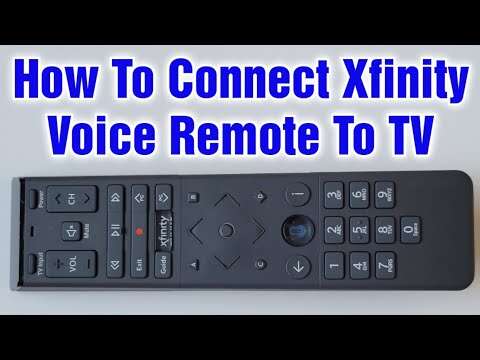
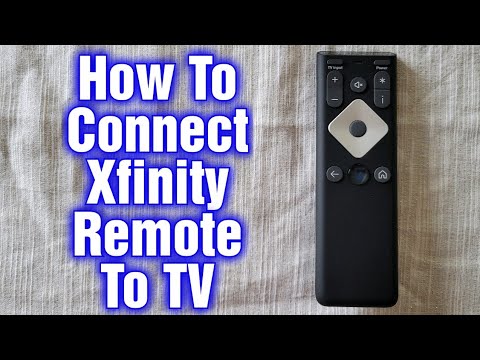
Look at the top or front of the remote for its model number. Common Xfinity models include:
• XR11, which usually has a small gray Setup button.
• XR15, which has a distinctive triangular shape and an A button.
• XR16, which is a smaller voice remote with fewer buttons.
• Older silver remotes, which often use a TV button and a Setup button.
You also need a clear path between the remote and the TV during setup. Most Xfinity remotes use infrared signals for TV control, so furniture, soundbars, and other objects can block the signal.

How do I sync my Xfinity remote to my TV with a code?
The code method is often the fastest way to program an Xfinity remote. You enter a code that matches your TV brand, then test the main controls.
Follow these steps
-
Turn on your TV.
-
Find the TV code for your brand by using the Xfinity remote code lookup tool or the guide that came with your remote.
-
Press the TV button on the remote.
-
Press and hold the Setup button until the LED changes from red to green.
-
Enter the four-digit TV code.
-
Point the remote at the TV and press the Power button.
-
Test the Volume Up, Volume Down, and Mute buttons.
If the TV responds, the remote is programmed. If it does not respond, repeat the process with the next code listed for your TV brand.
Some TV brands have several possible codes. One code may turn the TV on but fail to control volume. In that case, try another code until the power, volume, mute, and input buttons work correctly.
How do I sync my Xfinity remote to my TV without a code?
If you do not know your TV code, use the automatic code search feature. This method makes the remote test several codes until it finds one that works.
Automatic setup for many Xfinity remotes
-
Turn on the TV.
-
Press the TV button on the remote.
-
Press and hold Setup until the LED turns green.
-
Enter 9-9-1.
-
Press the CH+ button slowly and repeatedly.
-
Stop when the TV turns off.
-
Press Setup to save the code.
-
Press the Power button to turn the TV back on.
-
Test the volume, mute, and input buttons.
Take your time during the channel search. pressing CH+ too quickly can cause the remote to skip the correct code.
If you pass the correct code, keep pressing CH+ until the search cycles through the available codes. You may need to restart the process and move more slowly.

How do I sync an Xfinity voice remote to my TV?
Voice remotes usually need two types of setup. First, they must connect to the Xfinity TV box. Second, they must learn how to control the TV’s power and volume.
Pair an XR15 voice remote
-
Turn on the TV and Xfinity TV box.
-
Press and hold the Xfinity and Info buttons together for about five seconds.
-
Release both buttons when the remote light changes color.
-
Follow the instructions shown on the TV screen.
-
Enter the three-digit pairing code shown on the screen, if requested.
-
Test the voice button, power button, and volume controls.
If your remote does not display a pairing message, point it toward the Xfinity box and try again. Keep the remote close to the box during this first connection.
Pair an XR11 voice remote
-
Press the Setup button until the LED turns green.
-
Press the Xfinity button.
-
Follow the instructions on the TV screen.
-
Enter the pairing code shown on the screen.
-
Test the remote.
The exact steps can vary by equipment package and software version. If the screen gives instructions, follow those instructions first.
Pair an XR16 voice remote
The XR16 does not use the same button layout as older remotes. Press the buttons shown in the on-screen pairing prompt, then follow the instructions for adding TV controls.
If the XR16 works with the Xfinity box but not the TV, open the remote or device settings on the Xfinity screen. Look for options related to Remote Setup, TV Control, or Device Control.

How do I sync my Xfinity remote to my TV using the Xfinity screen?
Many X1 systems can guide you through setup on the television. This is useful when you do not know the TV code.
Use the remote to open the Xfinity menu. Then look for a path similar to:
-
Settings.
-
Remote Settings.
-
Voice remote pairing or Remote Setup.
-
TV or audio device setup.
-
Select your TV brand.
-
Follow the code or pairing instructions on screen.
Menu names can differ slightly between Xfinity boxes and software versions. If you see a device setup option, select the TV rather than the cable box.
This method is helpful because the Xfinity system can display the correct pairing code and confirm whether the TV responds. It also reduces the chance of entering a code for the wrong brand.

How do I sync my Xfinity remote to my TV when the volume does not work?
A remote may control the Xfinity box while failing to control the TV volume. This usually means the remote is paired with the cable box but has not been programmed for the television.
Try these steps:
• Reprogram the remote using the TV code method.
• Confirm that the remote is set to TV mode when testing volume.
• Make sure the TV speakers are selected instead of an external sound system.
• If you use a soundbar, program the remote for the soundbar or receiver.
• Point the remote directly at the TV or soundbar.
• Check whether the TV’s original remote can change the volume.
If the TV uses a soundbar, the Xfinity remote may need to control the soundbar instead of the television. This is common with optical audio and some HDMI setups.
A practical troubleshooting lesson is to test one function at a time. First test power. Then test volume. Finally test input. This shows exactly where the setup stopped working.

How do I sync my Xfinity remote to my TV after a reset?
Resetting the remote can help when it is stuck, paired with the wrong device, or responding unpredictably. A reset removes stored pairing information, so you will need to set up the remote again.
Reset an XR15 or similar remote
-
Press and hold the A and D buttons together.
-
Release them when the LED changes color.
-
Enter 9-8-1.
-
Wait for the remote light to flash.
-
Pair the remote with the Xfinity box again.
-
Program the TV controls using a code or automatic search.
Reset an XR11 remote
-
Press and hold the Setup button.
-
Wait for the LED to change color.
-
Enter 9-8-1.
-
Reconnect the remote to the Xfinity box.
-
Set up the TV controls again.
Reset instructions may vary by model. If the LED does not respond, install fresh batteries and repeat the process.
Avoid resetting the remote as your first step. A reset is useful, but it also removes working settings. Try reprogramming the TV first unless the remote is clearly frozen or confused.
Common reasons your Xfinity remote will not sync
When asking how do I sync my Xfinity remote to my TV, it helps to understand why pairing can fail. Most problems come from a small number of causes.
The remote has weak batteries
Weak batteries can let the remote send some commands but not complete pairing. Replace both batteries at the same time and check that they face the correct direction.
The wrong TV code was used
A TV brand may use several codes. If only one button works, try the next code listed for that brand.
The remote is controlling the wrong device
Pressing TV, AUX, or another mode button can change which device receives commands. Return to the correct mode before testing.
The TV sensor is blocked
Remove objects in front of the TV’s lower edge. Some televisions place the infrared sensor near the logo or status light.
The remote is too far away
Stay within a few feet of the Xfinity box during pairing. After setup, test the remote from your normal viewing position.
The TV uses a separate audio device
A soundbar or receiver may handle volume. In this case, the remote may need separate audio device programming.
The Xfinity box needs a restart
Unplug the Xfinity box for about 30 seconds, reconnect it, and wait for it to restart. Then try pairing again.

Tips for a smoother Xfinity remote setup
A few habits make the process easier and help prevent repeat pairing problems.
• Write down the working TV code and keep it near the remote.
• Use fresh batteries before starting.
• Keep the TV and Xfinity box powered on.
• Do not press buttons rapidly during automatic code search.
• Test power, volume, mute, and input after setup.
• Keep the remote pointed toward the TV when using infrared commands.
• Pair the remote with the Xfinity box before setting up TV controls.
• Remove other remotes from the area while pairing to avoid confusion.
If you help a family member set up their TV, take a photo of the remote model first. This small step makes it much easier to find the correct instructions later.
When to contact Xfinity or the TV manufacturer
You may need additional support if the remote still will not work after replacing batteries, resetting it, and trying several TV codes.
Contact Xfinity if:
• The remote LED never lights up.
• The remote cannot pair with the Xfinity box.
• The voice button does not respond.
• The remote has visible damage.
• The remote controls the box only after repeated attempts.
Contact the TV manufacturer if:
• The original TV remote also fails.
• The TV does not respond to any infrared remote.
• The television has unusual external control settings.
• A soundbar or receiver is taking over volume control.
Remote compatibility also has limits. An Xfinity remote may control basic functions such as power, volume, mute, and input but not every smart TV feature. Streaming apps, picture settings, and voice functions may still require the TV’s original remote.
Frequently asked questions about how do I sync my Xfinity remote to my TV
How do I put my Xfinity remote into setup mode?
For many models, press and hold the Setup button until the LED changes from red to green. On some voice remotes, hold the Xfinity and Info buttons together instead.
Why does my Xfinity remote control the box but not the TV?
The remote is likely paired with the Xfinity box but not programmed for TV control. Use the TV code method or automatic code search to add the television.
Can I sync an Xfinity remote without a TV code?
Yes. Many Xfinity remotes support automatic code search with 9-9-1. Press CH+ slowly until the TV turns off, then save the code.
How do I reset my Xfinity remote?
Many models reset when you hold Setup, or A and D, and then enter 9-8-1. The exact buttons depend on the remote model.
Why does my Xfinity remote not control my soundbar?
The remote may be programmed for the TV while the soundbar controls the audio. Set up the soundbar or receiver as the audio device if your Xfinity system supports it.
Will an Xfinity remote control every smart TV feature?
Usually not. It can often handle power, volume, mute, and input, but smart apps and advanced settings may require the original TV remote.
Conclusion
Syncing an Xfinity remote to your TV usually takes only a few minutes. Start by identifying the remote model, then use the TV code method, automatic code search, or the on-screen pairing tool. Test power, volume, mute, and input before you finish.
If the remote fails, replace the batteries, check the TV sensor, try another code, or reset the remote. Once you know how do I sync my Xfinity remote to my TV, the process becomes much less frustrating. Try the method that matches your remote, and share this guide with anyone who wants a simpler setup.

Everett Ashford is a tech reviewer at mytechgrid.com specializing in SSDs, cameras, TVs, earbuds, headphones, and other consumer electronics. He provides honest, data-driven reviews based on hands-on testing and real-world performance analysis. Everett simplifies complex tech details to help readers make smart, confident buying decisions.