Secure your TV with anti-tip straps, correct screws, and a stable stand rated for your television’s weight.
Learning how to secure a TV to a stand is one of the simplest ways to reduce the risk of costly damage and serious injury. A safe setup uses the TV’s mounting points, a strong strap or bracket, and a stand that sits level on a solid floor. This guide explains each step, including common mistakes, tool choices, safety checks, and practical tips for homes with children or pets.

Why You Should Secure a TV to a Stand
Modern TVs are thin and light, but their wide screens can act like a sail when bumped or pulled. Their center of gravity may sit high, especially when the television rests on a narrow base or raised feet. A small push can then make the TV tip forward.
The main risks include:
• A child pulling on the screen or console
• A pet brushing against the stand
• An uneven floor or loose furniture leg
• A cable catching on the TV
• A stand that is too narrow or weak
• An earthquake, vibration, or accidental bump
Learning how to secure a TV to a stand helps keep the screen in place. It also protects people nearby from injuries caused by falling furniture and electronics.
Safety agencies have repeatedly warned that unsecured TVs and furniture can tip over. The risk is highest for young children, who may climb shelves or pull down on drawers. A secured TV is not only more stable; it also gives you peace of mind.

What You Need to Secure a TV
Before you begin, check the TV manual and the stand instructions. The correct hardware depends on the TV design, the stand material, and the location of the mounting points.
Most setups need the following items:
• A TV anti-tip strap kit or safety bracket
• Screws that fit the TV’s VESA mounting holes
• Washers and spacers, if required by the TV manual
• A screwdriver or drill with the correct bit
• A measuring tape
• A level
• A pencil for marking holes
• A stud finder if you will attach the stand to a wall
• A wrench or socket set for furniture hardware
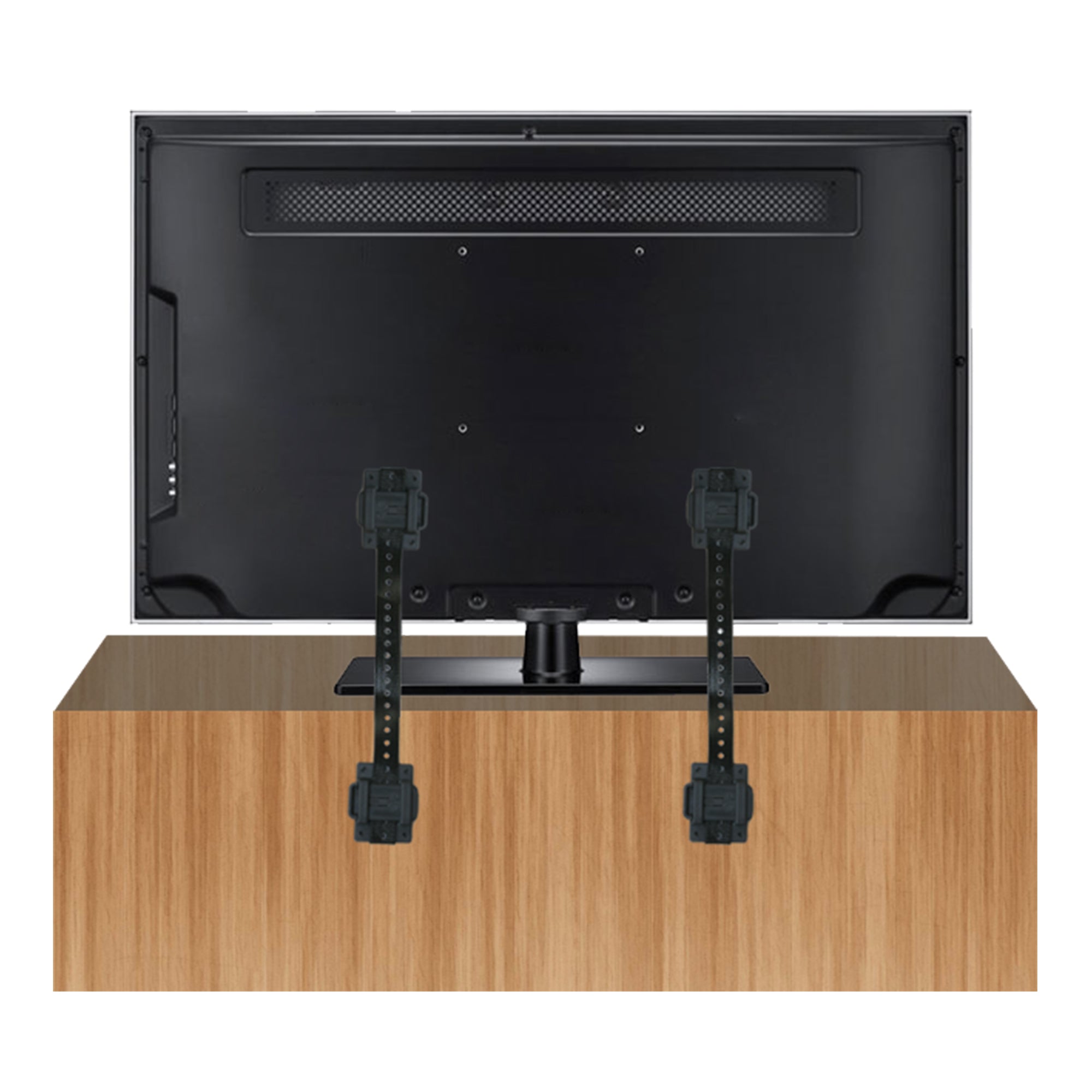
Many anti-tip kits include two straps. One strap attaches to the back of the TV. The other attaches to the stand or to a wall anchor. For a TV sitting on a stand, use a kit designed for furniture or tabletop installations.
Do not guess the screw size. A screw that is too long can damage internal TV parts. A screw that is too short may pull out under pressure. Most TVs use metric VESA screws, often M4, M6, or M8, but the correct size varies by model.
Choose the Best TV Stand
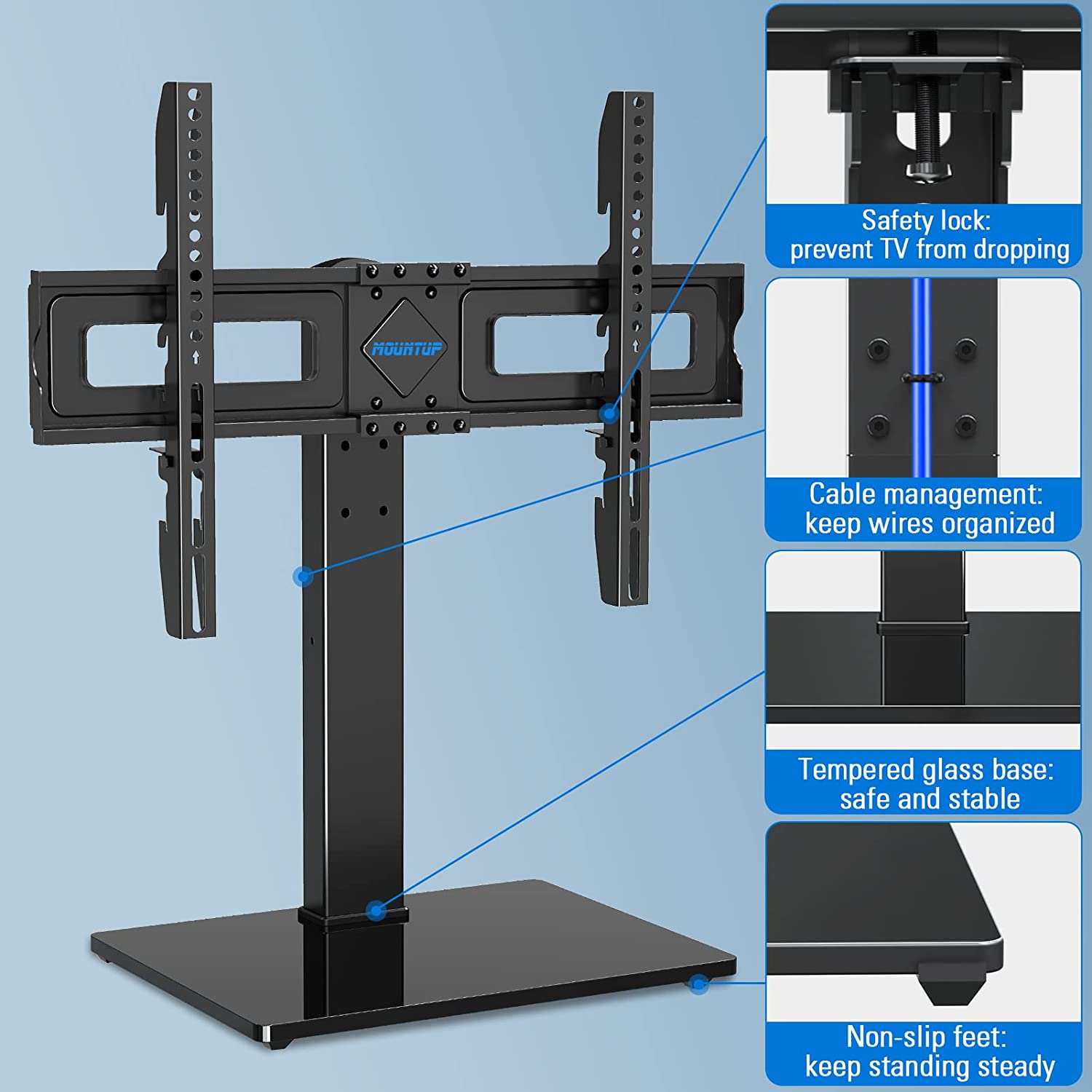
A secure TV setup starts with the stand. Straps cannot fully correct a stand that is too small, weak, or unstable.
Use a stand that meets these conditions:
• It is wider than the TV’s base or feet
• It can hold more than the TV’s total weight
• It has a broad, sturdy footprint
• It sits level without rocking
• It has strong joints and tight hardware
• It does not have damaged glass, shelves, or panels
• It keeps the TV’s center of gravity over the stand
Check the manufacturer’s weight rating before placing the TV on the stand. Include the weight of a soundbar, game console, streaming device, or other items that may sit on the furniture.
Avoid placing a large TV on a narrow end table or lightweight shelf. A stand may hold the TV’s weight but still tip because its base is too shallow. Stability depends on more than weight capacity. Width, depth, floor contact, and height all matter.
In my experience, a low media console is often safer than a tall cabinet. The lower the TV sits, the less leverage it has when someone bumps it. I have also seen people place a large screen on a stand with only a small part of each foot supported. That is a mistake. Every TV foot should rest fully on a firm surface.
How to Secure TV to Stand With Safety Straps
Anti-tip straps are usually the easiest method for securing a TV to a stand. They do not require you to drill into the television. They also work with many TVs that use tabletop feet instead of a separate wall mount.
Follow these steps:
-
Place the TV in the final position. Keep it centered on the stand, with both feet fully supported.
-
Unplug the TV and move it carefully if you need access to the rear panel.
-
Find the VESA mounting holes on the back of the TV. These are usually four threaded holes arranged in a square or rectangle.
-
Attach the TV-side brackets using the correct screws and any included spacers.
-
Attach the other ends of the straps to the back of the stand.
-
Tighten each strap until the TV is held firmly but not forced forward or backward.
-
Check that the straps do not touch ports, vents, power cables, or the screen panel.
-
Gently test the TV with light pressure near the top edge.
The strap should limit forward movement. It should not pull the TV so tightly that the frame bends or the stand lifts from the floor. If the kit uses two straps, attach one near each side of the TV for better balance.
Some straps attach to the TV feet instead of the VESA holes. These can work well when the TV has no accessible mounting points. Follow the kit instructions closely, and make sure the straps cannot slide off the feet.
When learning how to secure a TV to a stand, remember that a strap is a restraint, not a replacement for a stable stand. If the furniture rocks, repair or replace it before securing the TV.
How to Attach TV Straps to Different Stands
The correct attachment point depends on the material and design of the stand.
Wood TV stands
Wood provides a strong surface for screws when it is solid and thick enough. Drive screws into a sturdy rear panel, side panel, or structural frame. Avoid thin decorative trim, particleboard edges, and hollow sections.
Use the screws supplied with the strap kit when possible. If you need different screws, select ones that are suitable for the thickness and type of wood. Do not use screws so long that they come through the front of the furniture.
Metal TV stands
Metal stands may require bolts, clamps, or a special bracket. Do not drill into a thin metal panel unless the manufacturer approves it. A clamp-style attachment may be safer and easier to remove.
Glass TV stands
Glass shelves can crack under pressure. Do not assume a glass panel can hold a screw or anchor. Use a strap that connects to the metal frame, a solid rear support, or a wall anchor instead.
Open shelving units
Open shelves often have little structural support at the back. Attach the strap to a solid vertical frame or use a wall-mounted anti-tip connection. Keep heavy items on the lower shelves to improve stability.

How to Secure a TV Stand to the Wall
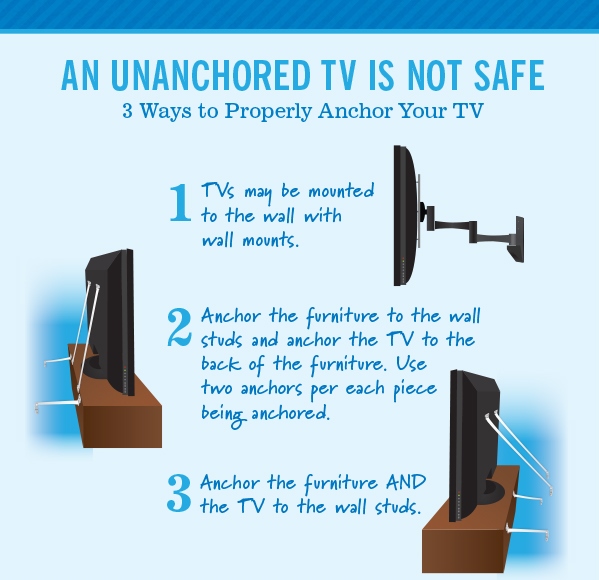
Securing the TV to the stand is helpful, but securing the stand to the wall adds another layer of protection. This matters when the stand is tall, narrow, lightweight, or placed in a home with small children.
First, locate a wall stud. A stud provides a strong anchor for a safety strap or bracket. If no stud lines up with the stand, use a wall anchor rated for the wall type and the expected load.
For drywall, do not rely on a small plastic anchor unless the product specifically supports the required weight and force. Toggle-style anchors may work in some situations, but a stud connection is usually stronger.
For masonry walls, use anchors designed for concrete or brick. The correct drill bit and screw type are important. If you are unsure about the wall material, ask a qualified installer.
A wall connection should prevent the stand from tipping forward. It should not pull the furniture tightly against the wall if that blocks ventilation or damages the finish.

Safe Cable Management for a Secured TV
Cables can create a hidden tipping hazard. A person may pull the TV when a power cord, HDMI cable, or antenna cable becomes caught.
Leave enough slack for normal movement, but avoid long loops. Route cables through the stand’s cable openings when available. Use soft cable ties or cable sleeves to keep cords together.
Keep cords away from:
• Walkways
• Chair legs
• Children’s reach
• Pet chewing areas
• Hot vents and power strips
• Sharp furniture edges
Do not use cable clips as the main way to secure a TV. They organize wires, but they are not designed to stop a television from tipping.

Common Mistakes to Avoid
Many unsafe TV setups look fine at first. The problem appears when the TV receives a sudden pull or impact.
Avoid these mistakes:
• Using a strap with the wrong screw size
• Attaching a strap to a thin decorative panel
• Securing only one side of a wide TV
• Placing the TV near the front edge
• Blocking the stand’s ventilation openings
• Using tape, glue, or hook-and-loop fasteners as a safety restraint
• Drilling into the TV without checking the manual
• Attaching a wall strap to drywall without a suitable anchor
• Ignoring a stand that rocks or wobbles
• Leaving heavy objects on high shelves
One common mistake I have seen is tightening the straps as much as possible. More tension is not always better. The goal is to stop dangerous movement while keeping the TV frame and stand under normal load.
Another mistake is testing the setup with a hard push. A light, controlled check is enough. Never pull on the top of the TV with force, especially if the stand is not anchored.
:max_bytes(150000):strip_icc()/icooker-tv-safety-straps-8bebe94186c04665b8b631c4ce43e150.jpg)
How to Check Whether Your TV Is Secure
After installing the restraint, perform a full safety check. Look at the TV from the front, side, and rear.
Use this checklist:
• The TV is centered on the stand
• Both feet sit flat and fully on the surface
• The stand does not rock
• The straps are tight but not overstretched
• The screws are fully seated
• No strap covers vents or ports
• Cables have safe slack
• The stand is attached to the wall when needed
• Heavy items are stored low
• The screen does not move easily when touched
Apply gentle pressure near the upper edge of the TV. It should remain stable and should not slide toward the front. If the stand shifts, stop using the setup until you improve the furniture or wall connection.
Recheck the hardware after a few days. Furniture can settle, and screws may loosen after installation. Check again after cleaning, moving the stand, or changing the TV.
When to Use a TV Mount Instead
A tabletop safety strap is not ideal for every room. Consider a wall mount if the stand is too small, the TV is unusually heavy, or the room has a high risk of impact.
A wall mount can save space and keep the screen out of reach. However, it must be attached to suitable studs or masonry with hardware rated for the TV’s weight. The wall mount also needs to match the TV’s VESA pattern and screen size.
A professional installer may be helpful when:
• The wall has unusual construction
• You cannot locate a safe stud
• The TV is very large or heavy
• The mounting area is above a fireplace
• The installation requires electrical work
• You are unsure about the bracket rating
Wall mounting has its own risks. Poor hardware, incorrect anchors, and blocked ventilation can damage the TV or wall. A secure TV stand setup is often the better choice when the furniture is strong and properly anchored.
Special Tips for Homes With Children and Pets
If children live in the home, secure both the TV and the furniture. A child may climb a shelf, pull a drawer, or grab the screen. Even a correctly strapped TV can fall if the stand tips over.
Keep toys, remotes, and game controllers away from the top of the stand. Store tempting items at a safe height. Use drawer latches when needed, and remove stools or chairs that make climbing easier.
Pets can also create unexpected movement. Dogs may bump a stand while playing, and cats may jump onto high furniture. Keep the stand away from common running paths, and avoid placing fragile items beside the TV.
These small changes work like guardrails. They reduce the chance that one ordinary moment becomes a dangerous accident.
How to Secure TV to Stand in an Earthquake Area
If you live in an earthquake-prone area, use two anti-tip straps and anchor the stand to the wall whenever possible. Place the TV toward the rear of the stand, but do not let it touch the wall.
Use flexible restraints that can handle limited movement. Rigid connections may transfer force to the TV or furniture during shaking. Keep heavy objects on low shelves and remove items that could fall onto the screen.
After an earthquake, inspect the straps, screws, stand joints, and wall anchors. Replace any bent or damaged hardware. Do not assume a strap is safe just because it still looks attached.
PAA-Style Answers About Securing a TV
Can I secure a TV to a stand without drilling?
Yes, some anti-tip kits attach to the TV’s VESA holes and clamp or connect to the stand. Avoid relying on adhesive alone, because heat, dust, and surface texture can weaken the bond.
Are TV straps better than brackets?
Both can work when correctly installed. Straps are flexible and simple, while rigid brackets may provide stronger control but require better alignment and compatible hardware.
Should I attach the TV strap to the wall or stand?
Attach it to the stand when the furniture is strong and stable. Anchor the stand to the wall as well when it is tall, narrow, light, or easy to tip.
Frequently Asked Questions About How to Secure TV to Stand
What is the safest way to secure a TV to a stand?
The safest setup uses a sturdy, level stand, two correctly installed anti-tip straps, and a wall anchor when needed. The TV should be centered, fully supported, and attached with hardware approved for that model.
Can I use any screws to attach a TV safety strap?
No. The screws must match the TV’s threaded holes and must not extend too far into the television. Check the TV manual or the hardware guide included with the safety kit before installation.
Do I need to secure the TV if it has a wide base?
Yes. A wide base improves balance but does not stop a child, pet, cable, or impact from tipping the screen. Learning how to secure a TV to a stand adds an important layer of protection.
Can I use adhesive strips to keep my TV from tipping?
Adhesive strips are not a reliable primary restraint for a TV. They may help with minor sliding on some surfaces, but use a mechanical strap, bracket, or approved clamp for real tip protection.
How often should I check TV safety straps?
Inspect the straps and screws every few months and after moving the TV or stand. Check them immediately after a strong bump, earthquake, or change in the furniture layout.
Is it safe to put a soundbar on the same stand?
Usually, yes, if the stand can support the combined weight and the soundbar does not block the TV screen or ventilation. Keep the soundbar low and ensure it does not push the TV toward the front edge.
What should I do if my TV stand wobbles?
Stop using the setup until you level or repair the stand. Tighten its joints, check the floor, and replace the furniture if it remains unstable.
Conclusion
Learning how to secure a TV to a stand takes only a few careful steps. Choose a strong, level stand, use the correct screws, install two anti-tip straps when possible, manage the cables, and anchor the furniture to the wall when its shape or location creates extra risk.
Do not treat a safety strap as a substitute for good furniture. A stable stand and a properly fitted restraint work together like a seat belt and a safe car. Check your setup today, make any needed repairs, and share your experience or questions in the comments.

Everett Ashford is a tech reviewer at mytechgrid.com specializing in SSDs, cameras, TVs, earbuds, headphones, and other consumer electronics. He provides honest, data-driven reviews based on hands-on testing and real-world performance analysis. Everett simplifies complex tech details to help readers make smart, confident buying decisions.