For people in the United States, the main alternatives to ChatGPT include Claude, Google Gemini, Microsoft Copilot, Perplexity, Meta AI, Grok, Mistral Le Chat, and Poe. Each platform has a different strength. Some are better for writing and analysis, while others work best for web search, coding, image tasks, office work, or social apps.
The best choice depends on what you need to do, what devices you use, how much you want to pay, and how comfortable you are sharing data with an AI service.
The Best ChatGPT Alternatives at a Glance
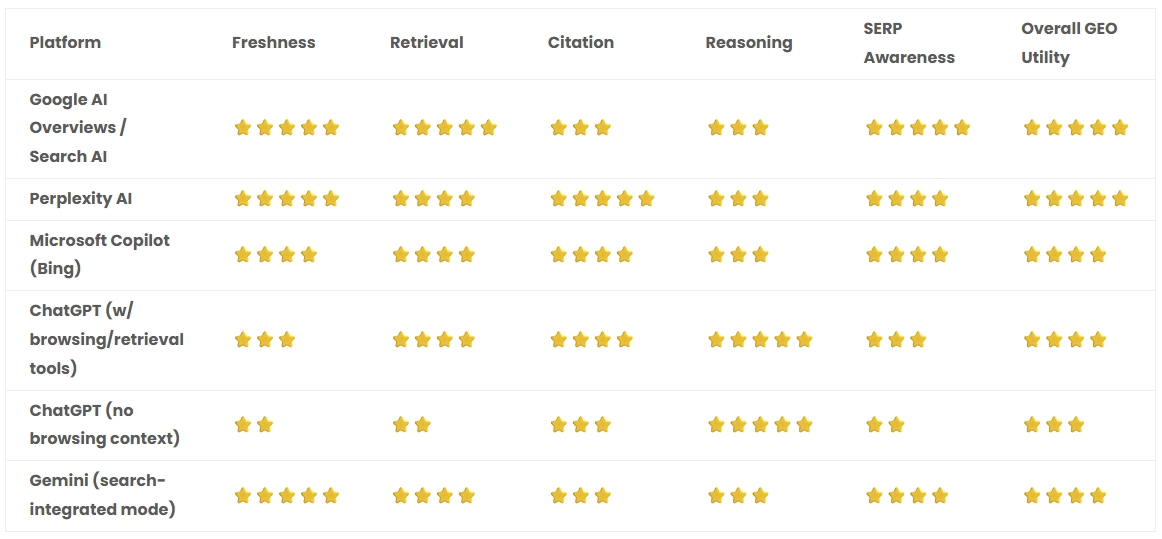
The table below compares major AI platforms available to users in the United States. Features, limits, and prices can change, so check each company’s current plan page before subscribing.
| AI platform | Best known for | Main advantage | Main limitation |
|---|---|---|---|
| Claude | Writing, analysis, and long documents | Clear responses and strong document work | Some features and usage limits vary by plan |
| Google Gemini | Google services and multimodal tasks | Works closely with Google products | Results may vary by task and account type |
| Microsoft Copilot | Windows and Microsoft 365 work | Useful for Word, Excel, Edge, and Teams users | The experience differs across Microsoft products |
| Perplexity | AI-powered web research | Answers usually include source links | It may summarize sources incorrectly |
| Meta AI | Social apps and casual assistance | Built into Meta products such as WhatsApp and Instagram | Not designed for every business or research task |
| Grok | Real-time conversations and X content | Strong connection to the X platform | Access and features depend on region and plan |
| Mistral Le Chat | Fast general-purpose AI and coding | European-developed alternative with business options | Smaller ecosystem than Google or Microsoft |
| Poe | Trying several AI models in one app | One account can access many bots | Usage limits and bot quality vary |
| Amazon Q | Business, software, and AWS work | Designed for workplace and cloud use | Less useful as a general consumer chatbot |
The most direct ChatGPT alternatives are Claude, Gemini, and Copilot. Perplexity is usually a better fit for source-based research, while Amazon Q is more focused on professional and developer tasks.
1. Claude: A Strong Choice for Writing and Analysis
Claude, made by Anthropic, is a general-purpose AI assistant known for writing, summarizing, analysis, coding, and work with long documents. It is available through the Claude website, mobile apps, and developer tools.
Claude can help with tasks such as:
- Rewriting reports and emails
- Summarizing contracts, papers, and meeting notes
- Reviewing code
- Creating outlines
- Comparing documents
- Brainstorming ideas
- Explaining complex subjects in plain language
Claude’s main appeal is its writing style. Many users prefer its calm, direct answers for editing and business writing. Its long-context features can also help when a task involves a large amount of text, although actual limits depend on the model and plan.
Who should use Claude?
Claude may suit you if you:
- Write reports, articles, or business documents
- Need help reviewing large text files
- Want detailed explanations
- Work with code or technical material
- Prefer a less chatty writing style
Claude is not automatically more accurate than ChatGPT. Both systems can make factual errors, so verify legal, medical, financial, and other high-impact information.
Official source: Anthropic Claude
2. Google Gemini: Best for Google Users
Google Gemini is Google’s AI assistant. It can answer questions, write and summarize text, analyze images, help with coding, and connect with selected Google services depending on the account and plan.
Gemini may be useful for people who already use:
- Gmail
- Google Drive
- Google Docs
- Google Calendar
- Google Maps
- Android devices
- Google Search
Its connection to Google’s product ecosystem is its clearest advantage. For example, a user may want help summarizing information in a document or drafting an email. The exact tools available can depend on the user’s country, account type, subscription, and Google product.
Gemini also supports multimodal work. Multimodal means the system can work with more than one type of input, such as text, images, audio, or files.
Who should use Google Gemini?
Gemini may be a good fit if you:
- Use Google services every day
- Own an Android phone
- Want an AI assistant connected to Google tools
- Need help with images, text, or files
- Prefer Google’s search and productivity ecosystem
Do not assume that a connection to Google makes every answer current or correct. Check important claims against the original source.
Official source: Google Gemini
3. Microsoft Copilot: Best for Microsoft 365 and Windows
Microsoft Copilot is Microsoft’s family of AI assistants. It appears in different forms across products such as Windows, Microsoft Edge, Bing, Microsoft 365, and business software.
Copilot can help with:
- Drafting emails
- Summarizing documents
- Creating presentations
- Analyzing spreadsheets
- Generating meeting notes
- Answering questions
- Writing and explaining code
- Searching the web
The word “Copilot” does not describe one identical product. Features differ between the consumer Copilot experience, Microsoft 365 Copilot, GitHub Copilot, and other Microsoft tools.
For example:
- Microsoft Copilot supports general questions and productivity tasks.
- Microsoft 365 Copilot works within selected business applications.
- GitHub Copilot focuses on software development.
- Security Copilot supports cybersecurity work.
Who should use Microsoft Copilot?
Copilot may be the better option if you:
- Work in Word, Excel, PowerPoint, or Outlook
- Use Microsoft Teams
- Use Windows regularly
- Develop software with GitHub
- Need an AI tool inside a business environment
Business buyers should review Microsoft’s data, security, identity, and compliance terms. A consumer chatbot and an enterprise AI service may handle information under different conditions.
Official sources: Microsoft Copilot and Microsoft 365 Copilot
4. Perplexity: Best for Web Research and Source Links
Perplexity is an AI search and answer platform. It combines conversational answers with web search and usually displays links to the sources it used.
This makes Perplexity useful for:
- Starting research on an unfamiliar topic
- Finding recent articles
- Comparing products
- Locating reports and public documents
- Building a list of sources
- Asking follow-up questions about a search
Perplexity can save time because it presents a short answer before the user opens several pages. However, a source link does not prove that the answer is correct. The cited page may not support the exact statement, or the AI may misunderstand it.
How to use Perplexity safely
For important research:
- Read the answer.
- Open the cited sources.
- Check the date and publisher.
- Compare at least two reliable sources.
- Confirm that the source actually supports the claim.
- Save the original source rather than relying only on the AI summary.
Perplexity is a research aid, not a substitute for reading primary evidence.
Who should use Perplexity?
Perplexity may fit you if you:
- Need current web information
- Want source links with an answer
- Research products, companies, or topics
- Need to explore a subject quickly
- Want a search experience that feels more conversational
Official source: Perplexity
5. Meta AI: Best for Casual Help Inside Social Apps
Meta AI is Meta’s assistant. It can be available through Meta products such as WhatsApp, Instagram, Facebook, and Messenger, depending on location and rollout status.
Meta AI may help with:
- Casual questions
- Brainstorming
- Writing short messages
- Planning activities
- Image generation
- Group conversations
- Recommendations and general information
Its key benefit is convenience. People may not need to open a separate AI app if the assistant is already available in an app they use.
The trade-off is that Meta AI is not designed to replace specialist research, professional advice, or a full business knowledge system. Users should also review the privacy settings and controls for the specific Meta product they use.
Who should use Meta AI?
Meta AI may be useful if you:
- Spend time on WhatsApp, Instagram, Facebook, or Messenger
- Want quick, casual assistance
- Need help writing short messages
- Want to try image-generation features
- Prefer an AI tool built into a social app
Availability can vary by country, language, account, and product version.
Official source: Meta AI
6. Grok: Best for Users Who Want X Integration
Grok is an AI assistant developed by xAI. It is closely associated with the X platform and may use information from X in some experiences. It can support conversation, writing, coding, research, and image-related tasks, depending on the available model and plan.
Grok may be useful for:
- Discussing current online conversations
- Brainstorming
- Writing and editing
- General questions
- Coding assistance
- Following topics discussed on X
Its connection to X can be useful when a user wants to understand public posts or online discussion. However, social posts are not automatically reliable evidence. They can contain rumors, satire, outdated claims, or coordinated misinformation.
Who should use Grok?
Grok may be a fit if you:
- Use X often
- Want to explore public online conversations
- Prefer a more informal assistant
- Need a general chatbot with writing and coding tools
Check the current access rules, privacy terms, and plan limits before relying on Grok for work.
Official source: xAI Grok
7. Mistral Le Chat: A European AI Alternative
Le Chat is Mistral AI’s conversational assistant. Mistral develops general-purpose and specialized language models, including models used for chat, coding, and business applications.
Le Chat can support:
- Text generation
- Summaries
- Translation
- Coding
- Research
- Document-based tasks
- General question answering
Mistral is notable for offering a major alternative to US-based AI companies. Its models are also used by developers and organizations through APIs and other deployment options.
Who should use Mistral Le Chat?
Le Chat may appeal to you if you:
- Want an alternative to the largest US AI providers
- Need a general chatbot
- Work with open or more flexible model ecosystems
- Need coding or document support
- Care about where an AI company is based
Model access, hosting choices, licenses, and business terms differ. Developers should read the license for the exact model they plan to use.
Official source: Mistral AI Le Chat
8. Poe: Best for Comparing Several AI Models
Poe, made by Quora, provides access to multiple AI bots through one service. The available bots can include models from different companies, as well as custom bots made by users.
Poe can be useful when you want to:
- Compare answers from several models
- Try different writing styles
- Use custom assistants
- Build or test a bot
- Switch between models without managing many accounts
The main advantage is choice. The main drawback is that each bot may have different limits, tools, context windows, and data policies.
Who should use Poe?
Poe may suit you if you:
- Want to compare AI models
- Enjoy testing new bots
- Need several assistants in one interface
- Want to build a custom chatbot
- Do not want separate apps for every model
Before uploading private files, check which model handles the information and how Poe’s terms apply to that interaction.
Official source: Poe
9. Amazon Q: Best for Business and AWS Work
Amazon Q is Amazon’s AI assistant for business, software development, and AWS-related tasks. It is not mainly positioned as a casual consumer chatbot.
Amazon Q can help with:
- Software development
- AWS questions
- Business data searches
- Internal company information
- Troubleshooting
- Code suggestions
- Enterprise workflows
Its usefulness depends heavily on setup. A business must connect the right data sources and manage user permissions. Without that setup, it may not provide the organization-specific answers that make an enterprise assistant valuable.
Who should use Amazon Q?
Amazon Q may be appropriate if you:
- Build or manage AWS systems
- Work with software development
- Need an enterprise assistant
- Want to search approved company data
- Already use Amazon Web Services
Businesses should involve their security and legal teams before connecting sensitive company data to any AI platform.
Official source: Amazon Q
How to Choose an AI Platform Besides ChatGPT
Choose the platform based on the task, not the brand name. A tool that works well for a college outline may be a poor choice for confidential business records or live technical support.
Use this decision guide:
Choose Claude for writing and long documents
Claude is a strong candidate for editing, summaries, document review, and detailed explanations. It may be especially useful when the tone and structure of the writing matter.
Choose Gemini for Google-based work
Gemini makes the most sense for people who rely on Gmail, Drive, Docs, Android, and other Google tools. Confirm which integrations your account supports before you depend on them.
Choose Copilot for Microsoft work
Copilot is the natural starting point for Word, Excel, Outlook, Teams, Windows, and GitHub users. The right Copilot product depends on whether you need consumer, office, coding, or business features.
Choose Perplexity for research
Perplexity is useful when source links and current web information matter. Always open and verify the sources for important decisions.
Choose Meta AI for quick help in social apps
Meta AI is convenient for casual use inside Meta’s products. It is less suited to formal research or sensitive work.
Choose Grok for X-related topics
Grok may help users who want to explore public discussions on X. Treat posts as leads, not verified facts.
Choose Mistral Le Chat for another model ecosystem
Le Chat is worth considering if you want a European AI provider, a different model family, or developer-oriented options.
Choose Poe to compare models
Poe is useful if you want to test several AI systems from one interface. Review the limits and privacy terms for each bot.
Choose Amazon Q for AWS or company work
Amazon Q is designed for business and cloud environments. It is usually not the first choice for a simple personal chatbot.
What to Check Before You Sign Up
Review five areas before choosing an AI platform.
1. Price and usage limits
Many AI services have a free tier and paid plans. Free accounts may limit:
- The number of messages
- File uploads
- Image creation
- Access to advanced models
- Search or research features
- Response speed
- Context length
A low monthly price may not be the lowest total cost if you need several services.
2. Privacy and data use
Read the provider’s privacy policy and account controls. Look for information about:
- Whether conversations may train models
- How to opt out
- How long data is stored
- Whether humans may review content
- How business data is separated
- What happens when an account is deleted
Do not paste passwords, Social Security numbers, private medical records, trade secrets, or confidential client data into a consumer chatbot unless you have confirmed that the service and your organization’s policy allow it.
3. Accuracy and source quality
AI platforms can produce false information with confidence. This is often called a hallucination, meaning the system generates an incorrect or unsupported statement.
For important information:
- Ask for sources.
- Open the sources.
- Check dates.
- Compare independent evidence.
- Ask a qualified professional when the decision carries serious risk.
4. Integrations
An AI assistant becomes more useful when it works with the tools you already use. Check support for:
- Google Workspace
- Microsoft 365
- Slack
- GitHub
- AWS
- Android or iPhone
- File types you use
- Business identity systems
Do not assume that two products with the same brand have the same integrations.
5. Account and location availability
Features may vary by:
- US state
- Country
- Age
- Language
- Account type
- Business plan
- Device
- Product rollout
For US users, check the provider’s current official page rather than relying on an old review.
Can You Use More Than One AI Platform?
Yes. Many people use different platforms for different tasks. For example, someone might use:
- Claude for writing
- Perplexity for research
- Copilot for Microsoft 365
- Gemini for Google services
- GitHub Copilot for programming
Using more than one tool can improve flexibility, but it also creates extra costs and privacy risks. Do not copy confidential information from one service into another without checking your organization’s rules.
A simple test can help you compare tools. Give each platform the same low-risk task, such as:
“Summarize this public article in five bullet points and identify one claim that needs verification.”
Then compare:
- Accuracy
- Source quality
- Clarity
- Speed
- Formatting
- Ease of use
- File and tool support
This is a practical comparison, not a scientific performance test. Results can change with the model, prompt, account, and date.
Common Mistakes When Choosing an AI Alternative
Choosing by popularity alone
A popular platform may not fit your workflow. A smaller tool can be more useful if it supports your files, apps, or business systems.
Treating every answer as fact
AI tools predict and generate text. They do not guarantee truth. Even platforms with web search can misread a source.
Ignoring the exact product name
“Copilot,” “Gemini,” and other brand names can cover several products. Read the details for the version you will use.
Uploading private information too soon
Test an AI platform with public or fictional data first. Learn its controls before using sensitive information.
Comparing free and paid plans as if they were equal
A free plan may use a different model or impose stricter limits. Compare the exact features you need.
Using a general chatbot for high-risk advice
For medical, legal, tax, investment, employment, or safety decisions, use AI only as a starting point. Confirm the answer with a qualified professional or authoritative source.
Frequently Asked Questions
What is the best alternative to ChatGPT?
There is no single best alternative for every user. Claude is often a strong choice for writing and document analysis, Gemini for Google users, Copilot for Microsoft users, and Perplexity for web research.
Is Claude better than ChatGPT?
Claude may be better for some writing and document tasks, while ChatGPT may be better for other tools or workflows. “Better” depends on the model, plan, task, and date. Compare both with the same low-risk prompt.
Is Google Gemini free?
Google offers free and paid Gemini options, but features and limits can change. Check Google’s current Gemini plan details for your account and location.
Which AI platform gives sources?
Perplexity is built around source-linked answers. Gemini, Copilot, Grok, and other tools may also provide web links in some modes. Always open the links and confirm that they support the answer.
Which AI is best for business use?
The best choice depends on your existing systems. Microsoft 365 Copilot may fit Microsoft organizations, Gemini may fit Google Workspace users, and Amazon Q may fit AWS environments. Review security, permissions, retention, and compliance terms before deployment.
Final Recommendation
If you want one simple alternative to try first, choose based on your main task:
- Writing and analysis: Claude
- Google apps and Android: Gemini
- Microsoft 365 and Windows: Copilot
- Web research with links: Perplexity
- Social app assistance: Meta AI
- X-related discussions: Grok
- A European AI provider: Mistral Le Chat
- Several models in one place: Poe
- AWS and enterprise work: Amazon Q
Start with a free option when available. Test it using public information, compare its answers with a second source, and review its privacy settings before using it for important or sensitive work.

Everett Ashford is a tech reviewer at mytechgrid.com specializing in SSDs, cameras, TVs, earbuds, headphones, and other consumer electronics. He provides honest, data-driven reviews based on hands-on testing and real-world performance analysis. Everett simplifies complex tech details to help readers make smart, confident buying decisions.