Google AI Mode changes how people search, but it does not create a separate set of secret ranking rules. The best path is still to publish useful, original content, make your site easy to crawl, show clear expertise, and answer the full question behind a search.
Google may use several searches to build an AI response. It can then show links to pages that support parts of that response. Your goal is not to “optimize for AI” with a trick. Your goal is to become a clear, reliable source that Google can understand, trust, and cite when your page adds value.
This guide explains how Google AI Mode works, what website owners can do, what does not work, and how to measure progress without making false promises.
What Is Google AI Mode?
Google AI Mode is an AI-powered search experience that gives users a more detailed answer than a traditional list of blue links. It may break a complex question into related searches, gather information from several sources, and present a written response with supporting links.
Google began testing AI Mode in the United States through Search Labs before expanding access. Features, layouts, and availability may change by account, device, query, and location. Check Google’s official announcements for the latest product details.
AI Mode is different from a normal featured snippet. A featured snippet usually highlights one passage from one page. An AI response may combine information from many pages and offer several links for deeper reading.
Google’s own guidance says the same core SEO practices apply to its AI search features. There is no official “AI Mode schema,” guaranteed citation method, or special meta tag that forces inclusion.
How AI Mode may select sources
Google has not published a complete public formula for selecting every link in an AI response. Still, its public documentation and normal search guidance point to several practical factors:
- The page must usually be accessible to Google.
- The content should directly address the user’s need.
- The site should provide useful, original information.
- Claims should be clear and supportable.
- The page should fit the topic and query well.
- Google must be able to understand the page’s content and purpose.
- The page should offer a good experience on mobile and desktop.
These factors do not guarantee a citation. They improve the chance that Google can use and understand your content.
Google AI Mode Ranking vs. Traditional SEO
Google AI Mode does not replace traditional SEO. It builds on many of the same systems that help Google find, understand, and evaluate web pages.
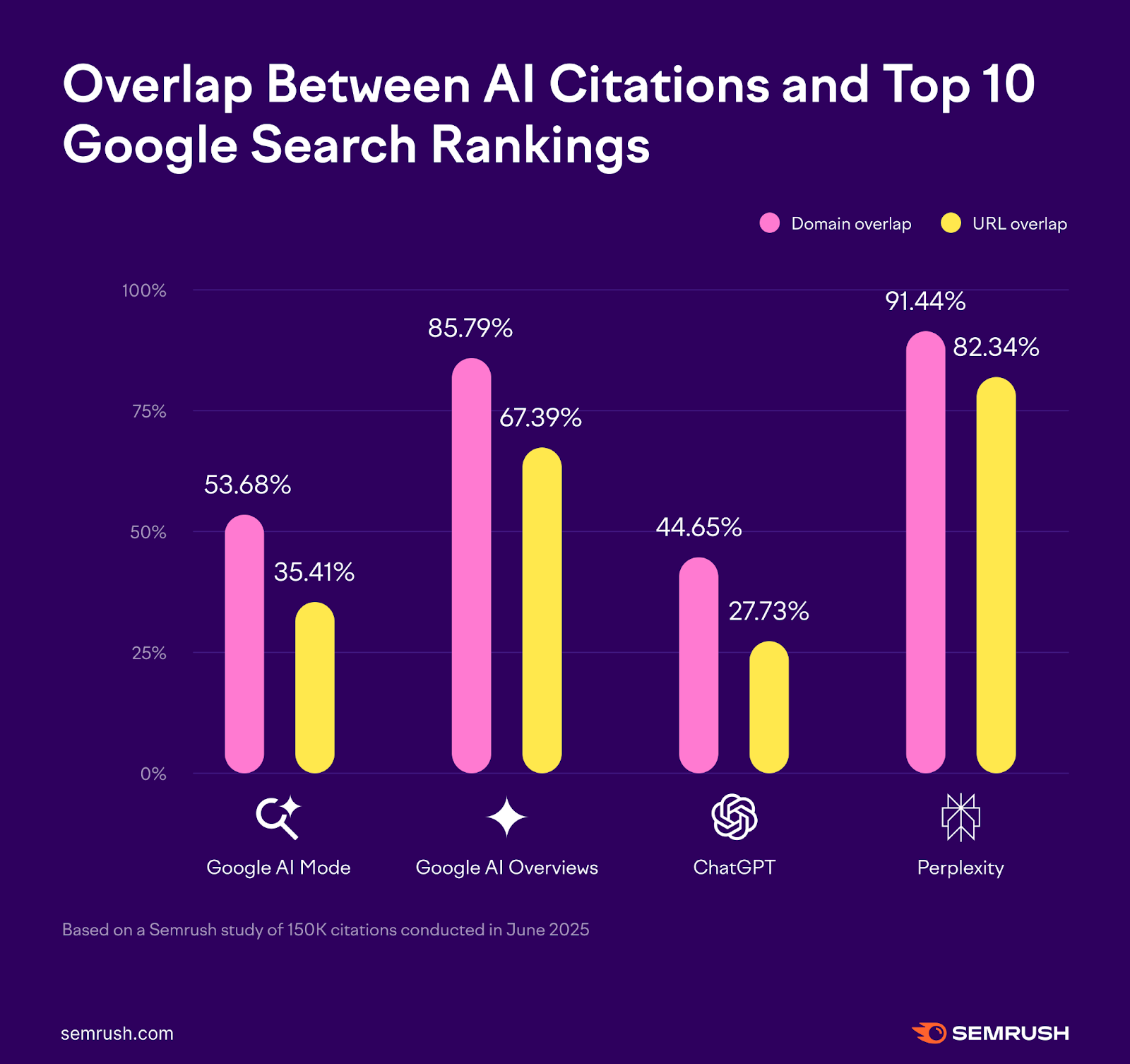
A page can rank well in standard search and never appear in an AI response. The reverse may also happen for a specific question. AI responses can use different supporting pages for different parts of a broad query.
For example, a user might ask:
“What is the best way to insulate a detached garage in Minnesota?”
Google may need sources about:
- Climate and building conditions.
- Insulation types.
- Moisture control.
- Local building rules.
- Installation limits.
- Cost and energy trade-offs.
One page may answer the main question. Other pages may support narrower details. This means broad topic coverage and strong page-level answers both matter.
The main difference: citation usefulness
Traditional SEO often focuses on earning a click from a search result. AI Mode may first use your page as evidence in an answer. The user may then click because they want proof, detail, instructions, product comparisons, or help with a decision.
A page that simply repeats common facts may have little reason to be cited. A page with a clear process, original data, strong examples, or useful limitations gives the search system more value to use.
That does not mean you should write for a machine. Write for the person who needs a reliable answer. Clear writing helps both readers and search systems.

1. Meet the Basic Technical Requirements
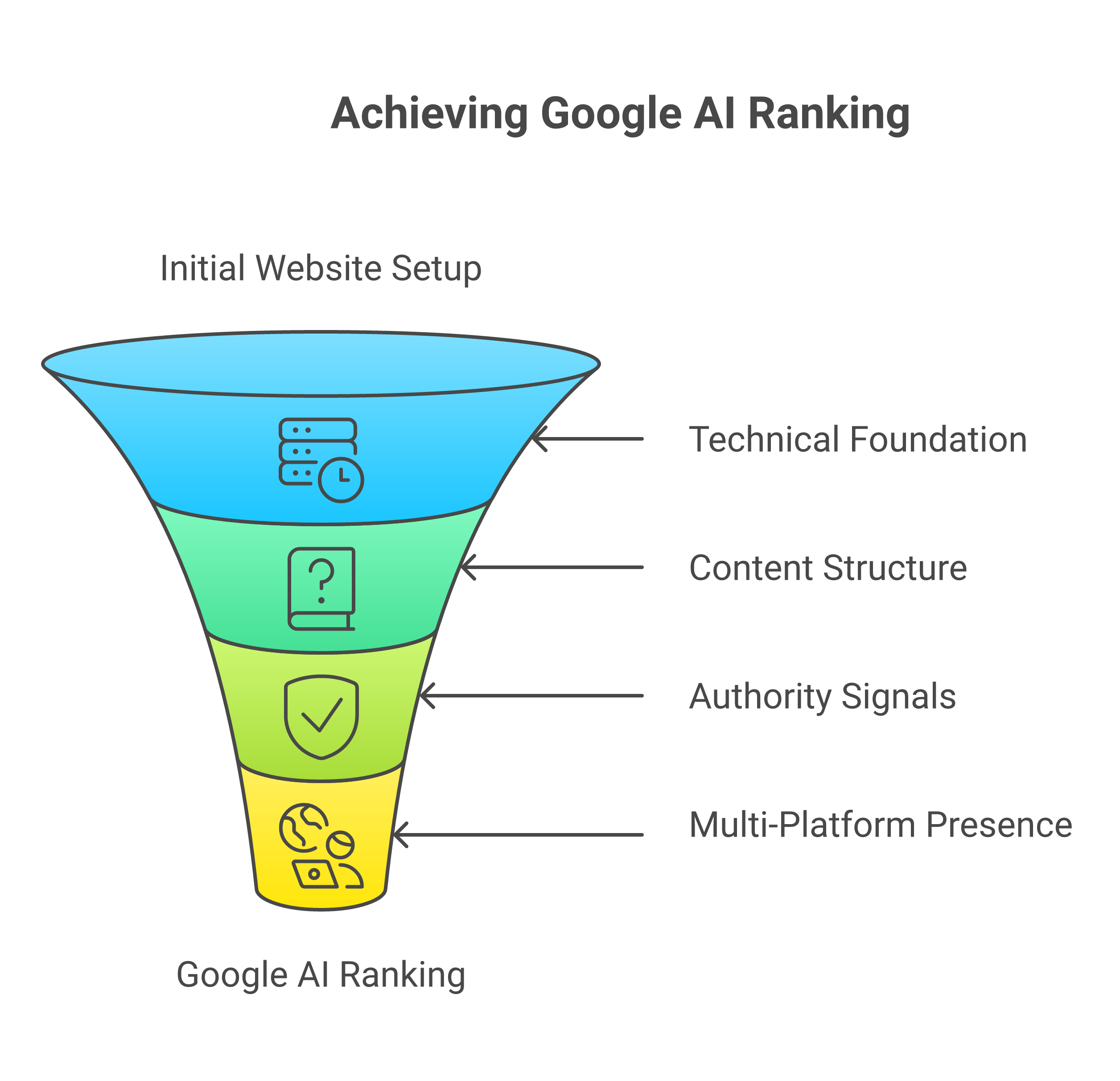
Before improving content, make sure Google can access and understand your pages. A strong article cannot earn visibility if Google cannot crawl it, index it, or connect it to your site.
Check these basics first:
- The page returns a normal success response, such as HTTP 200.
- The page is not blocked by
robots.txt. - The page does not contain a
noindexdirective. - Important content is available in the rendered HTML.
- Internal links point to the page.
- The canonical URL is correct.
- The page works on mobile devices.
- Images have useful alternative text when they convey meaning.
- The site uses HTTPS.
- The page does not rely on an interaction that search systems cannot use.
Google Search Console can help you inspect indexing, crawl issues, mobile problems, and search performance.
Do not hide key information
Some websites place important answers behind tabs, scripts, pop-ups, or user actions. Google can process JavaScript, but hiding core information adds risk and can reduce usability.
Put the main answer in visible text. Use tabs or accordions for supporting detail, not for concealing the only useful part of the page.
Use structured data correctly
Structured data helps Google classify page content. It can also make a page eligible for certain search features. However, structured data does not guarantee a ranking or an AI citation.
Use structured data only when it matches visible page content. For example:
Articlefor a suitable article page.Productfor a genuine product page.Recipefor a recipe with the required details.LocalBusinessfor a real local business.FAQPageonly when the page meets Google’s current eligibility rules.
Do not add fake reviews, hidden text, or schema types that do not match the page. Incorrect markup can confuse users and search systems.
2. Match the Full Search Task
The strongest AI Mode content answers the user’s real task, not just the exact words in the query.
A short query often hides several needs. Consider the query:
“How do I choose a home security camera?”
The user may also need to know:
- Whether the camera works indoors or outdoors.
- How it stores video.
- Whether it requires a subscription.
- How it handles power loss.
- Whether it supports local storage.
- How much internet bandwidth it uses.
- Whether it works with the user’s phone or smart-home system.
- What privacy risks exist.
A page that discusses only camera resolution gives a narrow answer. A better page explains the decision, the trade-offs, and the conditions that change the recommendation.
Use a search-task map
Before writing, create a simple map:
| Reader need | What the page should provide |
|---|---|
| Understand the topic | A plain-language definition |
| Make a choice | Clear decision factors |
| Take action | Steps, examples, or instructions |
| Avoid mistakes | Limits, risks, and common errors |
| Verify the answer | Sources, dates, tests, or documentation |
| Decide what to do next | A practical recommendation |
This process helps prevent thin content. It also stops you from adding unrelated sections just to include more keywords.
Answer the main question early
Start with the direct answer. Do not make readers scroll through a long story before they know what to do.
For example:
To improve your chances of appearing in Google AI Mode, create original, well-structured pages that answer a specific user task, keep the site technically accessible, support important claims, and cover the key follow-up questions without filler.
Then explain the method and the limits.

3. Create Original Information Worth Citing
Google’s Search Essentials and helpful content guidance emphasize useful, reliable, people-first content. AI search makes this even more important because a generic page may give Google little reason to select it over many similar pages.
Original information does not always require a large study. It can include:
- A documented test with clear conditions.
- A comparison based on stated criteria.
- A calculation readers can repeat.
- A process based on real professional work.
- A clear explanation of a confusing rule.
- A first-hand case study.
- A useful table that brings scattered facts together.
- A careful analysis of product limits or compatibility.
- A correction of a common misconception.
Do not label ordinary summary work as original research. If you did not test a product or collect data, say that the information comes from documentation or published sources.
Add evidence to important claims
Match the source to the claim:
- Use government or regulatory sources for rules and legal requirements.
- Use official product documentation for specifications and compatibility.
- Use original studies or datasets for research findings.
- Use company financial filings for reported business figures.
- Use direct testing only when you actually tested the item under stated conditions.
- Use reputable industry sources for market context, while noting their scope.
A source does not prove more than it says. A manufacturer’s specification may establish a stated feature. It does not prove that the feature performs better than a competitor in real-world use.
Show the date and conditions
Facts can change. Add dates when they matter, such as:
- Software support.
- Pricing.
- Product availability.
- Search features.
- Regulations.
- Compatibility.
- Medical or financial guidance.
- Company policies.
For a test or comparison, state the conditions. “Fast” is weak. “Loaded in 1.8 seconds on a wired connection during testing” is more useful, but only if you actually recorded that result.
4. Structure Pages So Google Can Understand Them
A clear page structure helps readers scan and helps search systems connect questions with answers.
Use:
- One clear H1.
- Descriptive H2 headings.
- H3 headings only for real subtopics.
- Short paragraphs.
- Direct answers near the relevant heading.
- Tables when readers must compare options.
- Lists for steps or separate items.
- Descriptive internal links.
- Plain language around technical terms.
Do not create a heading for every sentence. A page should feel like a useful guide, not a stack of search phrases.
Use question headings when they fit
Question headings can clarify the purpose of a section:
- “Can AI Mode cite a page that does not rank first?”
- “How should you measure traffic from AI search?”
- “Does FAQ schema improve AI citations?”
Descriptive headings also work well:
- “Build a clear topical structure”
- “Support claims with primary sources”
- “Measure assisted search visibility”
Choose the heading that best helps the reader.
Write citation-ready passages
A citation-ready passage has a clear subject, action, and condition. Compare these examples:
Weak:
There are many factors to consider when choosing insulation.
Clearer:
Fiberglass batts can suit framed walls with regular stud spacing, while rigid foam may help when you need continuous insulation across framing. Moisture control and local building rules can change the right choice.
The second example gives Google and the reader a complete idea. It also avoids pretending that one option works in every case.
5. Build Topic Depth Without Keyword Stuffing
Topic depth means covering the important parts of a subject. It does not mean repeating the same phrase or publishing dozens of near-identical pages.
For a central topic, create a sensible content network:
- One main guide for the broad task.
- Supporting pages for distinct subtopics.
- Internal links that explain the relationship.
- Clear differences in purpose between pages.
For example, a central guide about running a small U.S. e-commerce store might link to separate pages about:
- Product-page SEO.
- Shipping policy content.
- Checkout accessibility.
- Merchant Center requirements.
- Customer review management.
- Technical site audits.
Each supporting page should answer a different task. Do not create separate pages only by changing a city, product name, or keyword.
Avoid doorway and near-duplicate pages
Pages with nearly identical text and little local or product-specific value can create a poor experience. A location page should provide real local information. A product comparison should include meaningful differences, not a copied template with new names.
Google’s spam policies warn against scaled content made mainly to manipulate rankings. AI-assisted writing is not automatically spam, but publishing large amounts of unreviewed, repetitive, or inaccurate material can harm users and the site.
Link related pages naturally
Internal links help readers move from a broad answer to a deeper one. Use anchor text that describes the destination.
Good:
See the guide to measuring Core Web Vitals.
Weak:
Click here.
Do not force internal links into every paragraph. Add a link when it helps the reader complete the task.
6. Demonstrate Trust and First-Hand Knowledge
Trust signals matter most when a topic affects money, health, safety, privacy, or legal rights. Google’s quality guidance gives extra attention to content where inaccurate advice can cause harm.
To make your content more credible:
- Identify the author when appropriate.
- Explain the author’s relevant experience.
- Show how testing or research was done.
- Link to primary evidence.
- Correct mistakes openly.
- Keep dates and updates accurate.
- Separate fact from opinion.
- State when information is uncertain.
- Avoid unsupported “best” claims.
Do not add an author bio that implies qualifications the person does not have. Do not use a stock expert quote to make a page look reviewed.
Use careful language
Match your wording to the evidence:
- “The manufacturer states…” for product claims.
- “The regulation requires…” when the rule applies to the stated location and situation.
- “Our test found…” only when you actually tested it.
- “May help…” when the evidence is limited or conditional.
- “Not established…” when a claim lacks reliable support.
This is more than cautious writing. It helps readers understand how much weight to place on a statement.
7. Improve Page Experience, But Keep It in Perspective
A fast, usable page supports both people and search visibility. Google’s page experience systems consider factors such as mobile usability, HTTPS, intrusive interstitials, and Core Web Vitals.
Performance is not a substitute for useful content. A very fast page with no original value will not become a strong source merely because it loads quickly.
Focus on practical improvements:
- Reduce large, unnecessary images.
- Remove scripts that do not support the page goal.
- Use stable layouts to limit unexpected movement.
- Make text readable on small screens.
- Keep ads and pop-ups from blocking the answer.
- Make buttons and links easy to use.
- Test key templates on real mobile devices.
Check performance with Google’s PageSpeed Insights and Search Console. Treat the results as diagnostic information, not as a single score that guarantees rankings.
8. Measure Visibility in AI Search Carefully
Measurement is one of the hardest parts of AI Mode SEO. Google may not expose every AI citation or interaction as a separate report. Search features and reporting can change over time.
Use Google Search Console to review:
- Impressions.
- Clicks.
- Average position.
- Queries.
- Pages receiving search traffic.
- Country and device patterns.
- Changes after content updates.
Use analytics to study what happens after the visit:
- Engaged sessions.
- Scroll depth, if configured carefully.
- Conversions.
- Assisted conversions.
- Return visits.
- Downloads or sign-ups.
- On-site search behavior.
Do not treat an increase in traffic as proof that Google AI Mode cited your page. The same query may trigger normal results, an AI feature, or both. Search Console data may combine different search surfaces depending on Google’s reporting rules.
Build a citation observation log
For important topics, record observations in a consistent way:
| Field | Example |
|---|---|
| Query | “How to choose a heat pump” |
| Date and time | January 15, 2025, 10:00 a.m. ET |
| Location | United States |
| Device | Desktop |
| Search surface | AI Mode or another AI feature |
| Pages shown | URLs visible in the response |
| Your page shown? | Yes or no |
| Related normal result | Position or absence |
| Notes | Query wording and response changes |
This is not a ranking guarantee or a complete measurement system. It is simply a way to avoid relying on memory or screenshots without context.
Measure business results, not only citations
A citation can look impressive but have little value if it brings the wrong audience. Track whether search visitors take useful actions.
For a service business, that may be a qualified call or form submission. For a publisher, it may be a return visit or newsletter sign-up. For an online store, it may be a product view, add-to-cart action, or purchase.
9. Use a Practical AI Mode SEO Workflow
Follow this order when improving a page.
Step 1: Choose one clear reader task
Write the page for a defined need, such as:
- Compare two options.
- Learn a process.
- Fix a problem.
- Decide whether something is suitable.
- Understand a rule.
- Estimate a cost.
Avoid combining unrelated tasks into one article.
Step 2: Review the current search landscape
Search the main query and close variants in the United States. Review:
- The pages that rank.
- The questions people ask.
- The types of evidence used.
- The details that appear repeatedly.
- The practical gaps in the pages you inspect.
Record the date, device, and location. Search results can differ by user and time.
Step 3: Create a claim record
For important claims, record:
- The claim.
- The source.
- The source date.
- The relevant passage or data.
- The conditions.
- The section where you will use it.
- Any uncertainty.
This step reduces accidental errors and makes updates easier.
Step 4: Write the direct answer first
State the main finding near the top. Then explain why it is true, when it applies, and what could change the recommendation.
Step 5: Add useful proof
Use examples, calculations, screenshots, test notes, official documents, or clear comparisons. Do not add evidence merely to make the article look academic.
Step 6: Cover high-value follow-up needs
Add only questions that help the reader complete the main task. Skip unrelated topics for another page.
Step 7: Check technical access
Inspect indexing, canonicals, internal links, mobile layout, structured data, and page performance.
Step 8: Review after publication
Update changed facts, review user feedback, inspect queries in Search Console, and improve sections that fail to answer the reader’s need.
What Does Not Help You Rank in Google AI Mode?
Several popular tactics do not have reliable support:
- Repeating “AI Mode” throughout the page.
- Adding a special AI meta tag.
- Using hidden text.
- Publishing many low-value AI-written pages.
- Copying competitors and changing a few words.
- Adding irrelevant FAQs.
- Claiming “Google-approved” optimization.
- Paying for guaranteed AI citations.
- Buying links or arranging artificial link schemes.
- Adding unsupported statistics.
- Creating fake author credentials.
- Using structured data that does not match visible content.
Google’s spam policies prohibit or discourage several of these practices. More importantly, they make the page less useful and can damage trust.
Common Problems and Fixes
Problem: The page is indexed but never appears in AI responses
Possible causes include weak relevance, limited original value, unclear writing, poor topical fit, or strong competition. Indexing only means Google knows the page exists. It does not mean Google considers it the best source for a particular response.
Improve the page’s answer, evidence, and usefulness. Do not assume that adding more words will solve the issue.
Problem: The page ranks normally but receives few clicks
The search result may answer enough of the user’s question, or the title may not match the page. Review the query, title, description, opening answer, and next step.
If an AI response gives the user a summary, the page needs a reason to earn the click. That reason might be a full process, original data, a calculator, source documents, or detailed decision help.
Problem: Traffic falls after using AI-generated content
Review the content for factual errors, repetition, vague claims, and missing first-hand value. Compare the published page with the intended reader task.
Do not blame AI use alone. The problem may be poor editing, a technical change, a demand shift, a search feature change, or a mismatch between the page and the query.
Problem: Google shows the wrong page
Improve internal linking and clarify the purpose of each page. Consolidate overlapping pages when they serve the same task. Use canonical tags correctly, but do not use canonicals to force unrelated pages together.
Quick Checklist
Before publishing a page that you want Google AI Mode to understand, ask:
- Does the page answer one clear task?
- Is the direct answer easy to find?
- Can Google crawl and index the page?
- Does the page contain original value?
- Are important claims supported by suitable sources?
- Are dates, prices, rules, and specifications current?
- Does the page explain limits and exceptions?
- Are headings descriptive and useful?
- Are internal links relevant?
- Does the page work well on mobile?
- Does structured data match visible content?
- Have you avoided hidden text, fake claims, and keyword stuffing?
- Can the reader tell what to do next?
If several answers are no, fix those issues before chasing AI citations.
Frequently Asked Questions
Is there a separate Google AI Mode ranking factor?
Google has not published a separate public ranking factor or formula for AI Mode. Its guidance points site owners toward the same core practices used in normal search: accessibility, helpful content, clear organization, technical quality, and trustworthy information.
Can a small business appear in Google AI Mode?
Yes, a small business may appear when its page provides a strong answer for a relevant query. Local relevance, clear service information, accurate business details, useful proof, and a good customer experience can all help. Size alone does not guarantee inclusion or exclusion.
Does schema markup improve AI citations?
Correct structured data may help Google understand a page, but it does not guarantee an AI citation. Use markup that matches the visible content and follow Google’s current documentation.
Should I write a separate article for every related question?
No. Combine closely related questions when they support one reader task. Create a separate page when the question has a different audience, decision, process, or evidence base.
How long should an article be to rank in AI Mode?
There is no reliable word-count target. Write enough to answer the task fully, including important conditions and follow-up needs. A short, complete answer can be more useful than a long page filled with repetition.
Can I ask Google to include my page in AI Mode?
There is no public submission form that guarantees inclusion. You can use normal Search Console tools to request crawling for eligible pages, but crawling or indexing does not guarantee ranking or citation.
Conclusion
To improve your chances of appearing in Google AI Mode, build pages that are easy to access, easy to understand, and useful enough to support a real answer. Cover the reader’s full task, support important claims, add original value, and state limits clearly.
Do not chase a secret AI ranking trick. Review one important page, check its technical access, rewrite its opening answer, strengthen its evidence, and add only the follow-up information that helps the reader make a sound decision.
Google Search Central: Creating helpful, reliable, people-first content
Google Search Central: AI features and your website
Google Search Central: Search Essentials
Google Search Central: Spam policies
Google Search Central: Structured data guidelines
Google Search Central: Page experience
Google Search Console: Performance report

Everett Ashford is a tech reviewer at mytechgrid.com specializing in SSDs, cameras, TVs, earbuds, headphones, and other consumer electronics. He provides honest, data-driven reviews based on hands-on testing and real-world performance analysis. Everett simplifies complex tech details to help readers make smart, confident buying decisions.