Introduction
In the United States, cameras are used for far more than taking photos. They help people communicate, protect homes and businesses, guide vehicles, inspect machines, support medical care, study the environment, create news and entertainment, and record daily life.
A modern camera can capture visible light, heat, depth, or motion. Software can then store, edit, stream, search, or analyze that data. Some systems use artificial intelligence to detect objects or events, but the camera itself does not “understand” an image like a person does.
This guide explains how cameras are used today, where they are most common, what benefits they offer, and what limits and privacy risks readers in the U.S. should understand.
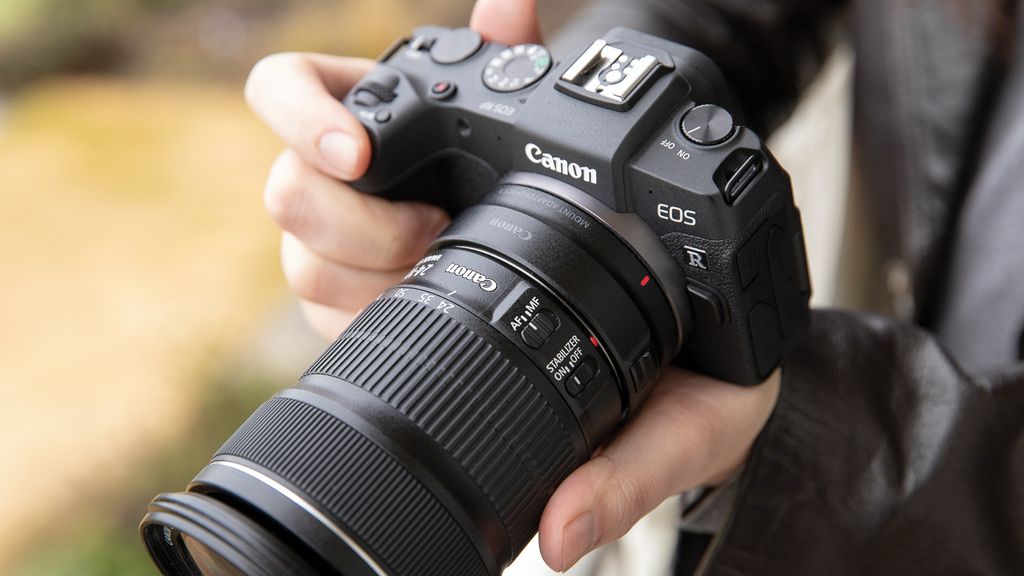
What are cameras used for today?
Cameras are used to collect visual information and turn it into a photo, video, measurement, or alert. Their role depends on the type of camera, the setting, and the software connected to it.
Common uses include:
- Taking photos and recording video
- Video calls and online meetings
- Home and business security
- Traffic monitoring and vehicle safety
- Medical imaging and patient care
- Manufacturing and quality checks
- Scientific research and weather study
- News, sports, film, and live events
- Agriculture and wildlife monitoring
- Document scanning and accessibility tools
- Evidence collection by law enforcement and courts
A camera may work alone, or it may connect to a phone, computer, cloud service, alarm system, vehicle, robot, or industrial control system.
The main types of cameras
Different cameras are built for different tasks.
| Camera type | Common use | What makes it useful |
|---|---|---|
| Smartphone camera | Photos, video, scanning, calls | Small size and strong software |
| Security camera | Property monitoring | Remote viewing, alerts, and recording |
| Webcam | Video calls and streaming | Real-time communication |
| Digital still camera | Travel, events, portraits, and news | Lens control and image quality |
| Action camera | Sports and outdoor video | Small size and wide views |
| Thermal camera | Heat checks and inspections | Shows infrared energy, not normal color |
| Depth camera | Robotics, scanning, and some vehicles | Measures distance |
| Machine-vision camera | Factory inspection | Fast, consistent image checks |
| Scientific camera | Research and measurement | Records faint, fast, or specialized signals |
| Medical camera | Diagnosis and treatment | Shows body structures or internal areas |
The word “camera” can therefore describe a simple phone lens or a specialized system used in a hospital, aircraft, or factory.
How a camera creates useful data
A camera lens focuses light onto an image sensor. The sensor changes that light into electrical signals. A processor then turns those signals into a digital image or video file.
Modern systems may also add:
- Exposure and color correction
- Image stabilization
- Noise reduction
- Motion detection
- Object recognition
- Face detection
- License plate reading
- Depth measurement
- Automatic alerts
These features can save time, but they can also create mistakes. A camera may miss an object in poor light, confuse one object with another, or record a scene without enough context.

How are cameras used in homes and businesses?
Cameras help people watch spaces, communicate, document events, and respond to problems. In the U.S., home security cameras are common in doorbells, indoor systems, baby monitors, and outdoor devices.
Home security
A home camera may:
- Show a live view of a doorway or yard
- Send a motion alert to a phone
- Record package deliveries
- Help identify damage after an event
- Support communication through two-way audio
- Connect with an alarm or smart-home system
A camera does not replace a lock, alarm, smoke detector, or good lighting. It also cannot guarantee that a crime will be prevented or solved.
Before installing one, check the viewing angle. Avoid pointing cameras into places where neighbors or visitors reasonably expect privacy. Use a strong, unique password and turn on multi-factor authentication when available.
The Federal Trade Commission has warned that internet-connected devices can create privacy and security risks. Buyers should check whether recordings are stored locally, in the cloud, or both. They should also review deletion tools, account access, software updates, and subscription terms.
Business security and operations
Businesses use cameras to protect buildings, watch entrances, manage deliveries, and review incidents. Retail stores may use video to study customer flow or reduce theft. Offices may use cameras for access control and safety checks.
A business should define why it uses each camera. It should limit access to recordings, set a retention period, protect the system from unauthorized access, and follow federal, state, and local rules.
Rules vary across the U.S. Audio recording can raise separate legal issues from video recording. A business should get legal advice before recording conversations or using biometric systems.
Video calls and remote work
Webcams support:
- Remote work
- Online classes
- Telehealth visits
- Customer service
- Interviews
- Family calls
- Live broadcasts
A webcam sends live images through software and a network. The quality depends on the camera, lighting, microphone, internet connection, and app settings.
For better results, place a light in front of the speaker rather than behind them. Keep the lens clean. Use a physical lens cover when the camera is not needed, and check which app has camera access.

How are cameras used in transportation?
Cameras help vehicles see roads, monitor drivers, record trips, and support traffic systems. They are used in cars, buses, trains, aircraft, ships, and public road networks.
Vehicle safety systems
Many newer vehicles use cameras for:
- Lane markings
- Nearby vehicles
- Pedestrians
- Road signs
- Parking assistance
- Rear views
- Driver attention
- Automatic emergency features
A camera-based safety feature is an aid, not a substitute for an alert driver. Rain, snow, glare, dirt, darkness, road work, and faded lane lines can reduce performance.
Drivers should keep camera areas clear and follow the vehicle maker’s instructions. A windshield camera may need calibration after glass replacement or some repairs.
Dash cameras
Dash cameras record the road from inside a vehicle. Drivers use them to document collisions, report hazards, or capture travel footage.
A dash camera may help show what happened, but its recording is not automatically accepted as proof in every dispute. Video can lack sound, context, or a clear view of traffic signals. Drivers should also check state rules about windshield placement, audio recording, and privacy.
Traffic and public transportation
Transportation agencies use cameras to monitor traffic flow, manage tunnels, inspect roads, and improve emergency response. Cameras may also appear on buses, trains, and stations.
The U.S. Department of Transportation studies camera-based safety systems and automated driving technologies. These systems combine cameras with tools such as radar, lidar, maps, and software. No single sensor works well in every condition.
Aircraft and drones
Aircraft use cameras for navigation, inspection, mapping, weather study, and search operations. Drones can capture views that would be costly or dangerous to obtain from the ground.
In the U.S., drone operators must follow Federal Aviation Administration rules. Some flights require registration, remote identification, airspace compliance, or certification. A camera does not give a drone operator permission to trespass, harass people, or record private areas.
How are cameras used in health care?
Cameras help health professionals see, record, measure, and guide medical care. Some cameras capture the outside of the body. Others are placed inside instruments or used with microscopes.
Common uses include:
- Endoscopy
- Dermatology imaging
- Eye exams
- Dental imaging
- Surgical cameras
- Microscopy
- Wound tracking
- Patient monitoring
- Medical education
- Telehealth
An endoscope, for example, can carry a small camera into the digestive tract or another body area. A surgeon can view the image on a monitor while using specialized tools.
Medical images are not just ordinary photos. They can become part of a patient’s protected health information. Health care organizations must manage access, storage, sharing, and security under applicable rules, including the Health Insurance Portability and Accountability Act.
Artificial intelligence may help flag an image for review or measure a feature. It does not remove the need for clinical judgment. A result can be wrong because of image quality, unusual cases, biased training data, or a mismatch between the tool and the patient group.
Patients should ask who can see images, how long they are kept, and whether the system uses them for teaching, research, or another purpose.
How are cameras used in factories and workplaces?
Factories use cameras to inspect products and guide machines. This field is often called machine vision.
A machine-vision system may check:
- Product size
- Shape and alignment
- Labels and bar codes
- Missing parts
- Surface damage
- Color differences
- Package seals
- Worker safety zones
The system compares each image with set rules or a trained model. It can work quickly and consistently on a production line.
Cameras also help robots locate parts. A robot may use a camera to find an object, estimate its position, and select the right movement.
Workplace cameras can improve safety, but they can also affect worker privacy. Employers should explain what the cameras record, why they are used, who can access the data, and how long recordings remain available. A safety camera aimed at a machine is different from continuous monitoring of individual workers.
Cameras are also used in construction, warehouses, utilities, and energy facilities. They may help inspect roofs, power lines, pipes, bridges, and other hard-to-reach areas.

How are cameras used in science, weather, and the environment?
Researchers use cameras to collect repeatable visual data. A camera can record changes that are too slow, too fast, too small, or too far away for direct observation.
Examples include:
- Wildlife population studies
- Bird migration tracking
- Glacier and coastline change
- Volcano and wildfire monitoring
- Weather observation
- Astronomical imaging
- Microscopy
- Ocean research
- Plant growth measurement
- Air and water quality studies
Some scientific cameras detect more than visible color. Infrared cameras can show heat patterns. Ultraviolet systems can reveal features that human eyes cannot see. High-speed cameras can record motion that happens in a fraction of a second.
NASA uses cameras and imaging instruments in space science and Earth observation. NOAA uses imaging systems to monitor weather and environmental conditions. The exact value of an image depends on calibration, timing, location, and the method used to interpret it.
A striking image is not always a precise measurement. Researchers need known settings and a clear record of how the image was captured.

How are cameras used in media, sports, and entertainment?
Cameras remain central to television, film, journalism, sports coverage, advertising, and online video.
Media teams use cameras to:
- Record interviews
- Stream live events
- Cover breaking news
- Track sports action
- Create films and shows
- Produce educational videos
- Make social media content
- Capture concerts and performances
Sports broadcasts may use several camera angles, slow motion, overhead views, and automated tracking. These tools help viewers see plays that would be hard to follow from one fixed position.
News cameras document events, but an image can still mislead if it is cropped, edited, delayed, or shown without context. Viewers should check the source, date, location, and surrounding reporting before treating a dramatic image as proof.
Content creators should also consider copyright, consent, location rules, and the rights of people who appear in a recording. Recording someone in a public place is not the same as having unlimited permission to use the footage for every purpose.
How are cameras used by police, courts, and public agencies?
Public agencies use cameras for documentation, evidence, traffic management, emergency response, and public records. Police body cameras and dashboard cameras can record interactions and incidents.
Camera footage may help establish:
- What happened
- When an event occurred
- Who was present
- The order of actions
- Damage or injuries
- Whether a report matches visible events
Footage is not automatically complete or neutral. A body camera may not capture what is outside its view. It may begin recording after an event starts. Video can also lack sound, depth, or important background information.
Public agencies must manage recordings under relevant laws and policies. Rules for access, release, retention, and redaction vary by state and agency. Facial recognition and other biometric tools may face additional limits.
The National Institute of Standards and Technology evaluates face recognition technology. Its work shows why performance must be considered by algorithm, image quality, demographic group, and use case. A match is a lead for review, not proof of identity by itself.

How do artificial intelligence and cameras work together?
AI helps cameras sort, label, search, and act on visual data. A system may detect a person, read text, count objects, or flag an unusual event.
Common AI camera tasks include:
- Object detection
- Face detection
- Facial recognition
- License plate recognition
- Automated counting
- Image classification
- Defect detection
- Motion analysis
- Text recognition
These terms are not identical. Face detection finds a face in an image. Facial recognition tries to compare that face with a known identity. Object detection identifies items such as cars, people, or packages without necessarily identifying a person.
The main benefit is speed. A system can scan thousands of images faster than a person. The main risk is error at scale. A wrong alert may affect many people before anyone checks it.
AI camera systems can fail because of:
- Poor lighting
- Obstructed views
- Unusual angles
- Crowded scenes
- Training data limits
- Software updates
- False matches
- Unclear rules for human review
Organizations should test a system in the setting where they plan to use it. They should measure false alerts, missed events, access controls, and the effect on people. “AI-powered” does not by itself prove accuracy, fairness, or safety.

What are the privacy and security risks of cameras?
Cameras collect information about people, homes, workplaces, movements, and behavior. The main risks are unauthorized access, excessive recording, misuse, weak security, and unclear retention.
Use these basic safeguards:
- Set a clear purpose. Record only what you need.
- Limit the view. Avoid private rooms, neighboring property, and sensitive areas.
- Secure the account. Use a unique password and multi-factor authentication.
- Update the device. Install firmware and app updates from trusted sources.
- Control access. Remove former users and limit administrator rights.
- Review storage. Know where recordings go and who can retrieve them.
- Set deletion rules. Keep footage only as long as there is a valid reason.
- Protect shared footage. Check links before sending recordings.
- Turn off unused features. Disable audio or remote access when they are not needed.
- Post notice when appropriate. Tell people when recording is expected or required.
U.S. privacy law is not one single national rule for every camera. Federal, state, local, workplace, health, education, and sector rules may all apply. Audio can be especially sensitive. When a camera will record employees, customers, patients, children, or private conversations, consult qualified legal counsel.

How should you choose the right camera for a task?
Start with the job, not the brand. A camera for a dark warehouse has different needs from one for a family video call.
| Need | Features to consider | Main trade-off |
|---|---|---|
| Home entry | Night view, motion alerts, local or cloud storage | Convenience versus privacy |
| Travel photos | Size, lens range, battery life | Portability versus control |
| Sports video | Fast shutter, stabilization, frame rate | File size and battery use |
| Factory inspection | Lens, lighting, speed, repeatability | Setup cost and maintenance |
| Outdoor monitoring | Weather protection, night performance | Power and network needs |
| Video calls | Clear lens, microphone, low-light image | Ease versus advanced control |
| Scientific work | Calibration, sensitivity, data format | Cost and technical skill |
Also check power, internet access, storage, mounting, temperature, software support, repair options, and total cost. A camera that needs a paid cloud plan may cost more over time than its purchase price suggests.
For high-risk uses, ask how the system fails. Does it stop safely? Does a person review alerts? Can the camera work without an internet connection? What happens when the lens is blocked?
Common mistakes when using cameras
The most common mistakes involve poor placement, weak security, and treating camera output as unquestionable fact.
Mistake 1: Expecting a camera to see in every condition
Darkness, glare, rain, fog, dust, reflections, and blocked views can reduce image quality. Add suitable lighting and inspect the actual view at different times of day.
Mistake 2: Using digital zoom as if it creates detail
Digital zoom enlarges existing pixels. It does not recreate information that the camera never captured. Move the camera closer, use a suitable lens, or improve lighting when detail matters.
Mistake 3: Ignoring storage and retention
A camera may record more data than expected. Check file size, recording length, cloud limits, backup needs, and deletion settings.
Mistake 4: Sharing footage without checking privacy
A clip may show faces, addresses, license plates, children, medical details, or private conversations. Review and blur sensitive information before sharing when appropriate.
Mistake 5: Treating an alert as proof
Motion alerts, AI labels, and face matches can be wrong. Review the original footage and surrounding context before taking action.
Mistake 6: Forgetting maintenance
Clean lenses, test batteries, check timestamps, review storage, and confirm that alerts still work. For vehicle and industrial systems, follow the manufacturer’s service and calibration guidance.
Key takeaways
- Cameras today collect images, video, heat data, depth data, and other visual information.
- The biggest uses in the U.S. include communication, security, transportation, health care, manufacturing, science, media, and public services.
- Software and AI make cameras more useful, but they can also create false alerts and mistaken matches.
- Camera footage is limited by lighting, angle, lens quality, storage, and context.
- Privacy and security should be planned before installation.
- Use a camera for a clear purpose, protect its data, and keep a person involved when the decision affects safety, health, employment, or legal rights.
Frequently asked questions
Are cameras used more for security or photography?
Both uses are widespread. Photography and video remain major camera uses, especially through smartphones. Security cameras are also common in homes, stores, offices, transportation systems, and public facilities. The leading use depends on how cameras are counted.
Can cameras work without the internet?
Yes. Many cameras can save images to a memory card, local recorder, or connected computer. Internet access is usually needed for remote viewing, cloud storage, some alerts, and certain AI features.
Do all modern cameras use artificial intelligence?
No. Many cameras simply capture and store images. Some use software for exposure, focus, stabilization, or compression without using AI. Others add AI tools such as object detection or image search.
Can a camera see through walls?
A normal camera cannot see through solid walls. Some specialized systems can detect heat or movement under limited conditions, but they do not work like ordinary video cameras and should not be treated as universal “see-through” tools.
How can I protect my privacy around cameras?
Ask where the camera points, whether it records audio, who controls it, and how long data is kept. Use privacy settings, avoid unnecessary exposure, and ask the owner or organization about its recording policy when appropriate.
Conclusion
Cameras are now basic tools for communication, safety, transport, health care, research, work, and entertainment across the United States. Their value comes from the full system: the lens, sensor, software, network, storage, and human decision behind it.
The best camera is not simply the one with the most features. It is the one that fits the task, works in the real conditions, protects the data, and has clear limits. Before using any camera, define its purpose, test its view, secure its access, and decide how recordings will be handled.

Everett Ashford is a tech reviewer at mytechgrid.com specializing in SSDs, cameras, TVs, earbuds, headphones, and other consumer electronics. He provides honest, data-driven reviews based on hands-on testing and real-world performance analysis. Everett simplifies complex tech details to help readers make smart, confident buying decisions.