Introduction
Many headphones sold in the United States now support some form of spatial audio. The best-known options include Apple AirPods, AirPods Max, Beats Studio Pro, Bose QuietComfort Ultra, Sony headphones, and Sennheiser models used with compatible apps or devices.
The key detail is that “spatial audio” does not mean the same thing for every headphone. Some models support Dolby Atmos or other surround formats. Some add head tracking, so the sound seems to stay in one place as you move. Others work with spatial audio created by your phone, computer, game console, or streaming app.
Short answer: The strongest all-around choices for spatial audio in the U.S. are Apple AirPods Pro 2 and AirPods Max for Apple users, Bose QuietComfort Ultra Headphones for built-in immersive audio, and Beats Studio Pro for users who want Apple and Android support. Many other headphones can play spatial sound through software, even if they do not include a special spatial audio mode.


What does spatial audio mean?
Spatial audio is a way to place sounds around you instead of keeping all sound inside a left and right channel. A movie may place dialogue in front of you, music beside you, and effects behind you.
There are two main types:
- Device-based spatial audio: Your iPhone, iPad, Mac, Windows PC, game console, or app processes the sound.
- Headphone-based spatial audio: The headphones use their own software or signal processing to create an immersive effect.
Some systems also use head tracking. With head tracking, the audio image changes when you turn your head. Voices and instruments can seem to stay in front of you, much like a speaker in a room.
Spatial audio is not the same as stereo
A normal pair of stereo headphones can play left and right channels. That is not the same as a full spatial system.
Still, almost any stereo headphone can work with software such as:
- Apple Spatial Audio or Spatialize Stereo
- Dolby Atmos for Headphones
- Windows Sonic for Headphones
- DTS Headphone:X
- Game-specific 3D audio systems
- Sony 360 Reality Audio
The headphone itself does not always need a special chip. The source device or app may do most of the work.


Head tracking makes the largest practical difference
A fixed surround effect can make sound feel wider. Head tracking can make it feel more like you are sitting in front of speakers.
Head tracking is most useful for:
- Dolby Atmos movies
- Apple Music tracks mixed in Dolby Atmos
- Supported games
- Concert videos
- Compatible TV sound systems
It can feel less useful for podcasts, ordinary music, or content that was not mixed for immersive playback.
Which headphones support spatial audio?
The table below separates headphones with documented built-in immersive modes from headphones that mainly rely on a phone, computer, app, or console.
| Headphone or family | Spatial audio support | Head tracking | Best fit | Main limitation |
|---|---|---|---|---|
| Apple AirPods Pro 2 | Apple Spatial Audio, Dolby Atmos, Spatialize Stereo | Yes | iPhone, iPad, Mac, Apple TV | Best features are tied to Apple devices |
| Apple AirPods 4 with ANC | personalized Spatial Audio and Dolby Atmos | Yes | Apple users who want an open fit | Open design gives less isolation |
| Apple AirPods Max | Personalized Spatial Audio and Dolby Atmos | Yes | Apple users who want over-ear headphones | Expensive and less flexible outside Apple devices |
| Beats Studio Pro | Personalized Spatial Audio and Dolby Atmos on supported Apple devices | Yes on supported Apple devices | Apple and Android users | Feature set changes by device |
| Bose QuietComfort Ultra Headphones | Bose Immersive Audio | Yes in Immersive Audio mode | Built-in immersive listening and strong noise cancellation | Immersive mode can use more battery |
| Bose QuietComfort Ultra Earbuds | Bose Immersive Audio | Yes in supported modes | Small earbuds with Bose processing | Not the same as Apple Dolby Atmos integration |
| Sony WH-1000XM5 | App-based 360 Reality Audio and compatible device spatial processing | Depends on service or device | Sony app users and general wireless listening | Support varies by app and content |
| Sony WH-1000XM4 | 360 Reality Audio with compatible services | Depends on service or device | Lower-cost Sony option when available | Older model and changing app support |
| Sennheiser Momentum 4 Wireless | Works with device and app-based spatial systems | Depends on source | Long battery life and general listening | No universal built-in spatial mode |
| Gaming headsets with Dolby Atmos, Windows Sonic, or DTS | Console- or PC-based 3D audio | Usually software-based | Gaming | Compatibility depends on the game and platform |
The most important distinction is this: a headphone may support spatial audio without supporting every spatial format. A model that works with Dolby Atmos on a Windows PC may not offer Apple head tracking. A model with Bose Immersive Audio may not appear as a special Dolby Atmos device in every streaming app.

Best headphones with built-in spatial audio
Apple AirPods Pro 2
AirPods Pro 2 are one of the simplest choices for iPhone users. Apple documents support for Personalized Spatial Audio with Dolby Atmos, dynamic head tracking, and Spatialize Stereo for content that is not mixed in Dolby Atmos.
They work especially well with:
- Apple Music
- Apple TV
- Apple TV 4K
- iPhone and iPad video
- FaceTime spatial audio
- Compatible games
The fit also matters. AirPods Pro 2 use silicone ear tips, which can create a stronger seal than open earbuds. That seal helps noise cancellation and can make spatial effects easier to hear.
Choose AirPods Pro 2 if: you use an iPhone and want small earbuds with head tracking.
Watch for: some advanced controls and personalization features work best, or only work, within Apple’s ecosystem.
Apple AirPods Max
AirPods Max provide the same Apple-centered spatial audio approach in an over-ear design. They support Personalized Spatial Audio with dynamic head tracking on compatible Apple devices.
Their large ear cups can help create a more natural sense of space. They also block more outside sound than open earbuds, which may help during flights, commutes, and movie watching.
Choose AirPods Max if: you want Apple’s spatial audio features in a full-size headphone.
Watch for: they are less useful as a spatial-audio purchase if you mainly use Windows, Android, or non-Apple streaming equipment.


Beats Studio Pro
Beats Studio Pro support Personalized Spatial Audio with dynamic head tracking on supported Apple devices. They also support Dolby Atmos content through compatible Apple hardware and services.
They are a useful middle ground for people who use both Apple and Android devices. Their USB-C connection can also support wired listening and certain audio modes, depending on the source.
Choose Beats Studio Pro if: you want an over-ear model that is more cross-platform than AirPods Max.
Watch for: the exact spatial features can change with the connected device. Always check whether head tracking is available on the device you plan to use.
Bose QuietComfort Ultra Headphones
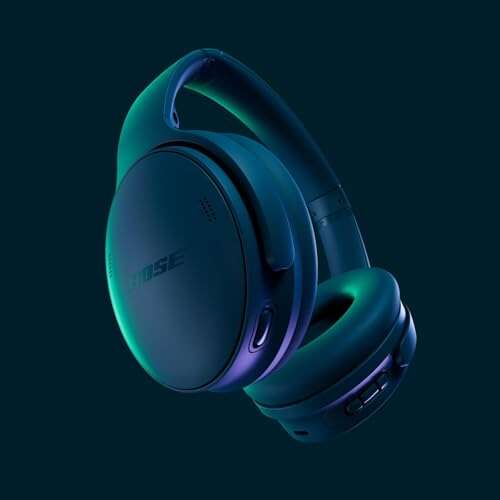
Bose QuietComfort Ultra Headphones include a built-in Immersive Audio mode. Bose describes this as a sound field that can work with ordinary stereo content, with options that use head tracking.
This is different from simply receiving a Dolby Atmos stream. Bose processes the sound inside its system, so the effect can work with more kinds of content.
They may suit listeners who want:
- A built-in immersive mode
- Strong active noise cancellation
- An over-ear design
- Head tracking without relying on Apple hardware
Choose Bose QuietComfort Ultra if: you want the headphones themselves to offer an immersive listening mode.
Watch for: Bose Immersive Audio is not identical to Apple Spatial Audio or Dolby Atmos. It may change the tone and space of ordinary music, so some listeners prefer it for films but not for every song.
Bose QuietComfort Ultra Earbuds
The Ultra Earbuds bring Bose Immersive Audio to a smaller design. They are useful when you want earbuds rather than a full-size headset.
Their spatial mode can be more flexible than a format tied to one streaming service because the processing occurs within the Bose system. However, battery life may change when immersive processing is enabled.
Choose them if: you want Bose’s built-in immersive sound in a compact earbud.
Watch for: fit, seal, and ear shape affect the result. Spatial audio cannot correct an unstable or poor-fitting earbud.

Headphones that work with Dolby Atmos and other software
You do not need a headphone marketed as “spatial” to hear surround sound. A standard wired or wireless model can work with software that converts surround signals for headphones.


Dolby Atmos for Headphones
Dolby Atmos for Headphones can create a virtual three-dimensional sound field from compatible content. It is available on supported Windows devices and Xbox systems, and some games include Dolby Atmos support directly.
You may need:
- A compatible Windows PC or Xbox
- The Dolby Access app
- A license or trial, depending on the platform
- A game, movie, or service with a suitable audio track
The headphones can be almost any well-functioning stereo model. The software does the main processing.
Windows Sonic for Headphones
Windows Sonic is built into supported Windows and Xbox systems. It can process compatible game and video audio for headphone playback.
It is a useful first test because it does not require buying headphones with a special spatial label. If you like the result, you can then compare Dolby Atmos for Headphones or DTS Headphone:X.
DTS Headphone:X
DTS Headphone:X is another software-based surround system. It appears in some gaming software, PCs, consoles, and headset packages.
The feature may be included with a gaming headset or sold as software. Check the exact platform before buying because a license for one device may not transfer to another.
Apple Spatialize Stereo
Apple devices can process ordinary stereo content with Spatialize Stereo. This can make music, videos, and other content sound more spacious.
It is not the same as a true Dolby Atmos mix. A real Atmos track contains spatial information created during production. Spatialize Stereo creates a virtual effect from a stereo source.
Sony 360 Reality Audio
Sony’s 360 Reality Audio places sounds around the listener in a spherical field. Compatible services and Sony headphones may use the Sony | Sound Connect app, formerly known as Headphones Connect, for setup and personalization.
Sony’s system depends heavily on:
- The music service
- The available 360 Reality Audio catalog
- The headphone model
- App support
- Your device and region
A Sony headphone with a 360 Reality Audio label does not automatically make every song three-dimensional.
How to choose the right spatial audio headphones
Start with the device you already use. This is often more important than the headphone brand.
Choose based on your main device
For iPhone, iPad, or Mac: AirPods Pro 2, AirPods Max, AirPods 4 with ANC, and Beats Studio Pro offer the clearest path to Apple Spatial Audio.


For Android: Bose QuietComfort Ultra models and Beats Studio Pro may offer more useful built-in or cross-platform features. Support still depends on the app and phone.
For Windows: Look at the computer’s support for Dolby Atmos, Windows Sonic, or DTS Headphone:X. A good stereo headphone may be enough.
For Xbox: Check the game and console support for Dolby Atmos, Windows Sonic, or DTS. Do not assume every wireless headset supports every format.
For PlayStation: Check the headset and console specifications. The PlayStation 5 has its own 3D audio system, so compatibility is more important than the words “spatial audio” on the box.
For TV watching: Confirm how the headphones connect to the television. Bluetooth audio support alone does not prove that the TV will send a spatial or Atmos signal.
Choose based on head tracking
Head tracking is useful if you want voices and effects to remain anchored as you move. It is less important if you only want a wider stereo image.
Ask these questions:
- Does the headphone support head tracking?
- Does it work with your phone, TV, computer, or console?
- Does it work in the apps you use?
- Can you turn it off?
- Does the mode reduce battery life?
A headphone may have head tracking but only support it on one operating system.
Choose based on sound isolation
Noise cancellation does not create spatial audio. It can, however, make quiet details easier to hear.
Consider:
- Over-ear noise-canceling headphones for flights, offices, and movies
- Sealed earbuds for travel and outdoor use
- Open earbuds when you want to hear nearby sounds
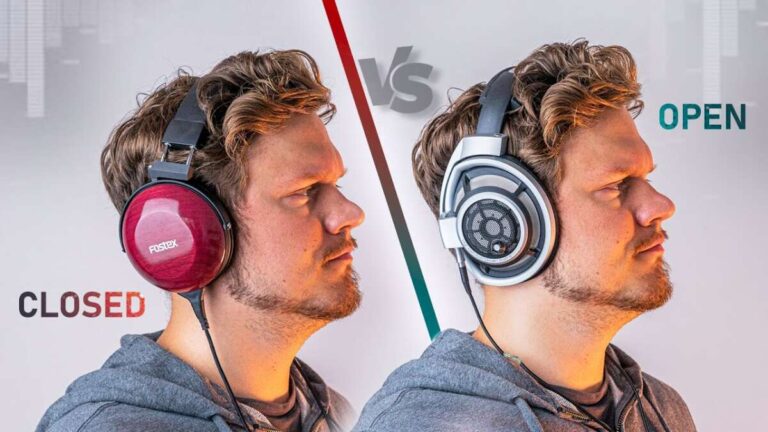
- Open-back headphones for a natural soundstage at home, though they usually leak sound and do not provide strong isolation
Spatial processing cannot overcome loud outside noise. If you are on a train or airplane, a good seal may matter more than a new surround format.

How to turn on spatial audio
The steps depend on the device. Use the matching path below.
On an iPhone or iPad
- Connect compatible AirPods or Beats headphones.
- Open Settings.
- Tap the connected headphones near the top of the screen.
- Select Spatial Audio.
- Choose Fixed or Head Tracked, when available.
- Play compatible Dolby Atmos content.
- Open Control Center and press and hold the volume control to check the setting.
You can also check Apple Music settings for Dolby Atmos playback. The available choices may include automatic playback, always on, or off, depending on the device and connected headphones.
On a Mac
- Connect compatible headphones.
- Start supported video or music.
- Open Control Center.
- Select the sound or AirPods controls.
- Choose the available spatial audio option.
Some apps manage spatial audio themselves. A setting in the app may override a system setting.
On Windows
- Connect your headphones.
- Right-click the sound icon.
- Open Sound settings.
- Select your output device.
- Find the Spatial sound option.
- Choose Windows Sonic, Dolby Atmos, or DTS when available.
- Test the setting with a compatible game or video.
If Dolby Atmos or DTS does not appear, install the required app or confirm that your license and Windows version support the feature.
On Xbox
- Open Settings.
- Select General.
- Open Volume & audio output.
- Find the headphone audio or spatial sound setting.
- Select Windows Sonic, Dolby Atmos, or DTS.
- Test it with a supported game.
The game may have a separate audio setting. Look for options such as headphones, 3D audio, or Atmos.
In a Bose headphone app
- Pair the headphones with the Bose app.
- Open the Immersive Audio controls.
- Select the preferred mode.
- Turn head tracking on or off if the model provides that option.
- Compare the result with Immersive Audio disabled.
Use familiar content for the comparison. A song or film you know well makes changes easier to hear.

Why spatial audio may not work
The most common cause is a mismatch between the headphones, source device, app, and audio format.
The sound still seems like normal stereo
Check whether the content actually supports spatial playback. A standard stereo version will not contain the same spatial information as a Dolby Atmos version.
Also check:
- The spatial setting on the source device
- The app’s audio settings
- Whether the headphones are connected to the correct device
- Whether head tracking is supported on that device
- Whether the headphone app needs an update
Head tracking is missing
Head tracking is not universal. It may be limited to certain Apple devices, headphone models, apps, or connection types.
Bluetooth, USB, and wired connections can expose different features. Read the support page for the exact model rather than relying on the product family name.
The effect sounds strange or too wide
Virtual surround can change the tone of music. It may make vocals sound farther away or create an echo-like effect.
Try this sequence:
- Turn off head tracking.
- Compare fixed spatial audio with ordinary stereo.
- Try another song or film.
- Check the earbud seal or headphone fit.
- Disable other sound effects, such as equalizers or listening modes.
- Update the headphone firmware and app.
If you prefer ordinary stereo, that is a valid result. Spatial audio is a listening option, not a quality test.
Battery life drops
Immersive processing and head tracking can use more power. Turn those modes off when you do not need them, especially for long flights or work sessions.
A wired connection may reduce some wireless processing, but it does not guarantee that every spatial feature will remain available.

Common mistakes to avoid
Assuming every “3D” label means the same thing
“Spatial audio,” “3D audio,” “surround sound,” “immersive audio,” and “360 audio” can describe different systems. Check the exact format and platform.
Buying headphones before checking the source
A headphone may have impressive spatial features that do not work with your TV, phone, or console. Confirm compatibility first.
Treating head tracking as a sound-quality guarantee
Head tracking changes the position of the sound field. It does not automatically improve tuning, bass, clarity, comfort, or noise cancellation.
Confusing a spatial mix with an upmix
A Dolby Atmos music track is produced for immersive playback. A software upmix takes ordinary stereo and creates a virtual surround effect. Both can be enjoyable, but they are not the same source.
Ignoring fit
Earbuds need a stable seal. Over-ear headphones need a good fit around the ears. A poor fit can reduce bass, weaken isolation, and make spatial effects less convincing.
Using spatial audio in every situation
Spatial modes can be helpful for films and games. For focused music listening, calls, or podcasts, standard stereo may sound more natural.
Frequently asked questions
Do all headphones support spatial audio?
No. Nearly all headphones can play a spatial signal as ordinary stereo, but special features such as head tracking or built-in immersive processing need compatible hardware and software.
Are AirPods the only headphones with spatial audio?
No. Bose, Beats, Sony, Sennheiser, and many gaming-headset brands support some form of spatial or 3D audio. AirPods have especially strong integration with Apple devices, but they are not the only option.
Can wired headphones use spatial audio?
Yes. A computer, phone, game console, or app can process spatial audio before sending it through a wired connection. Head tracking is less common with ordinary wired headphones because the system needs motion sensors and software support.
Do I need Dolby Atmos headphones?
No. Dolby Atmos is a sound format and processing system, not a special headphone type. Many standard stereo headphones work with Dolby Atmos for Headphones on compatible devices.
Is spatial audio better than stereo?
Not in every case. Spatial audio can improve the sense of space in films and games, but some listeners prefer stereo for music, podcasts, and calls. The best choice depends on the content and your preference.
Does Spotify support spatial audio?
Spotify has not offered the same broad Dolby Atmos music catalog and platform integration as services that explicitly support immersive formats. Check the current app and device support before buying headphones for Spotify alone.
Can spatial audio damage hearing?
Spatial audio itself is not known to cause hearing damage. Excessive volume can harm hearing, regardless of the audio format. Keep the volume at a comfortable level and take breaks during long listening sessions.
The bottom line
The best headphones with spatial audio depend on the device you use.
- iPhone and Apple users: AirPods Pro 2, AirPods 4 with ANC, AirPods Max, or Beats Studio Pro
- Built-in immersive sound across more content: Bose QuietComfort Ultra Headphones or Ultra Earbuds
- Windows and Xbox gaming: A compatible stereo or gaming headset with Dolby Atmos, Windows Sonic, or DTS Headphone:X
- Sony 360 Reality Audio: A compatible Sony headphone, app, and music service
- General movie and music listening: Choose for comfort, fit, sound quality, and noise control first; spatial audio should be a useful extra
Before buying, verify four things: your source device, the app or game, the spatial format, and whether head tracking works. Those checks matter more than the word “spatial” printed on the package.
Sources for product and platform details
- Apple: About Spatial Audio with Dolby Atmos
- Apple: Use Personalized Spatial Audio
- Bose: QuietComfort Ultra Headphones support
- Microsoft: Use spatial sound in Windows
- Dolby: Dolby Atmos for Headphones
- Sony: 360 Reality Audio
- DTS: Headphone:X

Everett Ashford is a tech reviewer at mytechgrid.com specializing in SSDs, cameras, TVs, earbuds, headphones, and other consumer electronics. He provides honest, data-driven reviews based on hands-on testing and real-world performance analysis. Everett simplifies complex tech details to help readers make smart, confident buying decisions.