If you are in the United States, the short answer is simple: most wired and wireless stereo headphones can play spatial audio. Your phone, computer, game console, streaming app, or operating system does most of the processing.
The bigger question is whether your headphones support head tracking. Basic spatial audio can work with almost any stereo headset. Dynamic spatial audio, which makes sound seem to stay in one place as you move your head, needs compatible headphones, earbuds, and software.
Your best match depends on the device you use:
- iPhone, iPad, Mac, or Apple TV: AirPods and some Beats models offer the widest Apple support.
- Android phones: Many wired and Bluetooth headphones work, but head tracking depends on the phone, earbuds, and app.
- Windows PCs: Most headphones work with Windows Sonic, Dolby Atmos for Headphones, or DTS Headphone:X.
- Xbox consoles: Compatible stereo headsets can use Windows Sonic, Dolby Atmos, or DTS Headphone:X.
- PlayStation 5: Most wired and wireless headsets work with the PS5’s 3D Audio features.
- Movies and music: The streaming service and the audio format matter as much as the headphones.


How spatial audio works with headphones
Spatial audio uses software to create the impression that sounds come from different places around you. A voice may seem to come from the center, while music or game effects appear to come from the sides, above, or behind you.
Headphones still send sound to only your left and right ears. Spatial audio changes the timing, volume, and tone of each channel. Your brain uses those changes to estimate where a sound is located.
There are three common forms of spatial audio.
Virtual surround sound
Virtual surround sound turns a normal stereo headset into a simulated surround system. It can make game sounds and movie effects feel wider and more distant.
This mode usually works with almost any stereo headphones. Examples include:
- Windows Sonic for Headphones
- Dolby Atmos for Headphones
- DTS Headphone:X
- PlayStation 3D Audio
- Many game and movie apps with built-in spatial processing
Object-based audio
Object-based formats, such as Dolby Atmos, store sounds as individual audio objects. The playback system then places those objects in a virtual room.


For example, a helicopter in a movie may move from behind you to above you. The headphones do not need separate speakers for each sound. The compatible device or app creates the effect.
Head-tracked spatial audio
Head tracking adds motion data. When you turn your head, the sound field can remain in place instead of moving with your head.
This can make dialogue seem fixed to the screen. It can also make music feel as if it comes from a speaker in front of you.
Head tracking requires more than ordinary stereo playback. You generally need:
- A device that supports spatial audio.
- Headphones or earbuds with motion sensors.
- Compatible firmware and software.
- Content or an app that supports the feature.
Head tracking is often limited to certain product families. A headset may play spatial audio but not support the moving sound field.

Which headphones work with spatial audio?
Any good stereo headphones can work with software-based spatial audio. compatibility becomes more specific when you want wireless control, automatic switching, personalized sound, or head tracking.
The table below shows the usual situation in the United States.
| Headphone type | Basic spatial audio | Head tracking | Main limit |
|---|---|---|---|
| Wired 3.5 mm headphones | Usually yes | Rarely | The connected device must process the sound |
| USB headphones | Usually yes | Sometimes | Requires driver or platform support |
| Standard Bluetooth headphones | Often yes | Usually no | Bluetooth alone does not guarantee spatial audio |
| AirPods and supported Beats | Yes on Apple devices | Supported on select models | Features vary by Apple device and model |
| Gaming headsets | Usually yes | Sometimes | Depends on console, PC, and software |
| Smart TV Bluetooth headphones | Sometimes | Rarely | TV audio support varies widely |
| USB-C earbuds | Often yes | Rarely | Depends on the phone or computer |
A headset does not need to advertise “spatial audio” to play a spatial mix. Many products use that phrase to describe extra features, not basic compatibility.
The key distinction is this:
- Playback compatibility: The headset can reproduce the left and right signals created by spatial audio software.
- Feature compatibility: The headset can also provide functions such as head tracking, device switching, or personalized listening.
The best headphones for Apple Spatial Audio
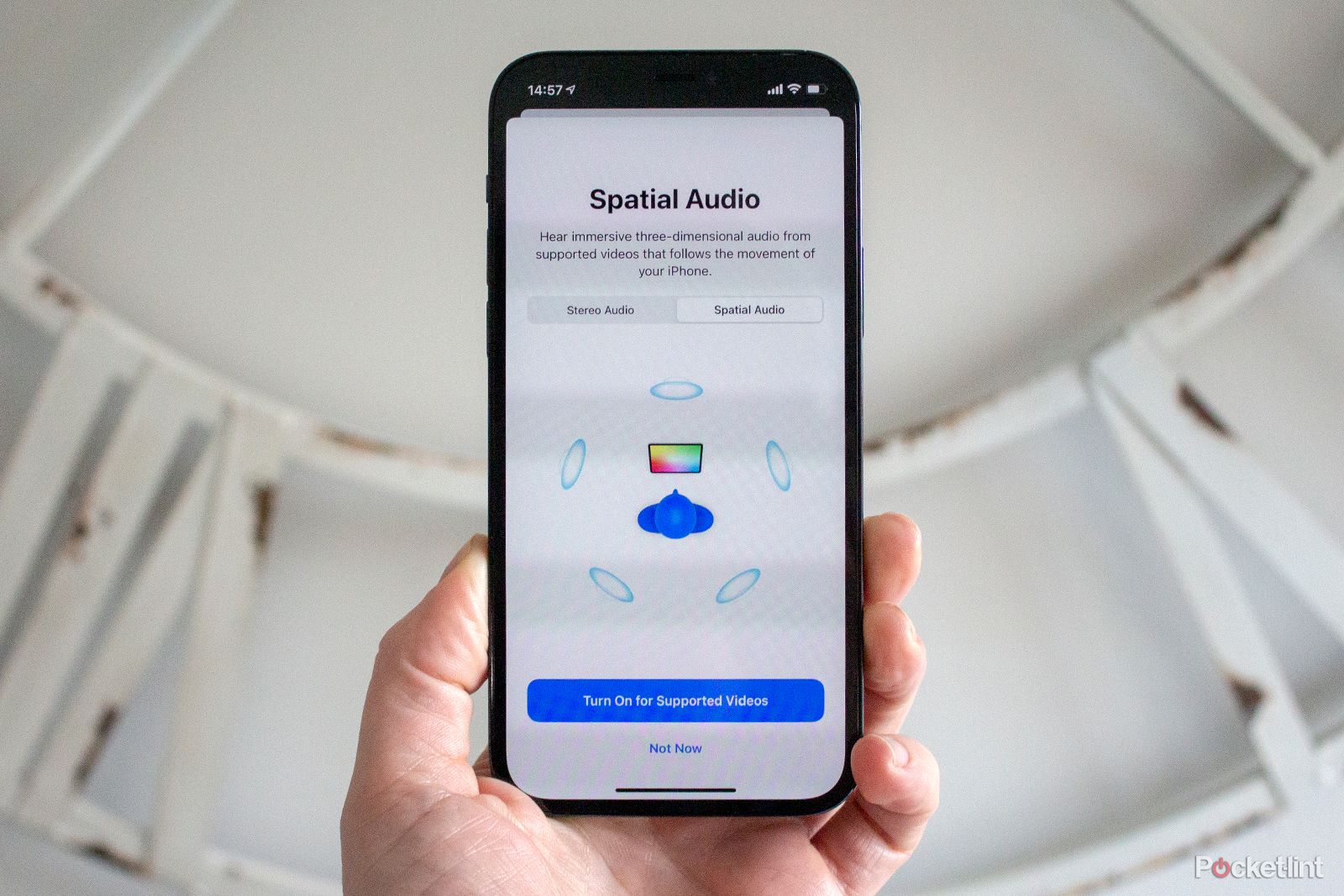
Apple Spatial Audio works with many headphones, but AirPods and selected Beats products provide the most complete feature set.
On supported Apple devices, Apple can apply Spatial Audio to Dolby Atmos music, movies, TV shows, and some other content. Compatible AirPods can also offer head tracking and Personalized Spatial Audio.
Common compatible options include:
- AirPods 3
- AirPods 4 and AirPods 4 with Active Noise Cancellation
- AirPods Pro models
- AirPods Max
- Selected Beats earbuds and headphones with Apple spatial audio support
Apple’s support pages should be checked for the exact model and operating system. Feature support can change by device, firmware, and content type.
Can regular headphones work with Apple Spatial Audio?
Yes. A regular wired or Bluetooth headset can play many forms of Apple spatial audio, especially when the app or device sends a processed stereo signal.


However, regular headphones may not support:
- Dynamic head tracking
- Personalized Spatial Audio
- Automatic device switching
- Siri announcements and other AirPods features
- Apple-specific control options
For Apple Music, the music must also be available in Dolby Atmos for the full music feature. A normal stereo track will not become a true Dolby Atmos mix simply because Spatial Audio is enabled.

The best headphones for Android spatial audio
Android support is less uniform than Apple support. The result depends on the phone maker, Android version, headphones, app, and audio format.
Many Android phones can play spatial audio through standard wired or Bluetooth headphones. Some phones also support spatial audio through the Android audio system. Google documents spatial audio support for certain Pixel devices and compatible headphones, while other brands use their own systems.
Examples include:
- Google Pixel phones with compatible earbuds or headphones
- Samsung Galaxy phones with supported Galaxy Buds and Samsung audio features
- Sony headphones used with supported Sony apps and services
- Standard wired headphones with compatible Android apps
A phone may list “spatial audio” in its settings but limit the feature to certain apps. It may also support spatial audio for video but not music, or support surround processing without head tracking.
Before buying, check four items:
- The exact phone model.
- The Android version.
- The headphone model and firmware.
- The app or service you plan to use.
A USB-C headset can be a good choice for Android because it avoids some Bluetooth limits. It still does not guarantee head tracking or Dolby Atmos support.

Which headphones work with spatial audio on Windows?
Most stereo headphones can work with spatial audio on a Windows PC.
Windows includes Windows Sonic for Headphones, which is available for compatible Windows systems. You can also use paid or separately licensed options such as Dolby Atmos for Headphones and DTS Headphone:X, depending on the computer and software setup.
These options can work with:
- Wired headphones
- USB headsets
- Bluetooth headphones
- Gaming headsets
- Earbuds connected to a Windows laptop
How to turn on Windows Sonic
The exact menu may vary by Windows version, but the usual steps are:
- Connect your headphones.
- Right-click the speaker icon on the Windows taskbar.
- Open the sound or spatial sound settings.
- Select Windows Sonic for Headphones.
- Play content that supports surround or spatial mixing.
For Dolby Atmos or DTS, install the related app from the Microsoft Store and follow its license and setup instructions.


If the sound becomes harsh, hollow, or too wide, turn the effect off and compare it with ordinary stereo. Spatial processing is not always better. Some music mixes and competitive games may sound clearer without it.
Which headphones work with Xbox and PlayStation?
Xbox
Xbox consoles support spatial sound options such as:
- Windows Sonic for Headphones
- Dolby Atmos for Headphones
- DTS Headphone:X
A compatible stereo headset can usually use these formats. The headset may connect through the Xbox controller, USB, or wireless Xbox accessories.
Dolby Atmos and DTS Headphone:X may require a purchase or an included license. Check the current Xbox and app instructions before paying, since licenses may be tied to an account or headset.
PlayStation 5
The PlayStation 5 includes 3D Audio processing for compatible headphones. Many wired headphones connected to the controller can use the feature. Sony also supports compatible wireless headsets through its own connection systems.
The PS5 may let you adjust the 3D Audio profile. Run the console’s sound setup and compare the result with stereo. The best setting depends on your ears, game, and headset.
A headset marketed as “7.1 surround” is not automatically better. Some models use their own surround mode, while the console applies another layer. Double processing can make voices and effects sound distant or unclear.

Do Bluetooth headphones support spatial audio?
Bluetooth headphones can support spatial audio, but Bluetooth itself is not the deciding factor.
A phone, computer, or console may process a spatial mix before sending it to ordinary Bluetooth headphones. In that case, the headphones simply reproduce the processed left and right channels.
Head tracking is different. The headphones need motion sensors and a way to send head-position data back to the device or app. Bluetooth headphones without those sensors cannot provide true head-tracked playback.
Bluetooth can also introduce practical limits:
- Some TVs support only basic Bluetooth audio.
- Audio delay may affect gaming.
- A device may disable spatial features when a certain Bluetooth codec is used.
- Head tracking may work only with the same brand’s phone or app.
- Firmware updates may be required.
For watching movies, delay is usually the main concern. For gaming, a wired headset or a headset made for the console may give a more reliable result.


Do wired headphones work better than wireless headphones?
Wired headphones are often the simplest choice for compatibility. They pass audio directly from the source and do not need a special wireless profile.
A wired headset can work with spatial audio from:
- A Windows PC
- A Mac
- An iPhone with the correct adapter
- An Android phone with a headphone jack or USB-C adapter
- A game controller
- A console
Wireless headphones can be more convenient and may support head tracking. They can also include active noise cancellation, automatic device switching, and firmware-based features.
The trade-off is that wireless features are more dependent on the exact device and software. If you want the fewest compatibility problems, choose a normal stereo headset and let the source device handle the spatial processing.
If you want head tracking, choose a model listed by the device maker as compatible. Do not rely only on a product page that says “3D sound” or “immersive audio.”

How to check whether your headphones support spatial audio
Use this process before buying new headphones or changing settings.
1. Identify the source device
Write down the device that will process the sound:
- iPhone or iPad
- Android phone
- Windows PC
- Mac
- Xbox
- PlayStation
- Smart TV
- Streaming stick
Spatial audio compatibility is often controlled by the source, not the headphones.
2. Check the app and content
Look for a supported format or feature in the app. Common examples include:
- Dolby Atmos
- 5.1 or 7.1 surround
- Spatial Audio
- 360 Reality Audio
- 3D Audio
A service may support spatial audio on one device but not another. A movie may include Dolby Atmos, while the same show is offered in stereo through a different app or browser.
3. Separate playback from head tracking
Ask whether you want:
- Wider or more realistic sound
- Surround effects for games
- A fixed soundstage that responds to head movement
The first two can work with ordinary headphones. The third usually requires a supported headset with motion sensors.
4. Turn on one spatial mode
Enable only one system at a time. For example, do not use a headset’s virtual surround mode, Windows Sonic, and a game’s own 3D mode together unless the manufacturer specifically recommends it.
5. Test with known content
Use a movie, game, or song that clearly supports the feature. Compare:
- Spatial audio on
- Spatial audio off
- Head tracking on
- Head tracking off
Listen for clear dialogue, stable bass, and natural placement. A wider sound is not always a more accurate sound.

Common spatial audio problems and fixes
Spatial audio does not appear
Possible causes include an unsupported device, outdated software, an incompatible app, or headphones connected through an unsupported method.
Try this order:
- Update the phone, computer, console, app, and headphone firmware.
- Confirm that the content supports spatial audio.
- Reconnect the headphones.
- Check the device’s sound settings.
- Test another supported app or title.
- Review the manufacturer’s compatibility list.
Head tracking does not work
Head tracking may be limited to certain headphones and devices. It can also fail when the feature is disabled in the app or when the headphones are connected to the wrong device.
Keep the headphones charged, install updates, and check whether head tracking is enabled. If the option is missing, the hardware combination may not support it.
The sound is quiet or distorted
Volume normalization, Bluetooth limits, or multiple surround systems may cause the problem. Turn off extra sound effects and test a direct wired connection if possible.
Also check whether the headset has a separate volume control. Some gaming headsets store their own EQ or surround profile in an app.
Spatial audio sounds worse
This is normal for some recordings and games. Virtual processing can reduce clarity or change the tone of music. Try a different profile, disable personalized audio, or return to stereo.
The best mode is the one that gives you clear voices, accurate effects, and comfortable listening.

How to choose headphones for spatial audio
Choose based on the feature you actually need.
| Your priority | Headphone choice |
|---|---|
| Broad compatibility | Wired stereo headphones |
| Apple head tracking | Supported AirPods or Beats |
| Android flexibility | Headphones listed for your exact phone |
| PC gaming | USB or wired gaming headset |
| Xbox spatial audio | Compatible Xbox headset or controller-connected headset |
| PS5 3D Audio | Wired or supported wireless headset |
| Low delay | Wired or console-certified wireless headset |
| Travel and movies | Comfortable Bluetooth headphones with stable app support |
Comfort matters more than a spatial-audio logo. A poor fit can weaken bass, reduce isolation, and make the virtual soundstage less convincing.
Also check the connection. A headset that works with a laptop may not work with a phone or console without an adapter. For Apple devices, confirm whether the phone or tablet still has a headphone jack. For USB-C connections, check whether the headphones support audio input from your specific device.

What headphones should you buy for spatial audio?
For most people, buy comfortable stereo headphones that match your main device. You do not need a special spatial-audio headset for basic surround playback.
Choose supported AirPods or Beats if you use Apple devices and want head tracking. Choose a compatible gaming headset if you mainly play on Xbox, PlayStation, or Windows. Choose wired headphones if low delay and broad compatibility matter most.
Before purchase, verify the exact model on the official support page for your phone, computer, console, or streaming service. “Spatial audio” on the box may describe software processing, not full head-tracked audio.
FAQs
Do I need Dolby Atmos headphones?
No. Dolby Atmos headphones are usually ordinary headphones used with Dolby Atmos processing. The device or app creates the virtual sound field.
Can AirPods work with Android spatial audio?
AirPods can play audio from Android devices, but many Apple-specific features may not work. Head tracking and personalized spatial features depend on the Android phone, app, and AirPods model.
Can any headphones play Dolby Atmos?
Many can play Dolby Atmos for Headphones when the source device or app converts the format into a headphone signal. Support still depends on the operating system, app, license, and connection.
Is spatial audio better for music?
Not always. A well-made spatial mix can create more space and separation. Some tracks may sound less natural or less focused than their stereo versions. Compare both modes.
Does spatial audio use more battery?
It can use more battery when the device performs extra processing or the headphones use head-tracking sensors. The effect varies by device, app, volume, and headphone model.
Does spatial audio damage hearing?
Spatial audio itself is not known to damage hearing. Excessive volume can damage hearing whether the sound is stereo or spatial. Keep volume moderate and take listening breaks, especially with long gaming or movie sessions.
Final answer
Most stereo headphones work with spatial audio. Wired headphones, Bluetooth headphones, earbuds, and gaming headsets can all reproduce spatial processing when the source device supports it.
The main exception is head-tracked spatial audio. That feature needs a supported combination of headphones, device, software, and content. Check the exact model before buying, enable one spatial mode at a time, and compare it with normal stereo.
Official sources consulted
- Apple: About Spatial Audio with Dolby Atmos in Apple Music
- Apple: Control Spatial Audio and head tracking
- Google Pixel Help: Spatial Audio
- Microsoft Support: Use spatial sound in Windows
- Xbox Support: Dolby Atmos and spatial sound
- PlayStation Support: 3D Audio on PS5

Everett Ashford is a tech reviewer at mytechgrid.com specializing in SSDs, cameras, TVs, earbuds, headphones, and other consumer electronics. He provides honest, data-driven reviews based on hands-on testing and real-world performance analysis. Everett simplifies complex tech details to help readers make smart, confident buying decisions.