For shoppers in the United States, a laptop with an AMD processor can offer strong speed, long battery life, capable built-in graphics, and good value. AMD Ryzen chips are found in budget laptops, business PCs, gaming systems, and premium models sold by brands such as Lenovo, HP, ASUS, Acer, Dell, and Framework.
The best choice still depends on the laptop design. Cooling, battery size, memory, storage, display, and software all affect the user experience. An AMD processor is not automatically better than every Intel or Apple chip. However, it can be an excellent fit for work, school, gaming, and content creation.

The Main Advantages of AMD Laptop Processors
AMD laptop processors offer several practical benefits:


- Strong performance for the price
- Efficient power use on many Ryzen models
- Good integrated graphics
- Many cores for multitasking
- Support for modern memory and connectivity
- Useful options for gaming and creative work
- Competitive choices in both low-cost and premium laptops
The exact benefit depends on the processor family. A Ryzen 3 chip is aimed at basic tasks. A Ryzen 5 model is a common choice for work and school. Ryzen 7 and Ryzen 9 chips target heavier work and gaming. AMD Ryzen AI processors add a neural processing unit, or NPU, for some local AI tasks.
1. Strong Performance for the Price
One of the biggest AMD laptop advantages is the amount of performance available at a given price.
A mid-range Ryzen 5 laptop may handle web browsing, office apps, video calls, coding, and light photo editing with ease. Higher-end Ryzen 7 and Ryzen 9 models can manage demanding work such as video editing, software development, 3D work, and gaming.
Performance comes from more than clock speed. Modern processors use several cores and threads. These cores let the laptop work on more than one task at a time. For example, you may be able to:
- Join a video call
- Keep many browser tabs open
- Edit a document
- Stream music
- Run a background file sync
The laptop should still have enough RAM. A fast processor with only 8GB of memory may feel limited during heavy multitasking. For many US buyers, 16GB of RAM is a better starting point for a new Windows laptop.
AMD also offers chips across a wide price range. This gives shoppers more ways to match the processor to their budget instead of paying for performance they do not need.


2. Better Multitasking With Multiple Cores
Many AMD Ryzen laptop processors include multiple performance cores. Some models also use different types of cores to balance speed and power use.
More cores can help when an app supports parallel work. This includes tasks such as:
- Video encoding
- Code compilation
- Large spreadsheet calculations
- 3D rendering
- File compression
- Running virtual machines
The benefit is smaller in simple tasks. Opening a basic web page may not need many cores. A laptop with a powerful multi-core processor will not always feel much faster for email or word processing.
The key is to match the processor to the task. A Ryzen 5 model may be enough for most students and office users. A Ryzen 7 or Ryzen 9 model makes more sense for users who often run demanding apps for long periods.
3. Capable Integrated Radeon Graphics
Many AMD laptop processors include integrated Radeon graphics. Integrated graphics share system memory instead of using a separate graphics card.
This design can lower cost, reduce weight, and use less power. It may also provide better graphics performance than the basic integrated graphics found in some competing laptops.
An AMD laptop with Radeon integrated graphics can be suitable for:
- Casual games
- Older PC games
- Esports games at modest settings
- Video playback
- Photo work
- Basic video editing
- Multiple external displays, where supported
Integrated graphics are not the same as a dedicated GPU. A laptop with a separate NVIDIA GeForce or AMD Radeon graphics card will usually perform better in modern games and demanding 3D work.
Memory matters here. Integrated graphics use the laptop’s system RAM. A dual-channel memory setup can improve graphics performance. Some thin laptops have memory soldered to the board, so check the upgrade options before buying.
4. Good Battery Life on Efficient Models
AMD processors can support long battery life, especially in thin laptops with low-power Ryzen U-series chips.
Battery life depends on the full system, not just the CPU. Important factors include:
- Battery capacity
- Screen size and brightness
- Display resolution
- Refresh rate
- Wireless use
- Cooling settings
- Operating system updates
- The apps running in the background
A laptop with an efficient AMD chip and a large battery may last through much of a school or work day. A gaming laptop with a high-power Ryzen processor and a dedicated GPU will use much more power.
Do not compare battery claims without checking the test method. A manufacturer’s estimate may use light tasks at low screen brightness. Real battery life can be shorter during video calls, gaming, or heavy editing.
5. Strong Support for Gaming Laptops
AMD processors are common in gaming laptops because they can provide high multi-core performance and competitive value.
A gaming laptop usually combines the CPU with a dedicated graphics processor. The dedicated GPU does most of the graphics work. The AMD CPU helps with game logic, background apps, frame rates, and system responsiveness.


An AMD gaming laptop can be a good choice when it includes:
- A Ryzen 5, Ryzen 7, or Ryzen 9 processor
- A dedicated GPU that matches the display
- At least 16GB of RAM
- Fast solid-state storage
- A high-refresh-rate display
- Adequate cooling
The graphics card often has a larger effect on gaming performance than the CPU. A laptop with a balanced Ryzen processor and a stronger GPU may outperform a laptop with a faster CPU but a weaker GPU.
6. Useful Features for AI and Modern Apps
Some newer AMD Ryzen AI processors include an NPU. This is a special part of the chip designed to process certain AI tasks with lower power use.
Supported features may include:
- Webcam background effects
- Noise removal
- Image effects
- Local AI tools
- Some creative and productivity functions
The NPU does not make every AI app faster. The software must support the hardware. The feature may also depend on Windows updates, application versions, and the laptop maker.
For most buyers, an NPU should be treated as a useful extra rather than the main reason to buy a laptop. Traditional CPU and GPU performance still matter more for most daily work.
7. A Wide Range of Laptop Choices
AMD processors appear in many types of laptops in the US market. Buyers can find them in:
- Affordable student laptops
- Thin-and-light Windows laptops
- Business laptops
- Large desktop replacement systems
- Gaming laptops
- Mobile workstations
- Convertible 2-in-1 computers
This range makes it easier to find a system with the right mix of price, size, battery life, and performance.
The processor name alone does not tell the full story. Two laptops with the same Ryzen model may perform differently because one has better cooling or a higher power limit. Check the complete laptop specifications, not just the CPU label.

AMD Processor Families Explained
AMD laptop chips use names that can be confusing. Here is a simple guide.
| AMD processor family | Best suited for | What to expect |
|---|---|---|
| Ryzen 3 | Basic school and office work | Web browsing, documents, streaming, and light multitasking |
| Ryzen 5 | General use | Strong daily performance and some creative work |
| Ryzen 7 | Heavy multitasking and gaming | More performance for demanding apps |
| Ryzen 9 | High-end work and gaming | Strong performance, often with higher power use |
| Ryzen AI | New AI-enabled laptops | CPU, GPU, and NPU features on supported models |
| Athlon | Entry-level tasks | Basic use at a lower cost |
The letters at the end of a model name also matter.
- U-series: Usually designed for thin laptops and lower power use.
- HS-series: Higher performance in a relatively portable design.
- H-series: High performance, often used in gaming and workstation laptops.
- HX-series: Very high performance and usually higher power use.
These labels are useful, but they are not the whole story. Laptop makers can set different power limits. Cooling design can also change real-world results.
AMD Versus Intel: What Should You Choose?
AMD and Intel both make capable laptop processors. The better choice depends on the exact models and the laptop around them.
AMD may have an advantage when you want:


- Strong multi-core performance
- Capable integrated graphics
- Good value
- A large selection of Ryzen laptops
- Efficient performance in a thin system
Intel may be a better fit when you need:
- A specific business feature
- Certain Thunderbolt configurations
- Software optimized for a particular Intel platform
- A laptop with a tested Intel-based design
- A specific integrated graphics or media feature
These are general guidelines, not fixed rules. New processor generations can change the result. Always compare the exact CPU, GPU, RAM, display, battery, and price.
The processor brand is only one part of the buying decision. A well-built laptop with a slightly slower chip may be better than a poorly cooled laptop with a faster chip.
What Types of Users Benefit Most From an AMD Laptop?
An AMD laptop is often a good match for the following users.
Students
A Ryzen 5 laptop with 16GB of RAM can handle research, documents, video meetings, online classes, and media use. Students who play games may also benefit from Radeon integrated graphics.
Office Workers
AMD systems can handle email, spreadsheets, web apps, presentations, and video calls. Choose a business-class model if you need a strong warranty, docking support, or easy service.
Programmers
Developers may benefit from multiple cores when compiling code or running containers. A model with 16GB or 32GB of RAM is useful for larger projects and virtual machines.
Content Creators
A Ryzen 7 or Ryzen 9 laptop can help with photo editing, video exports, and other multi-core tasks. For advanced video work, choose a system with a dedicated GPU and fast storage.
Casual Gamers
Radeon integrated graphics may handle lighter games. For modern AAA games, choose an AMD laptop with a dedicated graphics card.
Travelers
A low-power Ryzen U-series laptop may offer a good mix of weight, speed, and battery life. Look for a bright display, a comfortable keyboard, and a battery of suitable size.
What Are the Limitations of AMD Laptop Processors?
AMD laptops also have trade-offs. Understanding them helps prevent a poor purchase.
Battery life is not guaranteed
An efficient AMD processor cannot overcome a small battery, bright high-resolution display, or poor power settings.
Integrated graphics have limits
Radeon integrated graphics are useful, but they cannot replace a strong dedicated GPU for demanding games or professional 3D work.
Model names can be confusing
A newer model number does not always guarantee a large performance gain. Check the processor generation, core design, power class, and reviews of the exact laptop.
RAM may not be upgradeable
Many thin laptops use soldered memory. If the laptop has 8GB and no upgrade slot, it may become limiting later.


Cooling affects sustained speed
A laptop may run quickly for short tasks but slow down during long exports or gaming sessions if its cooling system is small.
Some ports depend on the laptop maker
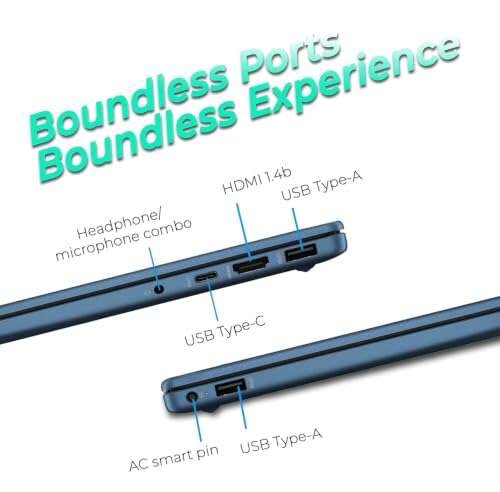
USB4, display output, charging, and docking support vary by model. Read the full specifications before buying accessories.

How to Choose the Right AMD Laptop
Use this process when comparing AMD laptops in the United States.
-
List your main tasks.
Separate basic work, gaming, creative work, and travel needs. -
Choose the processor class.
Ryzen 5 is a practical starting point for many users. Consider Ryzen 7 or Ryzen 9 for heavier workloads. -
Check the power series.
U-series chips usually favor battery life. H, HS, and HX chips usually favor performance. -
Check the RAM.
Choose 16GB for many current Windows tasks. Choose 32GB for demanding creative work, development, or virtual machines. -
Check the graphics system.
Integrated Radeon graphics suit light gaming. A dedicated GPU is better for modern games and 3D work. -
Review the display.
Check size, resolution, brightness, color coverage, and refresh rate. -
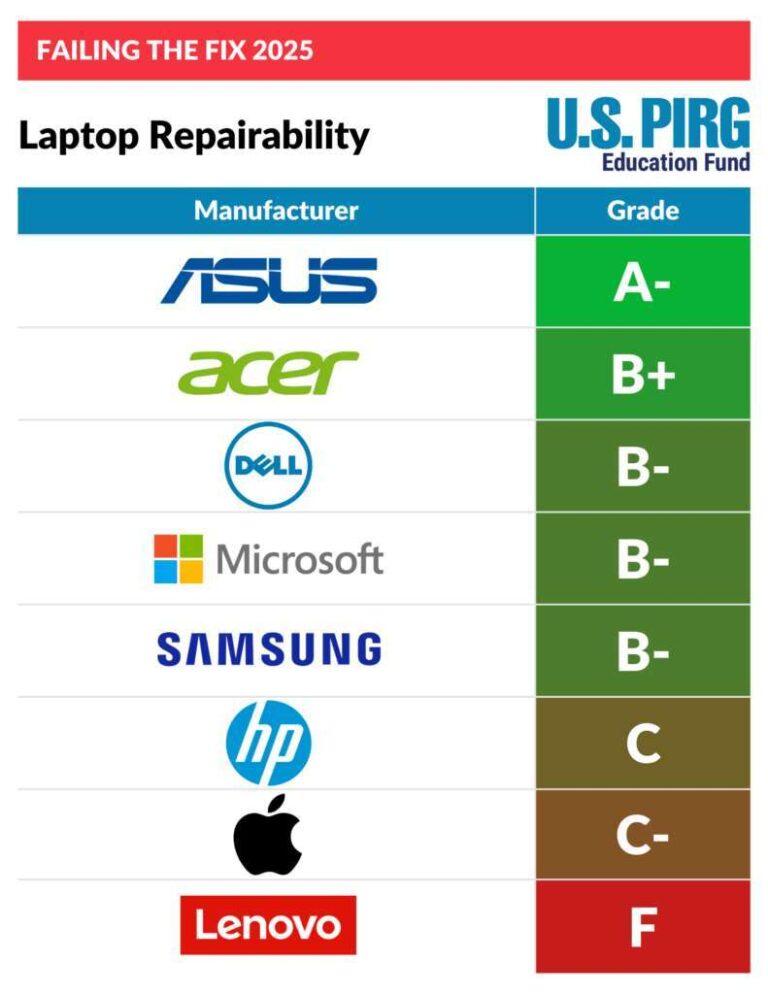
Check upgrade and repair options.
Look for replaceable storage, accessible RAM, and a service manual if long-term repair matters. -
Compare battery tests carefully.
Use results from the same test method when possible. -
Check warranty and support.
In the US, review the warranty period, return window, repair process, and available support channels.
The best AMD laptop is the one that balances the processor with the rest of the system. Do not spend more on a Ryzen 9 chip if the laptop has a weak display, poor cooling, or too little RAM.
Common Buying Mistakes to Avoid
Avoid these common errors:
- Buying based on “Ryzen 7” without checking the generation
- Assuming all AMD laptops have the same graphics performance
- Ignoring the amount and type of RAM
- Treating manufacturer battery estimates as guaranteed results
- Choosing a high-power processor for a travel laptop
- Buying a gaming laptop with a strong CPU but weak GPU
- Forgetting to check USB-C charging and monitor support
- Assuming the RAM can be upgraded
- Comparing laptop prices without comparing the display and storage
- Paying for performance that your daily apps cannot use
A simple office user may gain more from a better keyboard, screen, and battery than from a top-tier processor.
Frequently Asked Questions
Are AMD laptop processors good for everyday use?
Yes. Ryzen 3 and Ryzen 5 laptops can handle browsing, documents, streaming, email, and video calls. For a smoother long-term experience, consider 16GB of RAM and an SSD.
Is AMD better than Intel for laptops?
Neither brand is always better. AMD often offers strong multi-core performance, integrated graphics, and value. Intel may offer features or compatibility that suit some users. Compare the exact laptop models.
Do AMD laptops have good battery life?
Many do, especially models with low-power Ryzen U-series processors. Battery life still depends on the battery size, screen, software, and laptop design.
Can an AMD laptop run games?
Yes. Integrated Radeon graphics can run many light or older games. For modern games, choose an AMD laptop with a dedicated graphics card.
Is Ryzen 5 enough for college?
For most college work, Ryzen 5 is enough. Choose 16GB of RAM, an SSD, and a display that is comfortable for long reading sessions. Students in engineering, media, or computer science may need more memory or a dedicated GPU.
Are AMD Ryzen AI laptops worth buying?
They can be useful if you plan to use software that supports local AI features. Do not buy one based only on the NPU. Compare battery life, CPU speed, graphics, RAM, display, and price first.
Final Recommendation
The main advantages of an AMD laptop are strong value, solid multi-core performance, capable Radeon graphics, and efficient options for portable systems. AMD Ryzen laptops can serve students, office users, developers, gamers, and creators.
For general use, a Ryzen 5 laptop with 16GB of RAM and an SSD is a sensible starting point. Choose Ryzen 7 or Ryzen 9 for heavier work. Choose a dedicated GPU for modern gaming or serious 3D tasks. Before buying, compare the complete laptop rather than the processor name alone.

Sources and Further Reading
- AMD Ryzen Mobile Processors
- AMD Ryzen AI Processors
- AMD Product Specifications
- Microsoft Windows 11 Specifications and Requirements
- ENERGY STAR Computer Product Finder

Everett Ashford is a tech reviewer at mytechgrid.com specializing in SSDs, cameras, TVs, earbuds, headphones, and other consumer electronics. He provides honest, data-driven reviews based on hands-on testing and real-world performance analysis. Everett simplifies complex tech details to help readers make smart, confident buying decisions.