The best laptop deals for students and professionals balance price, speed, storage, comfort, and dependable daily performance.
A laptop can shape your whole workday. Students need a system for notes, research, video calls, and online classes. Professionals may need Office apps, email, reports, and steady multitasking. The hard part is finding useful features without paying for power you will never use. I reviewed these current laptop deals with a practical eye. I focused on screen size, memory, storage, portability, software, upgrade options, and daily value. The models below cover simple school work, office tasks, coding, travel, and large-screen productivity.
See the differences between my top picks at a glance.
HP 14-inch Lavender Laptop for Students

This HP 14-inch model aims at students and home-office users who need a compact Windows computer. Its listing includes Windows 11 Pro, Microsoft Office, Copilot AI, an Intel four-core processor, 4GB of DDR5 memory, and Wi-Fi 6. The storage setup combines 128GB of UFS storage with a 500GB external component for a listed 628GB total. That mix gives you more space than many entry-level laptops.
The 14-inch size should fit well in a backpack or small desk. It suits writing, web research, email, document work, and video meetings. The lavender finish also gives it a more personal look than a plain office laptop. Still, 4GB of RAM limits heavy multitasking, so I would not choose it for demanding editing or advanced coding.
Pros:
- Compact 14-inch format for travel and class use
- Windows 11 Pro and Office included in the listing
- Wi-Fi 6 supports newer wireless networks
- Large listed storage capacity for files and school work
- DDR5 memory uses a newer memory standard
Cons:
- 4GB RAM is low for many open apps
- Entry-level processor is not meant for heavy creative work
- Mixed storage design may not feel like a standard SSD
What Amazon Buyers Are Saying
When reviewing this type of listing, buyers tend to focus on ease of setup, compact size, included software, and value. Some may also discuss speed limits linked to 4GB of memory. Check the latest verified reviews for comments on battery life, keyboard feel, screen quality, and the exact storage behavior before ordering.
My Recommendation
I recommend this HP for basic school work, browsing, and light office use. It is a good low-cost choice when portability matters more than speed. Confirm the current configuration and software terms before buying.
HP 17-inch FHD Laptop with Office

This HP stands out with a 17.3-inch FHD IPS screen. That large panel gives you more room for spreadsheets, research tabs, and side-by-side documents. The listing also names 8GB of RAM, Windows 11 Pro, Office software, Wi-Fi 6, a 256GB SSD, and 500GB of external storage. A numeric keypad adds value for finance, data entry, and business work.
A large screen can reduce the need for an external monitor. It can also make long writing sessions easier on the eyes, though viewing comfort depends on brightness and room light. The trade-off is clear: this is less convenient to carry than a 14-inch model. I see it as a strong desk laptop for students and professionals who value screen space.
Pros:
- Large 17.3-inch FHD IPS display
- 8GB RAM gives better room for multitasking
- Numeric keypad helps with numbers and spreadsheets
- Listed combination of SSD and external storage
- Windows 11 Pro and Office support business tasks
Cons:
- Large body is less backpack-friendly
- Not the best choice for frequent commuting
- Storage setup should be checked before purchase
What Amazon Buyers Are Saying
Buyers shopping for a 17-inch budget laptop often care about screen size, keyboard comfort, setup, and value. Reviews may also reveal whether the machine feels quick with several apps open. Read current customer comments for direct feedback on hinge strength, fan noise, display quality, and portability.
My Recommendation
This is my top large-screen pick in the group. It makes sense for a home office, dorm desk, or work area where you want a built-in numeric keypad. It offers better everyday balance than the 4GB models.
HP 14-inch Silver Laptop for Travel

This silver HP shares the core platform of the lavender version. It lists an Intel four-core CPU, 4GB DDR5 RAM, 128GB UFS storage, 500GB of external storage, Windows 11 Pro, Office, Copilot AI, and Wi-Fi 6. The 14-inch body makes it a natural fit for campus bags, coffee shops, and small workspaces. Its silver finish looks simple and professional.
For daily tasks, the configuration targets documents, browser work, email, and online learning. Wi-Fi 6 is useful if your router supports it, but network speed also depends on your internet service. The 4GB memory remains the main limit. I would keep browser tabs under control and avoid treating this as a workstation for demanding apps.
Pros:
- Portable 14-inch design
- Professional silver color
- Wi-Fi 6 connectivity
- Office and Windows 11 Pro listed
- More storage space than many basic laptops
Cons:
- 4GB RAM can restrict multitasking
- Not suited to gaming or advanced editing
- Storage components may differ from a single SSD setup
What Amazon Buyers Are Saying
Common buyer priorities for this class include easy setup, weight, keyboard feel, and whether the laptop handles school apps without delay. Some customers may prefer the silver look for work use. Check recent verified reviews for battery results and real-world speed, since those details can vary by workload.
My Recommendation
This model is worth considering when you want an affordable, compact laptop for light productivity. I prefer it for students who carry a computer daily, but I would spend more for 8GB RAM if your budget allows.
NIMO 15.6-inch R5 AI Student Laptop

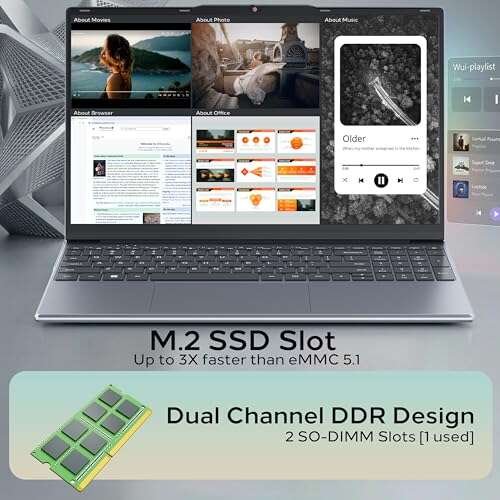
The NIMO is one of the more interesting best laptop deals for students and professionals because it targets users who may grow into heavier work. It lists 8GB RAM and a 256GB SSD, plus expandable storage up to 4TB. The four-core processor is listed at up to 3.7GHz and is marketed for student work, coding, and content creation. A 65W USB-C power delivery feature can make charging more convenient.
This laptop also lists a fingerprint reader and backlit keyboard. Those features matter in a dim room or shared study space. The 15.6-inch FHD screen offers a useful middle ground between desk comfort and travel. I would still check the exact processor name, ports, warranty, and upgrade method before buying because listing details matter greatly with lesser-known brands.
Pros:
- 8GB RAM for smoother daily multitasking
- 256GB SSD for faster file access than basic hard drives
- Storage expansion claim up to 4TB
- Backlit keyboard helps in low light
- Fingerprint reader adds quick login convenience
- USB-C 65W power delivery is useful for flexible charging
Cons:
- Brand support may be less familiar than HP support
- 256GB can fill quickly with large media files
- Confirm upgrade compatibility before purchase
What Amazon Buyers Are Saying
Buyers of this type of laptop often mention the backlit keyboard, screen size, startup speed, and value. Coding users may also comment on storage expansion and how the system handles development tools. Read the latest reviews for details on fan sound, battery life, ports, and customer service rather than relying only on headline specifications.
My Recommendation
I rate the NIMO as the most flexible choice for students who may code, create content, or add storage later. It is one of my stronger picks here, provided the current listing confirms the stated CPU and upgrade features.
Phatom 15.6-inch Upgradeable Laptop

This Phatom model focuses on low-cost basics with room for upgrades. Its listing includes 4GB RAM, a 128GB SSD, a Pentium processor, Windows 11 compatibility, HDMI, and support for adding more memory and storage. The 15.6-inch FHD screen gives students a larger work area for documents and online lessons. It may suit buyers who want to start small and improve the machine later.
Upgrade support sounds useful, but I always advise checking the exact parts and service instructions before purchase. Four gigabytes of RAM and 128GB of storage are modest in 2026. The laptop should handle writing, browsing, streaming, and basic school tasks, but it will need careful file management. It is not a strong fit for professional editing, gaming, or large software projects.
Pros:
- FHD screen for clearer text and video
- SSD storage should improve startup response
- RAM and SSD upgrade claims add flexibility
- HDMI helps connect an external display
- Large screen suits desk-based study
Cons:
- Only 4GB RAM in the listed setup
- 128GB storage leaves limited free space
- Pentium platform is aimed at light tasks
What Amazon Buyers Are Saying
Buyers usually look at whether an inexpensive laptop starts quickly, connects to Wi-Fi, and handles school websites. Upgradeable parts can attract value-focused shoppers. Read current reviews for comments about the keyboard, screen brightness, battery, and whether the upgrade process is clear.
My Recommendation
Buy this Phatom only if your needs are basic and the low price is the main goal. Its upgrade path gives it more long-term promise than a sealed budget laptop, but the starting hardware is limited.
HP 14-inch Sky Blue Ultra-Portable Laptop

This Sky Blue HP is built around portability. The listing names a 14-inch display, Intel four-core CPU, 4GB RAM, Windows 11 Pro, Microsoft Office, Copilot AI, and a combined 628GB storage setup. It also highlights long battery life and includes a Maxsol accessory package. The blue color gives it a friendly student look while still working in casual business settings.
The compact design can help commuters and students who move between classrooms. Office support is useful for reports, resumes, and spreadsheets. As with the other 4GB HP models, I would keep expectations realistic. It should serve light work well, but professionals who run many browser tabs, large spreadsheets, or specialist programs should choose an 8GB model.
Pros:
- Easy-to-carry 14-inch format
- Long-battery claim suits mobile work
- Office and Windows 11 Pro listed
- Wi-Fi and storage package support daily study
- Distinct Sky Blue design
Cons:
- 4GB RAM is a clear performance limit
- Battery results depend on screen use and apps
- Accessory bundles can vary by listing
What Amazon Buyers Are Saying
For portable HP laptops, buyers often discuss weight, setup, battery life, and whether the system meets school needs. Some may value the included accessories and color. Check current verified feedback for real battery times and notes about performance during video calls.
My Recommendation
This HP is a sensible pick for light mobile productivity. I would choose it over the other 4GB options when the color, portability, and battery focus matter most. Buy it only after checking the current bundle details.
NIAKUN 15.6-inch Windows 11 Pro Laptop

The NIAKUN offers a practical office and school setup. It lists 8GB RAM, a 256GB SSD, Windows 11 Pro, Office 365, an Intel dual-core processor, and a 15.6-inch FHD 1080p IPS display. A two-year warranty adds reassurance for buyers who want support beyond the first few months. Wi-Fi 5 and Bluetooth 4.2 cover common wireless needs.
The 8GB memory is a better starting point than the 4GB options for documents, web research, calls, and light multitasking. The 256GB SSD should give the system a responsive feel, though available space will be lower after Windows and apps use part of it. This is not a high-power professional workstation. It is better suited to email, Office, school portals, and remote work.
Pros:
- 8GB RAM supports normal multitasking
- 256GB SSD balances speed and capacity
- FHD IPS screen suits office and school work
- Office 365 is listed
- Two-year warranty adds useful buyer protection
Cons:
- Dual-core processor limits demanding workloads
- Wi-Fi 5 is older than Wi-Fi 6
- 256GB may feel small for large media libraries
What Amazon Buyers Are Saying
People comparing affordable work laptops often care about speed, screen clarity, setup, and warranty support. Buyers may also mention whether Office access meets their needs. Read current reviews for battery performance, webcam quality, keyboard comfort, and how the laptop handles many tabs.
My Recommendation
This is a balanced budget option for office workers and students. The 8GB RAM and SSD make it more practical than many entry-level systems. I would consider it a good value if the current price remains competitive.
2026 15.6-inch Pentium Laptop with Office 365

This 15.6-inch laptop targets students and business users who want a large display at a modest price. The listing includes Windows 11 Pro, Office 365, 8GB RAM, a 256GB SSD, an Intel Pentium processor, a six-hour battery claim, Mini HDMI, camera, and microphone. Those features cover common work needs such as documents, online classes, email, and video calls.
The 8GB memory is a strong point for this price class. The Pentium processor remains an entry-level choice, so I would not use it for complex design work or intensive data tasks. Mini HDMI may help with an external display, but you may need the correct adapter or cable. Battery life varies with brightness, streaming, and app use, so treat the six-hour figure as a guide.
Pros:
- 8GB RAM for smoother basic multitasking
- 256GB SSD for quicker file access
- Office 365 included in the listing
- Large 15.6-inch work area
- Camera and microphone support remote meetings
- Mini HDMI offers display connection options
Cons:
- Pentium processor is limited for demanding work
- Six-hour battery claim may vary in real use
- Mini HDMI may require an adapter
What Amazon Buyers Are Saying
Buyers usually assess this type of laptop by its startup speed, screen, keyboard, battery, and Office setup. Some may like the large display and 8GB memory. Check the latest customer reviews for comments on webcam quality, charging, fan noise, and real battery life.
My Recommendation
This model deserves a place on a budget shortlist for school and light office work. It gives you more RAM than the basic 4GB choices. I would buy it for simple tasks, not for demanding professional software.
Phatom Lightweight 15.6-inch FHD Laptop

This second Phatom model keeps the focus on basic school and business use. It lists 4GB RAM, a 128GB SSD, a 15.6-inch FHD IPS display, Windows 11 compatibility, HDMI, a 2MP webcam, Wi-Fi, and a cooling fan. At 3.46 pounds, it aims to be lighter than many large-screen laptops. That combination may appeal to students who want a bigger screen without a very heavy bag.
The 1080p display should help with text and video compared with a low-resolution panel. Still, 4GB RAM and 128GB storage set a firm limit. I would use it for word processing, browsing, streaming, and online classes. Keep files in cloud storage or an external drive if the available space becomes tight.
Pros:
- Light 3.46-pound listed weight
- 15.6-inch FHD IPS display
- 2MP webcam for online classes and meetings
- HDMI supports an external monitor
- Cooling fan may help during longer sessions
Cons:
- 4GB RAM is not ideal for multitasking
- 128GB SSD offers limited room
- Not suited to demanding professional applications
What Amazon Buyers Are Saying
Customers looking at lightweight budget laptops often care about the stated weight, display, setup, and battery. Webcam quality can also matter for school. Read current reviews for details about keyboard comfort, Wi-Fi stability, charging, and how much storage remains after setup.
My Recommendation
This is a reasonable low-cost school laptop when portability and screen size matter. I would rank it below the 8GB NIMO, NIAKUN, and 2026 Pentium models for long-term value. It makes sense only when the price is clearly lower.
How to Choose Best Laptop Deals for Students and Professionals
The best laptop deals for students and professionals are not always the cheapest listings. A low price can hide weak memory, limited storage, or poor upgrade support. I compare the actual work you plan to do with the laptop hardware. I also check the software bundle, warranty, display, keyboard, and return terms. These steps help you avoid buying a laptop that feels slow after only a few months.
1. Match Memory and Processor to Your Work
For simple notes, web browsing, email, and online classes, an entry-level processor can work. However, 4GB RAM leaves little room for many tabs and apps. I prefer 8GB for most students and professionals because it gives the system more breathing space. Coding, photo work, large spreadsheets, and content creation may need still more power. Read the exact processor name, not only phrases such as “AI” or “fast.”
2. Check Storage, Screen, and Daily Comfort
A 128GB drive can fill fast after Windows, updates, and apps use space. A 256GB SSD gives a better starting point. Expandable storage can improve long-term value, but confirm which part you can replace. A 14-inch screen works well for travel. A 15.6-inch display gives more room for work. A 17.3-inch model can replace a monitor on a desk, but it is harder to carry. Also check keyboard layout, numeric keys, webcam details, and ports.
3. Compare Software, Warranty, and Total Value
Windows 11 Pro and Office may add value, but read the listing terms. Some software offers may require activation or a subscription. A warranty can matter more than a small saving, especially from a less familiar brand. Check return rules, seller details, included accessories, and current customer feedback. For the best laptop deals for students and professionals, judge the complete package rather than one headline specification.
Final Verdict: Which Should You Buy?
For most buyers, the HP 17-inch model is the best large-screen choice, while the NIMO offers the best upgrade potential. The NIAKUN and 2026 Pentium laptop also give useful 8GB configurations.
Choose a 14-inch HP for light work and travel. Compare current prices before ordering to find the best laptop deals for students and professionals.
FAQs Of best laptop deals for students and professionals
What is the best laptop deal for college students?
The NIMO is a strong option for students who want 8GB RAM, an SSD, and storage expansion. The HP 14-inch models suit lighter work and daily travel.
Is 4GB RAM enough for school and office work?
It can handle basic browsing and documents, but 8GB is better for video calls, many browser tabs, and multitasking.
Is a 15.6-inch laptop better than a 14-inch laptop?
A 15.6-inch model gives you more screen space. A 14-inch laptop is easier to carry. Choose based on your desk use and travel needs.
How much storage should a student laptop have?
A 256GB SSD is a good starting point for most users. Choose more storage or an upgradeable model for photos, videos, and large projects.
Are budget laptops good for professional work?
Budget laptops work well for email, Office, research, and remote meetings. They may not suit advanced editing, 3D work, gaming, or large data tasks.

Everett Ashford is a tech reviewer at mytechgrid.com specializing in SSDs, cameras, TVs, earbuds, headphones, and other consumer electronics. He provides honest, data-driven reviews based on hands-on testing and real-world performance analysis. Everett simplifies complex tech details to help readers make smart, confident buying decisions.