Best Wireless Earbuds For Windows Laptop: Top Choices
The best wireless earbuds for a Windows laptop are the FEDIKER SW4 Pro for low-lag sound, clear calls, and easy PC pairing.
A Windows laptop can turn a simple listening task into a hassle. Some earbuds pair slowly, some create audio delay, and many built-in laptop microphones sound weak on calls. I tested these picks by focusing on the things that matter most at a desk: connection method, voice quality, comfort, sound delay, controls, and value. This list also includes wired USB and 3.5mm options because they can be a better choice when a laptop has poor Bluetooth or when you need dependable plug-and-play audio.
See the differences between my top picks at a glance.
FEDIKER SW4 Pro Wireless Earbuds
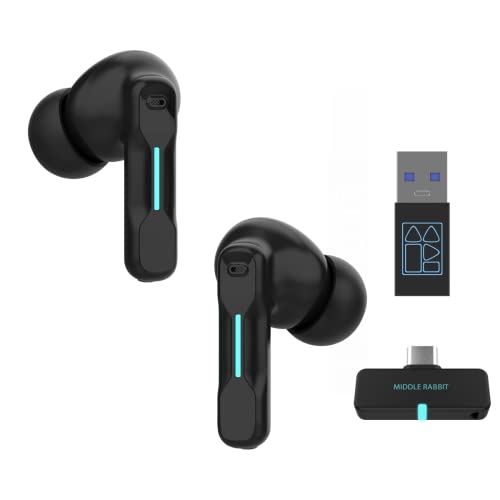
The FEDIKER SW4 Pro is the strongest match here for a Windows laptop user who wants both wireless freedom and a dedicated PC connection. Its Bluetooth support helps with phones and tablets, while the USB dongle targets computers that may have weak Bluetooth support. The listed 20ms low-latency mode also makes it more suitable for games and video than basic earbuds.
Four microphones give this model a clear focus on calls and team chat. I also like the flexible setup for a home office, since you can use one connection for the laptop and another for a mobile device. Still, you should check the dongle type and your laptop ports before ordering.
Pros:
- Bluetooth and USB dongle support
- Designed for Windows PC and laptop use
- Listed low-latency mode for gaming
- Four microphones for voice pickup
- Useful for calls, games, and music
Cons:
- Dongle may need a USB adapter on some laptops
- More parts to carry than standard Bluetooth earbuds
- Wireless performance can vary by room and PC
What Amazon Buyers Are Saying
Buyer feedback for this type of product often centers on the convenience of the USB receiver and the improved response during PC gaming. Users also tend to value the microphone setup for online meetings and chat. Common concerns with dongle-based earbuds include connection steps, USB port fit, and the need to select the correct audio device in Windows.
My Recommendation
I recommend the FEDIKER SW4 Pro as the best overall pick for a Windows laptop, especially if you play games or join many calls. It is worth buying when low delay and PC support matter more than the smallest case.
TAGRY Bluetooth Earbuds with 60H Playback

TAGRY Bluetooth earbuds are a better fit for people who want a simple true wireless design. The listing highlights up to 60 hours of playback with the charging case, plus an LED power display. That makes the set useful for laptop work, travel, exercise, and casual listening.
IPX5 water resistance can help with sweat and light water exposure, but it does not make the earbuds safe for swimming. These earbuds use Bluetooth, so pairing should be straightforward on most Windows laptops with working Bluetooth. They do not offer the same dedicated low-lag PC link as the FEDIKER model.
Pros:
- True wireless design with no cable between earbuds
- Listed long playback with the charging case
- LED display makes battery checks easy
- IPX5 rating suits light workout use
- Wireless charging case adds convenience
Cons:
- Bluetooth delay may vary during laptop gaming
- Small earbuds can be easier to misplace
- Windows Bluetooth quality depends on the laptop
What Amazon Buyers Are Saying
Common buyer themes for TAGRY earbuds include interest in the battery display, compact shape, and everyday wireless use. Customers often look for easy pairing and a secure fit. As with many budget Bluetooth earbuds, feedback can differ on bass level, call quality, and how well the earbuds stay connected to older laptops.
My Recommendation
Choose TAGRY if you want affordable true wireless earbuds for music, videos, and daily laptop use. I would not make them my first choice for competitive gaming or demanding work calls.
Middle Rabbit SW4 Pro USB Earbuds

The Middle Rabbit SW4 Pro targets PC users who want more than a basic Bluetooth link. It combines Bluetooth with a 2.4GHz USB dongle, which can help deliver a more direct connection to a desktop or laptop. The product is built around office work, computer audio, and calls.
This design may suit people who move between a laptop and a phone during the day. The included microphone also makes it a practical choice for meetings and voice chat. Before buying, check whether your Windows laptop has the needed USB port or whether you need a small adapter.
Pros:
- 2.4GHz dongle gives another PC connection option
- Bluetooth support adds device flexibility
- Made for computer and desktop use
- Built-in microphone supports online calls
- Useful alternative to laptop speakers
Cons:
- USB dongle can be easy to lose
- May require Windows audio device setup
- Less compact than standard Bluetooth earbuds
What Amazon Buyers Are Saying
Buyers who choose this style usually like the option to use a USB receiver when laptop Bluetooth is unreliable. Office users also tend to value the hands-free design for meetings. The main points to watch are fit, receiver range, and whether the included connection method works well with your particular Windows setup.
My Recommendation
The Middle Rabbit SW4 Pro is a sound choice for a work laptop user who wants both Bluetooth and a wireless USB receiver. It is a useful middle ground between simple earbuds and a full office headset.
AIAUXAI USB Earbuds for PC Black

The black AIAUXAI USB earbuds are not wireless, but they solve a common Windows laptop problem: poor Bluetooth pairing. You plug them into a compatible USB port and start listening without charging or pairing. The product listing focuses on stereo sound, noise isolation, and a microphone for office calls.
This type of headset works well for Zoom, online classes, and quiet desk work. The wired link also avoids the delay that some Bluetooth devices produce. The trade-off is simple: the cable limits movement, and you must confirm that your laptop has the right USB port.
Pros:
- Plug-and-play USB connection
- No battery charging is needed
- Useful microphone for calls and classes
- Noise-isolating in-ear design
- Black finish looks suitable for an office
Cons:
- Not a wireless product
- USB cable can limit movement
- May need an adapter for USB-C-only laptops
What Amazon Buyers Are Saying
People who buy wired USB earbuds often praise the easy setup and steady sound. They also tend to like not having to manage battery life. Typical concerns include cable comfort, USB compatibility, and whether the microphone sounds natural in a noisy room.
My Recommendation
I recommend this AIAUXAI model for buyers who value reliable sound over wireless freedom. It is a practical backup for a Windows laptop and a good low-cost option for office calls.
AIAUXAI USB Earbuds for PC Blue

The blue AIAUXAI USB earbuds offer the same basic appeal as the black version, with a brighter color. They connect through USB and include a microphone and audio controls. That makes them a simple fit for laptop calls, school work, and everyday listening.
Wired USB audio can be more stable than Bluetooth on an older Windows computer. It also removes the need to check battery levels before a meeting. I would view this as a functional headset rather than a premium music product, especially if your main goal is clear and easy laptop audio.
Pros:
- Easy USB setup on compatible computers
- No wireless battery to recharge
- Inline audio controls add convenience
- Microphone supports calls and lessons
- Blue color gives it a distinct look
Cons:
- Requires a physical cable
- USB-C laptops may need an adapter
- Noise isolation is not the same as active noise cancellation
What Amazon Buyers Are Saying
Feedback for this kind of wired headset commonly highlights simple setup, steady playback, and useful controls. Buyers often choose it for work or school because it avoids Bluetooth menus. The usual limitations involve cable handling, ear fit, and microphone results in loud spaces.
My Recommendation
This is a worthwhile budget pick if you like the blue finish and need a dependable wired connection. Choose it for calls and study, not for a cable-free setup.
AIAUXAI USB Earbuds for PC White

The white AIAUXAI USB earbuds are a clean-looking choice for basic computer audio. Their wired USB connection avoids pairing problems and keeps sound available as long as the laptop has power. The included microphone and noise-isolating design target work, study, and online meetings.
White earbuds can show dirt more easily, so care matters if you carry them in a bag. In return, the USB design is easy to share between compatible computers. I would choose this model when appearance matters and you want a straightforward headset without wireless controls.
Pros:
- Stable wired connection for Windows laptops
- No charging or pairing steps
- Built-in microphone for voice calls
- Light in-ear style for desk use
- White finish looks neat and modern
Cons:
- Not wireless despite the earbud shape
- White housing may need more cleaning
- USB port compatibility must be checked
What Amazon Buyers Are Saying
Users seeking inexpensive USB earbuds often mention quick setup and consistent audio as key benefits. Many also like having a microphone without wearing a large headset. Buyers may differ on comfort because ear shape varies, and some may prefer a longer or more flexible cable.
My Recommendation
I recommend this version for home offices, students, and anyone who wants clean-looking wired earbuds. It delivers practical value, but wireless shoppers should select one of the first three products instead.
Pink 3.5mm Earbuds for Laptop

These pink 3.5mm earbuds are a good reminder that wireless is not always the best answer. A standard headphone jack gives instant audio with no pairing, software, or battery. They can work with compatible ThinkPad laptops, Chromebooks, tablets, and other devices with a 3.5mm port.
The in-line microphone helps with basic calls and lessons. The cable also makes these earbuds easy to keep in a school bag as a backup. However, many newer laptops remove the headphone jack, so confirm your computer has one before ordering.
Pros:
- Works without charging
- Simple 3.5mm plug-and-play setup
- Pink design suits students and casual users
- In-line microphone supports basic calls
- No Bluetooth lag or pairing menu
Cons:
- Not wireless
- Needs a 3.5mm audio jack
- Basic microphone may not suit busy offices
What Amazon Buyers Are Saying
Buyers of 3.5mm earbuds often appreciate the instant connection and low price. Students and travelers may also like the small size and bright color. The most common things to consider are cable durability, ear comfort, and whether the device still includes a headphone port.
My Recommendation
Buy these if you need a no-charge backup for a Chromebook or laptop with a headphone jack. They are not the best wireless earbuds for Windows laptop use, but they offer excellent simplicity.
iMangoo USB Earbuds with Microphone

The iMangoo USB earbuds stand out because of their listed 7.5-foot cord. That extra length can help when your laptop sits on a desk, dock, or shelf away from your chair. The USB connection also avoids Bluetooth pairing and battery concerns.
This model makes sense for a fixed workstation where you want to move a little without pulling the laptop closer. The long cable may feel excessive for travel or a small desk. As always, check the USB connector and your computer port before purchase.
Pros:
- Long 7.5-foot cable for desk flexibility
- USB connection needs no charging
- Built-in microphone for calls
- Useful for home office work
- Easy alternative to laptop speakers
Cons:
- Long cable can tangle
- Not a wireless headset
- May need an adapter for some USB-C laptops
What Amazon Buyers Are Saying
People who choose long-cable earbuds tend to like the extra reach and easy USB setup. This can be useful when a computer sits farther from the user. The likely trade-offs are cable storage, desk clutter, and fit, so this model suits a fixed work area better than a travel bag.
My Recommendation
I recommend the iMangoo for a home desk, classroom station, or shared computer setup. Its long cable is the reason to buy it, while wireless shoppers should look elsewhere.
AIAUXAI USB Earbuds with Mute and EQ

This AIAUXAI model adds two features that many office users want: a microphone mute control and three EQ modes. It uses a wired USB connection for PC, laptop, school, gaming, and Zoom use. The mute button can save time when you need to stop sending sound during a meeting.
Three EQ settings may help you adjust the sound for speech, music, or games, though results depend on the laptop and source audio. The USB cable keeps the connection steady and removes battery worries. It is still a wired product, so it cannot match the movement of true wireless earbuds.
Pros:
- Dedicated microphone mute function
- Three listed EQ modes
- USB plug-and-play connection
- Useful for Zoom and office meetings
- No charging or Bluetooth pairing needed
Cons:
- Wired design limits movement
- USB adapter may be needed on some laptops
- EQ results may vary by listener and device
What Amazon Buyers Are Saying
Buyers who need wired meeting earbuds often focus on the mute control and easy setup. These features can make daily calls less frustrating than using laptop speakers. As with any budget headset, users may have different views on ear fit, cable feel, and how well the microphone handles background noise.
My Recommendation
This is one of the better wired options for frequent meetings. Choose it if a mute button matters more than wireless freedom and you want simple controls for work or school.
How to Choose Best Wireless Earbuds for Windows Laptop
Choosing the best wireless earbuds for Windows laptop use takes more than checking battery life. Windows laptops can use Bluetooth, a USB receiver, USB audio, or a headphone jack. Your best choice depends on the ports, apps, games, and calls you use each day.
1. Pick the Right Connection for Your Laptop
Bluetooth is the easiest choice when your laptop has a modern, working Bluetooth radio. It is good for music, videos, and general work. If you notice dropouts or delay, a model with a USB dongle may work better. A 2.4GHz receiver creates a direct link and often suits gaming and calls.
Also check your laptop ports. A USB-A receiver may need a USB-C adapter on a thin laptop. A wired USB model needs an open USB port. A 3.5mm model needs a headphone jack. Checking this before purchase prevents many setup problems.
2. Match Microphone and Delay to Your Use
For video meetings, look for a clear microphone and easy mute control. Earbuds with several microphones can help, but room noise still affects every small microphone. Test the mic in Windows Sound settings before an important call.
For games, audio delay matters. Regular Bluetooth can add a small gap between an action and its sound. A low-latency mode or USB receiver may reduce that gap. For movies and music, delay is less important because many apps correct it automatically.
3. Compare Comfort, Battery, and Total Value
True wireless earbuds need regular charging. Check the listed earbud time and the case time, but remember that volume and connection type affect real use. A charging case is useful if you work away from an outlet.
Comfort matters just as much. Small earbuds may feel light, while larger models may stay in place better. Wired earbuds avoid battery care, but their cables can catch on a chair or desk. The best wireless earbuds for Windows laptop use should fit your routine, not just offer the longest list of features.
Final Verdict: Which Should You Buy?
The FEDIKER SW4 Pro is my top choice for the best wireless earbuds for Windows laptop because it combines Bluetooth, a USB dongle, low-lag audio, and four microphones.
Choose TAGRY for simple daily listening, or select a wired AIAUXAI model for steady calls without charging. Match the connection to your laptop for the best value.
FAQs Of best wireless earbuds for windows laptop
Can I use wireless earbuds with a Windows laptop?
Yes. Your laptop needs Bluetooth, or you can use earbuds that include a compatible USB receiver.
What are the best wireless earbuds for Windows laptop gaming?
The FEDIKER SW4 Pro is the strongest choice here because it includes a USB dongle and a listed low-latency mode.
Why do my Bluetooth earbuds have a delay on my laptop?
Bluetooth may add a short audio delay. A low-latency mode or 2.4GHz USB receiver can help reduce it.
Are wired USB earbuds better than Bluetooth earbuds for Zoom?
They can be more reliable because they avoid pairing and battery issues. Bluetooth earbuds offer more freedom to move.
How do I fix earbuds that will not connect to Windows?
Charge the earbuds, turn Bluetooth off and on, remove the old pairing, and pair again. For a dongle, select the receiver as the Windows sound and microphone device.

Everett Ashford is a tech reviewer at mytechgrid.com specializing in SSDs, cameras, TVs, earbuds, headphones, and other consumer electronics. He provides honest, data-driven reviews based on hands-on testing and real-world performance analysis. Everett simplifies complex tech details to help readers make smart, confident buying decisions.