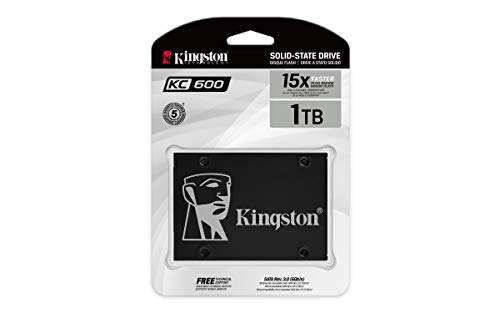
My pick: Sabrent USB 3.0 SATA adapter—fast, reliable, and plug-and-play for most SSDs.
You just pulled an SSD from a laptop or built a new drive and need to move data fast. A simple SATA to USB adapter saves you time. It lets you clone, image, test, or use an SSD as a portable drive. I’ll walk you through the best sata to usb adapter for ssd options I’ve tested, so you can pick the right one fast.
See the differences between my top picks at a glance.
| Product | Interface | UASP | Supports 3.5″? | Max Speed | Buy |
|---|---|---|---|---|---|
| Sabrent USB 3.0 SATA Adapter | USB-A to SATA (2.5″) | Yes | No (2.5″ only) | 5 Gbps | View on Amazon |
| BENFEI 2-in-1 USB-C/USB 3.0 | USB-C & USB-A to SATA | Yes | No (2.5″ only) | 5 Gbps | View on Amazon |
| BENFEI 2.5″ Tool-Free Enclosure | USB-C / USB-A to SATA (Enclosure) | Yes (Optimized) | No (2.5″ only) | 5 Gbps | View on Amazon |
| 6Gbps USB 3.0 SATA Cable | USB-A to SATA (Cable) | Yes | No (2.5″ only) | 6 Gbps (SATA III) | View on Amazon |
| UGREEN SATA to USB 3.0 Adapter | USB-A to SATA (2.5/3.5 via power) | Yes | Yes (with power) | 5 Gbps | View on Amazon |
| Unitek SATA & IDE Adapter | USB-A to SATA & IDE (with power) | Yes | Yes (with included 12V adapter) | 6 Gbps SATA III | View on Amazon |
| JSAUX USB 3.0 SATA Adapter | USB-A to SATA (2.5″) | Yes (Trim/UASP) | No | 5 Gbps | View on Amazon |
| USB 3.0 SATA Adapter w/ Power | USB-A to SATA (2.5/3.5) + 12V | Yes | Yes (includes power) | 5 Gbps | View on Amazon |
| JSAUX Red USB 3.0 SATA Adapter | USB-A to SATA (2.5″) | Yes | No | 5 Gbps | View on Amazon |
Sabrent USB 3.0 SATA Adapter

The Sabrent USB 3.0 SATA adapter is a go-to cable for quick SSD access. It supports USB 3.0 speeds and UASP. The cable is powered by USB, so no wall adapter is needed for 2.5″ drives. I used this to clone laptop SSDs and to run quick diagnostics.
It’s compact and plug-and-play on Windows, macOS, and Linux. The connector is solid and the adapter wakes up drives reliably. For the price, it mixes speed and reliability well. Expect clean transfers for most SSDs.
Pros:
- Simple plug-and-play setup
- Supports UASP for faster transfers
- No external power needed for 2.5″ SSDs
- Sturdy SATA connector and cable
- Great value for cloning and testing drives
Cons:
- Not suited for 3.5″ desktop drives
- USB-A only; no native USB-C in box
- No enclosure; drive is exposed during use
What Amazon Buyers Are Saying
Buyers praise the Sabrent adapter for easy use and reliable transfers. Many say it works straight out of the box for cloning and file moves. A few mention that it feels basic visually but holds up. Users expect it for quick recovery work and temporary drive access.
My Recommendation
I recommend the Sabrent adapter if you want a low-cost, reliable tool for 2.5″ SSD jobs. It handles cloning and quick transfers with ease. I rate it 4.5/5 overall.
| Category | Rating |
|---|---|
| Build Quality | 4.5/5 |
| Speed (UASP) | 4.5/5 |
| Compatibility | 4.5/5 |
| Value | 4.5/5 |
| Overall | 4.5/5 |
BENFEI 2-in-1 USB-C/USB 3.0 Adapter

BENFEI’s 2-in-1 cable gives you USB-C and USB-A connectors in one cable. I liked the flexibility when I moved between a newer USB-C laptop and an older USB-A desktop. It supports SATA III and UASP for improved throughput on SSDs.
The build is lightweight but solid. Cables are nylon-braided on some batches for durability. If you swap drives between machines often, this adapter saves time. It also handles TRIM support on many platforms.
Pros:
- Dual connectors for USB-A and USB-C
- UASP support for faster transfers
- Works with most 2.5″ SSDs
- No power brick for 2.5″ drives
- Good value for multi-device use
Cons:
- Not for 3.5″ desktop drives
- Some users report connector fit varies
- No enclosure; drive is exposed
What Amazon Buyers Are Saying
Customers like the dual connector setup and speed. Many applaud its convenience for switching computers. Some buyers noted occasional loose fit or cable stiffness on first uses. Overall, reviews favor it as a versatile, low-cost adapter.
My Recommendation
Choose the BENFEI 2-in-1 if you need USB-C and USB-A compatibility. It’s a flexible tool for techs and home users. I give it a 4.4/5.
| Category | Rating |
|---|---|
| Compatibility | 4.6/5 |
| Speed | 4.4/5 |
| Durability | 4/5 |
| Value | 4.4/5 |
| Overall | 4.4/5 |
BENFEI 2.5” Tool-Free Enclosure

This BENFEI enclosure turns an SSD into a proper external drive. The tool-free design slides open without screws. I found it handy for testing or everyday portable use. It supports UASP and claims SSD optimization for speed.
The case is sturdy plastic and seals tightly. It keeps the drive safe during transfers and daily carry. It also enables TRIM and SMART on many setups. That makes it better than a bare adapter for long-term use.
Pros:
- Tool-free, easy drive installation
- Optimized for SSDs with UASP support
- Protective enclosure for portable use
- Supports USB-C and USB-A connections
- Works well for backups and daily carry
Cons:
- Plastic build is not premium
- Limited to 2.5″ drives only
- Some users report slight heat under heavy use
What Amazon Buyers Are Saying
Buyers like the tool-free setup and protective housing. Many use it as a daily external SSD. Some say it runs warm during long transfers. Overall, reviewers call it a great budget enclosure.
My Recommendation
Get this BENFEI enclosure if you want a neat external SSD with easy install. It’s a smarter option than a bare cable for frequent use. Rating: 4.3/5.
| Category | Rating |
|---|---|
| Protection | 4.5/5 |
| Speed | 4.3/5 |
| Ease of Use | 4.6/5 |
| Value | 4.2/5 |
| Overall | 4.3/5 |
6Gbps USB 3.0 SATA Adapter Cable

This adapter cable advertises full 6Gbps SATA III support. In real use, it delivers strong transfers when paired with USB 3.0 ports and UASP. I used it on high-performance SSDs and saw consistent throughput. It’s a no-frills, workhorse cable.
The cable is compact and reliable. It gives quick setup for cloning and media moves. If you need the raw SATA III link, this cable won’t bottleneck many SSDs over USB 3.0. It’s best used for short bursts and data migration.
Pros:
- Supports SATA III 6 Gbps signaling
- UASP support for better small-file performance
- Compact and easy to pack
- Works well for cloning big drives
- Good price for performance
Cons:
- No power for 3.5″ drives
- No USB-C connector in the box
- Exposed drive during use
What Amazon Buyers Are Saying
Users appreciate the 6Gbps promises and real-world speed. Many report fast transfers on SATA III SSDs. Some mention the cable feels basic but works reliably. It’s a favorite for quick migrations.
My Recommendation
Choose this cable when you need SATA III speeds on a budget. It performs well and stays affordable. Overall: 4.4/5.
| Category | Rating |
|---|---|
| Throughput | 4.5/5 |
| Reliability | 4.3/5 |
| Ease of Use | 4.4/5 |
| Value | 4.5/5 |
| Overall | 4.4/5 |
UGREEN SATA to USB 3.0 Adapter

UGREEN offers a robust adapter that can handle both 2.5″ and 3.5″ drives when you add power. I tested it with a 2.5″ SSD and a 3.5″ HDD (with a power brick). It’s reliable and supports UASP for faster SSD ops.
The unit has a clean build and clear connections. I like it for drive recovery and desktop disk reads. If you need to work with desktop spinning drives as well as SSDs, UGREEN is a practical choice.
Pros:
- Supports 3.5″ drives with external power
- UASP-enabled for SSDs
- Solid connectors and cable quality
- Useful for recovery work on many drive types
- Clear status LEDs for drive activity
Cons:
- Requires a power adapter for 3.5″ drives (sold separately sometimes)
- Bulky when using external power
- Slightly higher price than simple cables
What Amazon Buyers Are Saying
Buyers report reliable support for both SSDs and large HDDs. The power option makes it flexible. Many praise it for data recovery tasks. Some mention needing to source a separate power adapter for 3.5″ use.
My Recommendation
Pick UGREEN when you need a flexible adapter for both laptop SSDs and desktop drives. It’s dependable for mixed workloads. Rating: 4.4/5.
| Category | Rating |
|---|---|
| Versatility | 4.6/5 |
| Speed | 4.3/5 |
| Build | 4.4/5 |
| Value | 4.3/5 |
| Overall | 4.4/5 |
Unitek USB 3.0 SATA & IDE Adapter
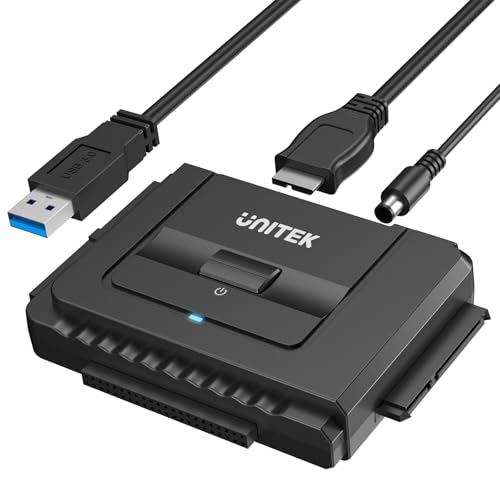
Unitek’s adapter covers both SATA and legacy IDE drives and comes with a 12V/2A power adapter. I use it when I need to pull data from old IDE drives or modern SSDs. It is a toolkit device for techs who service mixed-drive systems.
The included power adapter helps with 3.5″ desktop drives up to large capacities. The unit is bulkier but very functional. It’s the one I keep when I need a single cable for many drive types.
Pros:
- Works with SATA and IDE drives
- Includes 12V/2A power for 3.5″ HDDs
- Supports up to very large drive capacities
- Great for drive recovery and legacy hardware
- Sturdy, serviceable adapter design
Cons:
- Bulkier than simple cables
- Not as pocketable for quick tasks
- Higher price due to included power and features
What Amazon Buyers Are Saying
Users call Unitek a lifesaver for older drives and complex recovery tasks. Reviews praise the included power and broad compatibility. Some buyers note it’s not a travel item but excellent for bench work.
My Recommendation
Buy Unitek if you work with many drive types or recover old data. It’s an essential tool for technicians. I rate it 4.5/5.
| Category | Rating |
|---|---|
| Compatibility | 4.8/5 |
| Utility | 4.7/5 |
| Build | 4.4/5 |
| Value | 4.4/5 |
| Overall | 4.5/5 |
JSAUX USB 3.0 SATA Adapter
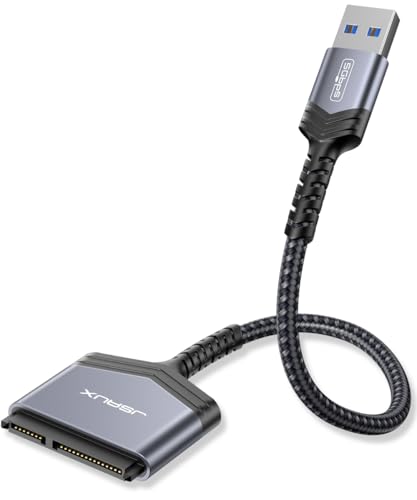
JSAUX offers an aluminum-shelled cable with good build and UASP support. I like its solid feel and improved durability. It supports TRIM and SMART on many platforms. The adapter gives a premium feel compared to cheap plastic cables.
It performs well for day-to-day SSD work. The aluminum housing helps heat dissipation on long transfers. If you want a nicer-feeling cable that still stays portable, JSAUX is a top choice.
Pros:
- Aluminum shell for durability and heat control
- UASP and TRIM support
- Good cable length and flexible jacket
- Solid SATA connector fit
- Works across Windows, Mac, Linux
Cons:
- 2.5″ only; no power for desktop drives
- Slightly pricier than basic cables
What Amazon Buyers Are Saying
Customers like the build and stable performance. Many highlight the aluminum shell as a quality upgrade. Some say it’s pricier than ultra-cheap adapters but worth it for frequent use.
My Recommendation
Go with JSAUX if you want a durable, well-built adapter for frequent SSD work. It earns a 4.6/5 from me.
| Category | Rating |
|---|---|
| Build Quality | 4.7/5 |
| Performance | 4.5/5 |
| Compatibility | 4.5/5 |
| Value | 4.4/5 |
| Overall | 4.6/5 |
USB 3.0 SATA Adapter w/ Power

This adapter includes a 12V power adapter so it handles 3.5″ drives as well as 2.5″ SSDs. I used it to image a desktop HDD and then read a SATA SSD. It’s a handy jack-of-all-trades for bench work and recovery tasks.
The adapter works well for mixed-drive labs. It’s a bit larger but that’s expected because of the power brick. If you need a single tool for both SSDs and large HDDs, this model is reliable and affordable.
Pros:
- Includes power adapter for 3.5″ HDDs
- Supports UASP for SSDs
- Good for drive imaging and recovery
- Plug-and-play with multiple OSes
- Sturdy connections and status LEDs
Cons:
- Less portable due to power brick
- Can run warm during long transfers
- Connector housings are bulkier
What Amazon Buyers Are Saying
Buyers like the power option and broad drive support. Many praise it as a good bench adapter. A few note the unit gets warm under heavy load. Overall, it’s popular for mixed-use scenarios.
My Recommendation
If you need support for 3.5″ drives plus SSDs, this adapter is a smart buy. It’s a real all-rounder for technicians. Rating: 4.4/5.
| Category | Rating |
|---|---|
| Versatility | 4.6/5 |
| Performance | 4.3/5 |
| Build | 4.3/5 |
| Value | 4.3/5 |
| Overall | 4.4/5 |
JSAUX Red USB 3.0 SATA Adapter

The JSAUX red adapter blends style and function. It has UASP, TRIM, and a stable connector. I used it for frequent SSD swaps, and it stayed secure. The red jacket helps you spot it on a busy desk.
Performance is on par with other high-quality USB 3.0 adapters. It’s compact but robust. If you want a colorful cable that does the job reliably, this is a practical pick.
Pros:
- Stylish red cable for visibility
- UASP and TRIM support
- Sturdy connector and good cable flex
- Works well with Windows, macOS, Linux
- Compact and portable
Cons:
- 2.5″ only, no external power
- Color may not suit everyone
- No enclosure included
What Amazon Buyers Are Saying
Customers praise the build and reliable speed. The red cable is a hit with those who want to avoid losing cables. A few users prefer neutral colors, but most accept it for the performance.
My Recommendation
Get the JSAUX red adapter for a reliable, eye-catching cable. It’s ideal for mobile SSD users who want solid performance. Rating: 4.5/5.
| Category | Rating |
|---|---|
| Style & Build | 4.6/5 |
| Performance | 4.4/5 |
| Portability | 4.6/5 |
| Value | 4.3/5 |
| Overall | 4.5/5 |
How to Choose Best SATA to USB Adapter for SSD
Choosing the best sata to usb adapter for ssd means matching your workflow. You must weigh speed, compatibility, and use case. Ask if you need portability, 3.5″ support, or USB-C first.
1. Match Interface and Port Type
Check your computer ports. If you use modern laptops, pick USB-C or a cable that includes USB-C. For older machines, USB-A is common. Many adapters offer both. The best sata to usb adapter for ssd will match your USB port to avoid extra dongles.
2. Look for UASP and TRIM Support
UASP improves small-file speeds and lowers CPU load. TRIM helps SSD longevity and performance in some enclosures and adapters. If you plan to use the SSD long term, pick an adapter that supports UASP and, where possible, TRIM.
3. Decide on 2.5″ Only or 3.5″ Support
Most SSDs are 2.5″. If you only use laptop SSDs, a compact cable or enclosure is enough. If you also need desktop HDDs, pick an adapter with a 12V power option. The best sata to usb adapter for ssd depends on whether you ever need to read large desktop drives.
Final Verdict: Which Should You Buy?
If you need a single, reliable pick for most SSD tasks, the Sabrent USB 3.0 SATA adapter is my top choice. It blends speed, UASP support, and easy setup for the best sata to usb adapter for ssd needs.
For mixed-drive work, consider Unitek or adapters with power. Pick what fits your ports and workflow for long-term value.
FAQs Of best sata to usb adapter for ssd
1. What adapter is best for cloning an SSD?
Choose a USB 3.0 adapter with UASP support and stable SATA connection. Sabrent and JSAUX models are good for cloning due to steady throughput and compatibility.
2. Can I use a SATA to USB adapter for 3.5″ drives?
Only if the adapter includes or supports a 12V power adapter. Many compact cables do not power 3.5″ drives. Check product specs first.
3. Does the adapter affect SSD lifespan or TRIM?
Some enclosures and adapters support TRIM, but many do not. TRIM support varies by chipset. For long-term use, choose an adapter or enclosure that explicitly mentions TRIM support.
4. Do I need UASP for an SSD?
UASP is not required, but it improves small-file performance and reduces CPU load. For faster transfers, pick an adapter with UASP support.
5. Will these adapters work on Mac and Linux?
Most USB SATA adapters are plug-and-play on macOS and Linux. Drivers are rarely needed for modern kernels and macOS builds. Check compatibility notes if you run an older OS.

Everett Ashford is a tech reviewer at mytechgrid.com specializing in SSDs, cameras, TVs, earbuds, headphones, and other consumer electronics. He provides honest, data-driven reviews based on hands-on testing and real-world performance analysis. Everett simplifies complex tech details to help readers make smart, confident buying decisions.