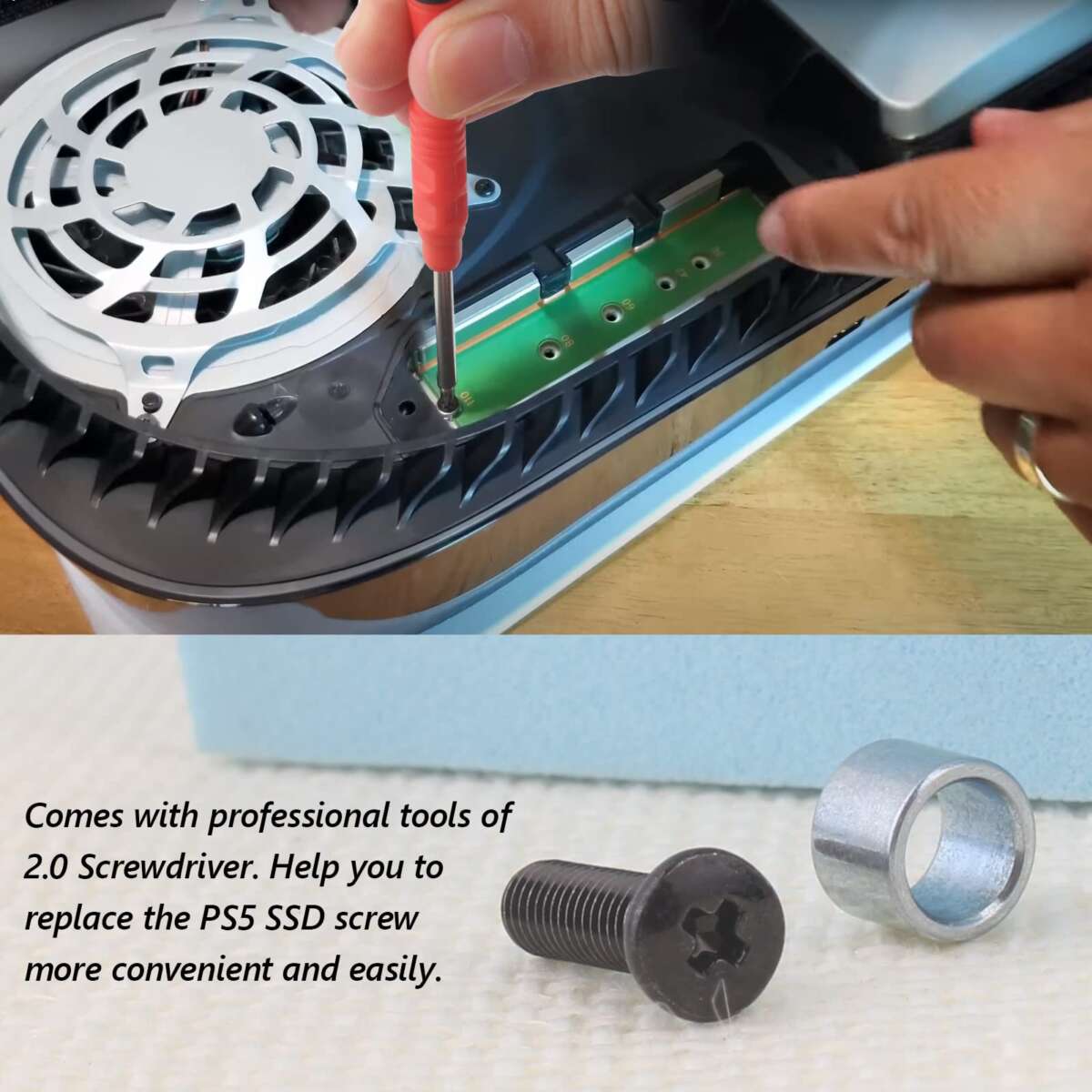
You need a #1 Phillips head screwdriver to open the PS5 SSD expansion slot cover. This single tool is the key to unlocking a world of expanded storage for your console. As someone who has performed this upgrade countless times, both on my own console and for friends, I know the anxiety that comes with opening up your prized possession. Using the wrong tool can turn a simple five-minute job into a frustrating ordeal with a stripped screw. This guide will walk you through exactly what screwdriver to open the PS5 SSD slot, why it's the only one you should use, and how to perform the task safely and confidently.

The Only Screwdriver You Need for a PS5 SSD Upgrade
When you're ready to expand your PlayStation 5's storage, the one tool you absolutely must have is a #1 Phillips head screwdriver. It’s that specific. The screw securing the SSD expansion bay cover is small, and using a screwdriver that is too large or too small is a guaranteed way to strip the head, leaving you in a difficult situation. This isn't a task where a generic, one-size-fits-all tool from your kitchen drawer will suffice.
The screw used by Sony is made of a relatively soft metal, making it susceptible to damage if you don't use the correct instrument. A #1 Phillips head screwdriver has a tip that is perfectly machined to fit the cross-shaped recess in the screw head. This perfect fit ensures that when you apply turning force, it is distributed evenly across the screw's grooves, allowing for a clean and easy removal without any slippage or damage. Getting the right screwdriver for your PS5 SSD is the most critical step in the entire process.

Why a #1 Phillips Screwdriver is the Perfect Fit
The world of screwdrivers is defined by precision. Phillips head screwdrivers come in various sizes, commonly designated by a number, such as #0, #1, #2, and so on. A #0 tip is too small and will spin inside the PS5 SSD screw, stripping the inner edges. A #2, which is very common in household toolkits, is too large and won't seat properly in the screw head, causing it to slip and round off the edges. The #1 size provides the ideal balance, fitting snugly into the screw.
I learned this lesson the hard way years ago while working on a different piece of electronics. I grabbed a screwdriver that looked "close enough" and ended up stripping a critical screw. That mistake cost me hours of frustration and a special trip to buy a screw extraction kit. For your PS5, that moment of hesitation to find the right tool is worth it. The goal is to have the screwdriver feel locked into the screw head before you even start turning, ensuring all your pressure translates directly into movement. Knowing what screwdriver to open the PS5 SSD slot is about preventing problems before they start.
Essential Features to Look for in a Screwdriver
While the size is the most important factor, not all #1 Phillips screwdrivers are created equal. For a smooth and hassle-free PS5 SSD installation, look for a screwdriver with a few key features that make a world of difference. These details elevate the tool from simply functional to perfect for the job.
- A magnetic tip. This is arguably the most valuable feature. The SSD cover screw is tiny, and a magnetic tip will hold onto it securely after you loosen it. This prevents the nightmare scenario of dropping the screw inside the PS5’s delicate internal components.
- A comfortable grip. An ergonomic handle allows you to apply firm, consistent downward pressure as you turn. This is the professional technique to prevent stripping. A good grip gives you superior control and reduces the chance of the screwdriver slipping.
- High-quality material. Look for screwdrivers with tips made from hardened materials like S2 steel or chrome-vanadium steel. These durable alloys resist wear and are less likely to deform, ensuring a perfect fit every time you use them.
A precision screwdriver, often found in electronics repair kits, is an excellent choice as it usually incorporates all these features. Investing a few extra dollars in a quality tool is a small price to pay for peace of mind.

Step-by-Step: Using Your Screwdriver to Access the SSD Slot
Once you have the correct #1 Phillips head screwdriver, accessing the M.2 SSD slot is straightforward. Following these steps will ensure a safe and successful installation. Remember to work in a well-lit area on a clean, flat surface.
- First, completely power down your PS5. Do not leave it in Rest Mode. Once it is fully off, unplug all cables from the back of the console.
- Lay the console on its side with the PlayStation logo facing down. Gently lift and slide the bottom cover off to expose the internal components.
- You will immediately see a rectangular metal plate held in place by a single screw. This is the SSD expansion slot cover.
- Take your #1 Phillips screwdriver and press it firmly into the screw head. While maintaining this downward pressure, turn the screwdriver slowly counter-clockwise to loosen it. The initial turn is the most important, so be steady.
- Once the screw is loose, remove it and the metal cover. Place the screw in a safe spot, like a small magnetic tray, so you don't lose it. You now have access to the SSD slot and are ready to install your new drive.

Frequently Asked Questions of what screwdriver to open ps5 ssd
Can I use a different size screwdriver if I don't have a #1 Phillips?
It is strongly recommended that you do not. Using a screwdriver that is too small or too large is the leading cause of stripping the screw head, which can make the upgrade process much more difficult.
What if I accidentally stripped the screw?
If you start to feel the screwdriver slipping, stop immediately. You can try placing a wide rubber band over the screw head before inserting the screwdriver to add extra grip. If that fails, a specialized screw extractor kit may be necessary.
Is a magnetic screwdriver necessary to open the PS5 SSD slot?
While not mandatory, a magnetic tip is highly recommended. It makes handling the tiny screw much easier and prevents it from falling and getting lost inside the console’s chassis.
Do I need a special electronics toolkit for this job?
A complete toolkit isn't required, but many affordable electronics repair kits include the correct #1 Phillips screwdriver and other helpful tools. For this specific task, a single, high-quality screwdriver is all you need.
Is the screw for the SSD expansion cover the same as the M.2 standoff screw?
Yes, the same #1 Phillips head screwdriver works for both the expansion slot cover screw and the small screw used to secure the M.2 SSD itself to the standoff.
Conclusion
Choosing what screwdriver to open the PS5 SSD slot doesn't have to be complicated. A quality #1 Phillips head screwdriver, preferably with a magnetic tip, is the one and only tool you need for a successful and stress-free storage upgrade. By using the exact right tool, you prevent damage, eliminate frustration, and turn the task into a simple, satisfying project.
Now that you're armed with the right knowledge, you can confidently open your console and install that new high-speed SSD. Get ready to enjoy faster load times and more space for all your favorite games. If this guide helped you, feel free to share your experience in the comments below

Everett Ashford is a tech reviewer at mytechgrid.com specializing in SSDs, cameras, TVs, earbuds, headphones, and other consumer electronics. He provides honest, data-driven reviews based on hands-on testing and real-world performance analysis. Everett simplifies complex tech details to help readers make smart, confident buying decisions.