Expect about 430–475 GB of usable space on a 512GB SSD after setup.
If you want a clear, real-world answer to how much usable space on a 512gb ssd, you’re in the right place. I work with drives daily, from fresh installs to heavy workstations. In this guide, I break down the math, the hidden overhead, and the simple steps to check your own device with confidence.
Why a 512GB SSD shows less space (GB vs GiB)
Drive makers use decimal units. Your OS reads binary units. That gap causes the mismatch you see.
Here is the simple math:
- 512GB from the box is 512,000,000,000 bytes.
- Your OS divides by 1,073,741,824 (1024³) to show “GB,” which is really GiB.
- 512,000,000,000 ÷ 1,073,741,824 ≈ 476.84 GiB.
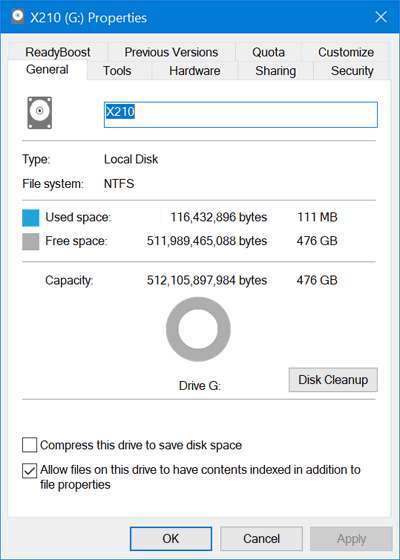
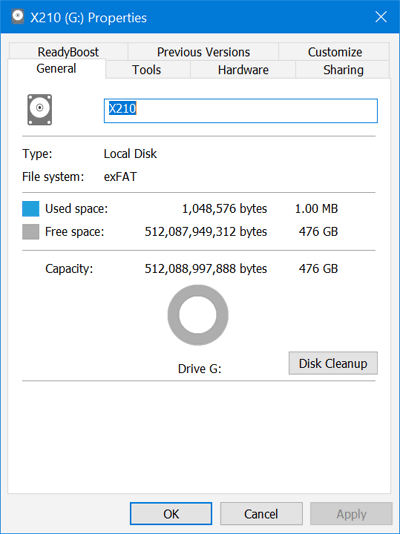
So, a 512GB SSD will show about 476 “GB” in Windows. That is before apps, updates, or system files. This is the core reason people ask how much usable space on a 512gb ssd.
What counts as usable space on a 512GB SSD
Usable space is the capacity you can store files on after the drive is set up. It is not the label on the box. It is what your system shows as capacity on your main volume.
These items reduce what you can use:
- File system overhead. NTFS, APFS, and ext4 store metadata. It takes a little space.
- Hidden partitions. EFI, MSR, and recovery partitions can take 0.5–2GB.
- System files. Pagefile, hibernation file, and swap take space based on RAM.
- Snapshots and caches. System restore, Time Machine local snapshots, and thumbnails grow over time.
When people ask how much usable space on a 512gb ssd, they often mean “space left after the OS is ready.” That number is lower than the raw 476 GiB figure.

Real-world numbers by OS
Here is what I see in fresh setups and client machines. Your numbers will vary a bit.
Windows 11
- Reported capacity for C: is about 476GB.
- After install and default features, free space is often 430–450GB.
- Hibernation and pagefile size depend on RAM. More RAM means more disk used.
macOS (APFS)
- Disk Utility shows the container with around 476GB capacity.
- Fresh macOS leaves about 450–470GB free.
- APFS uses snapshots. They count toward used space but free up when needed.
Linux (Ubuntu, Fedora)
- ext4 or Btrfs with a simple layout shows near 476GB capacity.
- A lean install leaves about 460–475GB free.
- Swap can be a file or a partition and can take several GB.
I say this often when asked how much usable space on a 512gb ssd: expect around 476GB total capacity in the main partition, then 430–470GB free after the OS, depending on setup.
Quick math examples
Let’s run two simple cases so you can compare.
Light Windows laptop
- Start: 476.8 GiB visible.
- Hidden partitions: about 1GB.
- OS and drivers: 25–30GB.
- Pagefile and hibernation with 16GB RAM: 20–25GB.
- Result: about 430–445GB free.
MacBook with APFS and 16GB RAM
- Start: about 476GB container.
- OS and base apps: 18–22GB.
- Snapshots and caches: 2–10GB, and they change.
- Result: about 450–470GB free.
These match what most people mean by how much usable space on a 512gb ssd.

How to check on your PC or Mac
Windows
- Press Windows key + E, open This PC, and check the C: drive. Capacity is the main number.
- For detail, press Windows key, type Disk Management, and review partitions.
macOS
- Click the Apple menu, About This Mac, Storage. Review capacity and available.
- For detail, open Disk Utility and inspect the APFS container.
Linux
- Run df -h in a terminal to see mounted volumes.
- Use a GUI like Disks or KDE Partition Manager for a clear view.
Run these steps once, and you will know how much usable space on a 512gb ssd on your system today.
Ways to reclaim space without risk
You can get back tens of GB with safe steps. Do not wipe recovery partitions unless you have a full backup.
Windows
- Disable hibernation if you never use it. This can free space equal to your RAM.
- Run Disk Cleanup or Storage Sense to remove temp files and old updates.
- Uninstall preinstalled apps you do not use.
macOS
- Manage Storage in System Settings to clear system data and trash.
- Turn off Time Machine local snapshots if you use a different backup plan.
- Remove old iOS backups and Xcode caches if present.
Linux
- Clear package caches with your distro tools.
- Reduce swap if it is too large for your use.
- Clean logs and temp folders regularly.
These steps change the answer to how much usable space on a 512gb ssd in your favor, with low risk.

Do you need 1TB instead?
Think about your files, not just the label. Here is a quick guide.
- Big games: Many AAA games are 80–150GB each.
- 4K video: One hour of 4K footage can be 22–100GB, based on codec.
- Photos: A 24MP RAW photo is 20–40MB. Ten thousand photos can be 200–400GB.
If you plan to keep many large files, a 1TB drive gives you room to breathe. If you only browse, stream, and write, a 512GB SSD is fine. This is why many ask how much usable space on a 512gb ssd before buying. Plan for 20% free space to keep the SSD fast and healthy.
Common mistakes and myths
Avoid these traps. They waste space or cause stress.
- Thinking 512GB means 512GB in Windows. It will show about 476GB. That is normal.
- Deleting recovery partitions without a backup. You will regret it later.
- Ignoring pagefile and hibernation. These can take a lot of space.
- Forgetting about cloud sync. Offline files from OneDrive or iCloud still use disk.
- Not leaving headroom. SSDs like 10–20% free for best speed and life.
I often get asked how much usable space on a 512gb ssd after two years of use. It depends on habits. Keep an eye on large folders and backups, and you will be fine.

Frequently Asked Questions of how much usable space on a 512gb ssd
Why does my 512GB SSD show only about 476GB in Windows?
Windows uses binary units under the hood. A 512GB drive in decimal is about 476.84 GiB, so you see around 476GB.
How much free space will I have after installing Windows 11 on a 512GB SSD?
Most users see about 430–450GB free after setup. This includes the OS, drivers, pagefile, and hibernation.
Is macOS better at saving space on a 512GB SSD?
macOS is efficient, but it also uses snapshots. You will often see 450–470GB free on a new install.
Can I increase usable space by reformatting my 512GB SSD?
You can change file systems or remove bloat, but gains are small. The GB vs GiB gap does not change with formatting.
How much usable space on a 512gb ssd if I have 32GB of RAM?
Expect less free space due to larger pagefile and hibernation. You may see 15–25GB more used compared to 16GB RAM systems.
Conclusion
You now know how much usable space on a 512gb ssd and why the numbers drop from the box label. Plan for about 476GB total capacity in your main volume, and 430–470GB free after a fresh OS, based on setup and RAM. That range is normal and healthy for modern systems.
Use the steps above to check your own device, reclaim space, and keep 10–20% free for speed and drive life. If your needs grow, move to 1TB with confidence. Want more guides like this? Subscribe, ask a question, or share your setup so we can help you fine-tune it.

Jamie Lee is a seasoned tech analyst and writer at MyTechGrid.com, known for making the rapidly evolving world of technology accessible to all. Jamie’s work focuses on emerging technologies, product deep-dives, and industry trends—translating complex concepts into engaging, easy-to-understand content. When not researching the latest breakthroughs, Jamie enjoys exploring new tools, testing gadgets, and helping readers navigate the digital world with confidence.