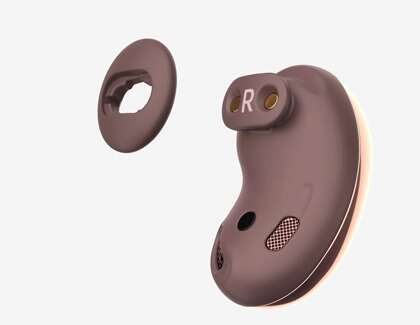
Gently remove tips, brush the mesh, wipe surfaces with isopropyl, and let everything dry completely.
I’ve cleaned dozens of earbuds in my work and at home, and I’ll walk you through a safe, step-by-step method for how to clean Samsung earbuds without damaging sound quality or electronics. This guide blends tested tips, simple tools, and clear warnings so you can restore hygiene and performance quickly. Read on to learn exact steps, common mistakes I’ve made (so you don’t), and simple maintenance habits that keep your earbuds fresh.
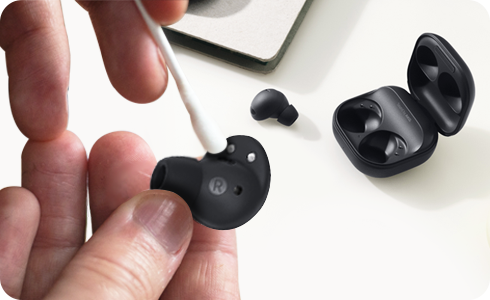
Why clean your Samsung earbuds
Earwax, sweat, and dust build up fast. Dirty grills and tips reduce sound clarity and can push moisture into drivers. Regular cleaning improves hygiene, sound quality, and the lifespan of your gear. Learning how to clean Samsung earbuds helps you avoid costly repairs and keeps the fit comfortable for daily use.

Tools and supplies you’ll need
Use gentle, safe items. Here’s what I keep in my cleaning kit:
- Soft microfiber cloth for wiping surfaces and the case
- Cotton swabs with tightly wound tips for edges
- Small soft-bristled brush or a toothbrush for mesh cleaning
- 70% isopropyl alcohol for disinfecting (use sparingly)
- Mild soap and warm water for silicone tips
- Compressed air can (optional) for case crevices
- Plastic or wooden toothpick for stubborn grime
- Clean towel and a small bowl for soaking tips
These tools let you clean deeply yet gently. They’re what I use when I show clients how to clean Samsung earbuds properly.
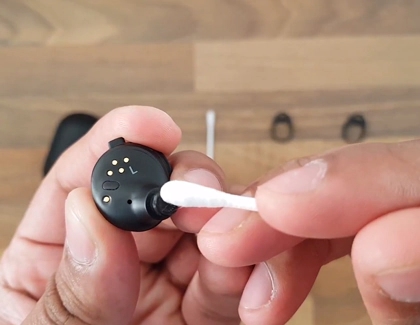
Step-by-step: how to clean Samsung earbuds safely
Follow these steps closely. Avoid excess liquid near the drivers.
- Prepare and power down
- Turn off your earbuds and remove them from the charging case.
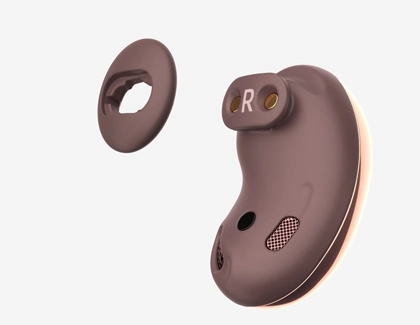
- If your model has removable tips, take them off carefully.
- Clean silicone or foam tips
- Wash silicone tips in warm water with a drop of mild soap.
- Rinse well and pat dry with a towel. Let air dry fully before reattaching.
- For foam tips, follow manufacturer guidance; some foam can be rinsed gently, others need replacement.
- Remove loose debris from the mesh
- Use a dry soft brush to sweep debris off the mesh.
- Brush in short, light strokes away from the driver.
- Don’t poke the mesh with metal objects.
- Disinfect surfaces and wipe housing
- Lightly dampen a microfiber cloth with 70% isopropyl alcohol.
- Wipe the earbud housings and stems. Avoid any openings.
- Use a barely damp cotton swab for tight seams.
- Clean the charging case
- Wipe the case interior and exterior with an alcohol-dampened cloth.
- Use a dry cotton swab for charging contacts. Avoid liquids inside the charging port.
- Reassemble and test
- Ensure all parts are fully dry before reattaching tips or charging.
- Power on and test sound. If muffled, repeat gentle brush cleaning of the mesh.
This step-by-step routine shows how to clean Samsung earbuds in a way that preserves sound and safety.

Deep cleaning and troubleshooting clogged drivers
If sound stays muffled after routine cleaning, your driver may be clogged.
- Try a soft brush and repeated light strokes across the mesh.
- Use a toothpick wrapped in tape to gently remove visible wax—never stick the tip into the driver.
- Do not use water or alcohol directly on the grill; it can push debris inward.
- If problems persist, consider professional cleaning or service.
From experience, most muffled sound clears after careful mesh cleaning. When in doubt, stop and seek professional help.
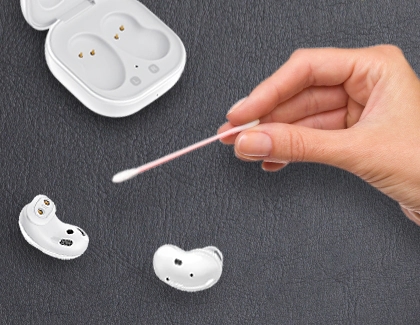
Cleaning the charging case properly
The case needs care too. Dirt in the case can transfer back to earbuds.
- Remove debris with compressed air or a soft brush.
- Wipe interior with a microfiber cloth slightly dampened with isopropyl alcohol.
- Clean charging pins gently with a dry cotton swab.
- Let the case dry face-down for at least 10 minutes before closing.
I once had a client who used water inside the case—this led to a non-working case. Avoid liquid near electronics.

Dos and don’ts when you clean Samsung earbuds
Do
- Remove tips before cleaning the drivers.
- Use 70% isopropyl alcohol on surfaces, not inside grills.
- Let parts dry completely before use.
Don’t
- Use sharp metal objects on the speaker mesh.
- Submerge earbuds or the case in water.
- Store wet earbuds in the case.
Following these rules prevents damage and maintains warranty coverage.

Maintenance routine: keep them clean longer
Small habits prevent big messes. Try this weekly routine:
- Wipe earbuds after workouts.
- Wash silicone tips weekly.
- Keep the case closed when not in use.
- Store earbuds in a clean, dry place.
In my work, clients who follow this routine need deep cleanings far less often.
Common mistakes I’ve made and lessons learned
I once used too much alcohol on the mesh and noticed a temporary drop in bass. Now I use a cloth dampened only slightly. I also learned that compressed air blasts can force grime deeper, so I use short controlled puffs. These practical lessons show the care needed when you clean Samsung earbuds.

Frequently Asked Questions of how to clean samsung earbuds
How often should I clean my Samsung earbuds?
Clean the earbud housings and tips weekly if you wear them daily. Do a deeper cleaning of the mesh and case every 2–4 weeks, depending on use.
Can I use water to clean Samsung earbuds?
Only use water for removable silicone tips. Never submerge earbuds or let water touch the speaker mesh or charging ports.
Is it safe to use alcohol on earbuds?
Yes for surfaces. Use 70% isopropyl alcohol lightly on cloths to disinfect housings and case. Avoid pouring alcohol into openings.
How do I remove earwax from the speaker mesh?
Use a soft-bristled brush and gentle strokes. If needed, a wrapped toothpick can lift visible grime, but don’t puncture the mesh.
Will cleaning my earbuds void the warranty?
Routine cleaning done carefully should not void a warranty. However, liquid damage caused by improper cleaning may affect coverage. Always follow manufacturer care instructions.
Conclusion
Cleaning Samsung earbuds is simple when you use the right tools and follow safe steps. Remove tips, brush the mesh gently, wipe housings with a slightly damp cloth, and keep the case clean and dry. Small habits prevent build-up and protect sound quality. Try the step-by-step routine today and keep your earbuds sounding great for years. Share your results or questions below, or subscribe for more hands-on tech care tips.

Everett Ashford is a tech reviewer at mytechgrid.com specializing in SSDs, cameras, TVs, earbuds, headphones, and other consumer electronics. He provides honest, data-driven reviews based on hands-on testing and real-world performance analysis. Everett simplifies complex tech details to help readers make smart, confident buying decisions.