Remove both Raycon earbuds from the charged case, then press and hold each button for two seconds.
Learning how to turn on Raycon earbuds is simple, but the exact steps can vary by model. Most Raycon earbuds power on as soon as you remove them from the charging case, while some models also support manual power controls. This guide explains the process, pairing steps, charging checks, common problems, and practical fixes in clear detail.
How to Turn On Raycon Earbuds
The fastest way to turn on Raycon earbuds is to remove both earbuds from the charging case. Most models switch on automatically when they leave the case.
Follow these steps:
- Charge the case and earbuds for at least a few minutes.
- Open the charging case.
- Remove both Raycon earbuds.
- Wait for the status lights to turn on.
- Listen for a startup sound or pairing message.
- Place the earbuds in your ears.
If the earbuds do not turn on automatically, press and hold the button or touch control on each earbud for about two seconds. The exact control may differ between Raycon models, so avoid pressing too hard on touch-sensitive earbuds.
When figuring out how to turn on Raycon earbuds, remember that the case acts like a small power station. If the case has no charge, it may not wake the earbuds or charge them when they are stored inside.

How to Turn On Raycon Earbuds Manually
Manual power-on is useful when the automatic feature does not work. It can also help if the earbuds were removed from the case but did not connect to your phone.
Try this process:
- Remove both earbuds from the charging case.
- Find the physical button or touch panel on each earbud.
- Press and hold the control for about two seconds.
- Watch for a flashing LED light.
- Wait for the earbuds to announce that they are ready or connected.
Some Raycon earbuds use a physical button. Others use touch controls. On a touch model, place your finger over the outer panel and hold it steady instead of tapping quickly.
Do not hold the controls for too long on the first attempt. A longer press may activate pairing mode or turn the earbuds off, depending on the model. If you are unsure how to turn on Raycon earbuds manually, check the quick-start guide that came with your specific model.
A useful rule is simple: a short hold usually powers the earbuds on, while a longer hold may enter pairing mode or shut them down.

How Raycon Earbuds Power On Automatically
Most Raycon wireless earbuds are designed to turn on when you remove them from the charging case. They may also turn off and begin charging when you put them back inside.
The automatic process usually works like this:
• The case detects that an earbud has been removed.
• The earbud leaves charging mode.
• The earbud powers on.
• Both earbuds try to connect with each other.
• The earbuds search for a previously saved Bluetooth device.
This feature saves time during daily use. You do not need to press a button each time you want to listen to music, take a call, or watch a video.
Still, automatic power-on can fail if the charging contacts are dirty, the earbud is not seated correctly, or the case battery is empty. If only one earbud turns on, return both earbuds to the case, close the lid, and wait about ten seconds. Then remove them together.
This reset-like step often restores the normal startup process. It is one of the first things to try when learning how to turn on Raycon earbuds without unnecessary troubleshooting.

How to Connect Raycon Earbuds to Your Phone
Turning on Raycon earbuds and connecting them to a phone are two separate steps. The earbuds can be powered on without being connected to Bluetooth.
To connect them for the first time:
- Turn on both Raycon earbuds.
- Keep them close to your phone.
- Open the phone’s Settings app.
- Select Bluetooth.
- Turn Bluetooth on.
- Look for your Raycon model in the available device list.
- Tap the model name.
- Accept the pairing request if one appears.
The device name may include “Raycon,” followed by the product or model name. After pairing, the earbuds should connect automatically whenever they are turned on and within range.
If your phone shows several old Raycon entries, select the one that matches your current earbuds. Old entries can cause connection confusion, especially after you replace one earbud or use the earbuds with more than one phone.
For the best result, keep the phone within a few feet of the earbuds during first-time setup. Bluetooth normally works across a wider distance, but walls, crowded wireless areas, and other electronics can weaken the signal.

How to Put Raycon Earbuds in Pairing Mode
Pairing mode allows your phone, tablet, or computer to find the earbuds. If the earbuds have never connected to a device, they may enter pairing mode automatically after you turn them on.
If they do not, use these steps:
- Turn off Bluetooth on nearby devices that previously used the earbuds.
- Place both earbuds in the charging case.
- Remove both earbuds at the same time.
- Press and hold the controls until the lights flash or the earbuds announce pairing mode.
- Open Bluetooth settings on your device.
- Select the Raycon earbuds.
The length of the button press varies by model. Some Raycon products enter pairing mode after several seconds, while others use a different touch pattern. Avoid guessing if your model has special controls. Use the model’s instruction guide when the usual method does not work.
After pairing, you should not need to repeat this process every time. The earbuds usually remember the last compatible device.
What to Do If Raycon Earbuds Do Not Turn On
If learning how to turn on Raycon earbuds has not solved the problem, check power first. A dead battery is the most common reason earbuds appear unresponsive.
Work through this list:
• Charge the case with a working USB cable and power adapter.
• Leave the earbuds inside the case for at least 15 to 30 minutes.
• Confirm that the case shows a charging light or battery indicator.
• Remove any plastic film covering the charging contacts.
• Clean the metal contacts with a dry, soft cotton swab.
• Make sure each earbud sits fully in its charging slot.
• Remove both earbuds and try the manual power-on method.
• Test the earbuds after restarting your phone.
Do not use water, household cleaner, or a sharp metal tool on the charging contacts. Moisture can damage the electronics, and metal tools may scratch or short the contacts.
If one earbud remains dark, compare its charging position with the working earbud. A small amount of dust can stop the earbud from touching the charging pins. In many cases, careful cleaning and correct placement solve the issue.

Why Only One Raycon Earbud Turns On
One earbud may fail to turn on because it did not charge, lost its connection with the other earbud, or entered a different operating state.
Try a complete resync:
- Turn off Bluetooth on your phone.
- Put both earbuds into the charging case.
- Make sure both earbuds show signs of charging.
- Close the case for about ten seconds.
- Remove both earbuds together.
- Turn Bluetooth back on.
- Connect to the Raycon earbuds again.
If the same earbud still does not work, clean its charging contacts and charge it for at least 30 minutes. Also check the phone’s audio balance settings. A balance control moved fully to one side can make a working earbud seem silent.
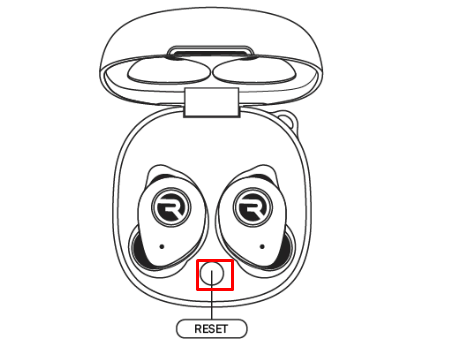
Some Raycon models use a reset procedure that requires holding both earbud controls for a set amount of time. Because the steps differ by model, use the instructions for your product rather than applying a random reset sequence.
How to Turn Off Raycon Earbuds
Turning off Raycon earbuds is usually just as easy as turning them on. Put both earbuds into the charging case and close the lid. Most models switch off and begin charging automatically.
You can also turn them off manually by pressing and holding the control on each earbud. The hold time depends on the model, but it is often longer than the power-on press.
Turning off the earbuds manually can help when:
• You want to save battery outside the case.
• You are switching to another Bluetooth device.
• The earbuds stay connected after removal.
• You want to prevent accidental taps.
If the earbuds remain connected after you place them in the case, check whether they are seated correctly. The case must touch the charging contacts to send the shutdown signal.

Common Mistakes to Avoid
Many problems related to how to turn on Raycon earbuds come from small setup mistakes rather than a serious hardware fault.
Avoid these common errors:
• Removing only one earbud during first-time pairing. Some models work best when both start together.
• Assuming the case is charged because it looks clean. Check its lights or battery level.
• Holding a control for too long. This may turn the earbuds off or activate pairing mode.
• Ignoring the charging contacts. Dirt can block power.
• Pairing with an old Bluetooth entry. Remove outdated entries if needed.
• Using a damaged cable. A cable may fit while failing to charge the case.
• Storing wet earbuds in the case. Moisture can damage both the earbuds and charging pins.
In practical device testing, the most reliable habit is to charge the case before troubleshooting the earbuds. It is similar to checking whether a car has fuel before diagnosing the engine. This simple step prevents a lot of wasted effort.

Battery and Charging Tips
Battery care affects how quickly Raycon earbuds turn on and how long they stay connected. Keep the earbuds in their case when you are not using them. This protects them and helps maintain a charge.
Use these habits:
- Charge the case before it reaches zero.
- Keep the charging port free from dust.
- Store the case in a cool, dry place.
- Avoid leaving the case in direct sunlight or a hot car.
- Do not force an earbud into its charging slot.
- Use a suitable charging cable.
- Allow damp earbuds to dry fully before charging.
Lithium-ion batteries naturally lose capacity over time. Run time may become shorter after extended use, and that does not always mean the earbuds are defective. A noticeable drop in battery life, swelling, heat, or a damaged case requires extra caution. Stop using damaged equipment and contact Raycon support.
Raycon Earbuds and Bluetooth Troubleshooting
If the earbuds turn on but will not connect, the issue is likely Bluetooth rather than power. Start by turning Bluetooth off and on again.
Then try the following:
• Restart your phone, tablet, or computer.
• Move away from other active Bluetooth devices.
• Remove the Raycon earbuds from the device’s saved Bluetooth list.
• Put the earbuds back into pairing mode.
• Search for them again.
• Install available software updates on your phone.
A phone may remember the earbuds but fail to complete the connection. Removing the saved device profile gives the phone a clean start.
Also check whether the earbuds are connected to another nearby device. Bluetooth earbuds often reconnect to the last device used. Temporarily turning Bluetooth off on that device can make the correct connection much easier.
Frequently Asked Questions About How to Turn On Raycon Earbuds
Do Raycon earbuds turn on automatically?
Yes, most Raycon earbuds turn on when you remove them from the charging case. If they do not, press and hold the button or touch control on each earbud for about two seconds.
How do I turn on Raycon earbuds without the case?
Remove the earbuds and press and hold the control on each one. If the batteries are empty, the earbuds will not turn on until they receive enough charge.
Why are my Raycon earbuds not turning on?
The case or earbuds may be out of power, or the charging contacts may be dirty. Charge the case, clean the contacts with a dry cotton swab, and try removing both earbuds together.
How long should I hold the Raycon earbud button?
A short hold of about two seconds often turns the earbuds on. The exact time varies by model, so check your model’s guide if this does not work.
How do I know when Raycon earbuds are on?
The status lights may flash, and you may hear a startup or connection sound. Your phone may also show the earbuds as available in its Bluetooth settings.
Can I use only one Raycon earbud?
Many Raycon models support single-earbud use, but the available controls and features can vary. Turn on the earbud you want to use and connect it through your device’s Bluetooth menu.
How do I reset Raycon earbuds?
The reset process depends on the model. A common approach is to forget the earbuds in Bluetooth settings, place both earbuds in the case, and follow the model-specific reset instructions.
Conclusion
The easiest way to turn on Raycon earbuds is to remove them from a charged case and wait for the automatic startup. If that fails, press and hold the control on each earbud, then check the battery, charging contacts, and Bluetooth settings.
Keep both earbuds charged, store them in the case, and use the instructions for your exact Raycon model when controls differ. Try these steps today, and explore Raycon’s official support resources or share your experience if you still need help.

Everett Ashford is a tech reviewer at mytechgrid.com specializing in SSDs, cameras, TVs, earbuds, headphones, and other consumer electronics. He provides honest, data-driven reviews based on hands-on testing and real-world performance analysis. Everett simplifies complex tech details to help readers make smart, confident buying decisions.