Use an RF detector, monitor video drops, and look for heat or LED anomalies to detect a camera jammer.
I have spent years testing security equipment and investigating signal interference in real-world settings. In this guide I’ll show you exactly how to detect a camera jammer, explain why jammers work, walk through the tools and steps I use, and give practical tips you can apply now. Read on to learn clear, tested methods for finding a camera jammer and protecting your surveillance system.

What a camera jammer is and why detection matters
A camera jammer blocks or scrambles video by emitting radio frequency (RF) or infrared (IR) interference. Jammers disrupt wireless feeds or confuse image sensors, causing blackouts or artifacting. Detecting a camera jammer quickly restores security and preserves evidence. Knowing how to detect a camera jammer cuts downtime and prevents repeated attacks.

How camera jammers work: basics you should know
Jammers send noise on the same frequencies used by cameras or their transmitters. Some use wideband RF bursts that overwhelm signals. Others exploit IR illumination or shine strong light into lenses to blind cameras. Understanding these methods makes it easier to spot and counteract interference. This chapter explains common jammer types and their signs.

Common signs that show how to detect a camera jammer
Video feed problems are the first clues. Cameras may show frozen frames, static, garbled video, or complete loss of signal. Physical signs include unusual LEDs, warm housings, or new devices near camera lines. Network logs can show repeated packet errors or sudden drops in signal strength. Watch for patterns like interference starting at specific times or when a vehicle is nearby.

Tools and equipment to detect a camera jammer
You do not need specialist gear to start, but certain tools speed detection and increase accuracy.
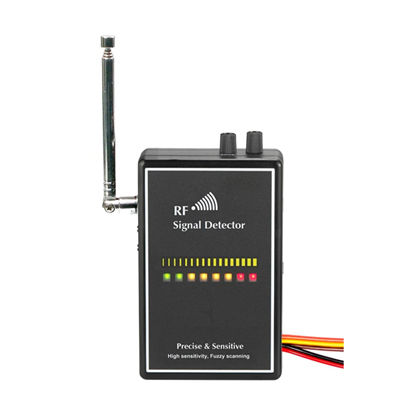
- RF detector: Scans for abnormal RF energy in the bands used by your cameras.
- Spectrum analyzer app or handheld: Provides a clearer view of frequency spikes.
- Thermal camera or infrared thermometer: Spots hot devices that may be active jammers.
- Directional antenna or yagi: Helps locate the direction of a strong RF source.
- Laptop with packet capture tools: Shows network-level drops and retransmissions.
- Simple flashlight and mirror: Useful for checking optical jamming or IR floods.
Using these tools together creates a layered approach to how to detect a camera jammer.
Step-by-step detection process you can follow
Follow these clear steps to find a jammer quickly.
- Verify symptoms: Confirm whether the issue is only one camera, a group, or all cameras.
- Check cables and power: Rule out loose connectors, power failures, or damaged cables.
- Monitor the feed: Note exactly when interference occurs and whether it follows a pattern.
- Scan RF bands: Use an RF detector to scan the frequencies your cameras use. Look for spikes when interference happens.
- Use direction finding: With a directional antenna, move around to see where signal strength increases.
- Inspect on site: Look for unfamiliar devices, strong lights aimed at lenses, or vehicles parked nearby.
- Capture network logs: Review packets for drops or retransmits during the incident period.
- Isolate and test: Temporarily swap the camera or switch to wired mode to confirm jamming.
Each step answers part of the question of how to detect a camera jammer and narrows down the cause.
Practical examples and real-life lessons from my experience
I once investigated repeated camera blackouts at a small retail store. The feed dropped every night between 1:15 and 1:30 a.m. Using a handheld RF detector, I found a narrow burst on the camera band nearby. Walking the perimeter with a directional antenna led to a parked delivery van that turned on a mobile signal booster. After discussing the issue with building management and repositioning the camera, the problem stopped. Key lessons:
- Check the environment first; interfering devices are often nearby.
- Timing patterns help pinpoint mobile or scheduled sources.
- Always document interference times and test after each change.
These examples show practical ways to detect a camera jammer and fix it.
Safety, legal, and ethical considerations
Jamming is illegal in many places and can endanger safety systems. If you suspect a jammer, document evidence but avoid confronting individuals aggressively. Notify building security or law enforcement when necessary. Use detection tools responsibly and follow local regulations when conducting sweeps. Being aware of legal limits protects you and strengthens any official complaint.
Preventive measures and hardening your cameras
Preventing jamming reduces the need to detect it later. Useful steps include:
- Use wired or fiber links where possible to avoid RF vulnerabilities.
- Employ encrypted, frequency-hopping wireless links for resilience.
- Add redundancy with multiple camera angles or overlapping coverage.
- Install tamper and motion notifications on camera housings.
- Regularly review logs and perform test sweeps for interference.
These steps lower risk and make future detection easier.
Advanced detection techniques for professionals
For complex installations use advanced methods.
- Spectrum analysis over time: Log RF levels to spot patterns or slow sweeps.
- Correlate telemetry: Match camera diagnostics with RF events and time stamps.
- Passive listening: Record background RF and compare during incidents.
- Use multiple detectors simultaneously: Cross-check readings to reduce false positives.
Advanced techniques deepen your ability to detect a camera jammer in sophisticated attacks.
Frequently Asked Questions of how to detect a camera jammer
What immediate sign shows a camera is being jammed?
The most immediate sign is sudden loss of video, severe static, or repeating patterns of dropouts that aren't explained by power or cable faults.
Can a jammer block wired cameras?
Most jammers target wireless links, but optical jamming or physical tampering can affect wired cameras too; always inspect physical connections and lenses.
How accurate are RF detectors for finding jammers?
RF detectors are effective for spotting unusual transmissions, but directional antennas and spectrum analysis improve localization and reduce false positives.
Is it legal to use a jammer detector on public property?
Using a detector is generally legal, but recording or acting on private signals can have legal limits; follow local laws and document findings responsibly.
How do I differentiate between network issues and jamming?
Check cabling and power first, then correlate packet loss or retransmits with RF spikes; if interference aligns with RF activity, jamming is likely.
Conclusion
Detecting a camera jammer means combining careful observation, the right tools, and methodical testing. Start with basic checks, use RF scanning and direction finding, and document each step. Protect systems by hardening links and creating redundancy so a jammer cannot easily blind your cameras. Take action now: schedule a sweep, test your feeds, and subscribe to updates or leave a comment below with your experiences to keep learning together.

Everett Ashford is a tech reviewer at mytechgrid.com specializing in SSDs, cameras, TVs, earbuds, headphones, and other consumer electronics. He provides honest, data-driven reviews based on hands-on testing and real-world performance analysis. Everett simplifies complex tech details to help readers make smart, confident buying decisions.