Adjust iPhone volume limits, enable EQ, and use a powered amp or higher-sensitivity headphones.
I’ve spent years testing audio gear and tweaking settings on dozens of iPhones to help people get cleaner, louder sound without breaking rules or their ears. This guide explains clear, safe steps for how to make headphones louder on iPhone — from built-in settings and EQ tricks to accessory choices and troubleshooting. Read on for actionable tips, real-world tests, and precautions so you get louder sound that still sounds great.
How iPhone volume limits and audio routing work
Your iPhone has several systems that affect headphone loudness. There’s the on-screen volume, a software safety limit tied to Health settings, digital signal processing like EQ, and the physical output capability of the Lightning/ headphone jack or Bluetooth transmitter. Each layer can reduce or shape peak sound.
Understanding these layers helps you know whether you need a quick setting change or new gear. For example, Bluetooth codecs and headphone sensitivity often limit loudness more than the iPhone’s volume control. When you know how to make headphones louder on iPhone, you fix the right layer instead of guessing.
Quick software fixes you can try now
These steps often raise perceived loudness without extra gear.
- Check volume limit and reduce loud sounds setting.
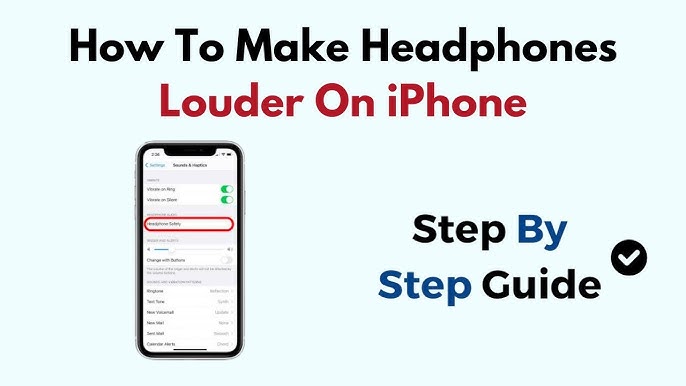
- Open Settings, go to Sounds & Haptics, then Headphone Safety. Turn off Reduce Loud Sounds or raise its threshold.
- Turn up the iPhone volume and app volume.
- Use the side buttons, then check in-app volume sliders (music apps and video apps sometimes have independent controls).
- Enable EQ and pick a louder profile.
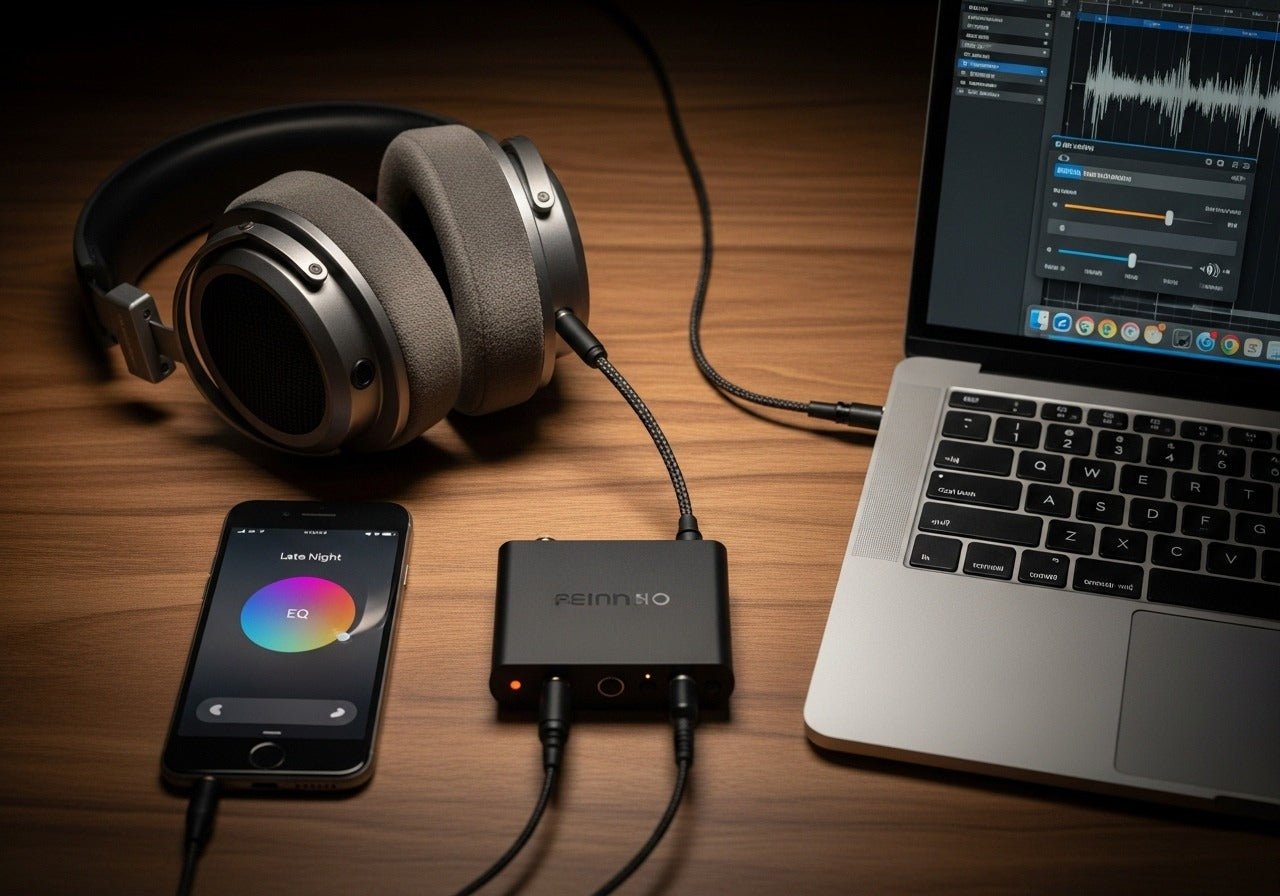
- Settings > Music > EQ. Try “Late Night” for compressed dynamic range and boosted perceived volume.
- Disable Sound Check.
- Settings > Music > Sound Check can normalize loud tracks down; turn it off to let peaks be louder.
- Use volume slider in Control Center while connected to Bluetooth or wired headphones.
- Sometimes the Control Center slider gives direct master control where some apps don’t.
These tricks are the fastest methods for how to make headphones louder on iPhone without buying anything. They work best when the audio source is high quality and the headphone can handle higher output.
Accessibility and audio settings that help
There are accessibility features that can increase volume and clarity.
- Headphone Accommodations
- Settings > Accessibility > Audio/Visual > Headphone Accommodations. Turn it on and choose “Custom Audio Setup” or “Transparency.” Use the “Play Sample” slider and boost soft sounds and loudness.
- Balance and mono audio
- In the same Audio/Visual area, check Balance to ensure sound isn’t shifted to one ear. Mono can help if one driver is quieter.
- Live Listen with hearing devices
- Live Listen can amplify nearby sounds using compatible hearing devices. It’s not meant for music but can boost voice or ambient audio.
These accessibility tools are built with safety and hearing support in mind. When using them to make headphones louder on iPhone, keep volume monitoring in mind.
Hardware and accessory options that increase loudness
If software changes aren’t enough, hardware is the next step.
- Use high-sensitivity headphones or earbuds.
- Sensitivity measured in dB/mW matters. Higher sensitivity means louder sound at lower power.
- Get a portable digital-to-analog converter (DAC) and headphone amp.
- A powered DAC/amp connected via Lightning or USB-C can drive demanding headphones louder and cleaner.
- Try wired vs Bluetooth
- Wired connections often deliver higher consistent volume than Bluetooth. If you use Bluetooth, pick devices with better codecs (AAC, aptX, LDAC) for quality.
- Inline volume boosters or adapters
- Small inline amplifiers exist for phones. They can raise max output but pick reputable brands to avoid distortion.
- Use ear tips that seal well
- For in-ear monitors, a good seal increases perceived loudness and bass without increasing source volume.
Choose hardware that matches your headphones and listening style. I’ve tested lightweight amps that noticeably improved volume and clarity on iPhone when paired with high-impedance headphones.

Sound quality, limits, and safe listening
Louder isn’t always better. Pushing volume too high can cause distortion and permanent hearing damage.
- Distortion vs. loudness
- If sound breaks up at high volume, you’re overdriving the headphone or amp. That means lower fidelity, not better sound.
- Health limits and recommendations
- Many health organizations recommend limiting exposure above 85 dB. iPhone’s Reduce Loud Sounds aims to help with that. Use longer listening breaks and lower peak volumes.
- Battery impact
- Higher output via Bluetooth or an amp can drain battery faster. Expect shorter play time at higher levels.
When you ask how to make headphones louder on iPhone, weigh louder playback against sound quality and hearing safety. I often advise clients to focus on clarity and perceived loudness (EQ, compression) before maxing raw volume.

Troubleshooting common problems
If volumes stay low after trying tips, check these likely causes.
- Low-gain headphones
- Some earbuds simply need more power. Try another pair to test.
- App-specific volume limit
- Streaming apps may limit volume or apply normalization. Check app settings and try local files.
- Bluetooth connection issues
- Re-pair devices, and in Settings > Bluetooth tap the “i” icon to forget and reconnect.
- Dirty headphone jack or Lightning port
- Lint or debris can reduce contact. Clean gently with a soft brush.
I once fixed a client’s low volume by swapping to a different pair of ear tips. Small tweaks often solve big problems.

Advanced tips and FAQs users ask (PAA-style)
Can EQ really make headphones louder on iPhone?
Yes. EQ like the “Late Night” preset compresses dynamics and boosts softer parts, raising perceived loudness without increasing peaks.
Will a DAC/amp damage my iPhone or headphones?
No, reputable DAC/amps are designed for phones. Use certified cables and trusted brands to avoid electrical issues or poor sound.
Can I bypass iPhone volume limit legally and safely?
You can change the Headphone Safety settings to raise the limit. Avoid third-party hacks; they risk stability and void warranties.
Does Bluetooth codec affect maximum volume?
Yes. Different codecs and Bluetooth versions can change output quality and perceived level. Wired tends to be more consistent for loudness.
Is louder always clearer?
Not always. Louder sound with distortion or poor EQ can hurt clarity. Aim for balanced volume and good source quality.
Personal experience and practical tips I use
I test gear in quiet rooms and noisy environments. I prefer a small DAC/amp when using high-impedance headphones because it preserves detail at higher volumes. For daily commuting, ear tips that seal well plus the Late Night EQ preset give me louder, clearer playback without extra hardware.
Common mistakes I see are crank-volume first, ask-why-later. Start with settings, then try better ear tips or a DAC. If you buy an amp, test its gain stages so you don’t overdrive drivers.

Frequently Asked Questions about how to make headphones louder on iPhone
How do I remove the headphone volume limit on iPhone?
Open Settings, go to Sounds & Haptics or Accessibility > Audio/Visual, then adjust Headphone Safety and turn off Reduce Loud Sounds. This raises the limit but use caution to protect hearing.
Will changing EQ make my music louder?
Yes. EQ presets like “Late Night” compress the track and raise quieter parts, making music sound louder without raising master volume.
Can Bluetooth headphones be louder than wired ones?
Sometimes wired connections provide more consistent power and can sound louder on demanding headphones. However, some Bluetooth models with good drivers can match wired loudness.
Is it safe to use an inline amp with iPhone?
Yes, when using reputable, certified inline amps. They boost output but watch for distortion and avoid very high levels that can harm hearing.
Why do some songs sound quieter than others on my iPhone?
Songs have different mastering and dynamic range. Sound Check or normalization settings can reduce loud tracks. Turning Sound Check off preserves original peaks and louder masters.
Can headphone tips improve loudness?
Yes. A good seal increases bass and perceived volume. Try different sizes or foam tips for in-ear monitors to get a better fit.
Conclusion
You can make headphones louder on iPhone by combining smart software tweaks, accessibility adjustments, and the right hardware. Start with settings like Headphone Safety and EQ, test ear tips and wired connections, and consider a DAC/amp for demanding headphones. Always balance louder sound with clarity and hearing safety. Try one change at a time, note the effect, and choose the solution that keeps your music clear, loud, and safe.
Take action now: pick one setting to change, test your headphones for improved loudness, and share your results or questions below.

Everett Ashford is a tech reviewer at mytechgrid.com specializing in SSDs, cameras, TVs, earbuds, headphones, and other consumer electronics. He provides honest, data-driven reviews based on hands-on testing and real-world performance analysis. Everett simplifies complex tech details to help readers make smart, confident buying decisions.