Yes. Bone conduction headphones can make noise that other people hear, but usually less than traditional headphones. They send sound through vibrations in the bones near your ears. Since they do not fully cover your ear canals, some sound can also escape into the air.
For people in the United States, this matters most in quiet places such as offices, libraries, classrooms, airplanes, and shared rooms. At a normal volume, the sound leak may be faint. At a high volume, nearby people may hear music, speech, or a light buzzing sound.
Introduction
Bone conduction headphones are not silent. They leave your ears open, which helps you hear traffic, coworkers, alarms, and other sounds around you. That design also means a small amount of sound can travel through the air.
The amount of noise depends on the model, volume, fit, audio type, and room. A spoken podcast at a low level may be hard for others to hear. Loud music with strong bass is much more likely to be noticeable.
This guide explains why bone conduction headphones make noise, how much sound they may leak, and how to reduce it without risking your hearing.

Why Do Bone Conduction Headphones Make Noise?
Bone conduction headphones make noise because their vibrating transducers move the skin and air around them. The vibrations reach the inner ear through the bones of the skull. However, the vibrations also create a small amount of sound in the surrounding air.
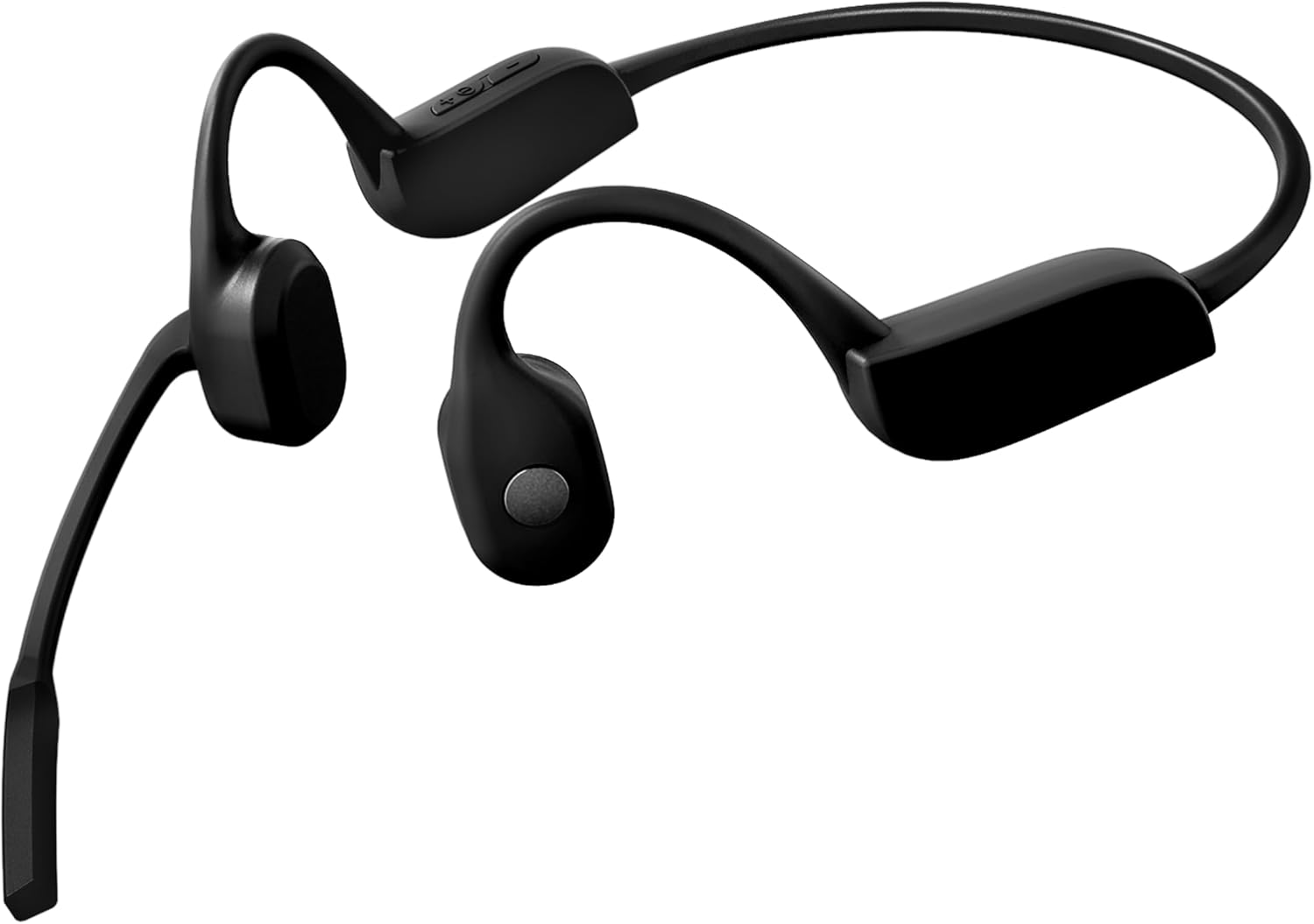
A typical pair has two small transducers. These sit near the cheekbones, usually just in front of the ears. They do not send sound into the ear canal like earbuds do.
The process has two paths:
- Bone path: Vibrations travel through the bones to the inner ear.
- Air path: The vibrating parts and nearby skin create sound that travels through the air.
The bone path is the main goal. The air path is the reason some sound leakage occurs.
Bone conduction does not mean “sound-free”
The term “bone conduction” can sound as if the headphones bypass all outside noise. That is not quite true. They bypass the ear canal, but they still use physical vibration.
Some vibration remains audible to other people. It may sound like:
- Faint music
- Muffled speech
- A soft buzz
- A thin, tinny sound
- Bass pulses at higher volume
Sound leakage is normally most noticeable when another person is very close. It may be less noticeable outdoors or in a busy gym.
Why sound can seem louder to the wearer
The wearer receives sound through the bone path. This can make the audio seem clear even when the air leakage is modest. A nearby person does not receive the same bone-conducted signal. They hear only the weaker sound that escapes into the air.
This creates a useful difference:
- You may hear full speech or music.
- Someone beside you may hear only a faint, unclear version.
The effect is similar to speaking softly through a closed door. The listener may hear that a sound exists, but not every word.
How Much Sound Do Bone Conduction Headphones Leak?
Bone conduction headphones usually leak a small amount of sound at moderate volume. They can leak much more at high volume or when the transducers do not sit firmly against the skin.
There is no single leakage level for every model. Results vary because brands use different transducers, shapes, materials, and sound settings. A quiet room also makes a small leak seem larger.
The following table shows the usual pattern:
| Situation | How noticeable the sound may be |
|---|---|
| Low volume in a busy street | Usually difficult to notice |
| Moderate volume outdoors | Often minimal |
| Moderate volume in a quiet office | May be faintly audible nearby |
| High volume in a quiet room | Often noticeable |
| Very high volume at close range | May be clear enough to identify |
| Poor fit or loose placement | More leakage is likely |
These are practical generalizations, not laboratory ratings. A product’s official specifications may describe battery life, water resistance, or wireless features, but they often do not provide a standard sound-leakage measurement.
Distance changes what others hear
Sound gets weaker as it moves away from its source. A person sitting next to you may hear leakage that someone across the room cannot hear.
The listener’s position matters too. Someone behind you may hear a different level than someone facing you. The room also changes the result. Hard walls can reflect sound, while carpets, curtains, and furniture can absorb it.
Music leaks more than speech
Music often makes leakage easier to notice. It contains bass, drums, and sustained tones that can travel through the air.
Speech and podcasts may be less obvious, especially when the volume is low. Still, a listener close to you might hear the speaker’s voice as a faint murmur.
Active noise cancellation does not solve leakage
Some open-ear headphones use microphones and digital processing. These features may improve what you hear, but they do not guarantee privacy.
Noise cancellation can reduce outside sound for the wearer. It does not always reduce the sound created by the transducers. In some cases, a user may raise the volume to overcome background noise, which can increase leakage.

What Makes Bone Conduction Headphones Louder to Other People?
Volume is the biggest factor. The higher the volume, the stronger the vibration and the greater the chance that someone nearby will hear it.
Other factors matter as well.
1. Volume setting
Start at the lowest level that lets you understand the audio. If you raise the volume in a loud place, sound leakage may increase quickly.
A high setting also creates a hearing risk. The National Institute on Deafness and Other Communication Disorders explains that loud sounds can damage hearing over time. Risk depends on both sound level and exposure time.
2. Headphone fit
The transducers should rest firmly near the cheekbones. If they sit away from the skin, the headphones may need more power to sound clear to you. That can increase the chance of audible leakage.
A poor fit can also make the sound thin or weak. Do not solve that problem by immediately turning the volume up. Adjust the position first.
3. Head shape and hair
Bone conduction headphones sit outside the ear, but hair, glasses, helmets, and hat straps can affect their position. Thick hair between the transducer and skin may reduce contact.
The best position differs slightly from person to person. Move the transducers a small amount until the sound becomes clear at a lower volume.
4. Audio type
Bass-heavy music often leaks more than spoken audio. Sound with strong low tones can create more noticeable vibration.
A compressed or distorted recording may also seem louder. Check the source audio before assuming the headphones are defective.
5. The room
Quiet rooms expose small sounds. In a library, even a faint buzz may disturb someone nearby. On a sidewalk, in a train station, or at a busy gym, the same leakage may go unnoticed.
6. Headphone design
Models differ in their transducer design and physical contact. A device with a stronger output may sound clearer to the wearer, but it can also be more audible to others at high settings.
Read the manual for the exact model. Do not assume that every bone conduction headset behaves in the same way.

How to Stop Bone Conduction Headphones From Making So Much Noise
You cannot remove all sound leakage while using an open-ear design. You can usually reduce it with a few simple steps.
1. Lower the volume first
Reduce the volume until the audio remains clear but no longer feels forceful. This is the most useful step for both leakage and hearing protection.
If speech is hard to understand, improve the fit before raising the volume.
2. Place the transducers correctly
Set each transducer on the skin near the cheekbone. Keep the contact steady. Follow the model’s instructions because exact placement can vary.
The headphones should not press painfully. They should also not float away from the skin.
3. Use a better audio source
Check whether the problem comes from the recording or app. Try:
- A different podcast
- Another music track
- A lower bass setting
- A normal equalizer setting
- A different streaming app
Heavy bass can make leakage more noticeable.
4. Test the headphones in the room where you will use them
Play audio at your usual volume. Ask someone to stand at the distance that matters.
For example:
- At arm’s length in a quiet office
- Across a desk in a classroom
- Beside you on a plane
- A few feet away in a home
Test with speech and music. This gives a more useful answer than a general product claim.
5. Use a private listening device when privacy matters
Bone conduction headphones are not designed for private listening. If nearby people must not hear the audio, use a well-sealed headset or earbuds when safe and suitable.
Do not use noise-isolating headphones when you need to hear traffic, alarms, announcements, or coworkers.

Are Bone Conduction Headphones Safe for Your Hearing?
Bone conduction headphones can still damage hearing if they play sound too loudly for too long. The fact that they bypass the ear canal does not remove the risk.
The inner ear contains delicate sensory cells. Loud sound can harm these cells. According to CDC hearing-loss guidance, repeated exposure to loud noise can lead to hearing loss.
Bone conduction headphones may feel different from earbuds, but “feels comfortable” does not prove that the sound level is safe. Comfort, clarity, and safety are separate issues.
Safer listening habits
Use these basic habits:
- Keep the volume as low as practical.
- Take listening breaks.
- Avoid increasing the volume to overpower loud surroundings.
- Use hearing protection in very noisy places.
- Stop if you notice ringing, muffled hearing, pain, or unusual sensitivity.
- Follow warnings in the device manual.
The World Health Organization’s safe listening guidance also supports lower volume, shorter exposure, and regular breaks.
Open ears do not make every activity safe
Open-ear headphones can help you hear your surroundings. That can be useful for walking, running, cycling, and work tasks. They do not make a person fully aware of traffic or prevent distraction.
Keep the volume low near roads, crossings, construction areas, and emergency vehicles. In the United States, local laws and workplace rules may also restrict headphone use during certain tasks.

Is Sound Leakage the Same as Static or Buzzing?
No. “Noise” can mean sound that other people hear, or it can mean unwanted sound in your own audio.
Sound leakage
Sound leakage is the audio that escapes into the room. It is usually caused by:
- High volume
- Close listening distance
- A quiet room
- Strong bass
- Poor transducer contact
Hiss, crackling, or buzzing
A hiss or buzz that you hear may come from:
- Bluetooth interference
- Low battery
- A poor wireless connection
- A damaged cable or charging port
- Audio distortion
- A software problem
- A defective transducer
Try these checks:
- Turn the volume down.
- Fully charge the headphones.
- Disconnect and pair them again.
- Test a different phone or computer.
- Move away from Wi-Fi routers and other wireless devices.
- Check whether the noise occurs with every app.
- Update the device if the manufacturer provides an update.
- Contact the manufacturer if the sound remains.
If the buzzing occurs only at high volume, the signal may be clipping or the transducer may be reaching its limit. If it occurs at every volume and with several devices, a hardware fault becomes more likely.

Bone Conduction Headphones vs. Open-Ear Speakers
Bone conduction headphones and open-ear speaker headphones are related but not identical.
| Feature | Bone conduction headphones | Open-ear speaker headphones |
|---|---|---|
| Main sound path | Vibrations through nearby bones | Sound through the air |
| Ear canal | Left open | Left open |
| Sound leakage | Usually present | Usually present and may be more obvious |
| Surrounding awareness | Usually good | Usually good |
| Privacy | Limited | Limited |
| Fit concern | Transducer contact matters | Speaker direction matters |
Open-ear speaker models place tiny speakers near the ears. Bone conduction models place vibrating transducers against the head.
Neither type provides full audio privacy. The better choice depends on what you need. Bone conduction may suit people who dislike ear tips or need a secure fit. Open-ear speakers may sound more natural to some listeners. The exact result depends on the model and volume.
Common Mistakes to Avoid
Assuming “bone conduction” means no one can hear it
It does not. The headphones can still produce airborne sound. Test them before using them in a quiet shared space.
Turning the volume up because the ears feel open
Open ears can make music seem less isolated. That may lead you to increase the volume. Keep the setting low enough that you can still notice important sounds around you.
Judging leakage from one short test
Leakage changes with music, fit, room noise, and distance. Test more than one track and use the room where the headphones will be used.
Wearing them too loosely
A loose fit may reduce clarity and encourage higher volume. Adjust the position before changing the volume.
Expecting private calls
A call may still be audible to someone nearby. Also, microphone quality can change in wind or busy places. Use a private device for sensitive calls.
Frequently Asked Questions
Can people hear bone conduction headphones in a quiet room?
Yes. At moderate or high volume, a person close to you may hear faint music or speech. At low volume, the sound may be hard to notice, but it is not guaranteed to be silent.
Do bone conduction headphones leak more sound than earbuds?
Usually, sealed earbuds provide more privacy because they send sound into the ear canal. Bone conduction headphones leave the ear open, so some sound can escape. The exact difference depends on fit, volume, and model.
Can I use bone conduction headphones in a library?
You can, but use a low volume and test for leakage. In a very quiet library, even a soft sound may bother another person. Follow the library’s rules.
Do bone conduction headphones work without sound leakage?
No. All practical bone conduction headphones can create some airborne sound. A model may reduce leakage, but it cannot promise complete silence to people nearby.
Why do my bone conduction headphones buzz?
A buzz may result from wireless interference, low battery, poor contact, audio distortion, or a hardware problem. Test another device, reconnect Bluetooth, lower the volume, and contact the manufacturer if the issue continues.
Key Takeaways
- Bone conduction headphones can make noise that others hear.
- Most leakage comes from sound created by the vibrating transducers.
- High volume, poor fit, strong bass, and quiet rooms make leakage more noticeable.
- Open ears do not remove the risk of hearing damage.
- Lower the volume and adjust the fit before troubleshooting further.
- Use sealed headphones when audio privacy is essential.
Conclusion
Bone conduction headphones are quieter to others than many traditional speakers, but they are not silent. Their transducers send vibrations through the bones while also creating a small amount of sound in the air.
For most users, the best approach is simple: place the headphones firmly, keep the volume moderate, and test them in the setting where you plan to use them. If privacy matters, choose headphones designed to seal the ear instead.

Everett Ashford is a tech reviewer at mytechgrid.com specializing in SSDs, cameras, TVs, earbuds, headphones, and other consumer electronics. He provides honest, data-driven reviews based on hands-on testing and real-world performance analysis. Everett simplifies complex tech details to help readers make smart, confident buying decisions.