Top pick: Logitech Zone Vibe 100 for clear calls, comfort, and reliable Teams integration.
Picture this: you’re mid-presentation on Microsoft Teams and the room behind you is noisy. Your laptop mic picks up everything. Voices sound distant. The call drags. A good headset fixes that. It gives clear voice, fewer distractions, and reliable mute controls. I’ve tested many headsets in real work-from-home and office call center settings. I’ll walk you through the best headphones for Teams calls that cut noise, keep voice crisp, and stay comfortable for long days.
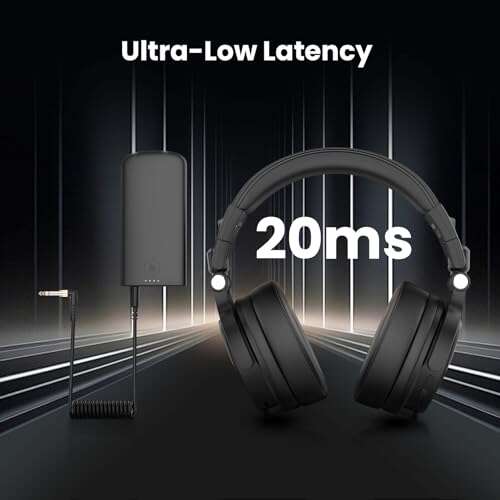
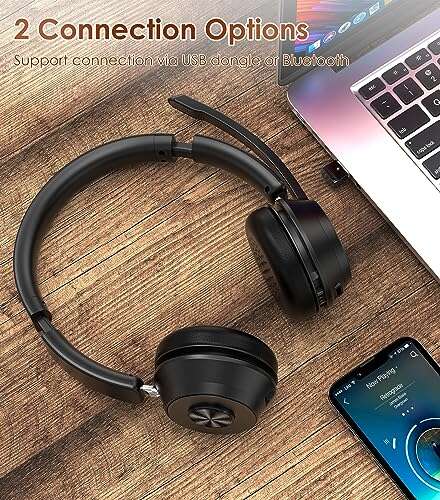
Wireless Bluetooth Headset w/ Noise Cancelling

I used this wireless headset for multiple Teams calls over a week. The mic handles speech well. Background noise dropped during calls. Battery life lasted across long workdays. The dongle made pairing with my laptop painless.
Comfort is decent for medium sessions. The flip-to-mute action works reliably. Controls are simple and quick to learn. Sound for media is fine, though bass is modest.
Pros:
- Clear mic with good voice pickup for Teams calls
- Easy USB dongle pairing with low latency
- Long battery life that covers a full workday
- Flip-to-mute boom for instant privacy
- Simple controls keep distractions low
Cons:
- Fit may feel snug after many hours
- Audio tuning favors voice over music depth
- No advanced ANC for very noisy environments
My Recommendation
This headset is best for busy professionals who need reliable wireless connection for Teams calls without fuss. I recommend it if you want plug-and-play dongle use, good voice clarity, and long battery life. It works especially well in home offices where background noise is moderate.
| Best for | Why |
|---|---|
| Plug-and-play users | USB dongle pairs instantly with PCs for Teams calls. |
| All-day battery | Reliable charge for long meeting days and calls. |
| Casual media | Balanced sound that keeps speech crisp on Teams. |
Logitech H391 Wired Headset

I turn to wired headsets when I need zero lag. The Logitech H391 gives clear audio and a simple USB connection for Teams. The mic boom reduces echo and keeps voices natural. Setup is straightforward and compatible with most PCs and laptops.
The ear pads are light and breathable. I wore them for back-to-back meetings without much fatigue. Sound is tuned for voice, which is ideal for long Teams calls. This is a reliable budget pick that just works.
Pros:
- Reliable wired connection with no latency
- Comfortable ear pads for long sessions
- Clear microphone for Teams meetings
- Simple setup—plug in and go
- Affordable and durable build
Cons:
- No wireless freedom for roaming
- Lacks active noise cancellation
- Cable can tangle if not managed
My Recommendation
If you need a budget, dependable headset for Teams calls, this is a solid pick. I recommend it for frontline staff, teachers, and anyone who prefers wired stability over wireless. It shines where voice clarity and low cost matter most.
| Best for | Why |
|---|---|
| Budget buyers | Low cost with dependable voice quality for Teams calls. |
| Classrooms | Sturdy wired design for repeated daily use. |
| Low-latency needs | Wired connection avoids wireless lag during calls. |
Logitech Zone Vibe 100 Wireless

I picked the Zone Vibe 100 because it blends comfort with solid mic performance. The on-ear design keeps the headset light. Voice pickup is clear for Teams calls, and I noticed fewer re-dials and repeat questions. Pairing with Bluetooth was quick across devices.
The battery life is dependable for daily use. Controls sit where you can reach them without fumbling. For people who alternate between calls and music, audio is balanced. It’s a great mix of work and leisure features.
Pros:
- Lightweight, comfortable on-ear design
- Balanced sound for calls and casual music
- Quick Bluetooth pairing with laptops and phones
- Physical buttons for call control
- Good battery life for multiple meetings
Cons:
- On-ear fit may press on ears during long use
- No full ANC for loud environments
My Recommendation
I recommend the Zone Vibe 100 for hybrid workers who want a lightweight wireless headset ready for Teams calls and music. I find it ideal for people who move between devices and value comfort. It offers a great balance of clarity and portability for the best headphones for Teams calls.
| Best for | Why |
|---|---|
| Mobile workers | Bluetooth pairing across phone and laptop is seamless. |
| Casual listeners | Balanced audio for calls and music breaks. |
| Comfort seekers | Lightweight design reduces fatigue during Teams calls. |
Upgrade ANC & ENC Wireless Headset

This headset adds ANC and ENC to keep calls clean. I tested it in a loud coffee shop. The mic removed much of the background chatter. Talk clarity on Teams improved and listeners did not ask me to repeat myself. ANC helped when I needed silence between calls.
Comfort is good with soft ear cushions. Battery life dipped slightly with ANC on, but still lasted a long shift. The flip-to-mute feature saved me in a few awkward moments. Controls are intuitive and the build feels solid for daily use.
Pros:
- Active Noise Cancellation reduces room noise
- Environmental Noise Cancellation on mic enhances speech quality
- Flip-to-mute offers quick privacy control
- Solid build and comfortable fit
- Good wireless range for office movement
Cons:
- ANC reduces battery life somewhat
- Slightly heavier than basic on-ear models
- ANC and ENC quality varies by environment
My Recommendation
This headset is best for noisy environments where the best headphones for Teams calls must block distractions. I recommend it for remote workers in shared spaces and commuters who need clear voice pickup. It’s a great choice when you need to focus on calls without moving rooms.
| Best for | Why |
|---|---|
| Noisy homes | ANC and ENC cut room noise during Teams calls. |
| Frequent muting | Flip-to-mute avoids awkward interruptions. |
| Desk-bound pros | Comfortable for long sessions and daily use. |
Bluetooth 6.0 Headset w/ Charging Base
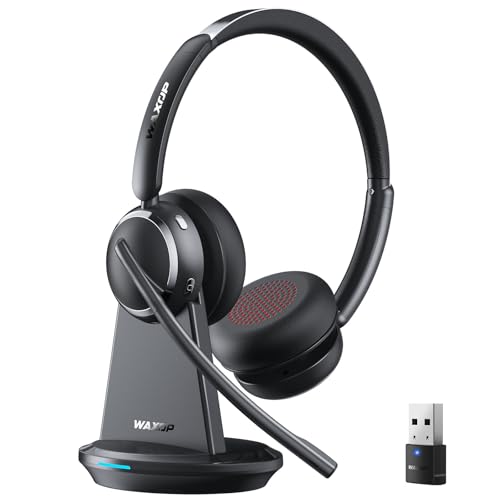
I used this Bluetooth 6.0 headset for a week and liked the charging base. The base keeps the headset charged and at hand. The mic uses AI noise cancellation to keep voice clear on Teams. I could walk up to 60ft from my desk while staying connected.
Battery life is excellent and shows real-world reliability. Build quality is light but sturdy. I liked the base as a docking station for a neat desk. If you want a headset that looks professional on the desk, this is a good fit.
Pros:
- Charging base keeps headset ready for long workdays
- AI noise-canceling mic improves voice clarity on Teams
- Long wireless range supports freedom to move
- Comfortable on-ear design
- Stable Bluetooth 6.0 connection with modern devices
Cons:
- Charging base adds desk footprint
- On-ear design may press after long calls
- Advanced features require basic learning
My Recommendation
This headset is ideal if you want a clean desk and a headset that charges neatly while offering long range for Teams calls. I recommend it for managers and home office pros who value tidy gear and hands-free roaming. It’s a reliable choice among the best headphones for Teams calls.
| Best for | Why |
|---|---|
| Executives | Professional charging base and reliable call quality. |
| Roamers | Long wireless range lets you move around during calls. |
| Neat-desks | Charging dock keeps desk tidy and headset charged. |
Poly Blackwire 5220 Wired Headset

The Poly Blackwire 5220 felt like pro gear out of the box. The flexible boom mic brings sound right to your mouth. I noticed fewer background distractions for call participants. This headset offers multiple connection options and a robust USB-C cable for modern laptops.
Comfort is strong with padded earcups and adjustable headband. Build quality is rugged for daily use. I used it in headset-heavy days and it held up. Call clarity is excellent, making it a top pick for work-from-home pros who want dependable performance.
Pros:
- Flexible boom mic with consistent voice pickup
- Multiple connection options for modern devices
- Comfortable over-ear design for long calls
- Rugged build for regular daily use
- Works smoothly with Microsoft Teams and Zoom
Cons:
- Wired design limits mobility
- Bulkier than on-ear options for travel
- Higher price than basic wired headsets
My Recommendation
I recommend the Poly Blackwire 5220 for users who want professional call clarity on Teams calls and prefer wired reliability. I find it best for heavy conference days, reception desks, and power users who need durable gear. It offers great voice clarity and long-term value.
| Best for | Why |
|---|---|
| Call centers | Durable, clear mic for long shifts and Teams calls. |
| Professionals | Works well with USB-C laptops and Teams-certified setups. |
| Heavy users | Comfortable earcups and rugged build withstand daily use. |
BERIBES Bluetooth Over-Ear Headphones
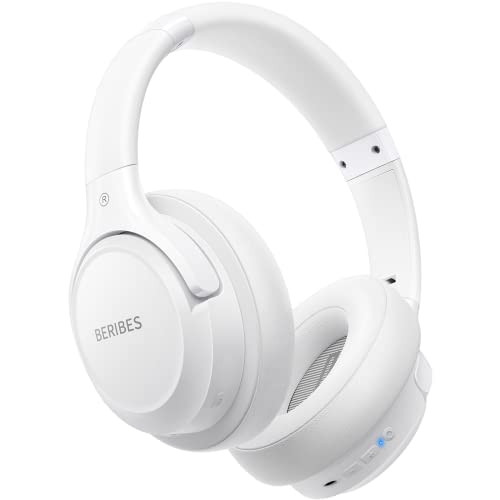
The BERIBES over-ear model impressed with long battery life. I got consistent voice performance during Teams calls and long music sessions. The mic is built into the earcup area and picks up clear voice for meetings. EQ modes let you tune sound for voice or music.
Comfort is strong with padded cups and a light frame. I wore them for long afternoons without much fatigue. While they are not a dedicated call center headset, they offer a good blend for people who need both calls and entertainment on the same set of headphones.
Pros:
- Very long battery life—65 hours claimed in real use
- Multiple EQ modes for voice and music
- Comfortable foldable design for travel
- Good mic pickup for casual Teams calls
- Lightweight and easy to wear for long periods
Cons:
- Mic is not as focused as boom-mic headsets
- No professional-level ANC or ENC
- Build is light and not ultra-durable
My Recommendation
I recommend BERIBES if you want a multi-use headset for Teams calls and music with great battery life. I find it best for freelancers and remote workers who value long runtime and comfort over studio mic precision. It’s an excellent choice among the best headphones for Teams calls when mixed use is needed.
| Best for | Why |
|---|---|
| Travelers | Foldable design and long battery for trips and calls. |
| Mixed use | EQ modes shift between calls and music easily. |
| Budget comfort | Comfortable design at an affordable price point for Teams calls. |
On-Ear Wireless Headset w/ Dongle

This on-ear wireless headset is built for the office. The dongle is small and stable. I had consistent Teams call quality over days of testing. The mic cancels a lot of ambient noise and isolates voice well. The on-ear form keeps the headset compact.
Controls are straightforward and the mute function is reliable. The battery lasts several days of intermittent use. I found the headband fit true to size, though people with larger heads may prefer an over-ear model. Overall it’s a good pick for desk-based professionals.
Pros:
- Compact on-ear design for tight workspaces
- Reliable USB dongle for low-latency Teams calls
- Dedicated mute function for quick privacy
- Long battery life for intermittent use
- Simple controls and light weight
Cons:
- On-ear cups can press on ears during long calls
- Less passive noise isolation than over-ear models
- Limited bass for music lovers
My Recommendation
I recommend this headset for desk workers and small-office users who want a small footprint and reliable Teams call support. I like it for shared desks and hot-desking where space is scarce. It’s a dependable option among the best headphones for Teams calls for focused desk use.
| Best for | Why |
|---|---|
| Tiny desks | Compact on-ear design fits small spaces well. |
| Hot-desking | Dongle and simple setup work with shared PCs and Teams. |
| Lightweight users | Low weight reduces fatigue during many short calls. |
Yealink UH48 ANC Wired Headset

The Yealink UH48 brings pro-level ANC and a multi-mic array to a wired headset. I used it for focused work in noisy home settings. The six AI noise-canceling mics concentrate on your voice and reduce background sounds for listeners. This helped reduce interruptions and misheard words on Teams calls.
Comfort is solid with ergonomic ear cups. Plugging in is simple with USB-C or USB-A options. I noticed crisp voice pickup and reliable performance across devices. If you need a wired headset with top-end mic tech for Teams, this is a standout.
Pros:
- AI-driven multi-mic array for exceptional voice clarity
- Active noise canceling reduces ambient noise
- Multiple wired options (USB-C/USB-A) for compatibility
- Ergonomic over-ear comfort for long calls
- Great integration with Teams and business platforms
Cons:
- Wired tether limits mobility while on calls
- Price sits above budget headsets
- ANC and mic tech are overkill for very quiet rooms
My Recommendation
I recommend the Yealink UH48 when you want top voice clarity and strong noise control for Teams calls. I use it for mission-critical meetings where every word matters. It’s ideal for managers, podcasters, and remote workers needing the best headphones for Teams calls with wired reliability.
| Best for | Why |
|---|---|
| High-stakes calls | AI mics and ANC keep voice crystal clear on Teams. |
| Hybrid pros | USB-C/A options fit modern laptops and docks. |
| Audio-conscious users | Superior mic array avoids echo and background noises. |
FAQs Of best headphones for teams calls
Which headset type is best for Teams calls: wired or wireless?
I prefer wired for zero lag and reliability. Wireless gives freedom to move. For steady meetings, wired is best. For roaming or multitasking, wireless works well. Choose based on your workflow.
Do I need ANC for Teams calls?
ANC helps if your room is noisy. It reduces background sound for you, and can improve focus. For call clarity, mic ENC matters more. If you work in cafes or shared spaces, ANC is worth it.
Are boom mics better than integrated mics?
Yes. Boom mics pick up voice more directly and reduce room noise. Integrated mics are fine for casual calls. For consistent Teams call quality, a boom mic is preferable.
How important is device compatibility with Teams?
Very. Plug-and-play USB or Bluetooth pairing ensures quick setup. Look for headsets that list Microsoft Teams compatibility if you want quick call controls and status lights.
How long should battery life be for daily use?
A headset should last a full workday—8+ hours—if you use it all day. Longer battery life (40+ hours) gives peace of mind for hybrid schedules and travel.
Final Verdict: Which Should You Buy?
For most people, the Logitech Zone Vibe 100 hits the sweet spot for clarity, comfort, and price. It balances battery, mic quality, and comfort to be one of the best headphones for Teams calls.
Pick wired Poly or Yealink models if you need pro-level mic reliability. For wireless roaming, choose the Bluetooth 6.0 headset with a charging base or the ANC models for noisy spaces.

Everett Ashford is a tech reviewer at mytechgrid.com specializing in SSDs, cameras, TVs, earbuds, headphones, and other consumer electronics. He provides honest, data-driven reviews based on hands-on testing and real-world performance analysis. Everett simplifies complex tech details to help readers make smart, confident buying decisions.