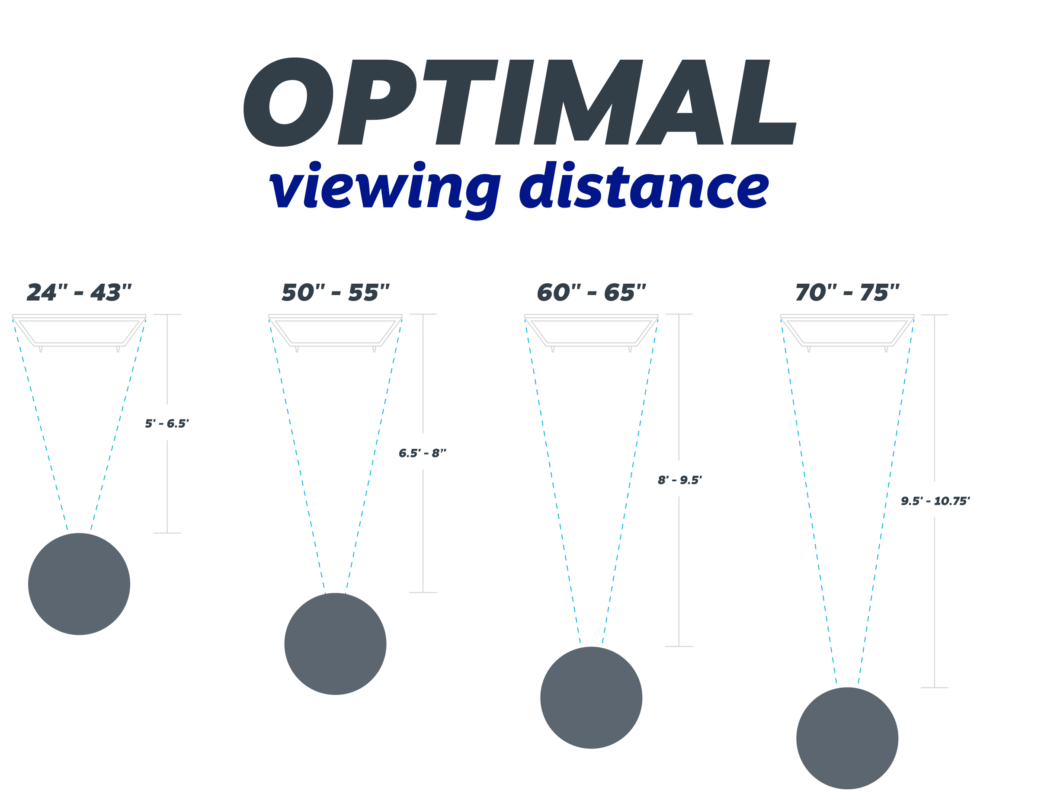
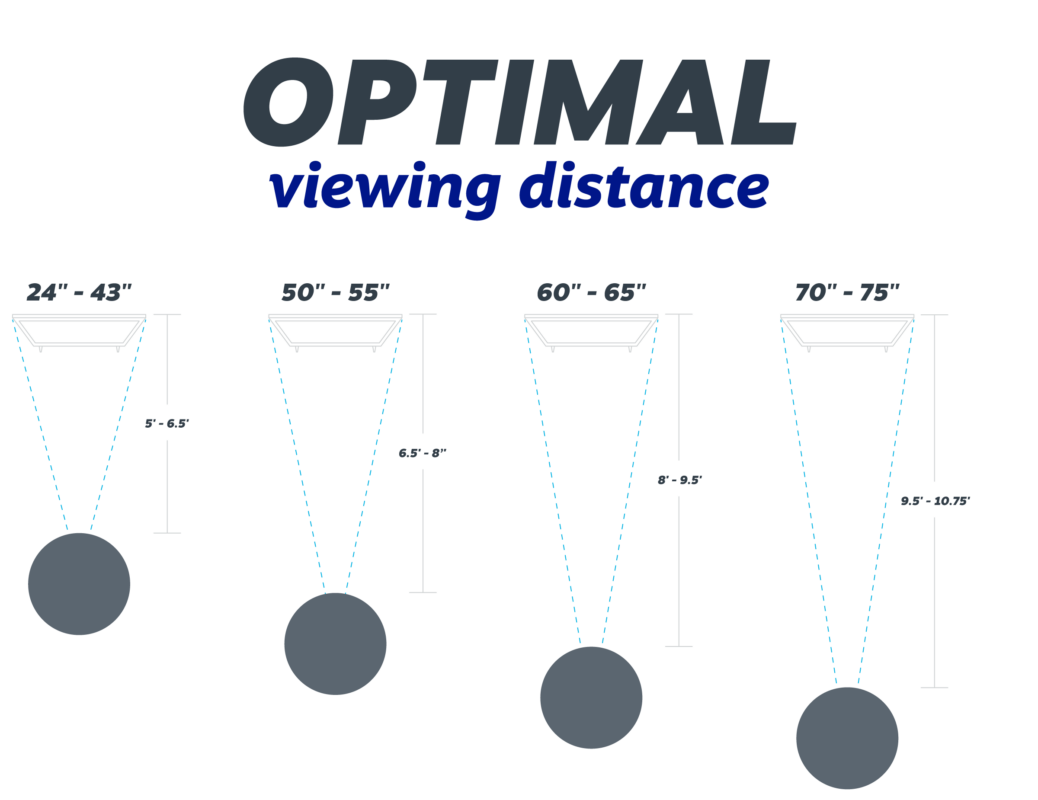
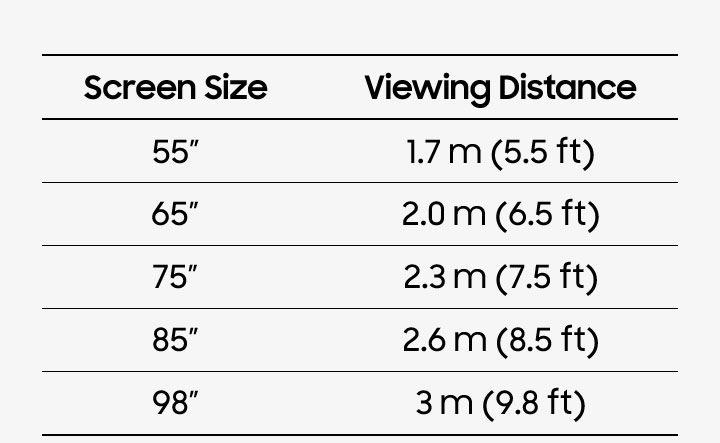
Most viewers should sit about 7 to 10 feet from a 75-inch 4K TV for a clear, comfortable view.
Knowing how far to sit from a 75 inch TV helps you enjoy sharp detail without feeling like you are sitting in the front row of a movie theater. The best distance depends on screen resolution, viewing angle, room size, content, and your comfort. This guide uses practical measurements and expert viewing standards to help you find the right spot.
How far to sit from a 75 inch TV?
For most homes, the ideal distance from a 75 inch TV is about 7 to 10 feet. This range works well for 4K content, streaming shows, sports, and video games.
Here is a simple guide:
| TV resolution and use | Recommended distance |
|---|---|
| 75-inch 4K TV, general viewing | 7 to 10 feet |
| 75-inch 4K TV, movies and detail-rich content | 6.5 to 9 feet |
| 75-inch 4K TV, sports and mixed content | 8 to 11 feet |
| 75-inch 1080p TV | 10 to 15 feet |
| Very immersive, theater-style viewing | 6 to 8 feet |
The distance is measured from your eyes to the screen, not from the front of the couch to the wall. If your sofa is 9 feet from the wall but sits 1 foot deep, your eyes may be only 8 feet from the TV.
A 75-inch television has a large screen. Sitting too close may make low-quality video look rough. Sitting too far away can make the picture feel smaller and reduce the impact of 4K detail.
The best distance based on viewing angle
Viewing angle is one of the most useful ways to decide how far to sit from a 75 inch TV. It describes how much of your vision the screen fills from your seat.
A wider viewing angle feels more like a movie theater. A narrower angle feels calmer and more relaxed. There is no single perfect angle for every person.
Common guidelines include:
• About 30 degrees for regular television and mixed viewing
• About 36 degrees for a more immersive movie experience
• About 40 degrees or more for a close, theater-like setup
A 75-inch 16:9 TV is about 65.4 inches wide. Based on that width:
• A 30-degree viewing angle is about 10.2 feet away
• A 36-degree viewing angle is about 8.9 feet away
• A 40-degree viewing angle is about 7.7 feet away
These numbers explain why many experts place the best viewing distance around 8 to 10 feet. They also show why a viewer who enjoys a dramatic movie experience may prefer sitting closer.
The Society of Motion Picture and Television Engineers has commonly used a minimum viewing angle near 30 degrees for an engaging image. THX has promoted a wider angle for a more immersive experience. These standards are useful guides, but comfort still matters most.

How resolution changes the ideal distance
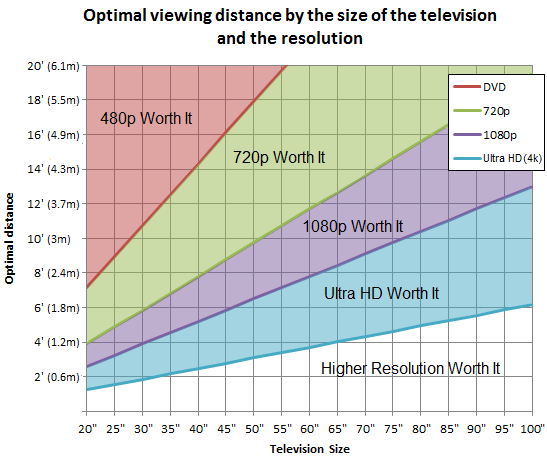
Resolution affects how close you can sit before you notice pixels, compression, or other flaws. A 4K TV has four times as many pixels as a 1080p TV. That extra detail allows you to sit closer without seeing a blocky image.
4K Ultra HD TVs
A 75-inch 4K TV is usually comfortable from about 7 to 10 feet. Some viewers can sit as close as 6 feet when watching high-quality 4K movies or playing detailed games.
At this distance, you can see fine texture in nature shows, small text in games, and detail in faces. You may also notice poor streaming quality more easily, especially when the video uses heavy compression.
1080p TVs
With a 75-inch 1080p TV, 10 to 15 feet may be more comfortable. Sitting too close can make pixels, soft edges, and compression artifacts easier to see.
A 1080p screen can still look good. However, the larger the screen, the more visible its limits become at close range.
Cable, DVDs, and low-quality streams
Not all content matches the quality of your screen. Older TV broadcasts, DVDs, and low-bitrate streams may look soft on a large 4K display.
If your picture looks rough from 7 feet, try moving back 1 or 2 feet. This does not improve the source itself, but it can make flaws less distracting.
A simple formula for a 75-inch TV
A quick rule can help you estimate how far to sit from a 75 inch TV:
• For a 4K TV, multiply the screen size by about 1.0 to 1.5
• For a 1080p TV, multiply the screen size by about 1.5 to 2.5
Using a 75-inch screen:
• 75 × 1.0 = 75 inches, or 6.25 feet
• 75 × 1.5 = 112.5 inches, or about 9.4 feet
• 75 × 2.5 = 187.5 inches, or about 15.6 feet
This formula provides a broad range, not a strict rule. It uses screen diagonal rather than screen width, so it is less precise than a viewing-angle calculation.
For most people, the 1.2 to 1.5 times range works well for a 75-inch 4K TV. That places the seat about 7.5 to 9.4 feet from the screen.

How room size affects seating distance
Your room may decide the answer before your TV does. A 75-inch screen needs enough space to feel balanced with the furniture and walls.
In a small living room, sitting 6 to 8 feet away may be perfectly fine with a 4K TV. You can make the setup feel comfortable by lowering brightness, using a cinema picture mode, and avoiding harsh overhead lights.
In a large room, you may sit 10 to 12 feet away. The screen can still look sharp, but it may feel less immersive. If the TV seems too small from that distance, moving the sofa forward may help more than buying an even larger screen.
Consider these room factors:
• The distance from the wall to your eyes
• The height and depth of your sofa
• The position of speakers
• Glare from windows and lamps
• The location of doors and walkways
• Whether more than one seat needs a good view
A good layout should work for the whole room, not only for the center seat.
How sitting distance affects eye comfort
A large TV does not automatically damage your eyes. However, watching any screen for a long time can cause eye strain, dry eyes, headaches, or blurry vision.
Many people feel discomfort when they sit too close because the screen fills most of their vision. Their eyes must move more often across the image. This can be tiring during long gaming sessions or movie marathons.
You can improve comfort by following these steps:
-
Keep the screen near eye level.
-
Reduce glare from windows and lights.
-
Use a moderate brightness setting.
-
Take regular breaks and look across the room.
-
Keep the room softly lit instead of watching in total darkness.
-
Move farther away if you need to turn your head to follow action.
The American Academy of Ophthalmology does not set one fixed distance for every TV. Comfort, viewing time, lighting, and individual vision needs all matter. If you often have eye pain or headaches, speak with an eye-care professional.

The right distance for movies and TV shows
For movies, many viewers prefer sitting 7 to 9 feet from a 75-inch 4K TV. This distance creates a strong sense of immersion without making the screen feel overwhelming.
If you watch mostly dramas, documentaries, and high-quality films, try starting at 8 feet. Sit there for at least 20 minutes. Then move back or forward by 6 to 12 inches and compare the experience.
For everyday shows, news, and sitcoms, 8 to 11 feet may feel more relaxed. These programs often have less visual detail than a 4K film, so a slightly greater distance can reduce the appearance of softness.
Your personal preference matters. Some people want the TV to feel like a window. Others prefer it to sit quietly in the room like a picture frame.
The right distance for sports
Sports viewing often works best from 8 to 11 feet from a 75-inch TV. This distance gives you a broad view of the field while making scoreboards and player movement easy to follow.
Sitting too close can make fast action tiring. Your eyes may jump from one side of the screen to the other. Sitting a little farther back helps you see the full play as it develops.
For sports, also consider:
• Motion handling
• Refresh rate
• Brightness
• Viewing angle
• Screen glare
A bright room can make a TV seem less vivid. Before moving your couch, try closing blinds or changing the TV picture mode. Better lighting can solve what seems like a distance problem.
The right distance for gaming
The ideal gaming distance depends on the game and your display.
For most console games on a 75-inch 4K TV, 6.5 to 9 feet is a useful starting range. Role-playing games and racing games can feel impressive at the closer end. Competitive games may feel easier from 8 to 10 feet because you can see the full screen without excessive eye movement.
For gaming, check these settings and features:
• Input lag
• Game mode
• Variable refresh rate
• Screen brightness
• Text size
• Field of view
If game menus are hard to read, do not assume you must sit closer. Increase the text size or adjust the game interface first. Sitting very close to a huge screen can make long sessions feel tiring.
In rooms where I have helped arrange large TVs, one common mistake is placing the sofa based on the wall rather than the game position. Players often move forward during intense matches, then remain too close for hours. A small side table or marked floor position can help maintain a comfortable seat.

How high should a 75-inch TV be mounted?
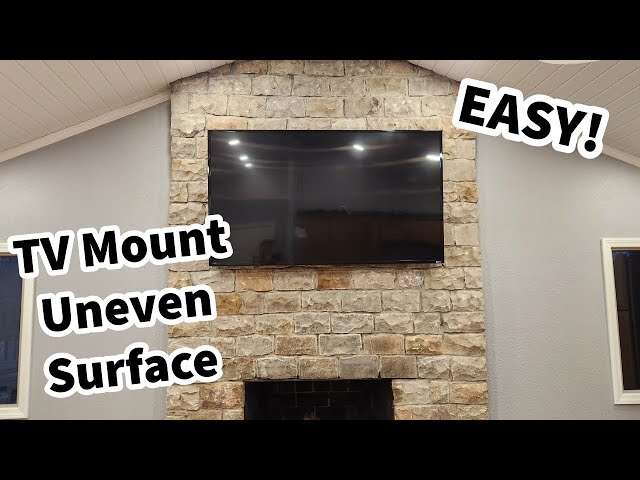
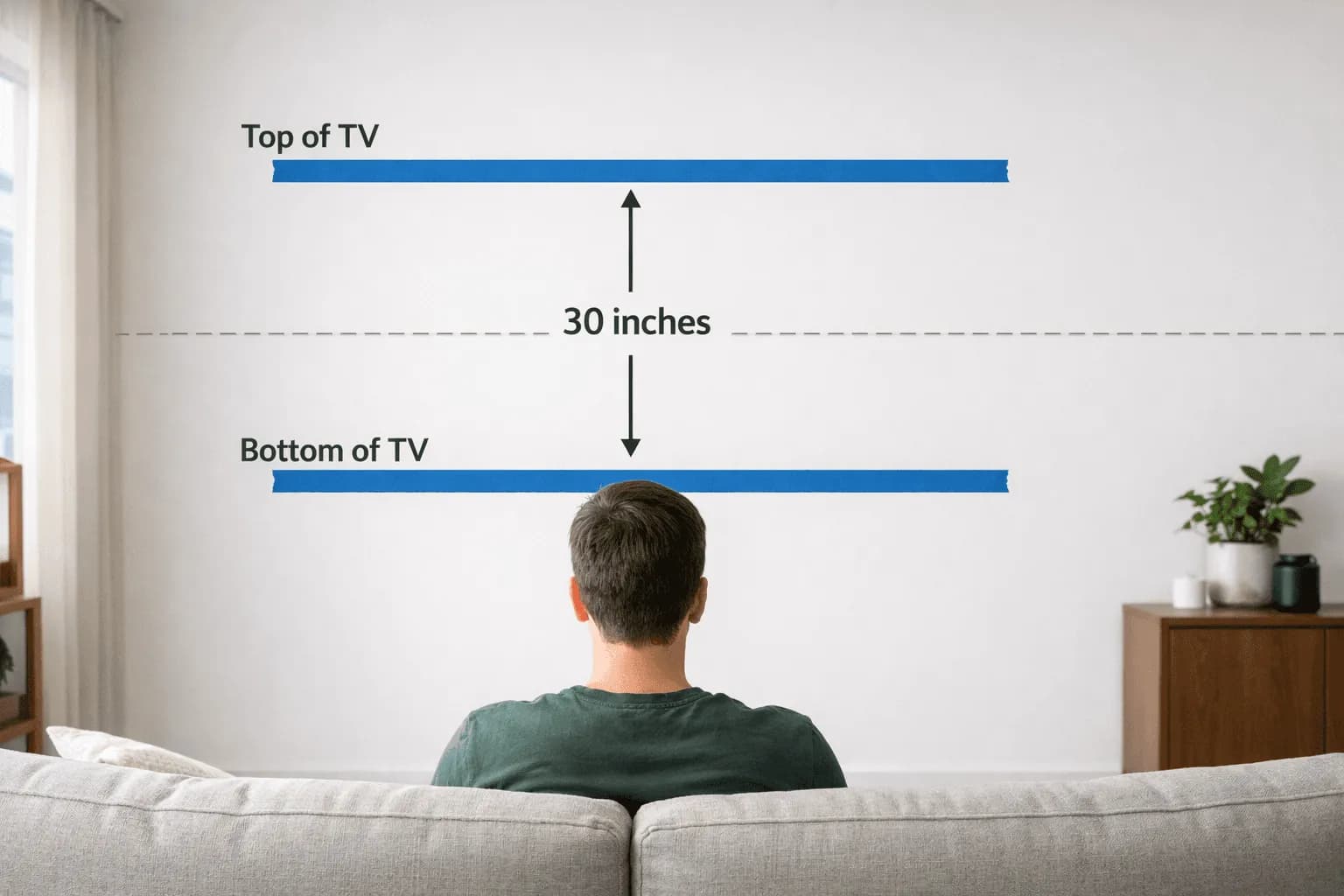
The center of the screen should usually be close to your seated eye level. For many living rooms, that means the center of the TV is about 42 to 48 inches from the floor.
A 75-inch 16:9 TV is about 36.8 inches tall. If the center is 45 inches from the floor, the bottom of the TV will be about 26.6 inches above the floor.
Mounting the screen too high can cause neck strain. This often happens when people place the TV above a fireplace. The correct distance from the screen will not fix a poor viewing height.
When seated, your eyes should aim near the middle of the display. A slight upward angle may be acceptable, but you should not need to tilt your head back.
How to measure your seating distance
Measuring how far to sit from a 75 inch TV is simple.
-
Place the TV or mark its planned wall position.
-
Sit in your normal viewing position.
-
Measure from the front of your eyes to the flat plane of the screen.
-
Test the image from that position during different types of content.
-
Adjust the seat in small steps until the picture feels clear and comfortable.
Do not measure from the back wall to the TV. That method can give you the wrong result, especially with deep sofas or recliners.
If the TV is not installed yet, use painter’s tape to mark its width and height on the wall. Sit at different distances and imagine the screen. This simple test can prevent expensive mounting mistakes.
A useful real-world test is to watch one sports program, one movie, and one normal TV show. If all three feel comfortable, your seating position is probably well balanced.
Common mistakes to avoid
Finding the right distance is easier when you avoid a few common errors.
Choosing a distance based only on screen size
Screen size matters, but it is not the only factor. Resolution, content quality, room light, and personal comfort can change the ideal position.
Sitting too close because the TV is 4K
4K allows closer viewing, but it does not require you to sit close. If the image feels intense or your eyes feel tired, move back.
Ignoring low-quality content
A premium TV cannot add real detail to a poor video source. Older content may look better from farther away.
Mounting the screen too high
A high TV can cause neck discomfort even when the viewing distance is correct.
Forgetting side seats
A sofa may be the right distance but still provide a poor side view. Check whether the TV uses an OLED or LCD panel and consider its viewing angle.
Using maximum brightness
Many TVs ship in a vivid or dynamic mode. This setting may look impressive in a store but feel harsh at home. A cinema, filmmaker, or standard mode is often more comfortable.
How to choose the best spot in your room
Start with 8 feet from the screen. This is a strong middle point for many 75-inch 4K TVs.
Then ask yourself:
• Can I see fine detail without leaning forward?
• Do I notice pixels or compression?
• Does the image fill my view without making me move my head?
• Can I read subtitles comfortably?
• Do my eyes feel relaxed after 30 minutes?
• Does the seat work for movies, sports, and games?
If the answer to most questions is yes, keep the seat there. If the picture feels too large, move back 1 foot. If it feels flat or too small, move forward 1 foot.
In my experience, people often expect one exact number. In practice, the best answer is a useful range. A difference of 12 inches can change comfort more than a calculator suggests.
Frequently asked questions about how far to sit from a 75 inch TV
Is 6 feet too close to a 75-inch TV?
Six feet is close, but it can work with a 75-inch 4K TV if you enjoy an immersive view. Move farther back if you notice eye strain, pixel structure, or difficulty following action.
Is 10 feet a good distance from a 75-inch TV?
Yes, 10 feet is a comfortable distance for many viewers. It works especially well for mixed content, sports, lower-quality streams, and people who prefer a relaxed viewing angle.
How far should I sit from a 75-inch 4K TV?
Most people should sit about 7 to 10 feet from a 75-inch 4K TV. Movie fans may prefer 6.5 to 9 feet, while casual viewers may prefer 9 to 11 feet.
How far should I sit from a 75-inch 1080p TV?
A 75-inch 1080p TV usually looks better from about 10 to 15 feet. Sitting farther away can make soft detail and visible pixels less distracting.
Does sitting close to a 75-inch TV hurt your eyes?
Sitting close does not normally cause permanent eye damage, but it may cause temporary strain or discomfort. Use reasonable brightness, reduce glare, take breaks, and move back if your eyes feel tired.
Should I sit closer for HDR content?
You can sit somewhat closer for high-quality HDR content because it often includes more detail and contrast. However, the best distance still depends on screen brightness, room lighting, and your comfort.
Conclusion
For most homes, the best answer to how far to sit from a 75 inch TV is about 7 to 10 feet when using a 4K model. Choose a closer seat for a theater-style view and a farther seat for relaxed viewing, sports, or lower-quality content.
Measure from your eyes to the screen, keep the TV near eye level, and test the position with several types of content. Start at 8 feet, then adjust in small steps until the image feels clear and comfortable. Try these tips in your room, and share your preferred viewing distance or explore more home theater guides for a better setup.

Everett Ashford is a tech reviewer at mytechgrid.com specializing in SSDs, cameras, TVs, earbuds, headphones, and other consumer electronics. He provides honest, data-driven reviews based on hands-on testing and real-world performance analysis. Everett simplifies complex tech details to help readers make smart, confident buying decisions.