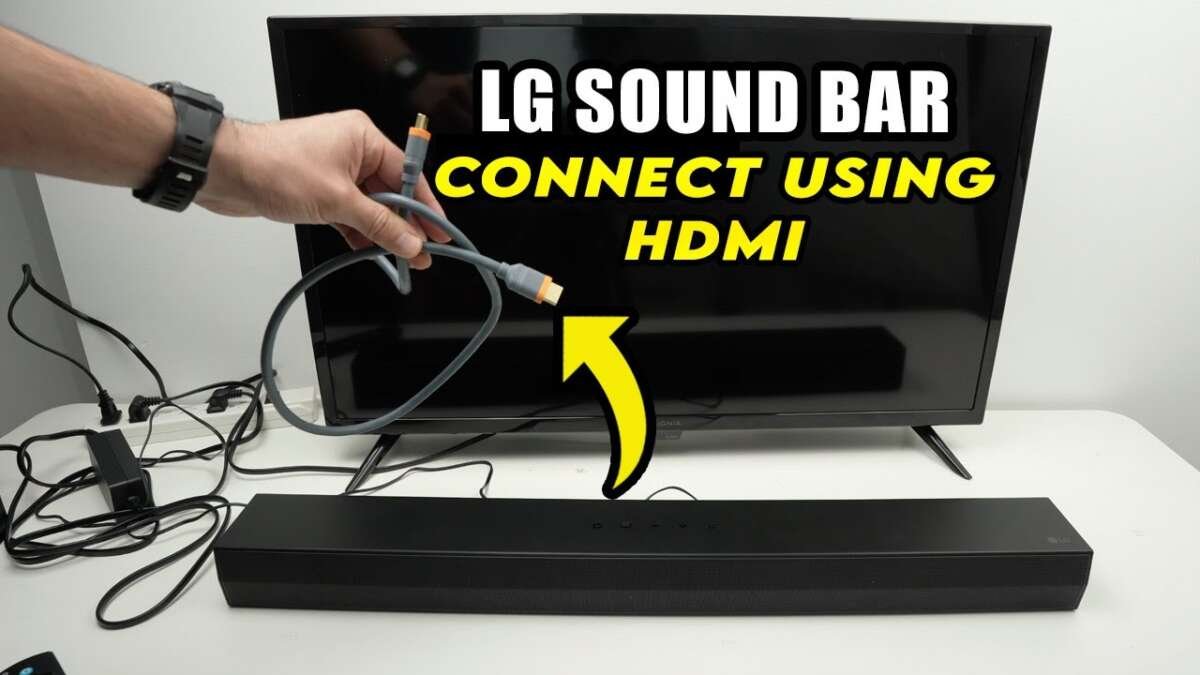
Connect an LG soundbar to your TV with HDMI ARC for the best sound and easiest control.
Learning how do you connect LG soundbar to TV is simple once you know which ports and settings to use. HDMI ARC or eARC is usually the best choice, but optical, Bluetooth, and analog connections can also work well. This guide explains each method, common setup mistakes, sound settings, and practical fixes so you can enjoy clear TV audio without guesswork.
Check your TV and LG soundbar before connecting
Before asking how do you connect LG soundbar to TV, check the ports on both devices. The ports determine which connection will give you the best sound and the most control.
Look at the back or side of your TV for one of these labels:
• HDMI ARC
• HDMI eARC
• Optical Out
• Digital Audio Out
• Headphone Out
• Audio Out
• Bluetooth settings
Now check the back of the LG soundbar. Most models include HDMI Out, optical input, Bluetooth, and sometimes HDMI In or an analog input. Newer LG soundbars often support HDMI eARC, Dolby Atmos, and wireless rear speakers, while older models may offer fewer options.
You will also need the right cable:
• HDMI cable for ARC or eARC
• Optical cable for digital audio
• 3.5 mm or RCA cable for analog audio
• No cable for Bluetooth
A cable that fits the port is not always enough. For example, a regular HDMI port may carry video but not return sound from the TV. The TV port must say ARC or eARC.
How do you connect LG soundbar to TV with HDMI ARC or eARC?
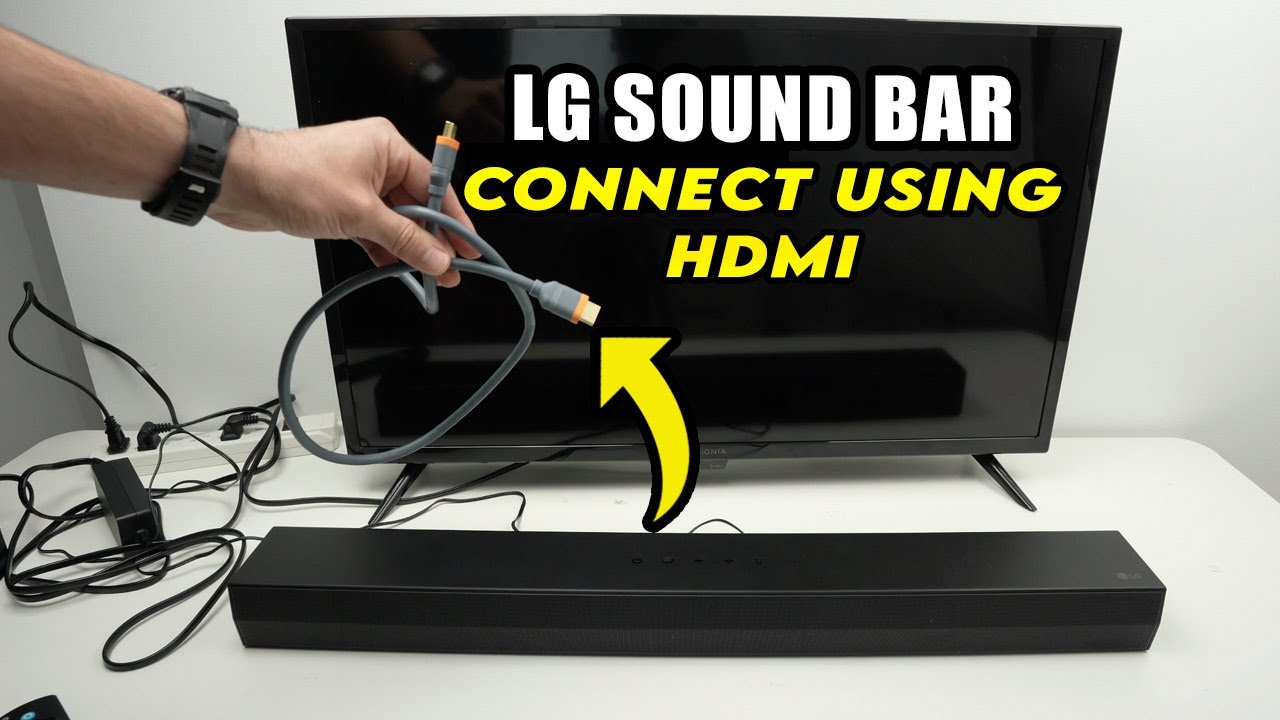
HDMI ARC is the best general method for connecting an LG soundbar to a TV. It sends TV audio to the soundbar through one HDMI cable. It can also let your TV remote control the soundbar volume.
HDMI eARC is an improved version of ARC. It supports more audio data and can handle high-quality formats such as lossless surround sound on compatible devices. You need eARC on both the TV and soundbar to use its full benefits.
Follow these steps:
- Turn off the TV and LG soundbar.
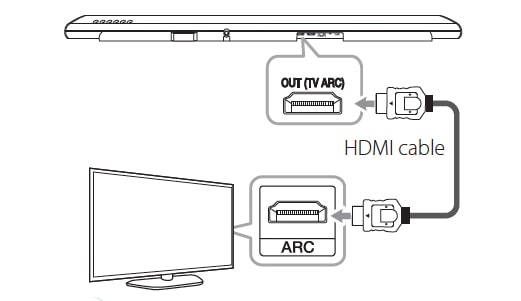
- Find the HDMI port labeled ARC or eARC on the TV.
- Find the HDMI OUT or HDMI OUT (TV ARC) port on the soundbar.
- Connect one end of the HDMI cable to the TV.
- Connect the other end to the soundbar.
- Turn on the TV and soundbar.
- Press the soundbar’s Function, F, or Source button until HDMI ARC appears.
- Open the TV audio settings.
- Select HDMI ARC, Receiver, External Speaker, or Sound Out.
- Turn on HDMI-CEC if your TV requires it.
LG TVs usually call HDMI-CEC SIMPLINK. Other brands may use different names. CEC allows devices to communicate, so your TV remote can often adjust the soundbar volume and turn it on or off.
If your TV has eARC, set the audio output to eARC when available. You may also see options for Pass Through, bitstream, PCM, Dolby Digital, or Auto. Start with Auto. If the sound cuts out, try PCM or Dolby Digital.
When I test an HDMI ARC setup, I always confirm the port labels before connecting anything. Plugging the cable into a standard HDMI port is one of the most common reasons people think the soundbar is faulty.
How do you connect LG soundbar to TV with an optical cable?
An optical cable is a reliable choice when your TV does not have HDMI ARC. It sends digital audio through light and avoids many HDMI control problems.
Here is how to connect an LG soundbar with optical audio:
- Remove the protective caps from both ends of the optical cable.
- Connect one end to the TV’s Optical Out port.
- Connect the other end to the soundbar’s Optical In port.
- Turn on the TV and soundbar.
- Select Optical, OPT, or D.IN on the soundbar.
- Open the TV sound settings.
- Choose Optical, Digital Audio Out, or External Speaker.
The small connector should click into place. Do not force it. Optical cables use a delicate inner fiber, so avoid sharp bends.
Optical audio can support stereo and several compressed surround formats. However, it does not provide the full features of HDMI eARC. You may lose advanced formats, two-way device control, and some Dolby Atmos capabilities.
If you are researching how do you connect LG soundbar to TV and your television has no ARC port, optical is often the next-best option. It is especially useful with older TVs and simple soundbar systems.
How do you connect LG soundbar to TV with Bluetooth?
Bluetooth is a convenient wireless option. It works best when you want a quick setup and do not need the highest possible audio quality.
To pair an LG soundbar with a Bluetooth TV:
- Turn on the soundbar.
- Press the Function or Source button until Bluetooth appears.
- Select BT Pairing if your model shows that option.
- Open the TV’s Bluetooth or Sound Output menu.
- Search for available devices.
- Select the LG soundbar from the list.
- Confirm the pairing request.
The exact menu names vary by TV. You may see Sound Output, Bluetooth Speaker List, Wireless Speaker, or Audio Device.
Bluetooth has some limits. You may notice a slight delay between the picture and sound. Wireless interference can also cause brief drops. The sound quality may be lower than HDMI or optical, especially with compressed audio.
Bluetooth is useful for bedrooms, temporary setups, or TVs mounted far from the soundbar. For a main living room system, a wired connection is usually more stable.
If the TV cannot find the soundbar, disconnect the soundbar from phones, tablets, and other nearby devices. A soundbar may connect to only one source at a time, depending on its model.
How do you connect LG soundbar to TV with an analog cable?
Some older TVs and LG soundbars use analog audio. This connection is less common, but it can still work.
Check for a 3.5 mm headphone jack or red and white RCA audio outputs on the TV. Then connect the TV audio output to the soundbar’s AUX or analog input.
Common cable choices include:
• 3.5 mm to 3.5 mm cable
• RCA to RCA cable
• 3.5 mm to RCA cable
After connecting the cable:
- Select AUX, AUX IN, or Analog on the soundbar.
- Open the TV audio menu.
- Choose Headphones, Audio Out, or External Speaker.
- Set the TV volume to a medium level.
- Adjust the final volume with the soundbar remote.
Analog audio usually supports stereo only. It will not carry advanced surround formats or Dolby Atmos. It can also create a low hum if connected devices use different power sources, though this is not common.
Use analog audio only when HDMI ARC, eARC, optical, or Bluetooth is unavailable. It is functional, but it should be your last choice for a modern home theater.

Set the correct TV audio output
Connecting the cable is only half of the process. The TV must send sound to the correct output.
Open the TV’s Settings menu and look for Sound, Audio, or Sound Output. Select the connection you used:
• HDMI ARC or eARC for an HDMI connection
• Optical or Digital Audio Out for an optical connection
• Bluetooth Speaker for a wireless connection
• Headphones, AUX, or Audio Out for an analog connection
Some TVs continue using their internal speakers until you select an external output. If the TV speakers and soundbar both play, turn off TV Speaker or select External Speaker.
You may also see a digital audio format setting. Use Auto or Bitstream when your soundbar supports surround sound. Select PCM if you hear silence, popping, or repeated audio cuts.
PCM is a safe fallback because it sends basic uncompressed audio. The trade-off is that some surround features may not work. After the connection is stable, test Auto or Pass Through again.
On LG televisions, SIMPLINK can help control compatible devices over HDMI. Turn it on if volume control does not work through the TV remote.

Choose the best sound mode on your LG soundbar
LG soundbars often include sound modes such as Standard, Cinema, Music, Bass Blast, Sports, and AI Sound Pro. The best setting depends on what you are watching.
• Standard keeps voices and effects balanced.
• Cinema adds a wider, more dramatic sound field.
• Music emphasizes instruments and detail.
• Sports can make commentary easier to follow.
• AI Sound Pro adjusts the sound for different types of content.
• Bass Blast increases low-frequency impact.
For everyday TV, Standard or AI Sound Pro is a good starting point. For movies, Cinema may create a more immersive effect. If voices sound buried, reduce the bass or use a voice enhancement feature if your model includes one.
Avoid judging the sound after only a few seconds. Play a news program, a movie scene, and music. Each source can sound very different.
If your LG soundbar includes a wireless subwoofer, place the subwoofer near the front of the room when possible. Keep it away from large metal objects and wireless routers. The subwoofer pairs with the soundbar, not directly with the TV.
Fix common LG soundbar connection problems
If you followed the steps for how do you connect LG soundbar to TV but hear no sound, work through these checks in order.
No sound from the soundbar
• Confirm the soundbar is powered on.
• Select the correct input, such as ARC, OPT, or BT.
• Make sure the cable is connected to the correct TV port.
• Set the TV sound output to the soundbar connection.
• Raise the soundbar volume.
• Turn off the TV’s internal speakers if needed.
• Restart both devices.
HDMI ARC does not work
Check that the HDMI cable connects to the TV’s ARC or eARC port and the soundbar’s HDMI OUT port. Then enable HDMI-CEC, which may be called SIMPLINK, Anynet+, Bravia Sync, or another brand-specific name.
Try a different high-speed HDMI cable if the problem continues. Also unplug both devices for about one minute, reconnect them, and turn on the TV first.
Optical audio is silent
Make sure the protective caps were removed from the optical cable. Confirm that the soundbar input is set to Optical or D.IN.
Change the TV’s digital audio output from Auto or Dolby Digital to PCM. If PCM works, the issue may be an unsupported audio format rather than a damaged cable.
Bluetooth keeps disconnecting
Move the soundbar closer to the TV and remove other Bluetooth devices from the area. Pair the devices again after switching Bluetooth off and on.
If the picture and sound do not match, look for an Audio Delay, AV Sync, or Lip Sync option on the soundbar or TV. Adjust it in small steps.
The soundbar turns off by itself
Some LG soundbars use automatic power-saving features. They may enter standby when no audio signal is detected.
Check the Auto Power, Auto Standby, and power-link settings. If the soundbar turns off during normal viewing, test another cable or input and check for a firmware update.
How to improve voice clarity and sound quality
A soundbar can make TV audio louder, but louder does not always mean clearer. Good placement and settings often make a larger difference than maximum volume.
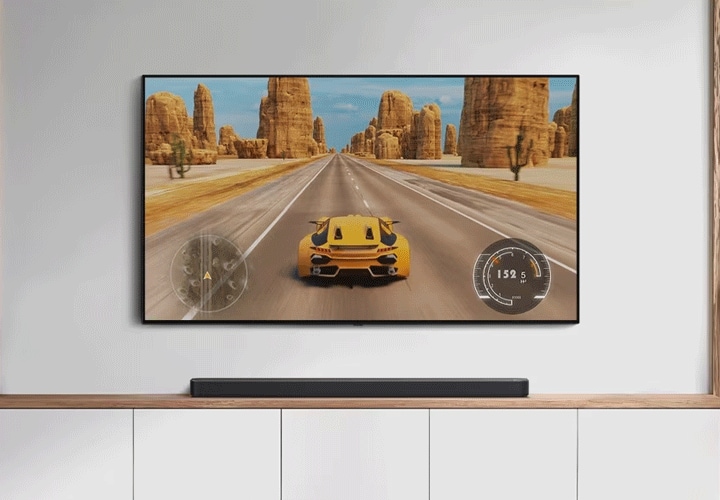
Place the soundbar directly below the TV. Keep its front grille clear and avoid putting it inside a closed cabinet. The sound should travel into the room, not bounce around inside furniture.
Keep the soundbar near the center of the TV. If it sits far to one side, voices may seem to come from the wrong place.
For clearer dialogue:
• Use Standard mode or a voice enhancement mode.
• Lower excessive bass.
• Keep the soundbar away from a wall corner.
• Check whether Night Mode reduces loud effects.
• Adjust the TV’s audio format if voices cut out.
If your soundbar includes rear speakers, place them slightly behind your seating position. Keep them at a similar height on the left and right sides. Wireless surround speakers need power, but they do not usually connect directly to the TV.
Room shape also matters. Hard floors and bare walls can create echoes. A rug, curtains, and soft furniture can reduce harsh reflections and make speech easier to understand.
Which connection should you choose?
The best option depends on your TV, soundbar, and desired features.
| Connection | Best for | Main limitation |
|---|---|---|
| HDMI eARC | High-quality surround sound and Dolby Atmos | Requires eARC on both devices |
| HDMI ARC | Easy control and strong overall performance | Less bandwidth than eARC |
| Optical | Older TVs and stable digital audio | Limited control and audio formats |
| Bluetooth | Fast wireless setup | Possible delay and lower quality |
| Analog | Very old equipment | Stereo sound only |
For most homes, choose HDMI eARC first, HDMI ARC second, and optical third. Bluetooth is practical when cable routing is difficult. Analog should be used only when the other choices are unavailable.
This order reflects both sound quality and convenience. HDMI gives you a direct digital path and usually lets one remote handle daily volume control.
Safety and maintenance tips
Use the power adapter supplied with the LG soundbar. Avoid placing the soundbar where ventilation openings are blocked. Heat can shorten the life of electronic parts.
Do not pull an optical cable by the cord. Hold the connector when removing it. For HDMI cables, insert the plug straight instead of twisting it.
Keep the soundbar firmware and TV software updated when updates are available. Updates can improve compatibility, fix audio dropouts, and add support for newer formats. However, do not interrupt a firmware update once it starts.
If you reset the soundbar, remember that stored Bluetooth pairings and custom sound settings may be erased. Write down important settings first.
When I troubleshoot a soundbar, I change only one setting at a time. That simple habit makes it much easier to identify the real cause instead of creating several new problems at once.
Frequently Asked Questions
How do you connect LG soundbar to TV using HDMI?
Connect the TV’s HDMI ARC or eARC port to the LG soundbar’s HDMI OUT port. Then select HDMI ARC or eARC in the TV sound settings and choose ARC, eARC, or HDMI as the soundbar input.
How do you connect LG soundbar to TV without HDMI?
Use an optical cable if both devices have optical ports. You can also use Bluetooth or an analog AUX connection, depending on the features supported by your TV and soundbar.
Why is my LG soundbar connected but not producing sound?
The TV may still be using its internal speakers, or the soundbar may be set to the wrong input. Check the TV’s sound output, confirm the cable is in the correct port, and select ARC, Optical, or Bluetooth on the soundbar.
Can I connect an LG soundbar to any TV?
Most LG soundbars can connect to many TVs through HDMI, optical, Bluetooth, or analog audio. The available features depend on the ports and audio formats supported by both devices.
Does HDMI ARC control the LG soundbar volume?
Usually, yes. HDMI ARC relies on HDMI-CEC, so you must enable the TV’s device-control feature, such as SIMPLINK on many LG TVs.
Is optical better than Bluetooth for an LG soundbar?
Optical is usually more stable and avoids Bluetooth delay. Bluetooth is easier when you want a wireless setup, but it may have lower audio quality or a small picture-and-sound delay.
Can I use HDMI ARC and optical at the same time?
You can physically connect both in some setups, but using two audio paths may cause confusion or an echo. Choose one primary connection and select its matching input on the soundbar.
Conclusion
The easiest way to connect an LG soundbar to a TV is HDMI ARC or eARC. It offers strong sound, simple volume control, and support for many modern audio formats. If HDMI is not available, optical is a dependable alternative, while Bluetooth and analog connections can solve specific setup needs.
Start by checking the labels on both devices, choose the best available cable, and set the TV’s audio output to match. Test the system with speech, movies, and music before changing advanced settings. Once your LG soundbar is working, fine-tune its placement and sound mode for a clearer, fuller listening experience.
Try the connection method that fits your equipment today, and share your setup or troubleshooting experience in the comments.

Everett Ashford is a tech reviewer at mytechgrid.com specializing in SSDs, cameras, TVs, earbuds, headphones, and other consumer electronics. He provides honest, data-driven reviews based on hands-on testing and real-world performance analysis. Everett simplifies complex tech details to help readers make smart, confident buying decisions.