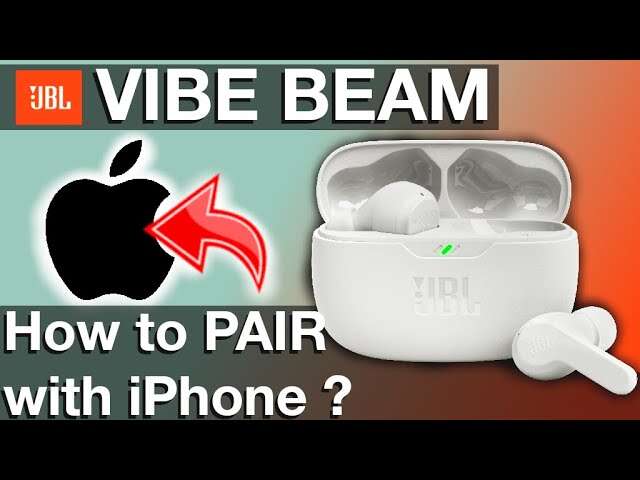
To reset JBL Vibe Beam earbuds, tap either earbud three times and hold the third tap for over five seconds.
Resetting JBL Vibe Beam earbuds can fix pairing errors, one-sided audio, touch control glitches, and repeated connection drops. The process is simple, but timing matters. This guide explains how to reset JBL Vibe Beam earbuds, remove old Bluetooth data, pair them again, and solve problems that remain after the reset.

What a Reset Does to JBL Vibe Beam Earbuds
A factory reset clears the earbuds’ stored Bluetooth connection data and returns their wireless settings to a fresh state. It does not physically repair damaged hardware, improve a worn battery, or restore deleted music files.
Resetting JBL Vibe Beam earbuds is useful when:
• Your phone cannot find the earbuds.
• Only one earbud produces sound.
• The earbuds connect to the wrong device.
• Bluetooth pairing fails again and again.
• Touch controls stop responding correctly.
• Audio cuts out even when the earbuds are close to your phone.
Think of a reset as wiping a small whiteboard clean. It removes old connection information so your phone and earbuds can start a new Bluetooth relationship.

How to Reset JBL Vibe Beam Earbuds
Before starting, charge the earbuds and charging case for a few minutes. A very low battery can make the reset fail or make the touch controls respond slowly.
Follow these steps for resetting JBL Vibe Beam earbuds:
-
Remove both earbuds from the charging case.
-
Make sure the earbuds are turned on and not actively playing audio.
-
Place a finger on the touch control area of either earbud.
-
Tap the touch area three times.
-
On the third tap, keep your finger pressed for more than five seconds.
-
Wait for the earbuds to power off or show a reset response.
-
Put both earbuds back into the charging case.
-
Close the lid for about 10 seconds.
-
Open the lid and remove the earbuds.
-
Pair them with your phone as if they were new.
The key part of how to reset JBL Vibe Beam earbuds is the third tap. The first two taps should be quick. The third tap must become a long press. If you tap three times without holding the last tap, the reset may not begin.
Some JBL Vibe Beam firmware versions may respond more consistently when the earbuds are outside the case. If the first attempt does not work, place both earbuds in the case, remove them again, and repeat the process with the lid open.

How to Reset JBL Vibe Beam Earbuds When the Touch Controls Do Not Respond
Touch controls may fail when the earbuds are wet, dirty, or not seated correctly in your ears. They can also act strangely when the battery is nearly empty.
Try these steps before repeating the reset:
• Dry the touch panels with a clean, soft cloth.
• Clean the small charging contacts on each earbud.
• Charge the case and earbuds for at least 15 minutes.
• Remove the earbuds from your phone’s Bluetooth range, then bring them close again.
• Turn off Bluetooth on nearby phones, tablets, and computers.
• Try the three taps and long third press on both earbuds.
The official reset method normally allows either earbud to begin the process. Still, testing both sides can help when one touch panel is not registering input.
In my troubleshooting experience, the most common mistake is holding the third tap too soon. The earbuds need two clear taps first. Then press and hold on the third touch. It is similar to pressing a camera shutter: two quick clicks, followed by one firm hold.

Remove the Old Bluetooth Pairing
Resetting JBL Vibe Beam earbuds may not be enough if your phone still remembers the old connection. Bluetooth devices often keep a saved profile, and that profile can contain incorrect pairing information.
Remove the saved JBL Vibe Beam entry from your phone.
On an iPhone
-
Open Settings.
-
Select Bluetooth.
-
Find JBL Vibe Beam in the device list.
-
Tap the information icon beside it.
-
Select Forget This Device.
-
Confirm the choice.
On an Android phone
-
Open Settings.
-
Select Connected devices or Connections.
-
Open Bluetooth.
-
Tap the settings icon beside JBL Vibe Beam.
-
Choose Forget, Unpair, or Remove.
-
Confirm the action.
After removing the old profile, turn Bluetooth off for a few seconds. Turn it back on only after the earbuds have completed the reset. This gives the phone a clean start.
If your phone shows several JBL entries, remove each old JBL Vibe Beam entry. Do not remove unrelated devices unless you want to pair them again later.

Pair JBL Vibe Beam Earbuds Again
After resetting JBL Vibe Beam earbuds, pairing should be treated as a new setup. Keep the phone and earbuds close together, preferably within three feet.
Use this process:
-
Open the charging case.
-
Remove both earbuds.