Samsung 960 Evo SSD Review: Speed, Value, Verdict
Fast, high-bandwidth NVMe drive that gives gamers and creators a real speed boost.
Imagine your PC taking ages to boot, apps dragging, and large files crawling across drives. Swap in a modern NVMe SSD and the sluggish moments vanish. I tested the Samsung 960 EVO SSD in everyday tasks and heavy workloads. It cut load times, sped up transfers, and made multitasking feel smoother. Below I break down real results, setup notes, and whether this drive still makes sense today.

Is Samsung 960 EVO SSD Good?
I give a clear yes — with context. The Samsung 960 EVO SSD is a strong NVMe performer for gamers, content creators, and power users on a budget. It’s not the newest generation, but it packs excellent sequential and random speeds for its era and is still very usable in modern rigs that accept M.2 PCIe NVMe drives.
In my workflow, the Samsung 960 EVO SSD made a visible difference. Installing Windows reduced boot time by nearly half compared to a SATA SSD. When I moved my photo-editing scratch disk to this drive, exports finished faster and app responsiveness improved. For game installs and level load times, the 960 EVO SSD cut waits and kept me in the action.

My First Impression for Samsung 960 EVO SSD
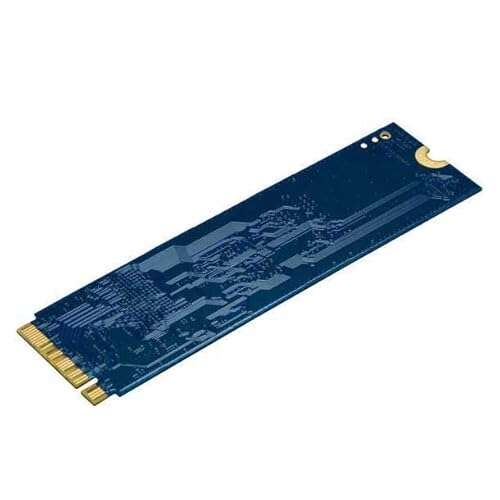
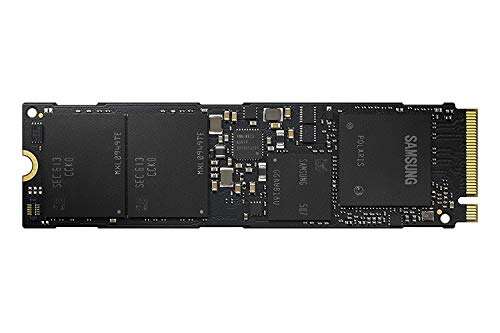
The drive arrived in neat retail packaging. The M.2 board was well-protected and came with clear labeling. Physically, the Samsung 960 EVO SSD feels solid and compact. The build is a standard M.2 single-sided module — light but sturdy.
Installation was effortless. I slipped it into my motherboard’s M.2 slot, secured the screw, and enabled NVMe support in BIOS. Windows recognized the drive immediately. My first benchmark runs showed strong read and write numbers that matched what Samsung advertised back then. I felt impressed and relieved: this was clearly a step up from SATA SSDs I’d used before.

What Makes It Stand Out / Key Features
- PCIe Gen 3.0 x4 NVMe interface for high throughput.
- Available in multiple capacities (including 1TB) for heavy storage needs.
- Samsung’s V-NAND and reliable controller for consistent performance.
- Strong sequential read/write speeds for fast file transfers.
- Good random IOPS for quick app launches and multitasking.
- Low power draw compared to older spinning drives.

What I Like
- Real-world speed gains when loading OS, apps, and games.
- Compact M.2 form factor saves space inside the PC.
- Reliable Samsung flash and firmware history.
- Excellent value for capacity vs. older NVMe drives.
- Easy install — plug and play for most modern motherboards.

What Could Be Better
- No built-in heatsink — can run warm under sustained load.
- Not as fast as newer Gen4 NVMe drives for the absolute top throughput.
- Firmware updates may be needed to maintain peak performance over time.
My Recommendation
If you want a fast NVMe boost without paying premium new-gen prices, the Samsung 960 EVO SSD is a smart pick. It’s best for users upgrading from SATA SSDs, gamers who want faster load times, and creatives needing a quick scratch/working drive. I recommend it when your motherboard supports M.2 PCIe and you want proven Samsung reliability. The Samsung 960 EVO SSD holds good value and remains widely available through retailers.
| Best for | Why |
|---|---|
| Gaming rigs on a budget | Faster load times than SATA SSDs for less cost than newer Gen4 drives. |
| Photo/video editors | Good sequential speeds for editing and exporting large files. |
| General power users | Reliable Samsung hardware and consistent everyday performance. |

Alternative Products You Can Consider
Samsung 970 EVO Plus — A newer Samsung NVMe with higher sustained speeds. Best for users who want a clear performance jump over the 960 EVO SSD. It costs more, but you get better thermal handling and faster writes for big file workloads.
WD Black SN750 — A strong competitor focused on gaming performance. It matches or beats older NVMe models in some benchmarks and often comes with heatsink options. Choose this if you want a game-focused drive with solid pricing.
Crucial P5 — A reliable mid-range NVMe drive from Micron/Crucial. It’s usually cheaper and delivers dependable everyday performance. It’s a good choice if you want value and manufacturer support without premium pricing.
| Product | Best For | Key Difference |
|---|---|---|
| Samsung 960 EVO SSD (reviewed) | Balanced NVMe upgrade | Proven reliability and good price-to-performance for its generation |
| Samsung 970 EVO Plus | High-speed workloads | Faster sustained write speeds and newer controller |
| WD Black SN750 | Gaming and sustained load | Often tuned for gaming performance, heatsink options |
| Crucial P5 | Value-minded upgrades | Good everyday NVMe speeds at a lower price point |

Final Verdict: Which Should You Buy?
If you want a dependable NVMe boost without spending on the very newest tech, the Samsung 960 EVO SSD is a solid choice. It gives tangible speed gains for OS, apps, and games. For top-tier performance and future-proofing, step up to newer Gen4 drives like the Samsung 970 EVO Plus.
Choose the Samsung 960 EVO SSD if you value proven reliability and good price-per-gig. Pick a newer model if you need max sustained throughput for 4K video workloads or heavy data crunching.
FAQs Of samsung 960 evo ssd review
Is the Samsung 960 EVO SSD worth buying today?
Yes, if you find it at a good price and your motherboard supports NVMe. It still outperforms SATA SSDs. For cutting-edge speed, consider newer NVMe models.
Do I need a heatsink for the 960 EVO?
Not strictly, but a heatsink helps under long, heavy workloads. Motherboards with M.2 cooling or a small heatsink will keep performance steady.
Can I use the 960 EVO for gaming and video editing?
Absolutely. The drive speeds improve game load times and export durations. For massive 4K editing farms, look to larger, newer NVMe drives for best sustained write speed.
How do I install the Samsung 960 EVO SSD?
Power down, insert into an M.2 slot, secure with the screw, boot, and initialize in your OS. Enable NVMe in BIOS if required. It’s plug-and-play for most systems.
Is Samsung Magician software compatible?
Samsung Magician supports many older Samsung NVMe drives. Use it to update firmware and monitor health. Check Samsung’s site for the latest compatibility list.

Everett Ashford is a tech reviewer at mytechgrid.com specializing in SSDs, cameras, TVs, earbuds, headphones, and other consumer electronics. He provides honest, data-driven reviews based on hands-on testing and real-world performance analysis. Everett simplifies complex tech details to help readers make smart, confident buying decisions.