
What Is Talk Through On JBL Headphones: Easy Guide
TalkThrough on JBL headphones lets you hear nearby voices and sounds without removing your headphones.
If you have seen “TalkThru” in the JBL Headphones app or on your JBL headset, you may wonder what it does and when to use it. TalkThru lowers your music and uses the built-in microphones to bring outside speech forward. This guide explains what is TalkThrough on JBL headphones, how it works, how to turn it on, and how it differs from Ambient Aware and noise cancellation.
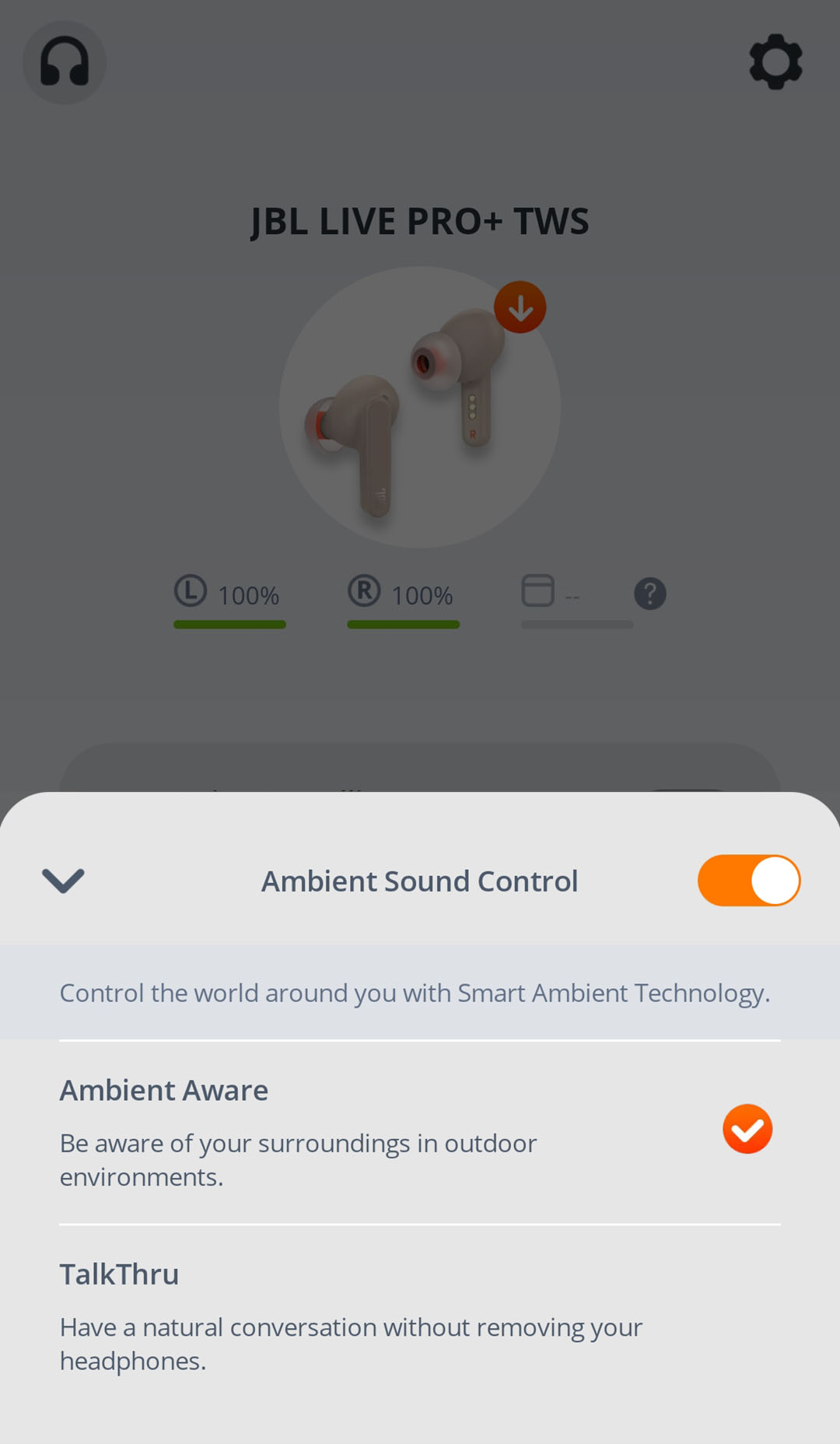
What Is TalkThrough on JBL Headphones?
TalkThru is a listening mode on many JBL wireless headphones and earbuds. It reduces the volume of your music or podcast and uses external microphones to pick up nearby voices. This lets you have a short conversation without taking off your headphones.
In simple terms, TalkThrough on JBL headphones works like a temporary “pause the world” button. Your audio stays connected, but speech near you becomes easier to hear.
The feature is useful in places such as:
• Airports and train stations
• Office spaces
• Gyms and fitness centers
• Coffee shops
• Classrooms
• Stores and checkout lines
• Walks where someone needs to speak to you
TalkThru does not usually stop your music completely. Instead, it lowers the audio and mixes outside sound into what you hear. The exact volume balance can differ by JBL model and app version.

How TalkThrough Works
JBL headphones with TalkThru use microphones placed on the outside of the earcups or earbuds. These microphones capture sound from your surroundings. The headphones then process that sound and send it into your ears along with reduced music.
The process has three basic steps:
- The outside microphones detect nearby sound.
- The headphones lower the volume of your current audio.
- The headphones amplify or pass through speech and other important sounds.
This system is different from simply removing your headphones. You still receive sound through the headphones, so the voice may not sound exactly as natural as it would with open ears.
TalkThrough is mainly designed for short conversations. It is not a replacement for fully removing your headphones when you need to listen closely, follow detailed instructions, or stay fully aware of your surroundings.
A useful way to understand it is to compare it with a dimmer switch. Noise cancellation turns unwanted sound down. TalkThru turns your music down and brings selected outside sound up.

TalkThru vs. Ambient Aware vs. Noise Cancelling
JBL often includes several sound control modes. Knowing the difference helps you choose the right setting.
TalkThru
TalkThru lowers your media volume and lets nearby voices come through. It is best for quick conversations while you are wearing your headphones.
Ambient Aware
Ambient Aware allows more surrounding sound into your headphones without necessarily lowering your music as much. It helps you hear traffic, announcements, people, or other sounds while continuing to listen to audio.
Ambient Aware is often better when you want ongoing awareness. For example, you may use it while walking in a busy area or waiting for a boarding announcement.
Active Noise Cancelling
Active Noise Cancelling, often called ANC, uses microphones and sound processing to reduce steady outside noise. It works well for sounds such as airplane engines, air conditioners, and bus noise.
ANC is not designed to make speech disappear in every situation. Voices can still pass through, especially when they are close or loud. TalkThru is the more convenient choice when your main goal is to hear someone speak.
Here is a simple guide:
• Choose TalkThru for a quick conversation.
• Choose Ambient Aware for general awareness.
• Choose ANC for reducing steady background noise.
• Turn all special modes off for the most natural headphone sound.
How to Turn On TalkThrough on JBL Headphones
The exact steps depend on your JBL model. Most compatible products use the JBL Headphones app, while some models let you control the feature from the headphone itself.
Using the JBL Headphones app
Follow these general steps:
- Install and open the JBL Headphones app.
- Turn on your JBL headphones or earbuds.
- Connect them to your phone through Bluetooth.
- Select your connected JBL product in the app.
- Find the Ambient Sound Control or Smart Ambient menu.
- Select TalkThru.
Some models show TalkThru as one of three modes: Noise Cancelling, Ambient Aware, and TalkThru. Other models may place it under a button customization menu.
Using the headphone controls
Many JBL products let you switch modes by pressing a button or tapping the touch panel. The control may be labeled Ambient Sound Control, Smart Ambient, or a similar name.
The number of taps varies. On some devices, a single tap changes modes. On others, you may need to press and hold. Check the product guide for your specific model because JBL headphone controls are not identical across every series.
If TalkThru does not appear
TalkThru is not available on every JBL headphone. If you cannot find it, try these steps:
• Update the JBL Headphones app.
• Update the headphone firmware through the app.
• Disconnect and reconnect Bluetooth.
• Restart your phone and headphones.
• Check your exact model’s user guide.
• Confirm that your headphones support TalkThru.
A common mistake is searching for TalkThru in the phone’s Bluetooth settings. The feature usually appears in the JBL Headphones app or through the headset’s physical controls.

What Does TalkThrough Sound Like?
TalkThrough on JBL headphones usually makes music much quieter. At the same time, nearby speech becomes clearer and more noticeable. You may still hear your music in the background, but it should no longer cover a normal conversation.
The sound can vary based on:
• The JBL model
• Microphone quality
• Earbud fit
• Your music volume
• The distance between you and the speaker
• Background noise
• Wind and movement
In a quiet room, TalkThru may make a person’s voice easy to understand. In a busy airport or loud gym, you may still need to lower the music more or remove one earbud.
TalkThru may also change the tone of your music. Since the microphones are processing outside sound, speech and background noise can seem slightly thin, sharp, or artificial. That is normal for a pass-through mode.
When testing this feature in daily situations, a practical habit is to lower your audio before activating TalkThru. This makes the change less sudden and can make conversation easier.

Benefits of TalkThrough on JBL Headphones
TalkThrough offers several practical benefits for people who wear headphones throughout the day.
You can respond quickly
If someone asks you a simple question, you do not need to remove your headphones. This is helpful when your hands are full or when you are moving through a busy place.
It helps you stay connected
Headphones can create a barrier between you and the people around you. TalkThru reduces that barrier while keeping your headphones on.
It is convenient at work
You can use TalkThru when a coworker stops by your desk. It can save time during short exchanges, especially when your headphones are part of your work routine.
It reduces repeated headphone removal
Taking headphones on and off all day can be annoying. It may also interrupt your music, podcast, or call. TalkThru gives you a faster option for brief conversations.
It works with many types of audio
TalkThru can reduce music, podcasts, and other media. However, the feature may be less useful during phone calls, since call audio can behave differently from normal media audio.

Limitations and Safety Concerns
TalkThru is useful, but it is not perfect. It should not be treated as a complete replacement for hearing your surroundings naturally.
The microphones may not capture every sound equally. A person standing behind you, a speaker far away, or someone speaking softly may remain difficult to hear. Wind can also create noise and reduce speech clarity.
You should remove your headphones when:
• Someone gives you important instructions.
• You are crossing a road or riding a bike.
• You are near heavy machinery.
• You need to hear alarms clearly.
• You are in an emergency.
• You must focus on a detailed conversation.
TalkThrough can improve awareness, but it does not guarantee safety. Sound processing creates a small delay, and microphones cannot perfectly reproduce the direction or distance of every sound.
For outdoor use, keep the volume moderate. Hearing health experts commonly recommend limiting both listening volume and exposure time. If you notice ringing, muffled hearing, or discomfort, take a break and reduce the volume.
How to Get Better Results From TalkThru
A few small adjustments can make TalkThru on JBL headphones more useful.
Lower your media volume first
TalkThru normally reduces media volume automatically, but starting with a moderate volume gives the microphones less work to do. It also makes speech easier to understand.
Use the correct ear tip size
For JBL earbuds, a proper ear tip seal improves sound quality and comfort. However, a very tight seal may make outside speech feel less natural when TalkThru is off. Try the available ear tips and choose the one that stays secure without pressure.
Keep the microphones clear
Do not cover the microphone openings with your fingers, hair, clothing, or a thick case. Dirt and earwax can also affect microphone performance. Clean the outside of your earbuds or headphones with a dry, soft cloth.
Update the firmware
JBL may improve sound modes, touch controls, and connection behavior through firmware updates. Use the JBL Headphones app to check for updates.
Customize the controls
If your model supports control customization, assign an easy-to-reach button or touch gesture to Ambient Sound Control. This makes TalkThru faster to access.
Test it before you need it
Try TalkThru at home first. Speak with someone at a normal distance, then test it in a moderately busy area. This helps you learn how your specific JBL model performs.
Common TalkThru Problems and Fixes
TalkThru does not turn on
Make sure the headphones are connected to the JBL Headphones app. If the option is missing, your model may not support the feature or may need a firmware update.
The music is still too loud
Lower the volume from your phone and use the JBL app if it provides a TalkThru or ambient sound level adjustment. Some JBL models offer more control than others.
Voices sound distant
Move closer to the person speaking and check that the microphone openings are clean. A loud environment, wind, or a poor Bluetooth connection can also affect the experience.
Only one earbud changes mode
Place both earbuds in your ears and check their battery levels. Then reconnect them to the phone. If the problem continues, reset the earbuds according to the model’s instructions.
TalkThru turns on by accident
Accidental taps can activate the feature on touch-controlled earbuds. Open the JBL Headphones app and change the touch control settings if your model supports that option.
The mode sounds strange after an update
Turn TalkThru off and on again. If that does not help, restart the headphones and check the app for another firmware update. A factory reset may help, but it should be the last step because it removes saved settings.
When Should You Use TalkThru?
TalkThru on JBL headphones is best for short, low-risk moments. It is a convenience feature, not a mode you must leave on all day.
Good examples include:
• Answering a quick question at work
• Ordering coffee
• Speaking with a gym staff member
• Hearing a train or flight announcement
• Talking with a friend during a walk
• Checking out at a store
For long conversations, switch to Ambient Aware or remove the headphones. TalkThru lowers media volume, but it may still make voices sound processed.
If you are driving, cycling, or walking near traffic, do not depend only on TalkThru. Keep your eyes alert, keep the volume low, and remove the headphones when you need full awareness.
PAA-Style Answers About TalkThrough on JBL Headphones
Does TalkThru pause music on JBL headphones?
Usually, TalkThru lowers the volume instead of fully pausing the music. The exact behavior depends on the JBL model and the type of audio you are playing.
Does TalkThru let you hear everything around you?
No. TalkThru mainly helps bring nearby speech and outside sound into your headphones. It may not reproduce every sound clearly, especially in wind or heavy background noise.
Can I use TalkThru during a phone call?
TalkThru is mainly designed for media playback and short conversations. During a phone call, the headphone may use a different microphone and sound mode, so the results can vary by model.
Frequently Asked Questions About What Is TalkThrough on JBL Headphones
What is TalkThrough on JBL headphones used for?
TalkThrough on JBL headphones lowers your music and uses the external microphones to make nearby voices easier to hear. It is designed for short conversations without removing your headphones.
How do I activate TalkThru on JBL earbuds?
Connect the earbuds to the JBL Headphones app and look for Ambient Sound Control, Smart Ambient, or TalkThru. Some models also activate it through a button press or touch gesture.
Is TalkThru the same as noise cancellation?
No. Noise cancellation reduces unwanted background noise, while TalkThru lowers your media and brings outside speech forward. Ambient Aware is another separate mode that provides broader environmental awareness.
Why can I still hear music when TalkThru is on?
TalkThru normally reduces media volume rather than stopping it completely. You can lower the music further from your phone or through the JBL app if the voice is still hard to understand.
Does every JBL headphone have TalkThru?
No. TalkThru is available only on selected JBL headphones and earbuds. The supported features depend on the product model, firmware, and JBL app version.
Is TalkThru safe to use outdoors?
TalkThru can help you hear some nearby sounds, but it should not be your only safety method. When walking near traffic, cycling, or working around hazards, remove your headphones or use extreme caution.
Conclusion
TalkThrough on JBL headphones is a smart ambient sound mode that lowers your audio and brings nearby voices into focus. It is helpful for quick conversations, announcements, and everyday moments when removing your headphones is inconvenient.
The best results come from using the JBL Headphones app, keeping the microphones clean, choosing a comfortable fit, and maintaining a safe volume. Remember that TalkThru improves awareness but does not replace natural hearing in risky or important situations.
Try the feature in a quiet place, learn how it sounds on your JBL model, and adjust your listening habits with care. If this guide helped, explore your JBL app’s other sound settings and share your experience with TalkThru.

Everett Ashford is a tech reviewer at mytechgrid.com specializing in SSDs, cameras, TVs, earbuds, headphones, and other consumer electronics. He provides honest, data-driven reviews based on hands-on testing and real-world performance analysis. Everett simplifies complex tech details to help readers make smart, confident buying decisions.


One Comment