Use a Bluetooth adapter or transmitter to turn wired headphones into wireless in minutes.
I’ve spent years testing audio hacks, adapters, and simple mods so you don’t have to. This guide explains how to make wired headphones wireless with clear options, step‑by‑step instructions, and real-world tips. You’ll learn practical methods, the tradeoffs for sound and latency, and which solution fits your needs — whether you want phone-friendly listening, TV audio, or low‑lag gaming.
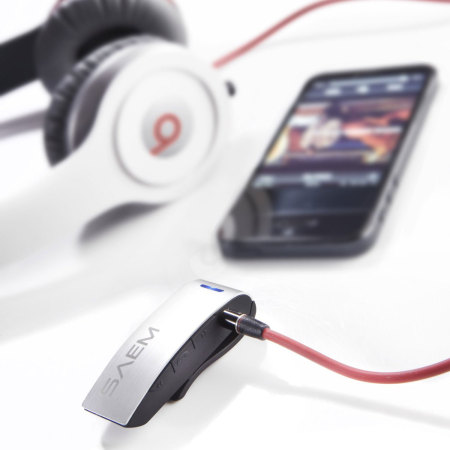
Why convert wired headphones to wireless?
Making wired headphones wireless removes the cord and adds freedom. It lets you move without tugging on your device and use older headphones with modern phones that lack headphone jacks. If you care about comfort, safety while exercising, or just want a cleaner desk, converting is worth it.
I’ll show easy, midlevel, and advanced options. You’ll see costs, expected sound quality, and how each choice affects battery life and latency. This helps you pick the right solution for how to make wired headphones wireless.

Methods to make wired headphones wireless
You have clear paths to go wireless. Pick the one that matches your budget and skill level.
- Use a plug‑in Bluetooth adapter or dongle for headphones.
- Use a Bluetooth transmitter for TV or non‑Bluetooth sources.
- Use a Bluetooth receiver module inside headphones (solder or plug style).
- Use a wireless adapter that uses RF instead of Bluetooth for very low latency.
- Use a phone or laptop as a temporary Bluetooth transmitter with the right app or settings.
Each approach changes sound quality, latency, and set‑up time. I’ll explain how to make wired headphones wireless using these methods and when each makes sense.

Bluetooth headphone adapter (plug style)
- Small dongles plug into the headphone jack on the headphones or device.
- They pair to your phone or PC like regular Bluetooth earphones.
- Best for quick use and travel.
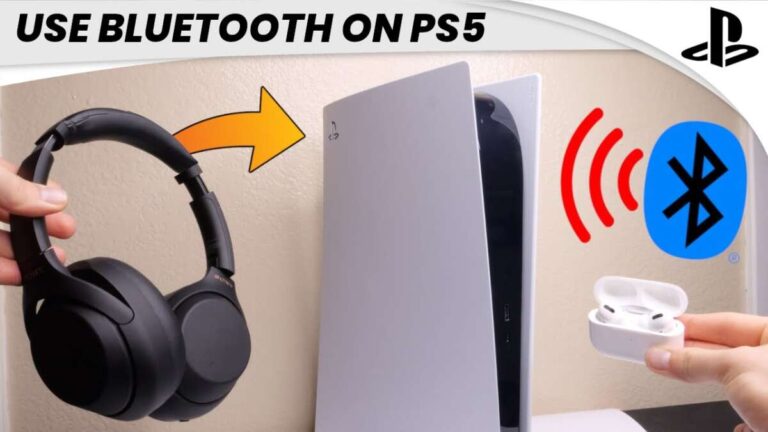
Bluetooth transmitter (for TV, consoles)
- Transmitters plug into TV optical, RCA, or 3.5mm outputs.
- They send audio to your Bluetooth headphone adapter or receiver.
- Ideal for watching TV without disturbing others.
Internal Bluetooth receiver (DIY or retrofit)
- Small modules fit inside headphone cups or inline housings.
- May require soldering, battery, and micro USB or USB‑C charging.
- Gives a neat finish but needs more skill.
RF or low‑latency adapters
- RF bases and receivers use dedicated radio, not Bluetooth.
- Often lower latency for gaming or pro audio.
- Can cost more and are larger.

Choosing the right Bluetooth adapter or transmitter
Choose based on use, codec support, and ports.
- For phones and music: look for aptX or AAC support.
- For TV and movies: prioritize low latency (aptX LL) or a wired option.
- For phones without a headphone jack: a compact headphone dongle works well.
- For headphones with large plugs: check if the adapter supports 1/4" or needs a converter.
Key specs to read:
- Bluetooth version (5.0 or above is preferable).
- Supported codecs (SBC, AAC, aptX, aptX LL, LDAC).
- Battery life and charging method.
- Pairing modes and multi‑device support.
When you shop, compare real user feedback on latency and reliability. That makes the difference in how to make wired headphones wireless and still get great sound.

Step-by-step: Using a Bluetooth adapter (easy method)
This is the fastest way to make wired headphones wireless.
- Buy a headphone Bluetooth adapter or receiver.
- Charge the adapter fully before first use.
- Turn on pairing mode on the adapter.
- Put your phone or computer into Bluetooth discovery mode.
- Select the adapter from the device list and pair.
- Plug your wired headphones into the adapter’s headphone jack.
Test playback and adjust volume. If you hear lag, check for aptX LL support or try a different adapter.

DIY and solder‑free options
If you like tinkering, there are two paths: plug‑and‑play modules and build‑in retrofits.
- Plug‑and‑play: small inline Bluetooth receivers with a 3.5mm plug. No soldering needed. They hang on the cable but work instantly.
- Retrofit with a module: buy a tiny Bluetooth board, battery, and charging board. You’ll need basic soldering. Mount components in the earcup or inline housing.
Tips from my experience:
- Use shielded wire and keep the battery away from the driver magnet.
- Test pairing before final assembly.
- Use heat‑shrink tubing to protect connections.
Retrofits look cleaner but take time. Plug‑and‑play options are reliable and fast if you want to make wired headphones wireless with minimal effort.

Audio quality, codecs, and latency
Sound depends on the adapter and codec more than the headphones. Know these basics:
- SBC is universal but may compress audio noticeably.
- AAC is good for Apple devices and yields better clarity for iPhone users.
- aptX, aptX HD, and LDAC offer higher bitrate audio for Android and compatible devices.
- aptX LL (low latency) reduces delay for video and gaming.
Latency matters if you watch movies or play games. Aim for under 40 ms for sync that feels natural. If you need zero lag, consider RF systems or wired connections.

Battery life and power considerations
Bluetooth adapters need power. Keep these points in mind.
- Small dongles often last 6–12 hours. Internal retrofits depend on battery size.
- Charging via micro USB or USB‑C is the norm.
- For extended use, carry a small power bank or choose replaceable batteries.
- Battery size adds weight if you retrofit inside earcups. Balance comfort and runtime.
When converting older headphones, consider whether added weight affects fit and sound seal.
Troubleshooting and tips from real use
I’ve tried many adapters and made a few retrofits. Here are tested tips.
- If audio stutters, move closer to the source and remove obstacles.
- For hiss or noise, try another adapter or add a ground loop isolator for TVs.
- If only one side works, check TRS vs TRRS plug types and use the right cable.
- Keep firmware updated for improved compatibility.
- Label devices when pairing many Bluetooth gadgets to avoid confusion.
A mistake I made once: I used a tiny battery that died after an hour during a commute. Lesson learned — check runtime before finalizing a build.
People also ask
Will converting affect audio quality?
Yes. Quality depends on the adapter and codec. A high‑quality adapter with aptX or LDAC preserves more detail than a cheap SBC unit.
Can I use a phone as a Bluetooth transmitter?
Some phones and apps can transmit audio, but the feature is limited and may add latency. It’s best for short, ad‑hoc uses rather than daily listening.
Is soldering required to make wired headphones wireless?
Not always. Many plug‑in receivers need no soldering. Soldering is only for clean internal retrofits or custom builds.
Frequently Asked Questions of how to make wired headphones wireless
How long does it take to convert wired headphones to wireless?
Most plug‑in adapters pair and work within 5–10 minutes. Internal retrofits take longer and may require a few hours for assembly and testing.
Will my headphones sound worse when wireless?
They can, depending on adapter quality and codec. A good Bluetooth transmitter with aptX or LDAC keeps sound close to wired quality.
Can I use wireless adapters with my TV?
Yes. Use a Bluetooth transmitter that supports optical or RCA outputs. Choose low‑latency codecs for better lip sync.
Are there adapters that fit every headphone plug?
Not always. Standard 3.5mm fits most models, but pro gear with 1/4" jacks may need an adapter or a transmitter with a compatible port.
Is it safe to open my headphones and add a Bluetooth board?
It can be safe if you know basic electronics. Disconnect power, avoid short circuits, and use correct batteries. If unsure, choose a plug‑in solution.
Will latency be a problem for gaming?
Bluetooth latency can be an issue for competitive gaming. For low latency, use aptX LL or an RF solution, or stick with wired.
Closing thoughts
Making wired headphones wireless opens many doors. You can pick a simple plug‑in adapter for quick freedom, a transmitter for TV, or a neat internal retrofit for a seamless look. Focus on codec support, battery life, and latency when choosing. Try a low‑cost adapter first to see if the change fits your routine.
Take action: choose one method above and test it this week. If you enjoyed this guide, subscribe for more hands‑on tips, share your build, or ask a question below — I’ll help you troubleshoot.

Jamie Lee is a seasoned tech analyst and writer at MyTechGrid.com, known for making the rapidly evolving world of technology accessible to all. Jamie’s work focuses on emerging technologies, product deep-dives, and industry trends—translating complex concepts into engaging, easy-to-understand content. When not researching the latest breakthroughs, Jamie enjoys exploring new tools, testing gadgets, and helping readers navigate the digital world with confidence.