For most digital marketers in the United States, the 15-inch MacBook Air with Apple silicon, 16GB of unified memory, and a 512GB SSD is the best overall laptop. It is fast, quiet, light, and strong enough for tools such as Google Ads, Meta Ads Manager, Google Analytics 4, Looker Studio, Canva, WordPress, HubSpot, Mailchimp, and light video editing.
A Windows laptop with an Intel Core Ultra 7 or AMD Ryzen 7 processor, 16GB of RAM, and a 512GB SSD is the better choice if you use Windows-only software, need more ports, or want a wider range of prices.
The right choice depends less on raw power and more on how you work. A social media manager may need a bright screen and a good webcam. A paid media specialist may value browser speed and battery life. A content marketer may need a comfortable keyboard and a larger display. An agency worker may need more memory for many browser tabs, dashboards, and creative apps.
Introduction: Choosing a Digital Marketing Laptop in the United States
Digital marketing work in the U.S. often means moving between many web apps in one day. You may use Google Workspace, Slack, Zoom, Salesforce, Google Ads, Meta Business Suite, TikTok Ads Manager, Canva, Adobe Express, and a content management system such as WordPress.
Most of these tools run in a web browser. That means you do not need a gaming laptop or a high-end workstation for normal marketing work. You need a laptop that stays responsive with many tabs open, has a clear screen, supports video calls, and can last through a workday.
The best laptop for digital marketing should also fit common U.S. work needs. It should support Wi-Fi used in homes and offices, work well with external monitors, handle cloud storage, and have a reliable warranty and repair option in the United States.

Quick Answer: Which Laptop Should You Buy?
Choose based on your work style:
| User type | Recommended laptop type | Suggested configuration |
|---|---|---|
| Most digital marketers | MacBook Air 15-inch | Apple silicon, 16GB memory, 512GB SSD |
| Windows users | Business-class Windows laptop | Core Ultra 7 or Ryzen 7, 16GB RAM, 512GB SSD |
| Heavy Canva, Photoshop, or video work | MacBook Pro or premium Windows laptop | 16GB to 32GB RAM, 512GB to 1TB SSD |
| Students and beginners | MacBook Air 13-inch or midrange Windows laptop | 16GB memory, 512GB SSD |
| Low-cost users | Chromebook Plus or budget Windows laptop | 8GB to 16GB RAM, 128GB to 512GB storage |
| Frequent travelers | 13- or 14-inch ultraportable | 16GB memory, strong battery, under about 4 pounds |
| Desk-based marketers | 15- or 16-inch laptop | Larger screen, USB-C charging, external display support |
The MacBook Air 15-inch is the best general pick because its larger screen helps with dashboards and spreadsheets while keeping the simple, quiet design of an ultraportable laptop.
The MacBook Air 13-inch is better if you travel often. A Windows business laptop is better if your employer uses Microsoft tools, Windows management software, or specialized applications.
What Digital Marketing Work Requires From a Laptop
Digital marketing does not usually require a powerful graphics card. It does require a balanced system.
Processor
The processor affects how quickly your laptop loads pages, runs apps, exports files, and handles several tasks at once.
For most marketers, use one of these classes:
- Apple silicon, such as the M-series chips
- Intel Core Ultra 5 or Core Ultra 7
- AMD Ryzen 5 or Ryzen 7
A modern processor in this range is enough for browser-based advertising platforms, analytics, email marketing, presentations, and light creative work.
A high-end gaming processor is usually unnecessary. Spend that money on more memory, a better screen, or a larger solid-state drive instead.
Memory
Memory, often called RAM, helps your laptop keep several apps active at the same time.
Digital marketers often run:
- Many Chrome, Edge, or Safari tabs
- Google Sheets and Docs
- Slack or Microsoft Teams
- Zoom
- Ad dashboards
- Image tools
- A content management system
- Music or video in the background
Choose 16GB of memory if your budget allows. It gives you more room for multitasking and should remain useful for longer than an 8GB model.
An 8GB laptop can work for basic email, writing, and light browsing. It is less comfortable when you keep many tabs and creative tools open. On some laptops, memory cannot be upgraded later, so check the specification before buying.
Storage
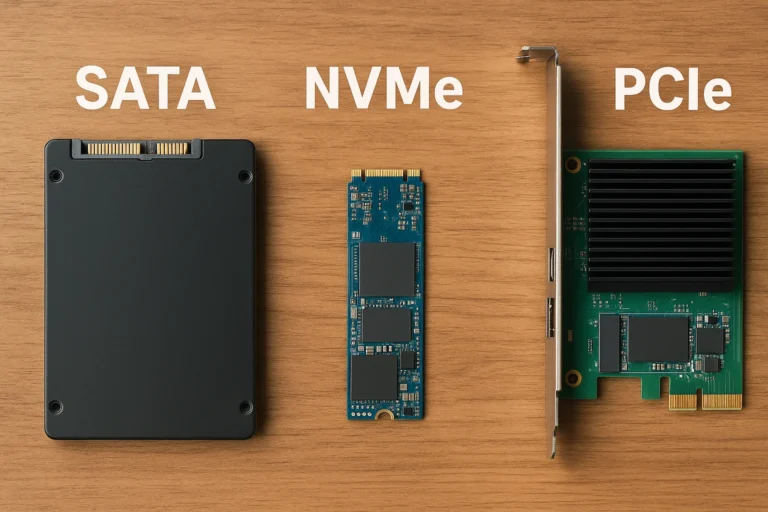
A solid-state drive, or SSD, stores your apps and files. It is much faster and quieter than an old hard disk drive.
Choose:
- 256GB for light cloud-based work
- 512GB for most digital marketers
- 1TB if you keep video, photo, podcast, or design files on the laptop
Cloud storage can reduce local storage needs, but it does not remove them completely. Video exports, downloaded assets, browser caches, and creative project files can fill a small drive quickly.
Display
A good screen helps you review ads, edit images, read reports, and compare campaign data.
Look for:
- A resolution of at least 1920 × 1080 on Windows laptops
- A sharp display on Mac laptops
- Good brightness for office and travel use
- A matte or low-glare finish if you work under strong lights
- A 14- to 16-inch screen for dashboards and spreadsheets
Color accuracy matters more if you create ads, edit photos, or work with brand assets. For reports and copywriting, screen size and text clarity usually matter more than professional color coverage.
Keyboard, webcam, and battery
These features affect daily comfort more than benchmark scores.
A good digital marketing laptop should have:
- A comfortable keyboard for long writing sessions
- A clear webcam for client meetings
- A microphone that reduces room noise
- Battery life that covers several hours away from an outlet
- USB-C charging if you want one charger for several devices
Battery results vary with screen brightness, video calls, browser tabs, and app use. Manufacturer battery figures are measured under set conditions, so treat them as comparison figures rather than a promise of a full workday.

Best Laptop for Digital Marketing: Top Choices
The following recommendations focus on fit, not on a single universal winner. Product names, configurations, and prices can change, so confirm the exact model and warranty before purchase.
Best overall: 15-inch MacBook Air
The 15-inch MacBook Air is the strongest all-purpose choice for many U.S. digital marketers.
It offers:
- A large screen for dashboards and spreadsheets
- Strong performance for browser-based work
- A quiet fanless design
- Good portability for a 15-inch laptop
- A sharp display for images and video
- Long battery life under light and mixed use
Choose at least 16GB of unified memory and 512GB of storage. The base configuration may be enough for light work, but the larger memory and storage options provide more room for browser multitasking and creative files.
The main limits are its port selection and operating system. You may need a USB-C hub for HDMI, USB-A devices, SD cards, or wired accessories. Some Windows-only business tools may also require a different computer or a virtual machine.
Apple documents MacBook Air technical specifications on its official MacBook Air page:
Best Windows option: Lenovo ThinkPad T14 or a similar business laptop
A business-class Windows laptop is a practical choice for marketers who work with Microsoft 365, Windows security tools, or company-managed systems.
The Lenovo ThinkPad T14 line is one example of this class. Similar options include business laptops from Dell, HP, and Microsoft.
Look for:
- Intel Core Ultra 5 or Ultra 7, or AMD Ryzen 5 or Ryzen 7
- 16GB of RAM
- A 512GB SSD
- A 14-inch screen with at least Full HD resolution
- A comfortable keyboard
- USB-C, USB-A, HDMI, or a docking option
- A business warranty available in the United States
Business laptops often offer better port selection, repair access, and management features than consumer models. Their screens and speakers may be less exciting than those on premium consumer laptops, so check the exact configuration.
Best for heavy creative marketing: MacBook Pro or premium Windows laptop
Choose a MacBook Pro or a premium Windows creator laptop if your marketing work includes regular video editing, large Photoshop files, motion graphics, or frequent exports.
A suitable configuration may include:
- 16GB or 32GB of memory
- At least 512GB of storage
- A faster Apple, Intel, or AMD processor
- A dedicated graphics processor for demanding Windows creative work
- An accurate display
- A stronger cooling system
Do not buy this class of laptop just because you use Canva or edit short social videos. A MacBook Air or midrange Windows laptop can handle those tasks. The extra cost makes sense when creative work takes up a large part of your week.
Adobe lists the system requirements for applications such as Photoshop, Premiere Pro, and After Effects. Those requirements change by app and version, so check the specific Adobe application you use:
Adobe Creative Cloud system requirements
Best budget option: Chromebook Plus or midrange Windows laptop
A Chromebook Plus can suit a student, solo marketer, or small business owner who works mainly in web apps.
It can handle:
- Google Ads
- Meta Ads Manager
- Google Analytics
- Google Workspace
- Canva
- Social media scheduling tools
- Email platforms
- Web-based project management
Check that your required tools work in a browser. A Chromebook is not ideal if you need desktop Photoshop, Premiere Pro, Microsoft Access, advanced Excel features, or other Windows and macOS programs.
For a budget Windows laptop, avoid buying based only on a low price. Aim for 16GB of RAM and a 512GB SSD if possible. A low-end processor and slow storage can make even simple work feel frustrating.

MacBook vs. Windows for Digital Marketing
Both platforms can support professional marketing work. The better option depends on software, teamwork, and accessories.
| Factor | MacBook | Windows laptop |
|---|---|---|
| Browser-based marketing | Excellent | Excellent |
| Battery and quiet use | Often strong | Varies by model |
| Microsoft business systems | Usually supported | Usually the safest choice |
| Port variety | Often limited | Often broader |
| Creative software | Strong | Strong, especially with dedicated graphics |
| Device choice by price | More limited | More varied |
| Company management | Depends on employer setup | Common in many workplaces |
| Gaming and specialist tools | More limited | Usually broader |
Choose a MacBook if you value quiet operation, a simple product range, strong creative software support, and a high-quality display.
Choose Windows if your employer requires Windows, you need more ports, want a touchscreen or 2-in-1 design, or need software that is not available for macOS.
Before buying for work, ask your employer whether it requires a specific operating system, security tool, VPN, browser, or device-management system. This check can prevent an expensive mismatch.
How Much Should You Spend?
The best budget depends on whether the laptop earns money for you or supports occasional work.
Under $600
Expect trade-offs. Look for:
- 8GB or 16GB of RAM
- A modern Intel, AMD, or Chromebook Plus processor
- At least 128GB of storage for a Chromebook
- At least 256GB for Windows
- A return policy
This range can work for basic marketing tasks, but it may feel slow with large spreadsheets, many tabs, or creative apps.
$600 to $1,000
This is often the best value range for students, freelancers, and small-business owners.
You can usually find:
- 16GB of memory
- A 512GB SSD
- A modern midrange processor
- A good 13- to 15-inch display
- Better build quality than entry-level models
Compare the full specification. Two laptops with the same price can have very different screens, storage, and memory.
$1,000 to $1,500
This range includes many premium ultrabooks and strong MacBook Air configurations.
You may gain:
- A brighter or sharper display
- Better build quality
- Longer battery life
- A better webcam
- More reliable performance
- Improved keyboard and trackpad quality
Above $1,500
Spend this much only when your work needs it. A powerful laptop may help with frequent video production, large creative files, or advanced data work. It will not automatically improve ad strategy, copy, analytics skills, or campaign results.

A Simple Laptop Buying Method
Use this process before you buy.
1. List the tools you use each week
Write down your core apps and services. Include desktop apps, browser tools, video meeting software, and company security tools.
Separate them into three groups:
- Browser-based tools
- macOS or Windows desktop tools
- Demanding creative or data tools
This list often reveals that your actual needs are lower—or higher—than you first expected.
2. Count your normal workload
Think about a typical work session. Do you use five tabs or 40? Do you edit one image or export videos each day? Do you work from a desk or move between client meetings?
For most multitasking marketers, start with:
- 16GB of memory
- 512GB SSD
- A modern midrange processor
- A 14- to 15-inch display
3. Check compatibility before payment
Confirm:
- Your required apps support the operating system
- Your monitor connects through the available ports
- Your webcam and microphone work with Zoom or Teams
- Your company VPN supports the device
- Your preferred browser supports your ad platforms
- The laptop includes a U.S. warranty if you live in the United States
4. Plan for accessories
A laptop may need a few extras:
- USB-C hub or dock
- External monitor
- Wireless mouse
- Laptop stand
- External backup drive
- Noise-canceling headset
A dock can make a thin laptop feel like a full desktop setup. Keep backups separate from the laptop, especially when client files or campaign records matter.
5. Review the return and repair terms
Check the return period, accidental damage coverage, battery warranty terms, and repair process. A low purchase price may not be a good deal if repairs are difficult or the warranty is limited.
Common Laptop Mistakes Digital Marketers Make
Buying too little memory
A cheap laptop with 8GB of RAM may work at first. It can become limiting when you add many browser tabs, video calls, spreadsheets, and creative tools.
Paying for gaming power you will not use
A dedicated graphics card can help with 3D work and advanced video editing. It adds weight, cost, heat, and power use. Most ad management and analytics work does not need it.
Ignoring the screen
A dim screen can make long work sessions tiring. A small display can also make dashboards and spreadsheets harder to use.
Choosing storage by price alone
A 128GB drive can fill quickly after system files, apps, downloads, and media projects are added. A 512GB SSD is a safer long-term choice for many professionals.
Assuming every Chromebook runs every app
Chromebooks are useful for web-based work. They are not universal replacements for Windows or macOS computers. Confirm your software needs first.
Forgetting workplace requirements
A laptop can be technically powerful but still unsuitable for a company’s security system, VPN, or device-management policy.

How to Set Up a New Laptop for Marketing Work
Start with security before installing every app.
- Install operating system and browser updates.
- Turn on automatic updates.
- Use a unique password and a password manager.
- Enable two-factor authentication on email, ad accounts, analytics tools, and cloud storage.
- Install only the apps you need.
- Set up automatic backups.
- Use separate browser profiles for personal and client work.
- Review browser extensions and remove unknown ones.
- Lock the screen when you leave the laptop.
- Test your webcam, microphone, VPN, monitor, and cloud files.
Marketing accounts can contain payment methods, customer data, and business access. Protect them as carefully as you would protect a bank account.
Google provides account security guidance through Google Safety Center, and the U.S. Cybersecurity and Infrastructure Security Agency provides general cybersecurity resources:
Best Laptop Specifications at a Glance
For a safe default, use this specification:
- Processor: Apple silicon, Intel Core Ultra 5 or 7, or AMD Ryzen 5 or 7
- Memory: 16GB
- Storage: 512GB SSD
- Screen: 14 to 15 inches with a sharp, bright display
- Webcam: 1080p preferred for frequent meetings
- Ports: USB-C plus the ports your monitor and accessories require
- Battery: A model with strong independent battery reviews
- Operating system: macOS, Windows, or ChromeOS based on app compatibility
- Warranty: Coverage that applies in your country and suits your work needs
These specifications are a starting point, not a guarantee of performance. Cooling, software updates, display quality, and build quality also affect the experience.
FAQs About the Best Laptop for Digital Marketing
Is a MacBook Air enough for digital marketing?
Yes. A MacBook Air is enough for most browser-based marketing, writing, analytics, email, presentations, Canva work, and light video editing. Choose 16GB of memory if you regularly keep many apps and tabs open.
Is 8GB RAM enough for digital marketing?
It can be enough for light work, such as email, writing, and a small number of browser tabs. For regular multitasking, 16GB is the better target because it leaves more room for dashboards, spreadsheets, video calls, and creative tools.
Do digital marketers need a dedicated graphics card?
Most do not. A dedicated graphics card becomes useful for frequent video editing, motion graphics, 3D design, or advanced visual production. It is not required for normal ad management, SEO, analytics, or content writing.
Is a Chromebook good for digital marketing?
A Chromebook can be good when your work is almost entirely web-based. Check each required app first. It may not support desktop versions of Adobe software, advanced Microsoft tools, or specialized company programs.
Should I buy a 13-inch, 14-inch, or 15-inch laptop?
A 13-inch model is easier to carry. A 14-inch model offers a strong balance. A 15-inch model gives more room for campaign dashboards and spreadsheets. If you work at a desk most of the time, the larger screen may be worth the extra size.
How long should a digital marketing laptop last?
A well-chosen laptop can remain useful for several years, but lifespan depends on updates, battery wear, workload, and repairability. Buying 16GB of memory and a 512GB SSD can reduce the need to replace the device early.
Key Takeaways
- The best overall choice for many marketers is a 15-inch MacBook Air with 16GB of memory and a 512GB SSD.
- A Windows business laptop is better when you need Windows-only tools, more ports, or company-managed software.
- Choose 16GB of RAM for comfortable multitasking.
- Choose a 512GB SSD for most professional marketing work.
- You usually do not need a gaming laptop or dedicated graphics card.
- Check software, workplace, warranty, and monitor compatibility before buying.
- Spend more on memory, display quality, and build quality before paying for extreme processor power.
Conclusion
The best laptop for digital marketing is a balanced laptop, not the most powerful one. For most people in the United States, a 15-inch MacBook Air with 16GB of memory and 512GB of storage is the simplest recommendation.
Choose a Windows business laptop if your tools or employer require Windows. Choose a more powerful MacBook Pro or Windows creator laptop only when video, design, or large files make up a regular part of your work.
Before you buy, list your real apps, count your usual browser tabs, check your company requirements, and compare the complete configuration. That short process will do more for your decision than a long list of processor benchmarks.

Everett Ashford is a tech reviewer at mytechgrid.com specializing in SSDs, cameras, TVs, earbuds, headphones, and other consumer electronics. He provides honest, data-driven reviews based on hands-on testing and real-world performance analysis. Everett simplifies complex tech details to help readers make smart, confident buying decisions.