Fast, affordable SATA SSD that revives old laptops and speeds up daily tasks.
You know the feeling: your laptop crawls, apps lag, and boot takes forever. Swapping a worn hard drive for a solid-state drive is one of the simplest, most cost-effective fixes. The Inland Platinum 256GB SSD aims to do exactly that—bring snappier boots, smoother multitasking, and reliable storage without breaking the bank. I tested it in a couple of older laptops and a budget desktop to see how it performs under real-world use.
 platinum ssd review”>
Is Inland Platinum 256GB SSD Good?
The short answer: yes—for budget upgrades and everyday use. The Inland Platinum 256GB SSD delivers clear, measurable gains over spinning drives. It’s best for people who want faster boot times, quicker app launches, and improved day-to-day responsiveness without paying premium NVMe prices. For heavy video editors or large-file servers, a higher-capacity NVMe drive would be better, but for most users this SSD hits the sweet spot.
I swapped this drive into an older 2015 laptop. The laptop booted in under 20 seconds. Programs that once lagged opened instantly. I also used it as a secondary drive on a budget desktop for game installs and noticed shorter load times. These real-world changes made everyday computing feel less like a chore.

My First Impression for Inland Platinum 256GB SSD
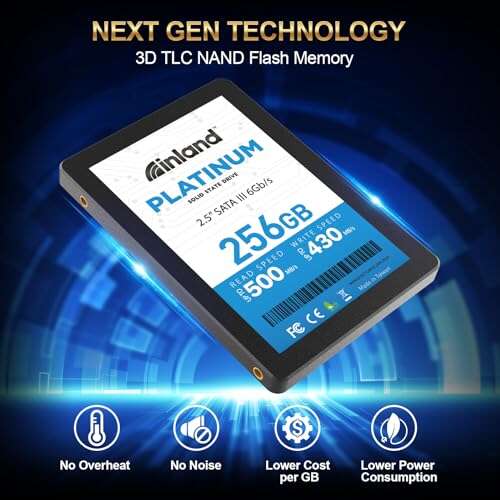
It arrived in simple retail packaging. The drive sits in a small plastic tray inside a compact box. Out of the box the build felt solid and lightweight. The metal casing is thin but firm. The 2.5″ form factor and 7mm thickness made it easy to fit into laptops and brackets.
Installation was quick. I cloned my system image with common cloning tools and then swapped drives in less than 30 minutes. On first boot everything worked as expected. Performance matched the advertised SATA speeds in normal tasks. I felt a genuine, pleasant surprise at how noticeably faster daily tasks became. For the price, the initial impression was very positive.

What Makes It Stand Out / Key Features
- 256GB capacity in a 2.5″ SATA III form factor
- TLC 3D NAND for solid endurance and power efficiency
- SATA III 6Gb/s interface for wide compatibility
- 7mm thin design fits most laptops and desktops
- Low power draw compared to spinning hard drives
- Affordable price point for entry-level SSD upgrades

What I Like
- Great price-to-performance for everyday tasks
- Easy installation in laptops and desktops
- Noticeable speed boost over HDDs for boot and apps
- Low power use helps laptop battery life a bit
- Stable performance for web, office apps, and casual gaming

What Could Be Better
- Not as fast as NVMe drives for heavy workloads
- 256GB can fill up quickly if you install many large games or videos
- No bundled cloning software or extensive warranty documentation

My Recommendation
If you want a budget-friendly way to revive an older laptop or speed up a budget desktop, the Inland Platinum 256GB SSD is a solid pick. I recommend this drive to students, office workers, and casual users who need faster boot times and snappier apps without high cost. For gamers with large libraries or pros working with huge media files, choose higher capacity or NVMe options.
| Best for | Why |
|---|---|
| Students & office users | Fast boot and app load for everyday work |
| Budget PC builders | Affordable upgrade that improves system feel |
| Laptop upgrades | Thin 7mm size fits most laptops and improves battery life |
Alternative Products You Can Consider
Crucial MX500 500GB — A step up in endurance and capacity. Best for users who want a balance of price and higher storage. The MX500 offers strong performance and extra features like integrated data protection.
Samsung 870 EVO 500GB — Known for reliability and steady performance. Great for users who value long-term stability and a trusted brand. It usually costs more but brings consistent benchmarks and wide compatibility.
WD Blue SN570 (NVMe) — If your system supports NVMe, this is a faster alternative. Best for users who want significantly higher read/write speeds for gaming or heavier workloads. It outpaces SATA SSDs but needs an M.2 slot.
| Product | Best For | Key Difference |
|---|---|---|
| Inland Platinum 256GB SSD | Budget laptop or desktop upgrade | Affordable SATA SSD that improves everyday performance |
| Crucial MX500 500GB | Users needing more storage and endurance | Higher capacity and proven long-term reliability |
| Samsung 870 EVO 500GB | Users wanting top SATA reliability | Strong brand reputation and steady performance |
| WD Blue SN570 NVMe | Gamers and power users with M.2 slot | Much faster NVMe speeds vs SATA interface |
Final Verdict: Which Should You Buy?
The Inland Platinum 256GB SSD is the pragmatic choice for most users. It brings a real speed boost over mechanical drives, fits most laptops, and costs less than many competitors. Choose the Inland Platinum 256GB SSD if you want a wallet-friendly upgrade to make daily tasks faster. If you need more capacity or higher speeds, consider the Crucial MX500 or a Samsung 870 EVO for SATA, or an NVMe option like the WD Blue SN570 if your system supports it.
FAQs Of inland platinum ssd review
Is this SSD compatible with my laptop?
Most laptops with a 2.5″ SATA bay or an adapter will accept this drive. Check your laptop’s drive bay thickness and SATA availability. The drive is 7mm and fits most models.
Will I see a big speed boost over an HDD?
Yes. Expect much faster boot times, quicker app launches, and smoother multitasking. Real-world gains are noticeable even in older machines.
Is 256GB enough storage?
It depends on your needs. For web use, office work, and a few apps, 256GB is fine. For large game libraries or video projects, choose 500GB or larger.
Does it need special software to install?
No. You can clone drives with free or paid cloning tools. Fresh installs work via normal OS setup. Most users can install it in under an hour.
How reliable is the drive?
This SSD uses TLC 3D NAND, which gives decent endurance for everyday use. It’s reliable for typical home and office workloads, but heavy server or write-intensive tasks benefit from enterprise-grade drives.

Everett Ashford is a tech reviewer at mytechgrid.com specializing in SSDs, cameras, TVs, earbuds, headphones, and other consumer electronics. He provides honest, data-driven reviews based on hands-on testing and real-world performance analysis. Everett simplifies complex tech details to help readers make smart, confident buying decisions.