You can track Soundcore earbuds through the Soundcore app, Bluetooth history, or a compatible device-finding network.
Losing a small earbud can feel like losing a tiny piece of your daily routine. The good news is that learning how to track Soundcore earbuds is fairly simple when you use the right method for your model. This guide explains how Soundcore’s tracking tools work, what to do when your earbuds are offline, and how to improve your chances of finding them next time.
How to Track Soundcore Earbuds With the Soundcore App
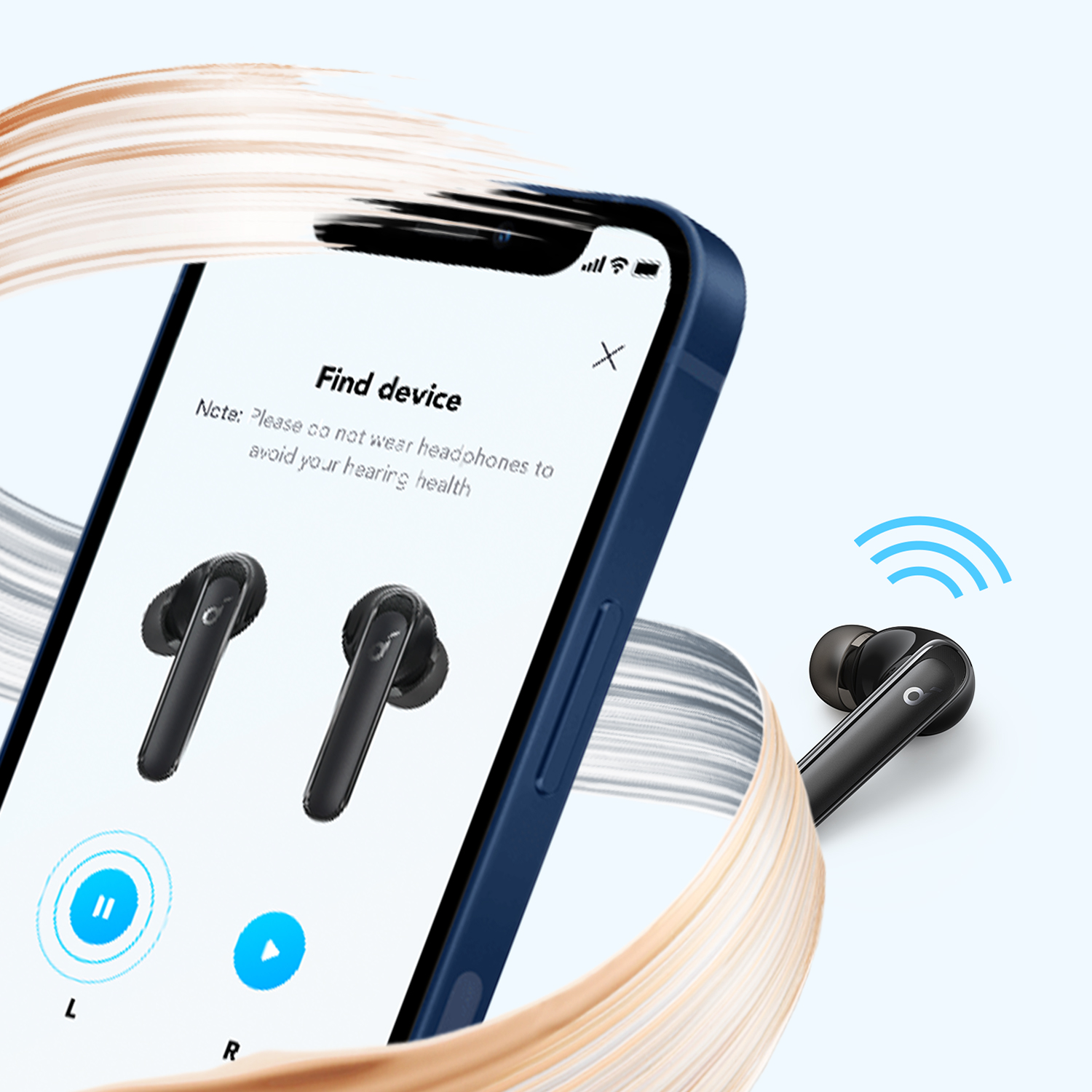
The Soundcore app is the best starting point for most supported earbuds. It may show a last known location or help you play a sound through the earbuds. However, the exact options depend on your Soundcore model and app version.
To begin, follow these steps:
- Install the Soundcore app from the Apple App Store or Google Play.
- Turn on Bluetooth on your phone.
- Open the charging case near your phone.
- Connect the earbuds to the app.
- Open the device settings or earbud controls.
- Look for Find Device, Find My Earbuds, or a similar option.
- Select the missing earbud if the app allows left and right earbud control.
- Use the sound feature to locate it.
The sound usually works only when the earbud has battery power and remains within Bluetooth range. If the earbud is inside its charging case, the sound may not play because the case can disconnect it.
When discussing how to track Soundcore earbuds, remember that the app often works more like a nearby finder than a live GPS tracker. It cannot normally show the earbud’s exact position anywhere in the world.

How the Soundcore Find Device Feature Works
The Find Device feature uses Bluetooth rather than a built-in GPS chip. Your phone searches for the earbud and checks whether it can establish a connection. If the connection works, the app may trigger a tone that helps you locate the earbud.
This process is similar to calling a phone in a quiet room. The sound does not tell you the exact address, but it helps you narrow the search.
The feature may help you find earbuds:
• Under a couch cushion
• Inside a jacket pocket
• In a backpack
• Beneath a car seat
• On a desk covered with papers
• In a bedroom or office
The feature has important limits. Bluetooth signals can pass through some walls and furniture, but distance, metal objects, thick walls, and electronic interference can weaken the signal.
A practical lesson is to walk slowly around the area while checking the app. Moving too quickly can make it harder to tell where the signal becomes stronger. Start with the last place you remember using the earbuds, then check nearby rooms and common storage spots.

How to Track Soundcore Earbuds When They Are Connected
If one or both earbuds are still connected to your phone, finding them is usually easier. Open the Soundcore app and check the battery status. A visible battery level often means the earbud is awake and communicating with your phone.
Next, play music or use the app’s earbud sound feature. Keep the volume at a safe level, then listen carefully. Walk around the room and pause often so the sound does not blend into background noise.
Try these steps:
- Keep your phone close to the area where you last used the earbuds.
- Turn off music, television, and fans.
- Check whether the left or right earbud is connected.
- Play a sound through the missing earbud.
- Search soft surfaces first, such as beds, sofas, and clothing.
- Check pockets, bags, drawers, and car seats.
- Look around the charging case and the place where you usually charge it.
If only one earbud is missing, place the earbud you still have in the charging case. This may make it easier to focus on the missing side. Some Soundcore models provide separate battery readings, while others show only a combined status.

How to Track Soundcore Earbuds After They Disconnect
Disconnected earbuds are harder to find, but you still have several useful options. First, check your phone’s Bluetooth settings. The last connected device may show when the earbuds were last active, although most phones do not provide a precise location.
Then retrace your steps from the last time you used them. Think about simple actions, such as taking off a coat, getting into a car, placing a bag on the floor, or lying down on a bed. Small earbuds often fall during these moments.
Use this search order:
- Check the last room where you listened.
- Search clothing and laundry.
- Look under furniture and along wall edges.
- Check bags, pockets, and desk drawers.
- Search your vehicle.
- Inspect the area around outlets and charging cables.
- Repeat the search with a flashlight held at a low angle.
A low flashlight beam can make the plastic surface of an earbud reflect light. This trick is useful under furniture and in dark corners.
If the earbud battery has died, the Soundcore app cannot make it ring. The app also cannot create a new location after the earbud loses power. In that case, your best tools are the last known use, your phone’s connection history, and a careful physical search.

Can You Track Soundcore Earbuds With Apple Find My?
Some wireless earbuds support Apple’s Find My network, while others do not. Compatibility depends on the specific Soundcore model, its firmware, and the feature supported by the product at the time of purchase.
Do not assume that every Soundcore earbud works with Apple Find My simply because it connects to an iPhone. Check the product page, user guide, or Soundcore app for clear compatibility details.
If your model supports Apple Find My, the setup usually involves:
- Open the Find My app on your iPhone.
- Select the Items or Devices tab, depending on the product setup.
- Add or register the compatible earbuds.
- Follow the on-screen instructions.
- Check the last reported location when needed.
Apple Find My may offer better location help than a basic Bluetooth search, but it still has limitations. The earbuds need enough battery, and the network may not report a current location immediately.
For users searching how to track Soundcore earbuds with an iPhone, the safest approach is to use both systems: check Apple Find My if the model supports it, then use the Soundcore app for nearby sound detection.

Can You Track Soundcore Earbuds With Android Find My Device?
Android users should check whether their specific Soundcore model supports Google Fast Pair or a compatible device-finding service. Bluetooth pairing alone does not guarantee that the earbuds can appear in Google’s device locator.
Open your Android phone’s Bluetooth settings and review the paired device information. Then open the Soundcore app and look for a Find Device feature. If the earbuds support a Google tracking service, follow the setup steps shown by your phone.
Keep these points in mind:
• Android phone features vary by brand and operating system version.
• Google account settings may affect device-finding options.
• A Bluetooth connection does not equal GPS tracking.
• The last known location may be old.
• Earbuds inside the case may not send a detectable signal.
When learning how to track Soundcore earbuds on Android, always update the Soundcore app and earbud firmware first. Updates can improve connection stability and may add or change available features.
How to Find One Missing Soundcore Earbud
Finding one earbud requires a slightly different approach. The missing side may have a different battery level, connection status, or range from the earbud you still have.
Start by putting the earbud you have in the charging case. Then open the Soundcore app and check whether the missing earbud appears. If it remains connected, use the sound feature and search slowly.
Focus on places where one earbud can slip away:
• Between sofa cushions
• Under a bed or nightstand
• Inside a hoodie or coat
• Beneath a car mat
• Between the seat and center console
• Near a gym bag
• In a pocket with a zipper
If the missing earbud is not detected, search in a tight circle around the last place you used it. Earbuds often bounce only a short distance, even when they seem to vanish.
Some Soundcore models let you purchase a replacement left or right earbud. Contact Soundcore support before buying a replacement, because compatibility may depend on the model, generation, firmware, and charging case.

What to Do If the Soundcore Earbuds Are in the Charging Case
Many people expect the earbuds to keep broadcasting their location while inside the case. In most cases, that is not how they work. Closing the case may disconnect the earbuds or place them into a low-power state.
If the entire case is missing, search for the case itself rather than relying only on the app. Think about where you last charged the earbuds, used a desk, packed a bag, or changed clothes.
Try this method:
- Check every charging location.
- Look inside bags and coat pockets.
- Search around your bed, sofa, and nightstand.
- Inspect your car’s cup holders and storage areas.
- Check kitchen counters and bathroom shelves.
- Review recent trips, workdays, and errands.
A useful habit is to place the case in one fixed spot at home. A small tray near your desk or entryway can prevent many losses.
Why You May Not Be Able to Track Soundcore Earbuds
Several technical issues can prevent the tracking feature from working. Understanding these problems can save you time and prevent false expectations.
The battery is dead
An earbud with no battery cannot maintain a Bluetooth connection or play a locating tone. If the battery died after you lost it, the app may show only an old connection.
The earbuds are out of range
Bluetooth range is affected by walls, floors, furniture, and interference. A phone may fail to detect earbuds that are only a room or two away if the signal is blocked.
The earbuds are inside the case
The charging case can disconnect the earbuds. This is one of the most common reasons the sound feature does not work.
The earbuds were reset
A factory reset can remove the current Bluetooth connection. You may need to pair the earbuds again before the app can detect them.
The model lacks the feature
Not every Soundcore model supports the same app tools. Basic models may provide Bluetooth pairing but no dedicated earbud-finding function.
The app needs an update
An outdated app or firmware can cause connection errors. Update the app, restart your phone, and try pairing again when the earbuds are nearby.
These limits show why how to track Soundcore earbuds is not the same as tracking a smartphone. Soundcore earbuds generally depend on Bluetooth or an optional finding network, not independent GPS.
How to Improve Your Chances of Finding Soundcore Earbuds
The best time to prepare for a lost earbud is before it disappears. A few simple habits can make the search much easier.
Use these prevention tips:
• Keep the earbuds in the charging case when you are not wearing them.
• Turn on any supported finding feature as soon as you set up the earbuds.
• Keep the Soundcore app updated.
• Charge the case before travel.
• Use a bright case or a small case cover.
• Avoid placing loose earbuds on beds or sofas.
• Create one storage spot at home.
• Record the model name and serial details.
• Check for firmware updates from time to time.
In my experience with Bluetooth accessories, the biggest mistake is assuming the last known location is live. It is often only the last moment when the phone and earbud communicated. Treat that location as a starting clue, not a precise map pin.
Another common mistake is searching while music or household noise is playing. A quiet room makes a soft alert much easier to hear.
How to Track Soundcore Earbuds While Traveling
Travel makes earbud loss more likely because your routine changes. Airports, hotels, rideshares, gyms, and cafés all create places where small devices can be left behind.
Before leaving a plane, train, or car, check:
- The seat pocket.
- The space under the seat.
- The armrest and tray table.
- Your jacket and pants pockets.
- Your personal bag.
- The floor beside your seat.
If you notice the earbuds are missing soon after leaving, return to the last location quickly. Bluetooth tracking may help if the earbuds are still nearby, but a fast physical search is often more effective.
For travel, keep the charging case in a zipped pocket. Do not carry the earbuds loose in a backpack. A case gives you one visible object to manage instead of two tiny objects that can separate.
How to Track Soundcore Earbuds From the Last Known Location
A last known location can help you rebuild the timeline. Start by checking when your phone last connected to the earbuds. Then ask what happened immediately afterward.
For example, you may have connected the earbuds in your kitchen, put them in your pocket, and later taken off your jacket in the bedroom. The last Bluetooth connection points to the kitchen, but the earbuds may actually be in the bedroom.
Create a simple timeline:
• Last time you remember wearing them
• Last time your phone connected
• Places visited afterward
• Clothing or bags used
• Places where you stopped to sit or rest
• Time when you first noticed they were gone
This method reduces random searching. It turns the process into a short investigation, much like following footprints instead of walking in circles.
Safety and Privacy Tips for Earbud Tracking
Use only official apps and trusted phone settings when trying to locate your earbuds. Avoid unknown tracking apps that request access to contacts, messages, location history, or unrelated personal data.
Bluetooth tracking also has privacy limits. A lost earbud does not usually provide a secure way to identify the person who found it. If you believe someone took your earbuds, avoid confrontation and contact the appropriate venue or local authorities.
You should also avoid unsafe searches. Do not reach into traffic, climb unstable furniture, or enter restricted areas to recover a small device. The earbuds can be replaced; your safety cannot.
Frequently Asked Questions About How to Track Soundcore Earbuds
Can Soundcore earbuds be tracked if they are turned off?
Usually, no. If the earbuds have no battery or are not broadcasting a Bluetooth signal, the Soundcore app cannot locate them in real time. You may still be able to use the last connected location as a search clue.
Does every Soundcore earbud have a Find Device feature?
No. Features vary by model, firmware, app version, and phone type. Check the Soundcore app and the official product guide to confirm whether your earbuds support finding tools.
Can I track Soundcore earbuds with GPS?
Most Soundcore earbuds do not contain independent GPS hardware. They generally rely on Bluetooth, the Soundcore app, or a compatible third-party finding network.
Can I make a lost Soundcore earbud play a sound?
You may be able to play a sound if the earbud is powered on, connected, and supported by the app. An earbud inside its charging case or with a dead battery may not respond.
Can I track Soundcore earbuds after someone else pairs them?
Usually, you cannot depend on tracking after another person resets or pairs the earbuds. Finding tools normally rely on the earbuds remaining connected to your account, phone, or supported tracking service.
Why does the Soundcore app show the wrong location?
The app may be showing the last place where your phone connected to the earbuds. It may not be a current location, especially if the earbuds moved, lost power, or went out of Bluetooth range.
Conclusion
Learning how to track Soundcore earbuds starts with the Soundcore app, Bluetooth connection checks, and a careful search of the last places you used them. The Find Device feature can help when the earbuds are powered on and nearby, but it is not the same as GPS tracking. Apple Find My or an Android finding service may provide extra help on compatible models.
Keep the case charged, update the app, and store the earbuds in one regular place. If you lose them, act quickly, search in silence, and treat the last known location as a clue rather than a guarantee. Check your model’s official support details for the features available to you, and share your own tracking tips in the comments.

Everett Ashford is a tech reviewer at mytechgrid.com specializing in SSDs, cameras, TVs, earbuds, headphones, and other consumer electronics. He provides honest, data-driven reviews based on hands-on testing and real-world performance analysis. Everett simplifies complex tech details to help readers make smart, confident buying decisions.