
Bone conduction headphones send sound through skull vibrations, bypassing the outer and middle ear.
Understanding how do bone conduction headphones work can make this unusual audio technology feel much less mysterious. These headphones use small transducers to create vibrations that travel through the bones near your ears and reach the cochlea, where your brain turns them into sound. This guide explains the science, benefits, limits, safety points, and practical uses in clear terms.
How do bone conduction headphones work?
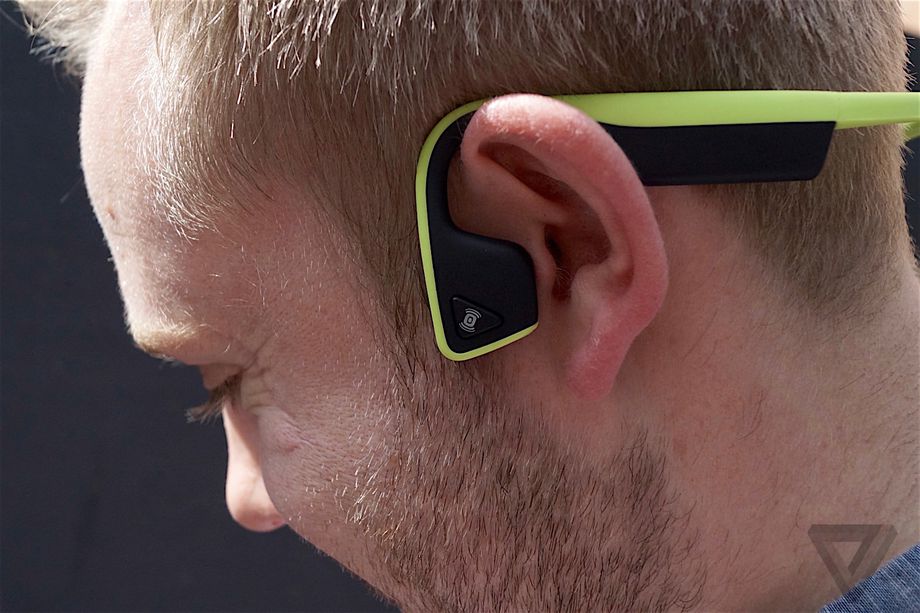
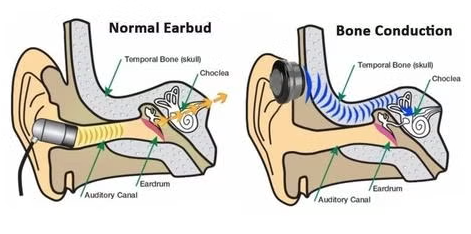
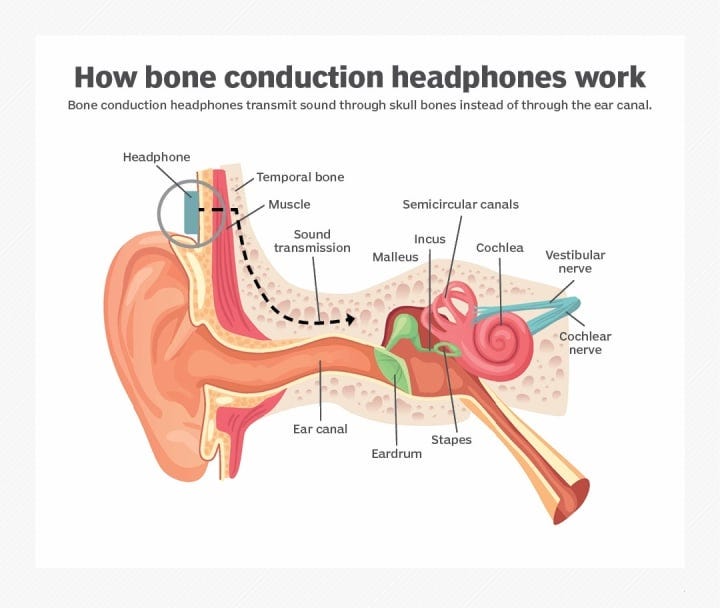
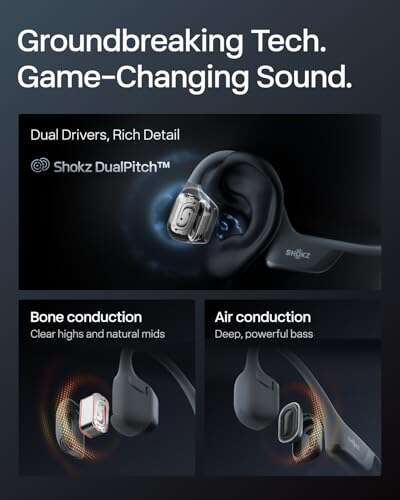
Bone conduction headphones rest on the bones in front of or beside your ears. Instead of sending sound into the ear canal, they use transducers to produce gentle mechanical vibrations. These vibrations move through the skull and stimulate the cochlea, the inner-ear structure that changes movement into electrical signals for the brain.
Think of the cochlea as a piano that your brain can hear. Traditional headphones press the keys by moving air through the ear canal. Bone conduction headphones take another path and create movement through the bones around the ear.
The basic process has four steps:
- Your phone, computer, or music player sends an audio signal to the headphones.
- The headphones change that signal into physical vibrations.
- The vibrations travel through nearby bone tissue.
- The cochlea detects the movement and sends sound information to the brain.
This is why bone conduction headphones can work while your ear canals remain open. They do not depend on tiny speakers sitting inside your ears.
The science behind bone conduction audio
Human hearing uses two main routes: air conduction and bone conduction. Air conduction is the familiar route. Sound waves travel through the outer ear, ear canal, eardrum, and middle-ear bones before reaching the cochlea.
Bone conduction skips much of that route. Vibrations move through the skull and stimulate the inner ear more directly. Your brain still processes the result as sound, even though the sound did not travel through the ear canal in the usual way.
Natural bone conduction happens every day. When you speak, you hear your own voice through both air and bone. The bone route makes your voice sound deeper to you than it does in a recording. Bone conduction headphones use this same general principle, but with controlled vibrations from electronic transducers.
The cochlea remains the key part of the system. If the cochlea and auditory nerve work well, the brain may detect these vibrations as meaningful sound. This explains why bone conduction devices can help some people with conductive hearing problems. However, they are not a universal treatment for hearing loss.
Main parts inside bone conduction headphones
A typical pair includes several small parts that work together. Each part has a specific job.
Transducers
Transducers are the most important parts. They convert electrical audio signals into vibrations. In many models, they sit on the cheekbones just in front of the ears.
The transducers must touch the skin firmly enough to transfer vibration. They should feel secure, but they should not cause pain or strong pressure.
Bluetooth or wired connection
Most modern models use Bluetooth. A Bluetooth chip receives music, calls, podcasts, or navigation prompts from a phone or another device.
Some models use a cable. Others include built-in storage, which can help runners or swimmers leave their phones behind.
Battery
Wireless bone conduction headphones need a rechargeable battery. Battery life often ranges from several hours to more than a full workday, depending on volume, Bluetooth use, and features.
Frame
The frame holds the transducers in place. Many models wrap around the back of the head. This design helps them stay stable during walking, running, or cycling.
Microphone
A built-in microphone supports phone calls and voice commands. Call quality depends on the microphone, wind control, and the design of the headphones.

How bone conduction compares with regular headphones
The biggest difference is the path sound takes.
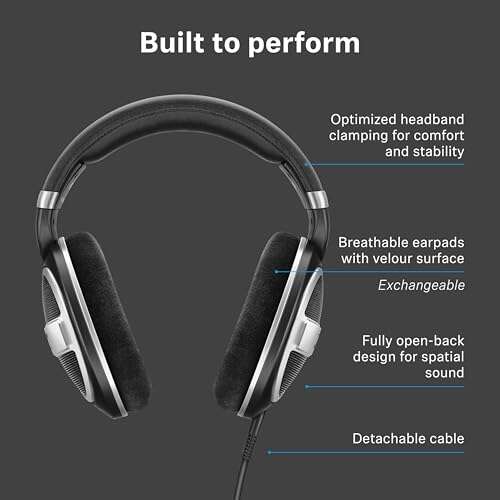
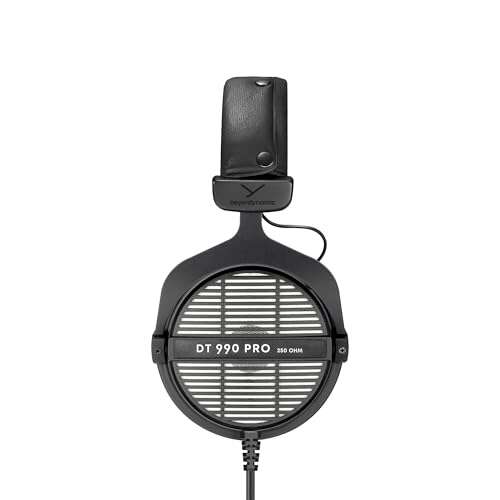
Regular headphones use air conduction. Their speakers create sound waves that travel through the ear canal. Bone conduction headphones use mechanical vibration through the skull.
Here is a simple comparison:
| Feature | Regular headphones | Bone conduction headphones |
|---|---|---|
| Sound path | Ear canal and eardrum | Bone and cochlea |
| Ear canals | Covered or filled | Usually open |
| Awareness of surroundings | Often reduced | Usually better |
| Bass strength | Often stronger | Usually lighter |
| Sound privacy | Often better | Usually lower |
| Fit | In or over the ear | Beside the ear |
| Main use | Music and focused listening | Outdoor awareness and calls |
Bone conduction headphones usually do not match premium over-ear headphones for deep bass, rich detail, or noise isolation. Their advantage is not perfect sound quality. Their advantage is an open-ear design that lets you hear traffic, coworkers, alarms, and other nearby sounds.
Benefits of bone conduction headphones
Bone conduction headphones solve problems that regular earbuds may create. They are especially useful in situations where awareness matters.
Open-ear awareness
You can listen to audio while still hearing much of your environment. This can help during a run on a busy road, a bike ride, or a walk through a city.
Open ears do not make outdoor listening completely safe. Loud traffic, poor visibility, and distracted behavior still create risks. Treat the headphones as one safety tool, not as a replacement for attention.
Comfort for some users
People who dislike earplugs may find this design more comfortable. The headphones do not press against the ear canal or create the plugged-up feeling that some earbuds cause.
Comfort varies. A tight frame or strong vibration can create soreness around the temples, cheeks, or ears. The right fit matters as much as the technology.
Useful for certain hearing conditions
Some people with conductive hearing loss may benefit because the device bypasses parts of the outer and middle ear. A hearing specialist should guide this choice, especially when hearing loss is new, uneven, or worsening.
Bone conduction headphones are not the same as medically fitted bone-anchored hearing systems. Consumer headphones provide entertainment audio and should not be treated as a medical device.
Good for active use
Many models resist sweat and light rain. Their stable frame can work well for running, hiking, gym sessions, and outdoor work.
Check the water rating before using a pair in heavy rain or near a pool. Water resistance ratings have limits, and salt water can damage electronics.
Less ear-canal buildup
Because the headphones do not sit inside the ear, they may reduce the moisture and warmth that can build up with in-ear earbuds. This may feel cleaner for some users, but the headphones still need regular cleaning.
Limitations and common drawbacks
Understanding the limits is just as important as understanding the benefits. Bone conduction headphones are not the best choice for every listener.
Sound quality can be less full
The open design allows outside noise to mix with your audio. Bass can also feel weaker because the headphones do not seal the ear.
Busy streets, airplanes, gyms, and loud offices can make music harder to hear. Increasing the volume may help, but it can also increase hearing risk.
Sound leakage
People nearby may hear some of what you are playing. Leakage becomes more noticeable at high volume or in a quiet room.
This may be fine during a run. It can be distracting in a library, meeting, or shared office.
Vibration can feel unusual
New users may notice a buzzing or tickling feeling. Some people adjust within minutes, while others never enjoy the sensation.
If the vibration causes pain, numbness, headache, or skin irritation, stop using the headphones and check the fit. Discomfort is not something you need to “push through.”
Lower privacy
Open-ear audio does not offer the same privacy as sealed earbuds. A caller’s voice or a podcast may be partly audible to people nearby.
For private calls, use a regular headset or move to a quieter, more private location.
Outdoor noise can overpower audio
Open ears are helpful for awareness, but they also let wind and traffic enter your listening experience. Wind noise can affect both music and calls.
Some models include wind-reduction microphones. These features help, but they cannot remove every outdoor sound.
Are bone conduction headphones safe?
For most healthy adults, bone conduction headphones used at a moderate volume are generally considered safe. The main risk is still excessive sound exposure. Even when the ear canal is open, the cochlea receives sound-related stimulation and can be harmed by loud audio.
The World Health Organization recommends managing both volume and listening time. A simple approach is to keep the volume comfortable, take breaks, and avoid raising it to overpower traffic or machinery.
Use these habits:
• Keep the volume at a level that allows you to notice nearby sounds.
• Take quiet breaks during long listening sessions.
• Avoid wearing headphones near loud machinery without proper hearing protection.
• Stop if you notice ringing, muffled hearing, pain, or dizziness.
• Get a hearing check if symptoms continue.
A common mistake is assuming that open-ear headphones cannot damage hearing. They can still produce strong auditory stimulation. Open design improves awareness, but it does not remove the need for safe listening.

Are bone conduction headphones good for running and cycling?
They can be a strong choice for outdoor exercise because they leave the ears open. You may hear a car horn, a runner behind you, or a conversation without removing your headphones.
Fit is critical. The frame should stay stable when you move your head. The transducers should sit on the intended contact points rather than sliding onto the ear itself.
For cycling, local laws and safety rules matter. In some places, wearing headphones on a bicycle may be restricted. No headphone design can make it safe to ignore traffic, road signs, or other riders.
A practical outdoor setup includes:
- Use a moderate volume.
- Choose a route with good visibility.
- Keep one ear focused on the environment, even though both ears remain open.
- Pause audio near intersections or crowded areas.
- Use reflective clothing and lights when visibility is low.
Are bone conduction headphones good for swimming?
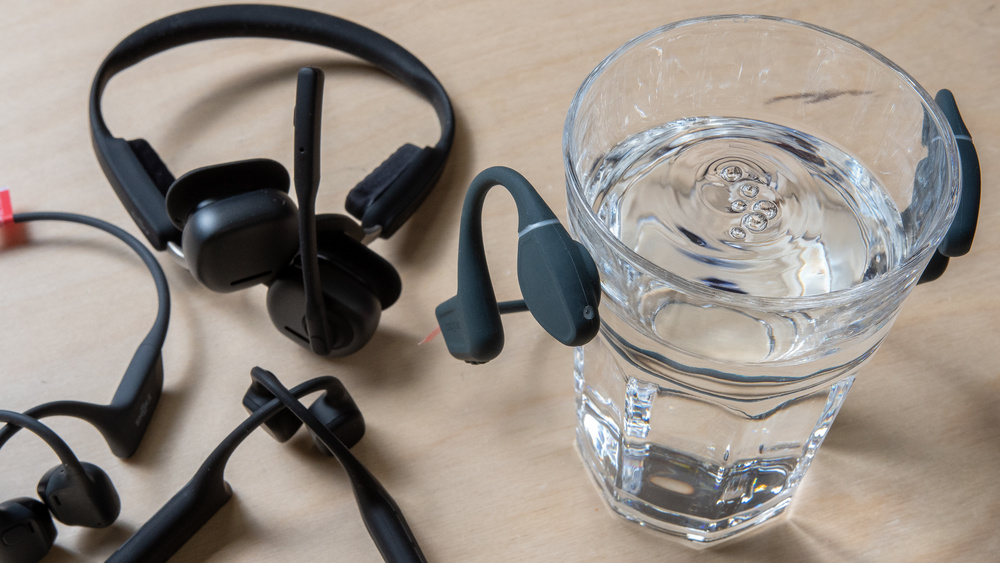
Some bone conduction headphones are designed for swimming. These models usually store audio internally because Bluetooth signals do not travel well through water.
Look for a suitable water-resistance rating. A device made for sweat and rain may not be suitable for submersion. Follow the manufacturer’s depth and time limits.
Swimming headphones can play music or spoken audio through bone vibration. The experience may differ from listening in dry air, and water movement can affect comfort and sound perception.
Never use headphones as a reason to ignore pool rules, lifeguard instructions, or nearby swimmers. Awareness is especially important in water.
How to choose bone conduction headphones
The best pair depends on where and how you plan to use it. Start with your use case rather than the brand name.
Consider these features:
• Fit and comfort: Look for a frame that stays steady without pressing too hard.
• Battery life: Choose enough capacity for your normal work, travel, or training day.
• Water resistance: Match the rating to sweat, rain, showering, or swimming.
• Call quality: Check microphone performance if you take calls outdoors.
• Controls: Physical buttons may be easier to use while running.
• Sound profile: Expect clear speech and balanced music, but compare models if bass matters to you.
• Storage: Built-in memory is useful for swimming or phone-free workouts.
• Charging system: A standard or secure charging method can make daily use easier.
• App support: Some models offer equalizer controls, firmware updates, or hearing-safety settings.
Try the headphones for at least several minutes if possible. A pair may sound clear but feel uncomfortable after a longer session. Comfort, stable placement, and safe volume often matter more than small differences in specifications.
How to wear and use bone conduction headphones correctly
Place the transducers on the firm area in front of your ears, usually along the cheekbone. The exact spot can vary by head shape and product design.
Keep the frame level. If it sits too high or too low, the vibration may feel weak or uneven. Avoid covering the transducers with thick hair, hats, or tight straps when possible.
Use this setup routine:
- Put the frame around your head.
- Position both transducers evenly.
- Start audio at a low volume.
- Adjust the frame until speech sounds clear.
- Walk or move your head to check stability.
- Make small adjustments instead of increasing volume right away.
Clean the contact points with a soft, slightly damp cloth. Do not soak the device unless it is specifically made for full immersion. Sweat, sunscreen, and skin oils can build up over time.

A practical lesson from everyday use
One useful lesson with open-ear audio is that more volume does not always mean better sound. In a noisy place, increasing volume can make music louder without making it clearer. A quieter route, a better fit, or a pause in playback may solve the problem more effectively.
Another common mistake is judging the headphones during the first minute. The vibration may feel strange at first. Give yourself a short adjustment period, but do not ignore pressure or pain.
For calls, wind is often a bigger problem than the speaker itself. Turning your body away from strong wind, lowering your voice less, and finding a sheltered spot can improve call quality more than changing settings.
These small habits make the technology easier to use. They also help prevent the most common complaints: weak sound, uncomfortable pressure, and poor outdoor calls.
Who should avoid or limit bone conduction headphones?
Most people can try consumer bone conduction headphones safely at moderate volume. However, some situations call for extra care.
Speak with a qualified hearing professional if you have:
• Sudden hearing loss
• Ongoing ringing in the ears
• Ear pain or drainage
• Severe dizziness
• A history of significant hearing problems
• Different hearing ability between the two ears
People with implanted medical devices should also follow advice from their clinician and the device manufacturer. Consumer products vary, and medical guidance is more reliable than a general online recommendation.
If headphones cause skin irritation, pressure pain, or headaches, stop using them. You may need a different frame, a different contact position, or another type of headphone.
Frequently asked questions about how do bone conduction headphones work
Do bone conduction headphones damage your hearing?
Bone conduction headphones can still expose the cochlea to strong sound stimulation, so excessive volume may harm hearing. Use a comfortable volume, take breaks, and stop if you notice ringing or muffled hearing.
Can bone conduction headphones work with earplugs?
Yes. Because the sound travels through bone, many people can hear them while wearing earplugs. The result depends on the person, the earplugs, the headphone model, and the type of hearing loss.
Do bone conduction headphones work for people with hearing loss?
They may help some people with conductive hearing loss because they bypass parts of the outer and middle ear. They may not help the same way with sensorineural hearing loss, so a hearing professional should provide personalized advice.
Can other people hear bone conduction headphones?
Yes. Some sound leakage is normal, especially at high volume or in a quiet space. They usually offer less privacy than sealed earbuds or over-ear headphones.
Are bone conduction headphones better than earbuds?
Neither design is better for everyone. Bone conduction headphones keep the ears open and can improve environmental awareness, while earbuds often provide stronger bass, clearer detail, and better privacy.
Can you use bone conduction headphones while swimming?
Some models are made for swimming and include internal music storage. Regular Bluetooth models usually lose connection underwater, so check the product’s water rating and swimming instructions before use.
Why do bone conduction headphones feel like they vibrate?
The transducers create physical movement against the skin and nearby bone. That vibration is the mechanism that carries the audio signal toward the cochlea.
Conclusion
Bone conduction headphones work by changing electrical audio signals into vibrations that travel through nearby bones to the cochlea. They keep the ear canals open, which makes them useful for outdoor awareness, exercise, calls, and some users with conductive hearing problems.
Their trade-offs are clear: sound may feel less rich, bass may be lighter, and nearby people may hear some audio. Use a comfortable fit, moderate volume, regular breaks, and the right water rating for your activity.
If you are deciding whether this design suits you, test it in the place where you will use it most. Compare comfort, clarity, awareness, and battery life before buying, then explore trusted hearing-safety resources or share your experience in the comments.

Everett Ashford is a tech reviewer at mytechgrid.com specializing in SSDs, cameras, TVs, earbuds, headphones, and other consumer electronics. He provides honest, data-driven reviews based on hands-on testing and real-world performance analysis. Everett simplifies complex tech details to help readers make smart, confident buying decisions.
One Comment