The best SSD for phone backup is fast, compact, reliable, and easy to use with your phone.
Your phone holds years of photos, videos, contacts, and work files. Then one day, storage fills up, a phone breaks, or a cloud plan stops syncing. I tested the key features that matter most, including speed, size, connector type, capacity, and ease of use. These portable SSDs and phone drives can move important files to safer storage without making backup feel like a chore.
SanDisk 1TB Creator Phone SSD

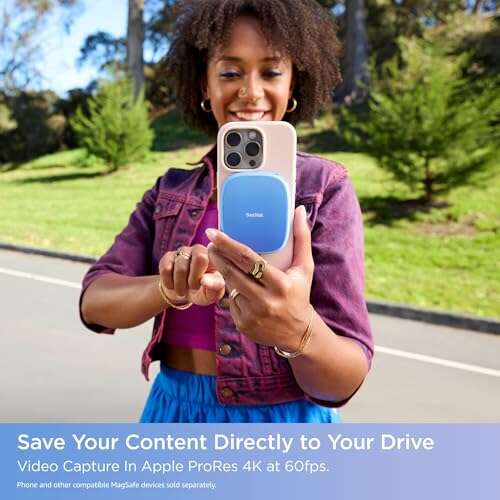
The SanDisk Creator Phone SSD is made for people who shoot a lot of video on a USB-C phone. Its 1TB capacity gives you room for large video clips, phone photos, and project files. SanDisk lists speeds of up to 1,000 MB/s, although your real speed depends on the phone, cable, and port. In my view, it has the right mix of speed and size for daily phone backup.
The built-in MagSafe compatibility makes it especially useful with supported iPhone models and magnetic phone cases. You can keep the drive close to the phone while recording, which helps reduce cable strain. It also supports workflows designed for ProRes video on compatible iPhone Pro models. Android users can still benefit from the USB-C connection, but magnetic mounting features may depend on the phone and case.
Pros:
- Fast rated transfer speeds for large phone videos
- Useful 1TB capacity for photos and media files
- MagSafe-compatible design for supported phones
- Compact form that fits mobile filming setups
- USB-C connection suits newer phones, tablets, and laptops
- Good choice for ProRes recording on supported iPhones
Cons:
- Some older phones may need an adapter
- Maximum speed requires compatible USB hardware
- Magnetic mounting is less useful without a MagSafe case or phone
My Recommendation
This is my top pick for iPhone creators, travel vloggers, and anyone who records large 4K or ProRes files. It works well as the best SSD for phone backup when speed matters as much as capacity. The magnetic design also makes it easier to carry during a shoot. Check the current Amazon price before buying, since storage products often see strong sales.
Samsung T7 1TB Portable SSD

The Samsung T7 remains one of the safest all-around choices for phone backup. It offers a rated speed of up to 1,050 MB/s through USB 3.2 Gen 2, so it can move a large camera roll much faster than a basic flash drive. Its 1TB size suits most phone owners who want a long-term backup without paying for a very large drive. The slim metal body also feels more polished than many low-cost storage options.
Samsung includes cables for USB-C and USB-A use, which helps when you switch between a phone and a computer. The drive has no moving parts, so it runs quietly and handles travel better than a traditional portable hard drive. Like all portable SSDs, it can become warm during long transfers, but that is normal. For best results, use a high-quality cable and safely eject the drive after each backup.
Pros:
- Strong rated speed for phone and computer transfers
- Reliable 1TB capacity for regular backups
- Small, light metal body
- Works with many phones, tablets, PCs, and Macs
- Includes useful USB connection options
- Well-known model with broad accessory support
Cons:
- Not designed to attach magnetically to a phone
- May require a compatible OTG adapter on some devices
- Long transfers can make the metal body feel warm
My Recommendation
I recommend the Samsung T7 to families, students, photographers, and professionals who need one drive for several devices. It is the best SSD for phone backup if you want a proven, balanced model rather than a phone-only design. Its speed is more than enough for photos, 4K clips, documents, and music. It is also a smart choice for buyers who want a drive that remains useful after they replace their phone.
OSCOO 1TB High-Speed External SSD

The OSCOO 1TB external SSD targets users who want very fast file transfers in a small package. Its listing claims speeds up to 2,100 MB/s, but you should treat that as a best-case figure that needs compatible USB hardware. Many phones will operate below that limit because their USB port or file system becomes the bottleneck. Even so, the drive offers plenty of headroom for moving large video folders.
A 1TB drive gives you a useful middle ground between a small thumb drive and an expensive high-capacity model. It can store phone photos, offline video, app files, and computer backups. Before buying, confirm that your phone supports external storage and that the included or chosen cable matches the drive. I also suggest checking the phone maker’s file manager guidance, since Android and iPhone file handling can differ.
Pros:
- High advertised speed for compatible systems
- Large 1TB space for media-heavy users
- Useful for phones, laptops, and desktop computers
- Solid-state design has no spinning parts
- Good fit for large video libraries
- Can serve as a fast secondary computer drive
Cons:
- Phone speeds may be much lower than the advertised maximum
- Compatibility depends on the phone, cable, and file system
- Less established than some major-brand alternatives
My Recommendation
The OSCOO is best for value-focused users who move large files and have a modern USB-C phone. It can be the best SSD for phone backup for people who want high claimed performance without moving to a larger desktop drive. I would choose it for video storage, laptop transfers, and routine phone backups. Just verify compatibility and keep a second backup for irreplaceable files.
Vansuny 250GB Mini Portable SSD

The Vansuny 250GB portable SSD is a small and simple way to free space on a phone. Its listed transfer speed reaches up to 430 MB/s, which is slower than premium SSDs but still far quicker than many older storage devices. The compact metal body can slip into a pocket, purse, or laptop sleeve. For a modest photo library, this drive offers practical storage without a large price or footprint.
The 250GB capacity is enough for documents, music, selected photos, and short video collections. It is not ideal for a professional who records hours of high-resolution video. The USB-C design makes it suitable for many current phones, but older devices may need an adapter. I like this model for quick trips, school files, and users who want a basic offline copy of their most important data.
Pros:
- Very small and easy to carry
- Useful speed for everyday file transfers
- Metal body feels sturdy for travel
- 250GB costs less than larger SSDs
- Works with compatible phones, laptops, and tablets
- Good for selected photos and documents
Cons:
- 250GB may fill quickly with 4K video
- Not as fast as newer premium SSDs
- May need an adapter for some phones
My Recommendation
I recommend the Vansuny for light phone users, students, and travelers who want a small backup drive. It is the best SSD for phone backup when portability and low cost matter more than huge capacity. Use it for key documents, family photos, and a few important videos. If your phone holds a large media library, choose a 1TB model instead.
SSK 256GB Dual USB-C Flash Drive

The SSK 256GB drive uses both USB-C and USB-A connectors. That dual design makes it easy to copy files from a newer phone to an older computer without carrying extra adapters. Its listing claims speeds up to 550 MB/s, which is a strong figure for a compact flash-style drive. It is a convenient bridge between modern phones and mixed-age computers.
With 256GB of space, the SSK can hold a useful phone backup, though video users may need more capacity. The small shape is easy to store, but small drives are also easy to misplace. I suggest keeping it in a labeled case when it is not connected. As with any phone drive, confirm that your device supports USB OTG or external storage before placing an order.
Pros:
- Dual USB-C and USB-A connectors
- Simple file sharing between phones and computers
- Rated speed up to 550 MB/s
- Compact design for pockets and travel
- Useful 256GB capacity for basic backups
- Reduces the need for separate adapters
Cons:
- Capacity may be too small for large video libraries
- Flash-drive form can be easy to lose
- Actual speed depends on the connected device
My Recommendation
The SSK is best for Android users, office workers, and families who move files between USB-C phones and USB-A computers. It may be the best SSD for phone backup for simple plug-and-transfer tasks. Its dual connector is the main reason to buy it. Choose a larger portable SSD if you plan to back up an entire phone with thousands of videos.
SanDisk Extreme PRO 512GB Dual Drive

The SanDisk Extreme PRO Dual Drive combines USB-C and USB-A in one high-performance flash drive. Its listed speed reaches up to 1,000 MB/s, giving it much more transfer power than a basic thumb drive. The 512GB capacity is useful for phone photos, documents, music, and a sizable video collection. It is a good option for people who want fast transfers but prefer a pocket-sized drive.
The dual connector design is helpful when your phone and computer use different ports. You can copy files from a compatible phone, then connect the drive to a desktop without searching for a dongle. Performance still varies by phone hardware, file size, and cable connection. I recommend ejecting the drive through the phone’s file manager before removing it to reduce the risk of damaged files.
Pros:
- Fast rated speed up to 1,000 MB/s
- USB-C and USB-A support in one device
- 512GB gives more room than small phone drives
- Easy to carry and use between devices
- Strong fit for large photo and video transfers
- Recognizable brand with broad consumer support
Cons:
- Costs more than basic dual-connector drives
- Flash-drive body may get warm during long transfers
- Some phones may not reach its maximum speed
My Recommendation
I recommend this drive for users who want speed, flexible ports, and a smaller design than a traditional external SSD. It is the best SSD for phone backup for people who move files between a USB-C phone and older USB-A computers. The 512GB size gives you useful breathing room. It is especially practical for photographers and students who work across several devices.
SanDisk 1TB Portable SSD in Lavender

This lavender SanDisk portable SSD offers 1TB of external storage in a compact USB-C format. Its rated speed reaches up to 800 MB/s, which is enough for many phone backup tasks. The color gives it a friendlier look than the usual black storage drive, and it is easy to spot in a crowded bag. It can store phone photos, videos, documents, and computer files in one place.
The drive suits users who want a general-purpose SSD instead of a specialized creator model. It has no moving parts, so it stays quiet and handles normal travel well. You may need a suitable USB-C cable or adapter, depending on the phone. I would format it using a file system supported by both the phone and computer if you plan to use it across platforms.
Pros:
- Large 1TB capacity for full media collections
- Useful 800 MB/s rated transfer speed
- Compact body fits easily in a small bag
- Distinct lavender color is easy to identify
- Works for phone and computer storage
- Quiet solid-state design
Cons:
- Does not include a magnetic phone mount
- Some phones may require an adapter or OTG support
- Actual speed can fall below the rated maximum
My Recommendation
This SanDisk model is best for families, casual creators, and anyone who wants a roomy everyday drive. It is a strong best SSD for phone backup choice when you want 1TB space without paying for the highest speed tier. The bright finish also helps prevent it from being forgotten in a drawer. Consider it a dependable general backup tool for home, school, and travel.
SanDisk 2TB Creator Phone SSD
The 2TB SanDisk Creator Phone SSD is built for serious mobile storage needs. It offers twice the capacity of the 1TB version while keeping the same listed speed of up to 1,000 MB/s. That extra space matters when you record long trips, client projects, or high-resolution video. It can act as a large working drive, not just a place for occasional photo copies.
Its MagSafe-compatible design helps supported iPhones keep the SSD close during recording. The USB-C connection also makes it useful with compatible Android phones, iPads, and computers. Large SSDs cost more, so this model makes sense when you will use the capacity often. I still advise keeping another copy of irreplaceable files because one drive should never be your only backup.
Pros:
- Generous 2TB capacity for heavy phone users
- Up to 1,000 MB/s rated speed
- MagSafe-friendly design for supported iPhones
- Strong choice for long video sessions
- Useful for mobile editing and project storage
- USB-C connection supports modern devices
Cons:
- Higher price than 1TB alternatives
- May be more storage than casual users need
- Some older phones cannot use its full speed
My Recommendation
Choose this model if you are a filmmaker, content creator, photographer, or frequent traveler with a large phone library. It is the best SSD for phone backup when 1TB is not enough and you want room to grow. The magnetic setup makes mobile recording more comfortable on compatible iPhones. For occasional photo backups, the lower-capacity model will offer better value.
Gigastone 1TB USB-C External SSD

The Gigastone 1TB external SSD is designed for broad device use. It includes USB-C and USB-A support, making it useful with phones, laptops, tablets, and other compatible equipment. The listed speed reaches up to 1,050 MB/s through USB 3.2 Gen 2. Its 1TB capacity gives phone users enough space for large photo libraries and regular video backups.
This drive may appeal to users who want one storage device for phone work and gaming storage. It can also connect to compatible consoles and computers, though console support may depend on the system and formatting. For phone use, the main check is whether your device supports external drives. I value its flexible design because it can stay useful even after your current phone is replaced.
Pros:
- USB-C and USB-A flexibility
- 1TB capacity for everyday backup needs
- Fast listed speed for large transfers
- Useful across phones, tablets, and computers
- Can serve multiple storage roles
- Good option for users with mixed devices
Cons:
- Actual phone performance depends on USB support
- May need reformatting for some devices
- Not as phone-focused as a magnetic creator SSD
My Recommendation
The Gigastone is best for people who use several device types and want one flexible drive. It can be the best SSD for phone backup for households that switch between USB-C and USB-A hardware. The 1TB capacity and fast rating make it a practical middle choice. Confirm each device’s compatibility before using it for important transfers.
SanDisk 256GB Phone Drive for Android

The SanDisk 256GB Phone Drive is aimed at Android users who want a simple way to move files between a phone and computer. Its two-in-one design includes USB-C and USB-A connectors. That means you can copy photos from a compatible Android phone and then plug the drive into a standard computer. The 256GB capacity works well for documents, photos, and selected videos.
This drive is smaller and simpler than a full portable SSD. It is a good fit for users who do not need extreme speed or multiple terabytes of storage. Android file managers usually make drag-and-drop transfers easy, but exact steps can vary by phone brand. Keep the drive protected from loss, and always use the phone’s eject option before unplugging it.
Pros:
- Designed with Android phone use in mind
- USB-C and USB-A connectors in one drive
- 256GB provides useful basic storage
- Easy to carry in a pocket or small case
- Convenient for phone-to-computer transfers
- Simple choice for users new to external storage
Cons:
- Less capacity than 1TB portable SSDs
- Best suited to Android rather than all phone platforms
- Small body can be easy to misplace
My Recommendation
I recommend this SanDisk phone drive for Android owners who want easy, direct file transfers. It is the best SSD for phone backup for light users who mainly save photos, documents, and short clips. The dual connector removes much of the adapter confusion. If you create lots of 4K video, choose a larger external SSD instead.
Best For Comparison
| Best for | Why |
|---|---|
| Mobile video creators | SanDisk Creator Phone SSD 1TB or 2TB offers fast USB-C transfers and MagSafe-friendly mounting for supported iPhones. |
| Everyday full-phone backup | Samsung T7, SanDisk Portable 1TB, OSCOO 1TB, and Gigastone 1TB provide useful space for photos, videos, and documents. |
| Low-cost plug-and-transfer use | Vansuny 250GB, SSK 256GB, SanDisk Extreme PRO Dual Drive, and SanDisk Android Phone Drive offer compact storage with flexible use. |
How I Choose the Best SSD for Phone Backup
A phone backup drive should do more than list a large capacity on a box. I first check the connector. Most newer Android phones and USB-C iPhones need USB-C storage or a proper adapter. A drive with USB-A alone may not connect directly to a modern phone.
Next, I look at speed. A rated speed of 1,000 MB/s sounds impressive, but phones may transfer at a lower rate. The phone port, cable, file type, heat, and operating system all affect real results. Small files often move slower than one large video file.
Capacity also matters. A 256GB drive works for documents and a modest photo library. A 1TB drive is a safer choice for most families and creators. Heavy video users should consider 2TB, especially when the drive will hold both current projects and older files.
I also check the shape and daily comfort. A small drive is easier to carry, but a tiny thumb drive can disappear in a bag. A portable SSD is often easier to grip and may manage long transfers better. Magnetic mounting adds value for iPhone creators, but it does not replace a proper connection.
How to Back Up a Phone to an External SSD
Start by checking the phone’s storage settings and available space. Connect the SSD with a compatible cable. On Android, open the file manager and copy folders such as DCIM, Pictures, Movies, Documents, and Downloads as needed.
On an iPhone, use the Files app to access the external drive. You can save photos and videos from the Photos app to the connected drive. Newer iPhone Pro models can also use supported external SSDs for certain high-quality video workflows.
Do not unplug the drive while files are moving. Wait for the copy to finish, then eject the drive if your phone provides that option. After the backup, open several photos and videos from the SSD to confirm that the files copied correctly.
I suggest using a simple folder system. For example, create folders by year, trip, or event. This small habit turns a pile of files into a backup you can actually use. Remember that a single SSD is not a complete backup plan; keep another copy in a different place when the files matter.
SSD Speed, USB Ports, and Phone Compatibility
USB labels can be confusing. USB 3.2 Gen 2 can support high transfer rates, but the phone must also support the needed standard. If the phone has a slower port, the SSD will work closer to that lower limit.
Some phones need USB OTG support to read external storage. Most newer Android phones include it, but support can vary. iPhones with USB-C can connect to external drives, though power needs and file handling may differ by model.
Cable quality matters too. A charging cable may not carry data at high speed. Use a data cable rated for the drive and phone. If a fast SSD seems slow, test another cable before blaming the drive.
SSD or Flash Drive for Phone Backup?
A portable SSD usually offers better sustained performance and larger capacity. It is the better choice for long videos, frequent backups, and large photo libraries. SSDs also tend to feel more robust during regular travel.
A flash drive is smaller and often cheaper. Its dual connector can make phone-to-computer transfers very easy. For 256GB or less, a quality phone drive may be all a casual user needs.
The best choice depends on your files. If you mainly save documents and a few photos, a dual USB drive is convenient. If your phone is your camera, the best SSD for phone backup will usually be a 1TB portable SSD or larger.
Common Backup Mistakes to Avoid
Do not wait until your phone is full before making a backup. Large transfers take time, and a nearly full phone may already perform poorly. Set a simple schedule, such as a weekly copy for active users or a monthly copy for light users.