Yes, people in the United States may hear your music through your headphones, but only if sound leaks from the ear cups or earbuds. This is more likely when the volume is high, the headphones do not seal well, or the design is open-back.
With well-fitted, closed-back headphones at a moderate volume, sound leakage is usually very low. Wireless or Bluetooth headphones do not normally broadcast your music into the room. They send the audio to the headphones, where the speakers create sound.
Why Can People Hear Music Through Headphones?
People can hear headphone music when sound energy escapes into the air. The drivers inside headphones move air to create sound. Some of that sound reaches your ears, while some can pass through the ear cups, earbud openings, or gaps around your ears.
The main factors are:


- Headphone design
- Volume level
- Fit and seal
- Music type
- The distance between you and other people
- The noise level around you
The louder your music is, the more sound can escape. Bass-heavy music may also be easier to notice because low-frequency sound can travel through materials and nearby air with less absorption.
A person sitting next to you on a quiet train may hear sound that someone several feet away cannot. In a noisy coffee shop, the same leakage may be almost impossible to notice.
Open-Back and Closed-Back Headphones
The headphone design often makes the biggest difference.
| Headphone type | How much sound usually escapes | Best use |
|---|---|---|
| Open-back | High | Quiet rooms and home listening |
| Closed-back | Low to moderate | Travel, work, and shared spaces |
| In-ear earbuds | Low when sealed well | Portable listening |
| Earbuds with a loose fit | Moderate to high | Casual use, but with more leakage |
| Bone-conduction headphones | Sound is heard mainly by the wearer, but nearby sound may still be audible | Outdoor awareness |
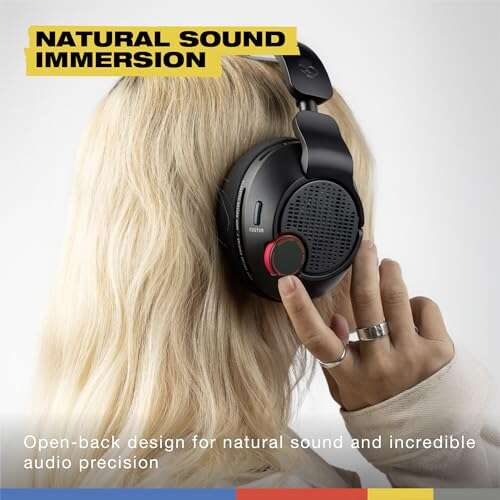
Open-back headphones
Open-back headphones have vents or grilles on the outside of the ear cups. These vents let air move more freely. They can create a spacious sound, but they also allow music to escape.
If you use open-back headphones in a library, office, airplane, or shared bedroom, nearby people may hear your music. This is normal and is part of the design.
Closed-back headphones
Closed-back headphones block the rear of the speaker driver. They usually leak less sound than open-back models.


They are not silent to people nearby. A poor seal, loud volume, worn ear pads, or a loose headband can still let music escape.
In-ear earbuds
Earbuds can leak very little when their tips fit well inside the ear canal. A good seal sends more of the sound toward your ears and lets you listen at a lower volume.
Loose earbuds often cause the opposite problem. You may raise the volume to hear your music, while more sound escapes around the earbud.
Can People Hear Music Through Bluetooth Headphones?
Bluetooth does not make other people hear your music. Bluetooth is a wireless connection between your phone, computer, tablet, or other source and the headphones.
The headphones still produce sound through small speakers. People nearby hear only the sound that leaks from those speakers.
Bluetooth headphones can leak music when:
- The volume is high.
- The ear cups do not seal.
- The ear tips are too small.
- The headphones are open-back.
- The ear pads are damaged or compressed.
- The listener removes one earbud and leaves the volume high.
- The headphones are not fully covering the ears.
Bluetooth range and leakage are separate issues. Someone cannot normally hear your music simply because they are close to your phone or headphones. They must hear the physical sound coming from the headphone speakers.
What about Bluetooth pairing?
A nearby person generally cannot hear your music by standing close to you. They would need to connect to your headphones, and most headphones allow only approved or active connections.
If you hear someone else’s audio, stop playback and check your device’s Bluetooth settings. Remove unknown paired devices and avoid pairing in crowded public places unless the headphones show a clear confirmation.
How to Tell If Your Headphones Are Leaking Sound
You can check sound leakage with a simple test. Use a normal listening track, not a test tone, because music gives a more realistic result.
- Set the volume to the level you normally use.
- Put on the headphones or earbuds.
- Ask a trusted person to stand about 1 to 2 feet away.
- Play a quiet section, then a loud section of the same song.
- Ask whether they can identify words, instruments, or only a faint hiss.
- Repeat the test in a quiet room and in a noisy room.
Do not turn the volume up to an uncomfortable level just to test leakage. If your ears hurt, ring, feel blocked, or sound dull after listening, stop and give your ears a break.
You can also use a phone recording as a rough check. Place the phone near your head while music plays, then listen to the recording. This is not a precise sound-level test, but it can show whether leakage is obvious.
How to Stop People From Hearing Your Music
The most useful fix is to lower the volume and improve the seal. You usually do not need to replace your headphones.
1. Lower the volume
Volume is the fastest way to reduce sound leakage. It also reduces the risk of hearing damage.
If you keep turning up the volume to cover voices, traffic, or engine noise, use headphones with better passive isolation or active noise cancellation. Do not use high volume as a substitute for a better fit.


2. Improve the earbud seal
Try a different ear tip size. Many earbuds include small, medium, and large tips for this reason.
A good seal should feel secure but not painful. You should hear less outside noise, and your music should sound fuller without needing as much volume.
If the earbuds fall out, sound thin, or need a high volume setting, the tips may be too small or the shape may not suit your ears.
3. Use closed-back headphones
Closed-back headphones are usually a better choice for offices, flights, classrooms, and other shared spaces.
Look for a model with:
- Ear cups that fully surround your ears
- Soft pads that touch the head evenly
- A stable fit without large gaps
- Intact ear-pad material
- A comfortable clamp that does not cause pain
Comfort matters. If a headset hurts, you may shift it often and create gaps that increase leakage.
4. Replace worn ear pads
Old ear pads can flatten, crack, or lose their shape. This creates gaps around the ears.
Replacement pads may restore the seal, but the correct part depends on the exact headphone model. Aftermarket pads can change comfort, isolation, and sound, so check fit before buying.
5. Use noise cancellation correctly
Active noise cancellation, or ANC, uses microphones and electronic processing to reduce outside noise. It does not guarantee that other people cannot hear your music.
ANC may help you listen at a lower volume in a noisy place. That can reduce leakage. However, the headphone design and physical seal still control how much music escapes.
6. Keep one earbud at a safe setting
Using one earbud can make you raise its volume to hear clearly. It can also make the sound more noticeable to people nearby.
If you need to hear announcements or traffic, use an awareness mode or keep the volume low. Follow local rules and stay alert when walking, cycling, or driving.
How Much Headphone Sound Leakage Is Too Much?
There is no single distance or volume level that applies to every headphone. The safe limit depends on the actual sound level at your ears, how long you listen, and how often you repeat the exposure.
The National Institute for Occupational Safety and Health uses 85 decibels over 8 hours as a recommended occupational exposure limit, with less allowable exposure as sound rises. Headphone output varies by device, track, settings, and ear fit, so a phone’s volume percentage does not equal a fixed decibel level.
Watch for these warning signs:


- Ringing in your ears
- Muffled hearing after listening
- Ear pain or pressure
- Needing to raise the volume over time
- Difficulty hearing normal speech after removing headphones
- Other people asking you to lower the volume
These signs mean your listening level may be too high or your ears need a break. Repeated loud exposure can cause permanent hearing damage. If ringing or muffled hearing continues, contact a hearing-care professional or medical provider.
A practical listening check
A useful everyday rule is simple: if someone standing near you can clearly hear the song, your volume may be higher than necessary. This is not a medical test, but it is a helpful prompt to lower the volume and check the fit.
For measured results, use a properly calibrated sound-level system. Phone sound-meter apps can be useful for rough comparisons, but they may not accurately measure sound at the eardrum.
Why Can I Hear My Own Music Outside My Headphones?
If you hear music even after removing your headphones, check the source before assuming the headphones are leaking.
Possible causes include:
- Your phone or computer speakers are still playing.
- The music is playing through a connected smart speaker.
- A second Bluetooth device is active.
- One earbud is not seated correctly.
- The headphone jack is only partly inserted.
- Audio is playing through both headphones and speakers.
- A notification or app is playing separate audio.
Pause the music, remove the headphones, and check the device’s audio output menu. On an iPhone, iPad, Android phone, Mac, or Windows PC, confirm that the selected output is the headphones you are wearing.
If the issue happens only with one app, close that app and test another audio source. If one ear cup or earbud is much louder than the other, inspect the cable, connector, mesh, and balance settings.
Common Situations and the Likely Answer
| Situation | Can others hear the music? | Why |
|---|---|---|
| Open-back headphones in a quiet room | Often | The design intentionally lets sound pass through |
| Closed-back headphones at low volume | Usually little or no sound | The ear cups block most outward sound |
| Earbuds with a strong seal | Usually little leakage | The tips direct sound into the ear canal |
| Loose earbuds at high volume | Possibly | Sound escapes around the ear |
| Noise-canceling headphones | Sometimes | ANC reduces outside noise but does not stop leakage |
| Headphones on a quiet airplane | Possibly | The cabin is relatively quiet, and high volume is common |
| Headphones in a busy street | Less noticeable | Background noise masks small amounts of leakage |
| One earbud removed while music plays | More likely | The open earbud can be heard by nearby people |
Common Mistakes That Increase Sound Leakage
Assuming Bluetooth means private
Bluetooth sends the signal wirelessly, but the headphone speakers still create sound in the room. Wireless does not mean silent.
Turning up the volume when the fit is poor
A loose earbud or damaged ear pad wastes sound. Fix the fit before raising the volume.
Treating ANC as a privacy feature
ANC is mainly for reducing outside noise. It does not make open-back headphones private, and it does not seal gaps around your ears.
Testing in a noisy room only
A noisy room can hide leakage. Test in a quiet room if you want to know whether someone nearby can hear your music.
Ignoring changes in your hearing
Ringing or muffled hearing is not something to push through. Lower the volume and rest your ears. Seek medical advice if symptoms persist.
Frequently Asked Questions
Can people hear music through AirPods?
Yes, but usually only when the volume is high, the fit is loose, or the person is very close. AirPods with a good fit generally leak less than loose-fitting earbuds. Open-ear or transparency-style designs may let more sound be heard by the wearer and by people nearby.
Can people hear music through noise-canceling headphones?
Yes. Noise cancellation can help you use a lower volume, but it does not prevent all sound from escaping. Leakage still depends on the headphone design, volume, fit, and condition of the ear pads.
Can someone hear my music through my headphones on a plane?
Possibly. Aircraft cabins contain steady background noise, but nearby passengers may hear loud music, especially during quiet parts of a flight. Keep the volume low enough that you can still respond to announcements.


Can people hear my music if my headphones are plugged in?
Yes. A wired connection does not stop sound leakage. The cable carries the audio signal, while the headphone speakers create the sound that may escape.
Can people hear my music through earbuds in a library?
They may, especially if the earbuds fit loosely or the volume is high. In a quiet library, even a small amount of leakage can be noticeable. Use a good seal, keep the volume modest, and ask someone nearby to check if you are unsure.
Why do people hear my headphones even at a low volume?
Your headphones may have an open design, a poor seal, damaged ear pads, or a loose fit. The room may also be very quiet. Try another ear tip or closed-back headphones before increasing the volume.
Key Takeaways
- Yes, people can hear music through headphones, but the amount varies.
- Open-back headphones leak the most sound.
- Closed-back headphones and well-fitted earbuds usually leak less.
- High volume increases both leakage and hearing risk.
- ANC reduces outside noise but does not guarantee privacy.
- A better seal often solves the problem without new headphones.
- If others can clearly identify your music, lower the volume and check the fit.
Conclusion
People nearby may hear your music, but Bluetooth itself is not the cause. Sound leakage mainly comes from high volume, open-back designs, loose earbuds, poor seals, and worn ear pads.
For private listening in a shared U.S. setting, use closed-back headphones or well-sealed earbuds at a moderate volume. Test them in a quiet room, and treat ringing or muffled hearing as a signal to stop and rest your ears.
Sources
- National Institute for Occupational Safety and Health: Criteria for a Recommended Standard—Occupational Noise Exposure
- CDC: About Noise-Induced Hearing Loss
- National Institute on Deafness and Other Communication Disorders: Noise-Induced Hearing Loss
- Federal Aviation Administration: Hearing and Listening on Aircraft

Everett Ashford is a tech reviewer at mytechgrid.com specializing in SSDs, cameras, TVs, earbuds, headphones, and other consumer electronics. He provides honest, data-driven reviews based on hands-on testing and real-world performance analysis. Everett simplifies complex tech details to help readers make smart, confident buying decisions.