SSD power use is easiest to check with the right tool for your setup. On a U.S. desktop, you can measure the whole PC at the wall, measure a SATA drive on its power cable, or use a specialized DC power meter. On a U.S. laptop, software tools can show battery drain, but they usually cannot isolate the SSD from the screen, CPU, memory, and other parts.
The most accurate method depends on what you need:
- Drive power in watts: Use an inline power meter.
- Whole-system power: Use a wall power meter.
- Power trends during use: Use software and repeatable tests.
- Estimated SSD power: Use the manufacturer’s data sheet.
This guide explains how to check SSD power consumption safely, how to calculate watts, and how to avoid common measurement errors.
What SSD power consumption means
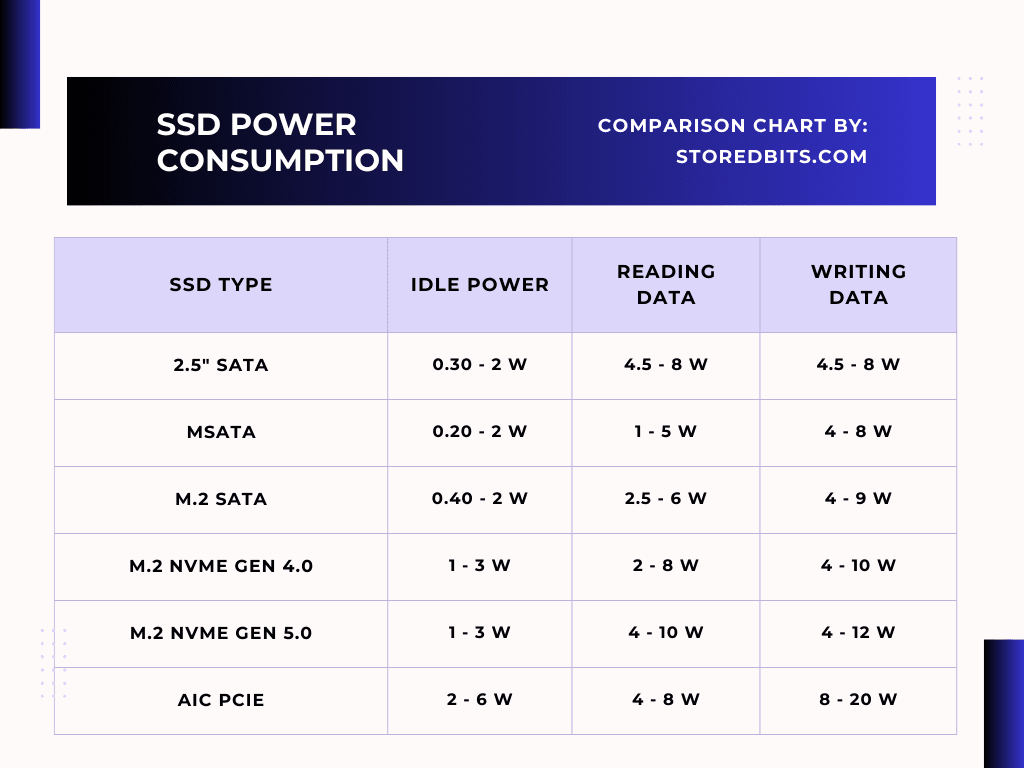
SSD power consumption is the electrical power the drive uses at a specific time and workload. It is measured in watts (W).
A drive may use different amounts of power in these states:
- Active: Reading or writing data.
- Idle: Powered on but doing little work.
- Low-power idle: A supported sleep state.
- Startup: The short period when the drive begins operation.
- Peak load: The highest draw during a demanding task.
A manufacturer may list several values, such as:
- Typical active power
- Maximum active power
- Idle power
- Sleep or standby power
- Average power during a test
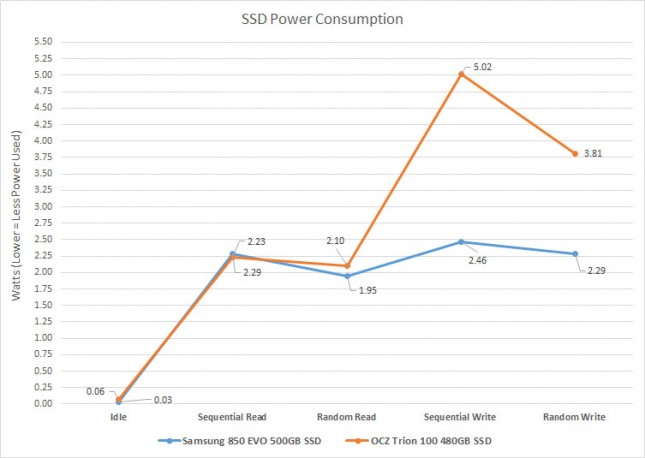
These values are not always directly comparable. One brand may measure power during sequential reads, while another may use random writes or a low-power state.
The key formula is:
[
\text{Power in watts} = \text{Voltage in volts} \times \text{Current in amps}
]
For example, a drive using 5 volts and 0.6 amps uses:
[
5 \times 0.6 = 3\text{ W}
]
If a meter reports milliamps, convert them first:
[
600\text{ mA} = 0.6\text{ A}
]
The word power is not the same as energy. Power is the rate of use. Energy is the total amount used over time and is usually measured in watt-hours (Wh).
Check the SSD’s rated power first
Before measuring anything, read the exact SSD model number. Then open the manufacturer’s data sheet or support page.
Look for terms such as:
- Power consumption
- Active power
- Average active power
- Maximum power
- Idle power
- PS0, PS1, PS2, or PS3 power states
- Slumber or DevSleep power
- Typical power
The model number matters. Two SSDs from the same product family may use different controllers, NAND types, firmware, or interfaces.
Where to find the SSD model
On Windows:
- Press Windows + X.
- Select Device Manager.
- Expand Disk drives.
- Record the full drive name.
You can also use PowerShell:
Get-PhysicalDisk | Select FriendlyName, MediaType, Size
On Linux, run:
lsblk -o NAME,MODEL,SIZE,TRAN
For more detail, use:
sudo smartctl -i /dev/nvme0
Replace /dev/nvme0 with the correct device. The smartctl command is part of the smartmontools package.
The rated value gives you a useful reference, but it is not a live measurement. Real power changes with temperature, workload, link speed, queue depth, and power-saving settings.

How to measure SSD power on a desktop PC
A desktop gives you the best chance of measuring the SSD directly because the drive is usually easy to access.
Method 1: Measure the whole PC at the wall
this is the simplest method.
You need:
- A plug-in watt meter
- A desktop computer
- A repeatable test
Connect the watt meter between the wall outlet and the computer. In the United States, household outlets normally supply about 120 volts AC, but the meter will calculate the actual input power.
Record the reading in these states:
- Computer turned off but still plugged in.
- Computer powered on and idle.
- Computer copying files.
- Computer running a storage benchmark.
- Computer idle again.
The difference between two readings gives an estimate:
[
\text{Estimated SSD system impact} =
\text{PC power under load} – \text{PC power at idle}
]
However, this does not equal SSD power. The CPU, memory, graphics card, cooling fans, motherboard, and power supply also change their power use.
This method is useful when you want to know whether an SSD upgrade affects total PC energy use. It is not suitable for proving that a drive uses exactly 2 watts or 4 watts.
Method 2: Measure a SATA SSD with an inline meter
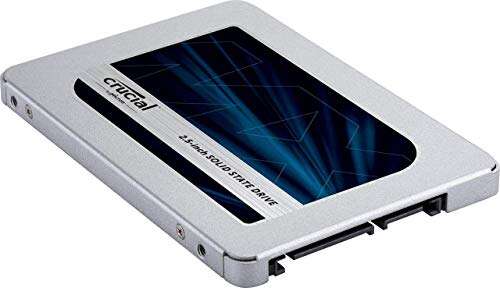
A 2.5-inch SATA SSD receives power through a SATA power connector. An inline DC power meter can sit between the power supply and the drive.
A suitable meter may report:
- Voltage
- Current
- Instant power
- Energy over time
To measure the drive:
- Shut down the computer.
- Turn off the power supply and unplug the system.
- Connect the inline meter between the SATA power cable and the SSD.
- Check that the connector direction is correct.
- Secure the cable so it cannot touch a fan.
- Start the computer.
- Record idle and load readings.
- Shut down before removing the meter.
Some SATA drives use both 5-volt and 12-volt input paths. The meter must measure every power path used by the drive. A meter connected to only one voltage rail can produce a false result.
Do not force a connector. Do not modify a modular power supply cable. Modular power supply cables are not universal, even when the plugs look similar.
Method 3: Measure an M.2 NVMe SSD
An M.2 NVMe SSD receives power from the motherboard. This makes direct measurement harder.
The drive may receive power through motherboard contacts that also carry signals and control lines. A basic inline cable meter will not usually work.
Possible approaches include:
- A purpose-built M.2 power measurement board
- A PCIe test fixture
- A motherboard development platform with power telemetry
- A laboratory-grade current probe
For most home users, the safest choice is to measure whole-system power and compare the system at idle and under the same storage workload.
Do not insert a meter into an M.2 slot unless it is designed for that slot and drive type. A wrong connection can damage the SSD, motherboard, or both.
How to check SSD power use on Windows
Windows usually does not report live SSD wattage. It can show storage activity, temperature, and health data, but those readings are not the same as power.
You can still use Windows to create a repeatable test.
Step 1: Record the drive model
Use Device Manager, PowerShell, or a drive utility. Save the exact model name.
Step 2: Watch storage activity
Open Task Manager:
- Press Ctrl + Shift + Esc.
- Select Performance.
- Choose the SSD.
- Watch active time, read speed, and write speed.
You can also open the Resource Monitor:
- Press the Windows key.
- Search for Resource Monitor.
- Open the Disk tab.
- Check which programs are reading or writing data.
High active time does not always mean high power. A drive can be busy with small random requests while moving very little data.
Step 3: Run the same workload
For a simple test, copy a large folder to another drive. Use the same source, destination, file set, and test time each time.
You can also use a storage benchmark. Close other programs first. Record:
- Idle power
- Power during sequential reads
- Power during sequential writes
- Power after the test
Use a wall meter for total system power, or an inline meter for direct SATA measurements.
Step 4: Compare results
Run each test at least twice. Discard the first result if the SSD’s cache, operating system, or background tasks changed the conditions.
A useful table looks like this:
| Test state | Total PC power | SSD activity | Notes |
|---|---|---|---|
| Powered off | 0.8 W | None | Standby draw |
| Windows idle | 48 W | 0–2% | Background tasks stopped |
| File read | 57 W | 90–100% | Sequential read |
| File write | 61 W | 90–100% | Sequential write |
| After test | 49 W | Low | Drive cooling down |
The difference between idle and load is a system-level change, not a direct SSD measurement.

How to check SSD power use on Linux
Linux provides useful tools for monitoring storage activity and system energy. It still may not expose direct SSD wattage.
Identify the drive
Run:
lsblk -o NAME,MODEL,SIZE,TRAN
For NVMe information:
sudo nvme list
For device details:
sudo smartctl -a /dev/nvme0
For a SATA SSD, the device may be /dev/sda.
Monitor activity
Use:
iostat -xz 1
This command is provided by the sysstat package on many Linux distributions.
Important fields include:
- Read and write operations
- Throughput
- Utilization
- Average request time
These values show activity, not watts.
Check system energy data
On supported systems, Linux may expose power information through the powercap interface:
sudo turbostat
You can also inspect:
ls /sys/class/powercap/
On laptops, tools such as powertop may estimate system power or show device activity:
sudo powertop
These readings can help identify power-hungry processes. They usually cannot separate the SSD from the motherboard, PCIe link, and storage controller.
For NVMe drives, the active power state may be visible through:
sudo nvme get-feature /dev/nvme0 -f 0x02 -H
This reports a controller feature related to power management on compatible devices. It does not guarantee that the drive is drawing the listed amount at every moment.

How to check SSD power consumption in a laptop
A laptop is more difficult because the SSD shares the battery with many other components.
You can estimate storage-related impact by comparing battery drain during controlled tests.
A simple laptop test
- Charge the battery to a known level.
- Set a fixed screen brightness.
- Disconnect unnecessary USB devices.
- Close background applications.
- Record the battery percentage and time.
- Run a storage workload for a fixed period.
- Record the battery percentage again.
- Repeat the test while the laptop is idle.
The battery percentage is a rough measure. It can change in steps, and the operating system estimates remaining capacity.
If your laptop reports battery power in watts, you can use:
[
\text{Battery energy used} \approx \text{Power in watts} \times \text{Time in hours}
]
For example, a laptop averaging 12 W for 30 minutes uses approximately:
[
12 \times 0.5 = 6\text{ Wh}
]
This includes the entire laptop, not just the SSD.
For a better comparison, keep the following fixed:
- Screen brightness
- Wi-Fi or Ethernet state
- CPU workload
- Fan mode
- Power plan
- Room temperature
- Test duration
- File set and storage workload
A small change in display brightness can be larger than the SSD’s own power difference. This is why laptop tests should be treated as comparisons, not direct SSD measurements.
How to calculate SSD energy use and cost
Once you know average power, you can estimate energy use.
[
\text{Energy in watt-hours} =
\text{Power in watts} \times \text{Time in hours}
]
If an SSD averages 2 W for 8 hours per day:
[
2 \times 8 = 16\text{ Wh per day}
]
That equals:
[
16\text{ Wh} = 0.016\text{ kWh}
]
For a 30-day month:
[
0.016 \times 30 = 0.48\text{ kWh}
]
To estimate cost:
[
\text{Cost} =
\text{kWh used} \times \text{electricity price per kWh}
]
Using a hypothetical U.S. electricity rate of $0.18 per kWh:
[
0.48 \times $0.18 = $0.0864
]
That is about 9 cents for the month under those conditions.
This calculation is only an example. Use the electricity rate on your U.S. utility bill for a local estimate. Also remember that an SSD rarely uses its maximum rated power all day.
Why SSD power readings can be wrong
The most common error is measuring the wrong part of the system.
Whole-system power is not drive power
A wall meter measures the computer, monitor, and power supply losses if they are connected to the same meter. It cannot identify the SSD’s individual draw.
Active time is not wattage
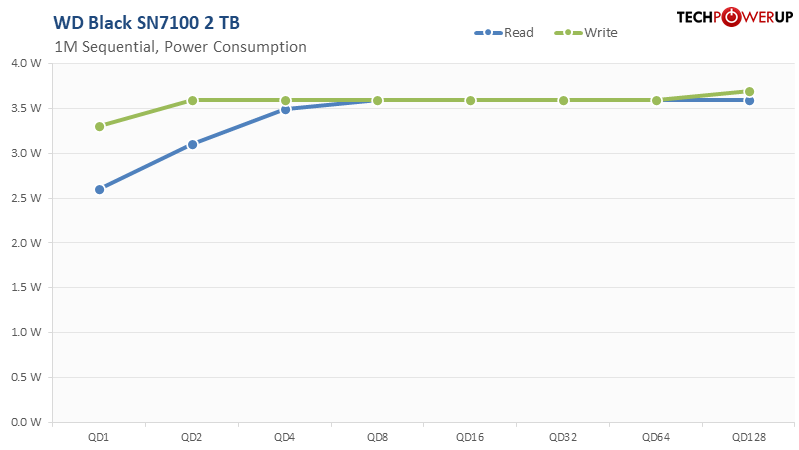
A drive at 100% active time may use less power than expected if it is handling small requests. A high-speed sequential workload may use more power even if it finishes quickly.
Short peaks may be missed
Some meters refresh slowly. A brief power spike may not appear on the display. Use a meter that logs samples if peak power matters.
Power supply losses affect readings
A desktop power supply consumes more AC power than the components receive. If the SSD uses 2 W inside the PC, the wall meter may show a slightly larger increase.
Temperature changes the result
An SSD may draw more power when its controller is working hard or when it starts cooling after a sustained load. Record temperature when comparing tests.
Low-power states need time
An SSD may enter a low-power state only after a period of inactivity. Measure idle power after waiting long enough for the drive and operating system to settle.
The operating system may create background activity
Indexing, antivirus scans, updates, backups, and virtual memory can change the result. Pause or control these tasks during a comparison, but do not disable security software permanently.
Best method by SSD type
| SSD setup | Best practical method | Accuracy limit |
|---|---|---|
| 2.5-inch SATA SSD | Inline DC meter | Must measure all used voltage rails |
| M.2 SATA SSD | Purpose-built test fixture | Motherboard power paths can be difficult to isolate |
| M.2 NVMe SSD | PCIe or M.2 power analyzer | Specialized equipment may be required |
| Desktop PC | Wall meter plus controlled workload | Measures the whole system |
| Laptop | Battery and system power comparison | Cannot isolate the SSD reliably |
| Server or workstation | Platform telemetry or laboratory meter | Firmware and shared rails affect results |
For most home users, the practical choice is to combine three sources:
- The manufacturer’s rated figures.
- A wall meter or laptop power reading.
- A repeatable read and write test.
That combination gives a useful estimate without pretending that system-level data is direct drive data.

Common mistakes to avoid
- Reading the SSD’s temperature as power: Temperature shows heat, not electrical consumption.
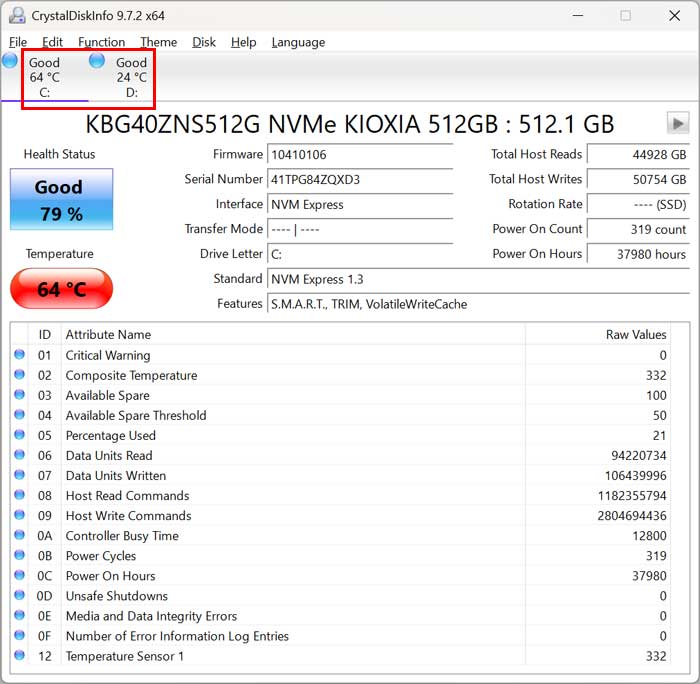
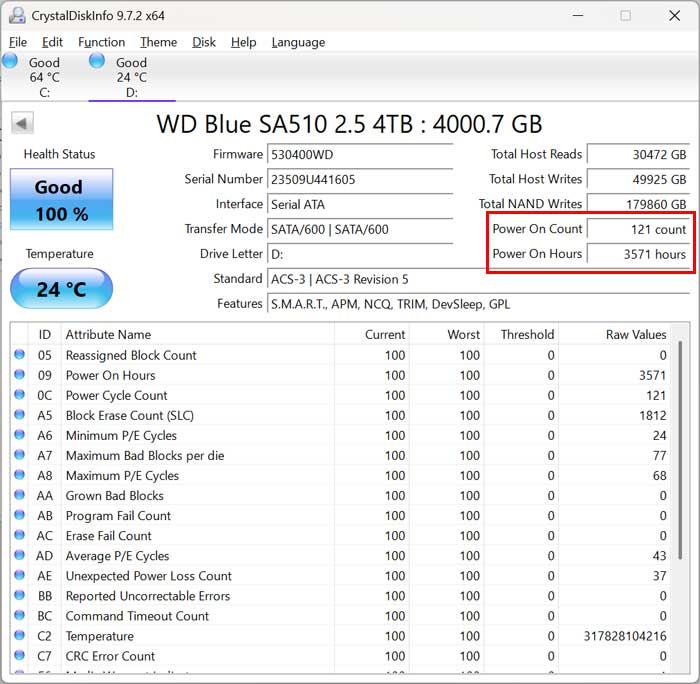
- Using SMART data as a watt meter: SMART can report health and statistics, but most drives do not provide a reliable live watt reading through SMART.
- Comparing different workloads: Sequential reads, random writes, and idle states are not equivalent.
- Ignoring power states: A drive may use very different power in active and low-power idle modes.
- Measuring only one cable: Some drives use more than one voltage rail.
- Using a cheap USB meter for an internal drive: USB readings apply to the USB device and enclosure, not necessarily the SSD alone.
- Changing several settings at once: You will not know which change affected the result.
- Opening a power supply: Never open a desktop power supply to measure internal circuits. Dangerous stored voltage can remain after unplugging.
If a measurement seems impossible, check the setup first. Confirm the model, meter range, cable path, workload, and test time.

Key takeaways
- The most accurate way to measure SSD power is an inline meter that covers every power path.
- A wall meter measures the whole computer, not just the SSD.
- Windows and Linux can show drive activity, but activity is not the same as wattage.
- Laptop tests usually show total system power and cannot isolate the SSD.
- Use watts for power, watt-hours for energy, and kilowatt-hours for electricity cost.
- Compare the same workload, temperature, power plan, and idle period.
- Do not modify power cables or place a meter in an M.2 slot unless the equipment is made for that purpose.
FAQs
Can CrystalDiskInfo show SSD power consumption?
Usually, no. CrystalDiskInfo can show drive health, temperature, firmware, and SMART information for many drives. It generally does not provide a dependable live watt reading.
Is NVMe more power-hungry than SATA?
Not in every case. NVMe drives can use more power during high-speed workloads, but power depends on the controller, NAND, firmware, PCIe link state, workload, and cooling. Compare measured or documented values for the exact models.
Does SSD power consumption affect laptop battery life?
Yes, but the effect may be small compared with the display, processor, wireless radios, and cooling system. A high-power storage task can increase battery drain, while a drive in a low-power idle state may have a much smaller effect.
How can I measure SSD power without special equipment?
Use the manufacturer’s specifications and a wall meter or laptop battery test. Run the same workload with the SSD active and compare it with a controlled idle state. Treat the result as a system-level estimate.
What is the difference between SSD power and SSD energy use?
Power is the rate of electrical use, measured in watts. Energy is the total used over time, measured in watt-hours or kilowatt-hours. A drive can have high short-term power but low total energy if it finishes a task quickly.
Conclusion
To check SSD power consumption, start with the exact model’s technical documentation. Then choose a method that matches your hardware: an inline DC meter for direct measurement, a wall meter for desktop system changes, or a controlled battery test for laptops.
For a useful result, measure idle, read, and write states under repeatable conditions. Record the units, test time, temperature, and workload. Most errors come from confusing SSD activity or total computer power with the SSD’s actual electrical draw.

Everett Ashford is a tech reviewer at mytechgrid.com specializing in SSDs, cameras, TVs, earbuds, headphones, and other consumer electronics. He provides honest, data-driven reviews based on hands-on testing and real-world performance analysis. Everett simplifies complex tech details to help readers make smart, confident buying decisions.