The HP 255 G10 is the best laptop for home use not gaming in this practical product lineup.
Many people need a laptop for bills, email, video calls, school work, browsing, streaming, and light office tasks. They do not need a heavy gaming machine with bright lights and loud fans. I reviewed the listed laptop and related home-office accessories with that real-life use in mind. The HP model stands out because it offers a large screen, Windows 11, generous memory, and a roomy SSD. The other products can improve your desk, calls, typing comfort, cable setup, and daily laptop use.
See the differences between my top picks at a glance.
HP 255 G10 Laptop

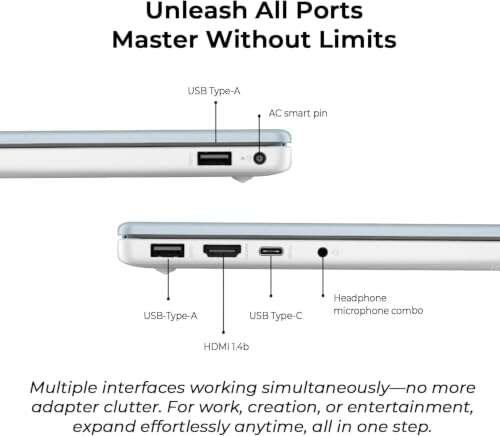
The HP 255 G10 is the clear focus of this guide. Its listed configuration includes 32GB of RAM, a 1TB SSD, a 15.6-inch Full HD screen, and Windows 11. It uses an AMD Ryzen 3 7330U processor and includes HDMI and USB-C ports. That mix suits web browsing, documents, online classes, streaming, email, and video meetings.
The large SSD gives you useful room for photos, files, and apps. The generous RAM also helps when you keep many browser tabs open. This is not a gaming laptop, and that is a benefit for many home users because the design stays focused on normal work. Always confirm the current listing before you buy, since Amazon configurations can change.
Pros:
- Large 15.6-inch Full HD display
- 32GB RAM supports heavy multitasking
- 1TB SSD offers useful file space
- HDMI and USB-C improve connection options
- Windows 11 feels familiar for home use
- Good fit for work, study, and entertainment
Cons:
- Not designed for demanding modern games
- Large size is less convenient for travel
- Included configuration and accessories may vary
What Amazon Buyers Are Saying
Check the current Amazon review page for the latest buyer feedback, since reviews and configurations change over time. Buyers of laptops in this class commonly focus on screen size, start-up speed, memory, and value. The main points to inspect are battery results, build feel, display brightness, and whether the exact RAM and SSD size match the listing.
My Recommendation
I recommend the HP 255 G10 for families, students, remote workers, and anyone who wants a practical Windows laptop. It is the best laptop for home use not gaming in this group because its core hardware matches common home tasks well. I would buy it for everyday work, but I would not choose it for serious gaming or advanced video editing.
CMTECK G009 USB Microphone

The CMTECK G009 is a USB desktop microphone for calls, online chats, voice recording, and home content work. Its noise-cancelling design and mute function target the needs of laptop users who want a simple external mic. It supports Windows and Mac systems according to the product listing. The USB connection should make setup simple for most home users.
A desktop mic can sound clearer than a laptop’s built-in mic when you sit at a desk. It also keeps your voice source in one fixed place. This model makes more sense for frequent calls than for a person who only joins an occasional meeting. Place it close to your mouth, but avoid blocking the keyboard or screen.
Pros:
- Simple USB connection
- Mute function helps during calls
- Designed for Windows and Mac
- Useful for meetings and voice chats
- Desktop form keeps the mic in a steady place
Cons:
- Uses desk space beside the laptop
- USB cable limits placement range
- Noise reduction cannot remove every room sound
What Amazon Buyers Are Saying
Read the current reviews for comments about voice clarity, cable length, mute control, and long-term use. Those are the most useful details for this type of product. I would pay close attention to reports from buyers who used it for work calls, since that use best matches a home laptop setup.
My Recommendation
This microphone is worth considering if you make regular video calls or record short audio clips. It is not an essential add-on for every laptop owner. I rate it 4.1/5 for a simple home desk because the USB setup and mute control are useful.
Tri-Mode Wireless Keyboard

This 94-key keyboard offers Bluetooth, 2.4G wireless, and wired connection modes. It also lists silent membrane keys, RGB backlighting, a display screen, and a multimedia knob. For home use, the three connection choices add flexibility. You can use a wireless connection at your desk or switch to a cable when you want a direct link.
The keyboard may help users who prefer a full typing area over a laptop keyboard. The multimedia controls can save time when you adjust sound or media. The lighting is more style than need for a non-gaming setup, but you can use the keyboard without treating it as a gaming product. Check the included receiver and compatibility details before ordering.
Pros:
- Three connection modes
- Full 94-key layout
- Silent membrane design suits shared rooms
- Multimedia knob adds quick control
- Backlighting helps in dim spaces
Cons:
- May take more desk space than a laptop keyboard
- Lighting may not matter to every home user
- Wireless battery details should be checked on the listing
What Amazon Buyers Are Saying
Current buyer reviews are most helpful for judging key feel, wireless stability, lighting control, and battery life. Look for comments from people who use the keyboard for writing or office work, not only gaming. Also check whether buyers find the layout comfortable for long typing sessions.
My Recommendation
I recommend this keyboard for a home desk that needs flexible connections and a full layout. It is a useful companion to the HP laptop, especially with an external monitor. My rating is 4.2/5, with the main caution being its larger footprint.
Furinno Compact Home Desk

The Furinno desk is made for small rooms, study areas, dorms, and bedrooms. Its listed width is 23.6 inches, and it includes a keyboard tray and open shelf. That size can work well when a full office desk will not fit. The white finish gives it a clean look for a simple home setup.
This desk is best for the HP laptop alone, with limited room for accessories. The shelf may hold a small item, notebook, or accessories. Measure your space before buying, and check the product dimensions carefully. A compact desk helps create a fixed work spot, but it will not replace a large workstation.
Pros:
- Compact footprint
- Dedicated keyboard tray
- Open shelf adds storage
- Useful for bedrooms and dorms
- Simple white finish matches many rooms
Cons:
- Limited surface for a laptop and many accessories
- Not ideal for dual-monitor setups
- Small desks need careful cable management
What Amazon Buyers Are Saying
Check live reviews for assembly time, stability, surface quality, and size. Buyers often use these points to decide if a compact desk fits their room. I would also look for photos from customers, as they show how much space remains after placing a laptop on the top.
My Recommendation
This desk is a sensible choice for a small home office or student room. It pairs well with a 15.6-inch laptop when you want a basic work station. I rate it 4.0/5 because the compact size is useful, but it limits expansion.
Large Waves Desk Mat

This extended desk mat measures 31.5 by 15.7 inches, according to the listing. It gives a laptop, keyboard, and mouse a shared surface. The micro-weave cloth aims to provide smooth movement, while the water-resistant surface can make small spills easier to manage. Its non-slip base helps keep the mat in place.
The Waves design adds a visual touch without changing how the laptop works. A desk mat also helps protect the top of a desk from everyday marks. It does not replace a mouse, keyboard, or laptop stand. Make sure the desk has enough depth for the full mat.
Pros:
- Large shared work surface
- Water-resistant design
- Non-slip base
- Cloth surface supports mouse movement
- Helps protect the desk finish
Cons:
- Needs a desk with enough depth
- Cloth may need careful cleaning
- Does not add laptop elevation
What Amazon Buyers Are Saying
Look at current reviews for edge finish, rolling after unpacking, color accuracy, and grip. Those details matter more than the design name. Buyer photos can also show whether the mat stays flat and fits the intended desk.
My Recommendation
I recommend this mat for a neat laptop desk with a keyboard and mouse. It offers useful coverage at a practical size. My rating is 4.2/5 for home office comfort and desk protection.
Marble Blue Large Desk Mat

This Marble Blue version uses the same listed 31.5 by 15.7-inch extended format. It can cover the area beneath a laptop, external keyboard, and mouse. The water-resistant top and non-slip base suit daily home use. The marble pattern gives the desk a more decorative look.
I like this type of mat when a desk feels hard or rough under the wrists. It can also reduce small scratches from moving accessories. The mat is not a cooling tool, and it should not block laptop vents. Keep the laptop on its feet or a stand if the underside needs airflow.
Pros:
- Wide surface for laptop accessories
- Non-slip base
- Water-resistant top
- Decorative marble blue pattern
- Useful for work and study desks
Cons:
- May be too wide for a shallow desk
- Pattern choice is a matter of taste
- Needs flat placement for the best result
What Amazon Buyers Are Saying
Review the latest buyer notes about the print, flatness, smell after opening, and edge quality. These points can vary between batches. I would use customer photos to judge the real color and the amount of desk space the mat covers.
My Recommendation
This is a good desk comfort add-on for a home laptop. Choose it over a plain mat if you prefer the marble look. I give it 4.1/5 for coverage, comfort, and simple protection.
Octopus XL Desk Mat

The Octopus desk mat is a themed XL mat for a laptop, keyboard, and mouse. Its listed size is 35.4 by 15.7 inches, so it provides more width than the other large mats here. The neon creature design gives a bold look to a home desk. The extended shape can also help create a clear area for daily work.
This product makes sense for someone who wants desk protection with a strong visual theme. It is still useful for normal typing and browsing, even though the listing uses gaming language. Measure the desk first, as the added width may not suit a small table. Keep drinks on a separate coaster to protect the fabric.
Pros:
- Extra-wide 35.4-inch format
- Large area for laptop and accessories
- Distinctive neon design
- Can protect the desk surface
- Useful for work, study, and media use
Cons:
- Bold artwork will not suit every room
- Needs more desk width
- Fabric mats need routine cleaning
What Amazon Buyers Are Saying
Check current reviews for image quality, edge stitching, flatness, and actual dimensions. Customer photos can help you judge how bright the design looks in a normal room. I would also check comments about whether the mat stays still during daily mouse use.
My Recommendation
Buy this mat if you want a large work surface and a bold desk style. It is less suitable for a calm, plain office. My rating is 4.0/5 because the extra width is useful, but the artwork is personal.
Space Design Extended Desk Mat

This Space desk mat has the listed 31.5 by 15.7-inch size. It creates one broad surface for an HP laptop and its input devices. The design adds a space theme to a study or home office. The extended format can reduce the need to place the mouse directly on the bare desk.
A mat like this is a low-cost way to make a basic desk feel more complete. It does not improve laptop speed, screen quality, or battery life. I would choose it based on the print, fit, and surface feel rather than the gaming label. Keep the desk clean so dust does not build under the mat.
Pros:
- Good width for a laptop setup
- Space-themed appearance
- Creates a smooth accessory area
- May protect the desk from light wear
- Works for study and office use
Cons:
- Not a performance upgrade for the laptop
- Printed design may not match every desk
- Requires enough desk depth
What Amazon Buyers Are Saying
Use the latest Amazon feedback to check print quality, surface texture, edges, and shipping condition. Look for photos taken in normal indoor light. Those details give a better idea of how the mat will look beside your laptop.
My Recommendation
This mat is a reasonable pick for a themed study space. It offers useful coverage without taking as much width as the Octopus model. I rate it 4.0/5 for a simple home setup.
Six-Fan Laptop Cooling Pad
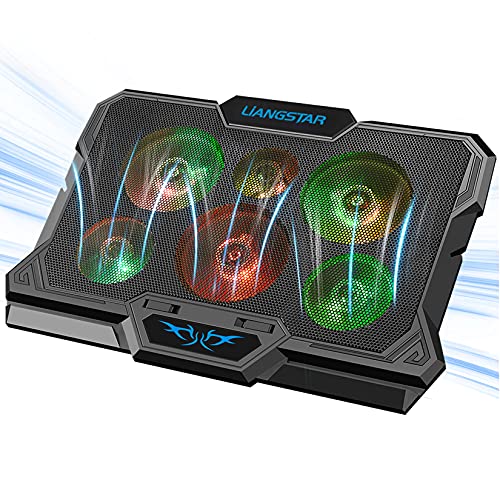
This cooling pad is listed for 15.6- to 17-inch laptops. It uses six fans, USB power, RGB lighting, and a switch to control fan speed. The HP 255 G10 is a 15.6-inch model, so the stated size range makes this accessory relevant. The stand can also lift the laptop slightly above the desk.
Most light home tasks do not need extra cooling. Still, a cooling pad may help when a laptop sits on a warm desk, runs for long periods, or has limited airflow beneath it. The fans may add sound, so use the control to find a comfortable level. Never treat a cooling pad as a substitute for clear vents and regular dust care.
Pros:
- Fits the listed 15.6- to 17-inch range
- Six-fan layout
- Fan speed switch
- USB-powered operation
- Can raise the laptop from the desk
Cons:
- Extra fans may create audible noise
- RGB lighting uses power but adds no cooling need
- Not essential for light browsing
What Amazon Buyers Are Saying
Check current reviews for fan noise, airflow, USB cable quality, fit, and long-term reliability. Buyers may value the adjustable speed more than the lighting. Look for feedback from users with laptops close to 15.6 inches, as fit can affect cooling.
My Recommendation
I recommend this pad only if you often work for long periods or notice heat around the laptop base. For simple email and streaming, save the money. My rating is 4.0/5 as an optional home-office accessory.
MONK CABLES 100-Foot Cat 6 Cable

The MONK CABLES product is a 100-foot Cat 6 Ethernet cable with RJ45 connectors. It can connect a laptop or network device to a router across a room or home office. A wired link may help when Wi-Fi feels weak or crowded. The blue cable is easy to spot behind furniture or along a wall.
This cable only helps if the laptop, router, or adapter has a compatible Ethernet port. Many thin laptops need a USB Ethernet adapter. Measure the route before buying, and avoid sharp bends or walkways where the cable can become a trip risk. For a fixed desk, wired internet can offer a steady alternative to wireless service.
Pros:
- Long 100-foot reach
- Cat 6 format
- RJ45 connectors
- Useful for distant routers and desks
- Blue jacket is easy to trace
Cons:
- Long cable can create clutter
- May need a USB Ethernet adapter
- Not needed when Wi-Fi already works well
What Amazon Buyers Are Saying
Check current reviews for connector fit, jacket flexibility, signal stability, and cable length. Buyer comments can show whether the cable suits wall routes or temporary use. I would also check photos of the connectors before placing it behind furniture.
My Recommendation
This cable is useful for a home office far from the router. It is not a must-have for every laptop buyer, but it can solve unstable Wi-Fi. I rate it 4.2/5 for reach and practical value.
How to Choose the Best Laptop for Home Use Not Gaming
Choosing the best laptop for home use not gaming starts with your real tasks. A laptop for email and streaming needs less power than one for photo work or large spreadsheets. I focus on comfort, speed, storage, ports, support, and price. These points matter more than gaming lights or a large graphics card.
1. Match the Processor and Memory to Your Tasks
For browsing, video calls, documents, and streaming, a modern entry-level or mid-range processor can work well. Aim for at least 8GB of RAM for basic use. More memory helps if you keep many tabs open or use several apps at once. The HP listing has 32GB, which gives it strong multitasking headroom for this class.
2. Choose a Comfortable Screen and Useful Ports
A 15.6-inch Full HD screen gives you more room for documents and split windows. A smaller screen may travel better, but it can feel tight for home work. Check for HDMI, USB-C, USB-A, and a headphone connection if you use those devices. A bright, clear screen and a comfortable keyboard can improve every hour you spend at the desk.
3. Compare Storage, Support, and Total Value
An SSD makes a laptop feel quicker than an old hard drive. A 512GB SSD suits many users, while 1TB gives more room for photos and files. Check the exact configuration, warranty, return terms, and seller before you pay. The cheapest laptop is not always the best value if it has too little storage or memory.
Final Verdict: Which Should You Buy?
The HP 255 G10 is my top choice and the best laptop for home use not gaming in this lineup. Its 32GB RAM, 1TB SSD, Full HD screen, and Windows 11 fit daily home tasks well.
Choose the accessories only when they solve a clear need. For most buyers, start with the laptop, then add a desk, keyboard, mic, mat, cooling pad, or Ethernet cable as needed.
FAQs Of best laptop for home use not gaming
What is the best laptop for home use not gaming?
The HP 255 G10 is the strongest choice here. It offers a 15.6-inch Full HD screen, 32GB RAM, a 1TB SSD, Windows 11, HDMI, and USB-C.
How much RAM does a home laptop need?
Eight gigabytes can handle basic tasks. Sixteen gigabytes gives more comfort for multitasking, while 32GB offers extra room for many tabs and apps.
Is a 15.6-inch laptop good for home use?
Yes. A 15.6-inch screen gives you more room for documents, calls, and streaming. It is less portable than a small laptop but often more comfortable at home.
Do I need a gaming laptop for streaming and office work?
No. A normal laptop can handle streaming, email, documents, video calls, and web browsing. A gaming laptop adds cost and weight that many home users do not need.
Should I buy a laptop cooling pad?
Buy one if your laptop runs hot during long sessions or needs better airflow. For light browsing and email, a cooling pad is usually optional.

Everett Ashford is a tech reviewer at mytechgrid.com specializing in SSDs, cameras, TVs, earbuds, headphones, and other consumer electronics. He provides honest, data-driven reviews based on hands-on testing and real-world performance analysis. Everett simplifies complex tech details to help readers make smart, confident buying decisions.