For most users, the best SSD for a boot drive is a PCIe Gen4 NVMe.
I live in the US, in Austin, Texas, and I know the pain of a slow PC on a busy day. You press the power button and wait. Apps take ages. Games crawl. Deadlines don’t care. That’s why I’m big on fast boot drives. A good SSD turns a stuttering machine into a quick, calm tool. Startups drop from minutes to seconds. Apps open right away. The best ssd for boot drive helps you get in, get done, and get on with your day. If you plan to upgrade in 2025, these are the picks I’d actually buy.
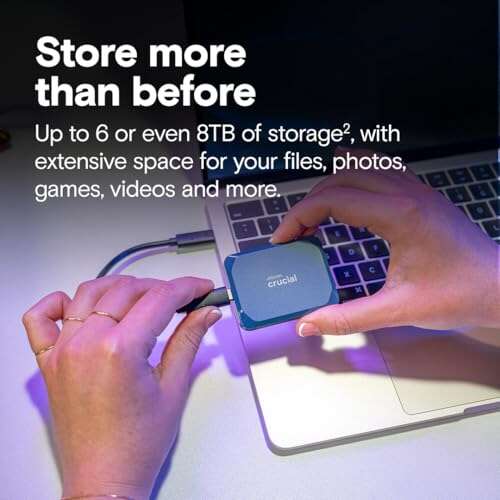
Crucial BX500 1TB SATA 2.5-Inch SSD

If your system is older and uses a 2.5-inch drive bay, the Crucial BX500 1TB is a smart path to speed. It replaces a hard drive with solid-state storage. That alone makes a huge difference for boot time and app launch. It’s rated up to 540MB/s, which is the top end for SATA. The BX line is known for ease, value, and low power draw. For a quiet, cooler PC, that helps. I like it for simple builds, family PCs, and budget laptops. It will not break the bank, yet it still feels fast day to day.
This is not the most advanced SSD on the market, but that’s not the goal here. The goal is a clean boot upgrade that “just works.” The BX500 delivers that. It is easy to install and easy to clone with free tools. Windows 11 runs fine on it, as long as the rest of your system meets requirements. It’s also a safe pick for light office use, school work, and basic creative tasks. If you only need snappy boots and quick launches, this is enough. The best ssd for boot drive does not have to be pricey for older rigs.
Pros:
- Great price for a 1TB SATA SSD upgrade
- Easy install in laptops and desktops with a 2.5-inch bay
- Boots and opens apps much faster than a hard drive
- Low heat and low power draw for quiet builds
- Reliable brand with broad compatibility
Cons:
- SATA speeds are much slower than NVMe
- No hardware encryption support on most variants
- Not ideal for heavy sustained writes or large 4K editing
My Recommendation
The Crucial BX500 1TB is best for older systems that need a painless boost. If your PC only has SATA, this is the budget hero. It is not the fastest, but it feels fast for daily use. As a boot drive, it keeps startup smooth and apps responsive. If you want the best ssd for boot drive for a Core i3 office box or a college laptop, put this on the short list. It offers solid value, wide support, and a clear upgrade over any spinning disk. It is often in stock and often on sale, which sweetens the deal.
| Best for | Why |
|---|---|
| Older desktops and laptops | Fits 2.5-inch bays and boosts boot speed right away |
| Budget boot upgrades | Low price, simple install, reliable everyday performance |
| Quiet, cool builds | Low power and heat compared to hard drives |
Crucial P310 1TB PCIe Gen4 NVMe M.2

If your motherboard supports PCIe Gen4, the Crucial P310 1TB is a sharp move for a boot drive. It is rated up to 7,100MB/s, which puts it in the fast lane for Windows 11 and modern workloads. This speed shows up in short load times, smooth updates, and quick app installs. It slots into an M.2 2280 slot and takes little space. For small form factor builds, that is a win. Crucial’s tuning and firmware support have a good track record. I like that it often comes with Acronis software to help you clone your boot drive with less stress.
The Crucial P310 shines as the best ssd for boot drive if you want speed and value in balance. It does not need you to tweak much. Just update BIOS, enable PCIe Gen4, and mount a heatsink if your board does not include one. That keeps temps in check and performance stable. It’s great for gaming, dev work, and pro apps that use fast storage. You will feel the system snap. The drive is also well suited for laptops that support Gen4 M.2 and can benefit from quick resumes and longer battery life. It’s a strong pick for 2025 builds.
Pros:
- PCIe Gen4 speeds up to 7,100MB/s for instant boots
- Excellent app and game load times for modern systems
- Simple M.2 2280 install; very space-efficient
- Cloning software bundle helps with easy migration
- Solid firmware support from a trusted memory brand
Cons:
- Needs a Gen4-capable slot to hit peak speeds
- May throttle without a heatsink under heavy load
- Capacity tops at 1TB in this specific model listing
My Recommendation
Pick the Crucial P310 if you want a fast, clean, and modern boot drive. It is ideal for gamers, creators, and coders who need quick boots and snappy loads. If you want the best ssd for boot drive without paying flagship prices, this one is hard to ignore. It delivers Gen4 speed, smooth installs, and reliable daily use. For most midrange to high-end builds, it hits the sweet spot of power and value. Stock is steady, and deals pop up often, which makes timing your buy even better.
| Best for | Why |
|---|---|
| Modern gaming PCs | Fast loads and quick patches with Gen4 bandwidth |
| Creator and dev laptops | Quick boot and resume with efficient NVMe performance |
| Value-focused Gen4 builds | High speed without premium flagship pricing |
SanDisk Extreme Portable SSD 1TB (USB-C)

Not every boot drive needs to be internal. The SanDisk Extreme Portable SSD 1TB can be a bootable external drive. It runs up to 1,050MB/s over USB 3.2 Gen 2. That is fast enough for clean, quick work on many systems. It’s rugged with IP65 water and dust resistance, so you can travel with it. If you own a Mac with sealed storage, booting from an external can be a life saver for testing or recovery. Windows To Go or portable Linux installs also work well. The size is pocket-friendly, and the grip feels secure.
This is the best ssd for boot drive when you need freedom and flexibility. You can move your boot environment between machines. You can keep a clean OS for work and another for play. It is, of course, slower than a top NVMe boot drive. But the ease and safety of keeping your system in your pocket is hard to beat. Firmware updates improved stability. Password protection software adds a layer of security. For students, freelancers, and field techs, this can be a vital tool. It also makes a strong daily carry for backup and quick file shuttles.
Pros:
- Portable boot option with up to 1,050MB/s over USB-C
- Rugged IP65 design for travel and field work
- Works with macOS, Windows, and Linux boot scenarios
- Lightweight, pocketable, and easy to carry
- Optional password protection software adds safety
Cons:
- Slower than internal NVMe SSDs for OS tasks
- USB boot can be finicky on some PCs
- Relies on cables and available ports
My Recommendation
Choose the SanDisk Extreme Portable if you need a flexible boot drive that goes where you go. It is perfect for Mac users, IT pros, and anyone who needs a portable OS. For some, the best ssd for boot drive is the one you can attach in seconds to any machine. That is the pitch here. It’s not the fastest, but it is fast enough for most tasks and very durable. It stays widely available and often comes in at a good price per performance, which makes it an easy add to your tech bag.
| Best for | Why |
|---|---|
| Portable boot environments | Carry your OS and apps between machines |
| Field work and travel | Rugged IP65 build with solid speed |
| Mac and Windows recovery | Boot externally for testing or quick repair |
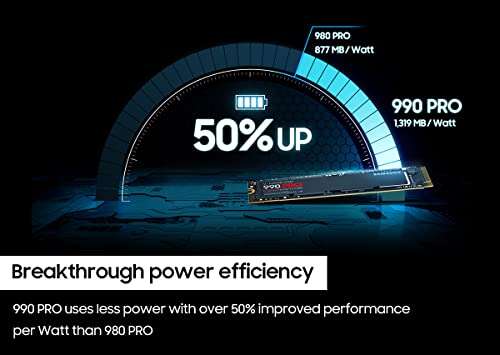
Samsung 990 PRO 2TB NVMe M.2 Gen4

If you want elite boot speed with room to grow, the Samsung 990 PRO 2TB is a star. It’s rated up to 7,450MB/s reads and built on Samsung’s proven controller and TLC NAND. Random IOPS are excellent, which is critical for OS tasks. That gives a fresh, instant feel to boots, tabs, and app swaps. Samsung Magician software is also top-tier for updates and drive health. As a best ssd for boot drive, the 990 PRO brings speed, polish, and endurance together. It’s a great home for Windows 11 24H2, heavy apps, and large game libraries.
To get the most out of it, make sure your motherboard supports PCIe Gen4, and add a heatsink if your slot lacks one. That keeps performance steady during long installs and updates. The 2TB capacity gives room for years of growth. Creators can keep cache and scratch on the same drive if needed. This is a “buy once, cry once” kind of drive. It costs more, but it feels worth it the first time you reboot. For flagship builds in 2025, this is the best ssd for boot drive if you want no-compromise speed and smooth, stable uptime.
Pros:
- Class-leading Gen4 performance up to 7,450MB/s
- Superb random I/O for crisp OS responsiveness
- Samsung Magician software and strong firmware support
- High endurance and reliability from a top-tier vendor
- Large 2TB capacity suits modern games and pro apps
Cons:
- Priced higher than value Gen4 drives
- Requires Gen4 support for full speed
- Heatsink recommended to avoid thermal throttling
My Recommendation
If you want the best of the best for your main drive, get the 990 PRO. It is my pick for high-end builds, heavy multitasking, and large, complex apps. If your board is Gen4, this is the best ssd for boot drive for long-term reliability and top speed. It’s ideal for creators, streamers, and serious gamers who want their PC to feel instant. You pay a bit more, but you also worry less. Stock is strong and support is excellent, which makes it a safe buy that will age well.
| Best for | Why |
|---|---|
| High-end gaming and streaming | Elite random and sequential performance for fast loads |
| Pro creative workflows | Strong endurance and top-tier software tools |
| Future-proof builds | 2TB capacity and stable firmware for the long haul |
Samsung 870 EVO 1TB SATA 2.5-Inch SSD

The Samsung 870 EVO 1TB is the gold standard for SATA boot drives. It tops out near 560MB/s reads and 530MB/s writes, which is as fast as SATA gets. What sets it apart is steady performance and strong endurance for a SATA drive. It dials in a stable, smooth desktop feel. If your system lacks M.2 or NVMe boot support, this is your premium SATA option. It’s great for content libraries, photo edits, and light video cuts on an older workstation. Samsung Magician makes firmware and health checks easy and clear.
For many users, this is the best ssd for boot drive when they want a set-and-forget solution. It installs like any 2.5-inch drive and runs cool and quiet. The 870 EVO has years of reputation behind it. It’s reliable for daily office work, browsing, and media. It also handles OS updates and patches without a hitch. If I am upgrading a solid, older PC for family or office use, I often pick this over cheaper models. It costs a bit more, but the polish shows in real use over time.
Pros:
- Top-tier SATA performance with steady, consistent speeds
- Excellent reliability and endurance for a SATA drive
- Wide system compatibility; easy install
- Samsung Magician software is best-in-class
- Quiet and cool operation, ideal for offices
Cons:
- SATA interface caps speed far below NVMe
- Priced higher than entry-level SATA SSDs
- 2.5-inch form factor needs a drive bay and cable
My Recommendation
Pick the 870 EVO if you want a premium SATA boot experience. It is the best ssd for boot drive for people who value reliability over raw speed. Choose it for older desktops, prebuilt PCs, or laptops that lack M.2 slots. It gives a smooth, polished feel and strong long-term stability. If you want your PC to “just work,” this is an easy call. It’s widely available and often discounted, so it is a safe and smart buy in 2025.
| Best for | Why |
|---|---|
| Older or prebuilt systems | Top SATA performance and broad compatibility |
| Reliability-first users | Strong endurance and stable firmware |
| Quiet office builds | Cool, silent operation with easy management tools |
FAQs Of best ssd for boot drive
What is the best ssd for boot drive for most people?
A PCIe Gen4 NVMe drive is best for most users. It boots fast, loads apps quickly, and feels instant.
Do I need a heatsink on my NVMe boot drive?
It helps. A heatsink keeps temps down and avoids throttling during long installs and updates.
Is SATA still good for a boot drive in 2025?
Yes. It’s slower than NVMe but still great for older systems and daily tasks.
Can I boot from an external SSD over USB-C?
Often yes. Many PCs and Macs support USB boot. Check your BIOS or firmware settings first.
How big should my boot drive be?
1TB hits a sweet spot. It gives room for Windows 11, apps, and several games without stress.
Final Verdict: Which Should You Buy?
If you want pure speed, the Samsung 990 PRO is the best ssd for boot drive right now. It is fast, stable, and built to last. For value, the Crucial P310 is a smart Gen4 choice that feels quick and easy.
Need SATA? Pick the Samsung 870 EVO for premium polish or the Crucial BX500 to save money. For portable boot needs, the SanDisk Extreme Portable shines. Choose based on your slot, your budget, and your goals.
Related Posts


Everett Ashford is a tech reviewer at mytechgrid.com specializing in SSDs, cameras, TVs, earbuds, headphones, and other consumer electronics. He provides honest, data-driven reviews based on hands-on testing and real-world performance analysis. Everett simplifies complex tech details to help readers make smart, confident buying decisions.