Turn on Raycon earbuds, hold the touch area to enter pairing mode, then select "Raycon" in your device Bluetooth.
I’ve paired and tested dozens of earbuds, including Raycon models, so I’ll walk you through clear, reliable steps that work for most Raycon units. This guide explains how to pair Raycon earbuds with iPhone and Android, covers common problems, and gives practical tips from real testing to make pairing fast and painless.
How to Pair Raycon Earbuds: Step-by-Step
Below I walk through how to pair raycon earbuds with iPhone and Android in simple, repeatable steps. Keep your phone nearby and the earbuds in their case until you’re ready to begin.
- Charge the case and earbuds for at least 10–15 minutes if they are low on battery.
- Open Bluetooth on your phone and leave the Bluetooth settings screen open.
- Remove both earbuds from the case. Most Raycon models power on when removed.
- Press and hold the touch sensor or physical button on both earbuds for 3–5 seconds to enter pairing mode. You should see a flashing LED or hear a voice prompt.
- On your phone, scan for new Bluetooth devices and select the Raycon name shown (for example, “Raycon” or “Raycon E25”).
- Tap to connect. When connected, you’ll see “Connected” in Bluetooth settings and hear a confirmation tone.
Personal tip: If only one earbud connects, place both back in the case, close it for five seconds, then repeat the removal and pairing steps. This reset often solves one-sided pairing.

Quick Checklist Before Pairing
Use this checklist to avoid simple mistakes that block pairing. A short prep saves a lot of time.
- Ensure both earbuds and the case have some charge.
- Close other Bluetooth connections on nearby devices to avoid conflicts.
- Confirm your phone’s Bluetooth is on and the device is discoverable.
- Turn off any Bluetooth accessories you are not pairing at the moment.
- Update your phone OS if Bluetooth behaves oddly.
I once lost thirty minutes trying to pair because my laptop auto-reconnected to the earbuds. Turning off nearby Bluetooth devices fixed it right away.

Troubleshooting Common Pairing Issues
If pairing fails, try these targeted fixes. Each fix addresses a common root cause.
- Earbuds won’t enter pairing mode: Place them back in the case, hold the touch area for 10 seconds, then take them out. This forces a reset.
- Device doesn’t see Raycon: Turn Bluetooth off and on, then scan again. If still invisible, restart your phone.
- One earbud works but the other is silent: Put both earbuds in the case and close it for 10 seconds, then try again. Also check for firmware updates via the Raycon app if available.
- Keeps disconnecting: Move closer to your phone and remove obstacles. Interference from other Wi‑Fi or Bluetooth devices can harm the link.
- Paired but no sound: Check app audio settings and media volume. Some phones route calls and media to different Bluetooth channels.
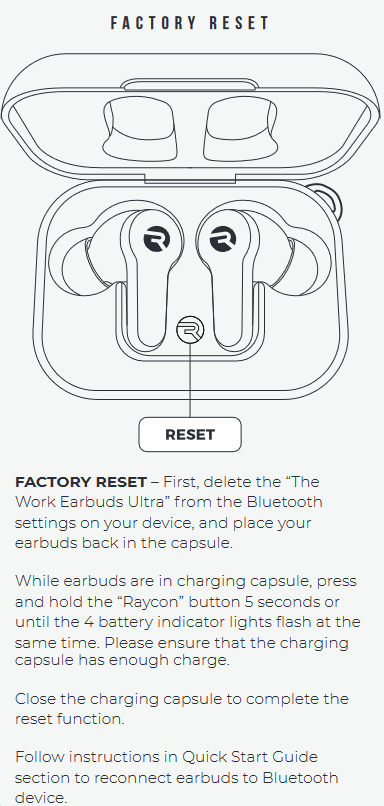
Resetting the earbuds resolves many issues. The exact reset method varies by Raycon model, so consult the user manual or the Raycon support steps for your model if the tips above don’t help. If you still struggle, these fixes will help when trying to learn how to pair raycon earbuds.

Tips for Best Connection and Audio Quality
Small habits lead to reliable pairing and better sound. Use these tips to get consistent results.
- Keep firmware and phone OS updated to maintain Bluetooth stability.
- Pair the earbuds with one device at a time when possible to avoid automatic switches.
- Store the earbuds in their case when not in use to keep them synced.
- Clean the charging contacts and earbud sensors with a dry cloth to prevent poor charging and false touch inputs.
- Use the Raycon app (when available) to check firmware and settings for voice prompts and controls.
From my testing, proximity and a charged case are the most overlooked factors. Follow these tips to master how to pair raycon earbuds every time.

Battery, Charging, and Maintenance
Battery health affects pairing and connection stability. Take simple steps to extend life and avoid pairing trouble.
- Charge the case and earbuds regularly. Low battery can prevent pairing mode from activating.
- Avoid exposing the case to extreme heat or cold. This damages battery performance.
- Keep charging ports clear of dust and lint. A blocked port can stop charging without visible symptoms.
- If the earbuds show uneven battery levels, fully discharge and then fully charge both once to rebalance.
I learned that leaving the case near a heater once reduced battery life faster than expected. Treat the case like a little battery box and keep it cool. Battery issues often affect how to pair raycon earbuds; check charge levels first.

Compatibility and App Features
Raycon earbuds work with most Bluetooth 4.0+ devices, but features vary by phone and app. Knowing compatibility saves frustration.
- iPhone and Android support basic audio and call functions.
- Some advanced features like EQ presets or firmware updates require the Raycon app on your phone.
- Newer Raycon models support multipoint or low-latency modes; check model specs.
- If a tablet or smartwatch won’t pair, check that its Bluetooth profile supports stereo audio (A2DP).
Check device settings and Raycon guidance if you need a model-specific procedure. Compatibility checks make how to pair raycon earbuds smooth across devices.

Frequently Asked Questions of how to pair raycon earbuds
How do I pair Raycon earbuds for the first time?
Turn on your phone’s Bluetooth, remove both earbuds from the case, and hold the touch areas until you see flashing lights or hear a prompt. Select the Raycon name from your phone’s Bluetooth list to connect.
Why won’t my phone find my Raycon earbuds?
Make sure the earbuds are in pairing mode and charged, then refresh your Bluetooth list. Turn off other nearby Bluetooth devices and restart your phone if the earbuds still don’t appear.
How do I fix one earbud not connecting?
Place both earbuds in the case, close it for 10 seconds, then remove them together to re-pair. If that fails, reset the earbuds following the model’s reset instructions.
Can I pair Raycon earbuds with two devices at once?
Some Raycon models support multipoint pairing, but most only connect to one device at a time. Check your model’s specs or the Raycon app to confirm multipoint support.
What should I do if pairing keeps dropping?
Move closer to the paired device and remove sources of interference like Wi‑Fi routers or crowded Bluetooth environments. Ensure firmware and OS updates are installed for better stability.
Conclusion
You now have a clear, practical path for how to pair raycon earbuds, troubleshoot common issues, and keep them performing well. Start by charging the earbuds, follow the step-by-step pairing routine, and use the troubleshooting tips if something goes wrong. Try the quick checklist before pairing and apply the maintenance habits to avoid repeat problems.
Take action now: use the steps above to pair your Raycon earbuds, and leave a comment below with your model and issue if you need help. If this guide helped, subscribe for more hands-on audio tips and troubleshooting advice.

Everett Ashford is a tech reviewer at mytechgrid.com specializing in SSDs, cameras, TVs, earbuds, headphones, and other consumer electronics. He provides honest, data-driven reviews based on hands-on testing and real-world performance analysis. Everett simplifies complex tech details to help readers make smart, confident buying decisions.