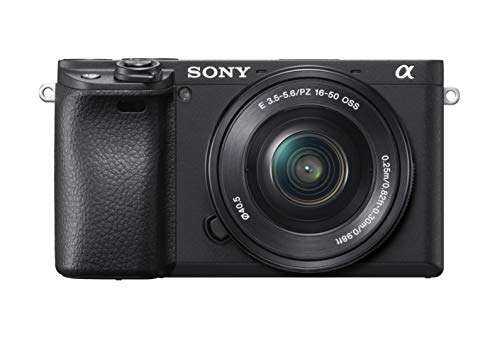
A digital camera is an electronic imaging device that captures and stores photos as digital files.
To understand what type of device is a digital camera, think of it as a small computer built around a light sensor and lens. It turns light into image data, processes that data, and saves the result to memory. This guide explains its device category, how it works, its main parts, benefits, limits, and how it compares with other cameras.
What Type of Device Is a Digital Camera?
A digital camera is an electronic input device and an image-recording device. It captures visual information from the world and converts it into digital data that a computer, phone, or other device can read.
Unlike a traditional film camera, a digital camera does not use photographic film. Instead, it uses an electronic image sensor, such as a CMOS or CCD sensor, to record light. The camera then saves the image as a file, often in JPEG, HEIF, or RAW format.
This means a digital camera fits into several device categories:
• It is an electronic device because it uses circuits, software, and electrical power.
• It is an input device because it collects visual data from the environment.
• It is an imaging device because it creates photographs and videos.
• It is a data storage device in a limited sense because it saves files on a memory card or internal storage.
• It is a communication device when it transfers photos through Wi-Fi, Bluetooth, USB, or mobile networks.
The simplest answer to what type of device is a digital camera is this: it is an electronic imaging device that captures, processes, stores, and sometimes shares visual data.

How a Digital Camera Works
A digital camera works by measuring light. When you press the shutter button, light passes through the lens and reaches the image sensor. Each tiny sensor area measures the light level and color in that part of the scene.
The camera’s processor then turns those measurements into pixels. Pixels are small units of color that combine to form a complete image. A photo with more pixels may show more detail, although pixel count alone does not determine image quality.
The basic process includes these steps:
-
Light enters through the lens.
-
The aperture controls how much light enters.
-
The shutter controls how long the sensor receives light.
-
The image sensor records the light.
-
The processor adjusts color, brightness, and noise.
-
The camera saves the image to a memory card or internal storage.
A digital camera is similar to a human eye in one helpful way. The lens acts like the eye’s lens, while the sensor acts somewhat like the retina. The camera processor then works like a fast digital brain that turns light into a viewable image.
In my experience using both compact cameras and interchangeable-lens models, many beginners focus only on megapixels. A better approach is to learn how light, focus, shutter speed, and lens choice work together. A modest camera used well can often create better photos than an expensive camera used on automatic settings.

Main Parts of a Digital camera
understanding the main parts makes it easier to identify what type of device is a digital camera and why it performs differently from other electronic devices.
Image sensor
The image sensor is the heart of a digital camera. It converts light into electrical signals that become digital image data.
Common sensor sizes include:
• Full frame
• APS-C
• Micro Four Thirds
• One-inch
• Smaller compact-camera sensors
Larger sensors often perform better in low light and can create a softer background. However, they may increase the camera’s size, weight, and price.
Lens
The lens focuses light onto the sensor. Some cameras have a fixed lens, while others allow you to change lenses.
A wide-angle lens is useful for landscapes and buildings. A telephoto lens helps you photograph distant subjects. A macro lens is made for close-up details, such as flowers or insects.
Shutter
The shutter controls the length of time light reaches the sensor. A fast shutter speed can freeze movement, while a slow shutter speed can show motion blur.
For example, a sports photographer may use a fast shutter speed to capture a moving athlete. A photographer taking a night city photo may use a slower speed and a tripod.
Aperture
The aperture is an opening inside the lens. It controls the amount of light entering the camera and affects depth of field.
A wide aperture can make a subject stand out against a blurred background. A narrow aperture can keep more of a landscape in focus.
Image processor
The image processor handles the data from the sensor. It helps manage color, sharpness, noise reduction, autofocus, and file creation.
Memory card
Most digital cameras store photos on removable memory cards. Secure Digital cards are common in many models. Card speed and capacity matter when recording high-resolution photos or video.
Display and viewfinder
The display lets you review photos and adjust settings. A viewfinder helps you frame a scene, especially in bright sunlight.
Battery
Digital cameras need electrical power for the sensor, processor, display, autofocus system, and wireless features. Carrying a spare battery is a simple habit that prevents many missed shots.
 camera”
style=”max-width: 100%; height: auto; border: 2px solid black; border-radius: 10px; display: block; margin: 0 auto;”
loading=”lazy”
/>
Is a Digital Camera an Input or Output Device?
A digital camera is mainly an input device because it collects information from the outside world. It receives light and converts that light into digital image data.
It can also act as an output device in certain situations. Its screen displays photos, and its speakers may play recorded sound. When the camera sends files to a computer or printer, it also works as a data transfer device.
So, the most accurate description is that a digital camera is a multifunctional electronic imaging device. Its primary role is input, but it can also display, store, process, and transmit information.
This classification is useful in computer studies. A keyboard sends text to a computer, while a camera sends visual data. The difference is that a digital camera often processes and stores the data before sending it elsewhere.
Types of Digital Cameras
There is no single design that suits every photographer. The best type depends on portability, image quality, control, speed, and budget.
Compact digital cameras
Compact cameras are small and easy to carry. They usually have a built-in lens and automatic controls.
They work well for travel, family events, casual photos, and users who want simple operation. Their small sensors may limit low-light performance, but modern models can still produce pleasing images.
Bridge cameras
Bridge cameras sit between compact cameras and advanced interchangeable-lens cameras. They often include a large zoom range and a DSLR-style body.
They are useful for wildlife, travel, and sports when you want reach without carrying several lenses. The tradeoff is that many bridge cameras use smaller sensors than professional models.
DSLR cameras
A digital single-lens reflex camera uses a mirror and optical viewfinder system. Light enters the lens and reflects from a mirror into the viewfinder.
DSLR cameras offer strong battery life, detailed controls, and a wide selection of lenses. They can be larger and heavier than newer mirrorless cameras.
Mirrorless cameras
A mirrorless camera does not use the reflex mirror found in a DSLR. Light reaches the sensor directly, and the camera shows the image through a screen or electronic viewfinder.
Mirrorless models are often smaller and offer advanced autofocus, fast shooting, and strong video features. Many professional photographers now use them for studio work, travel, sports, and documentary photography.
Action cameras
Action cameras are designed for movement and harsh conditions. They are small, durable, and often water-resistant with the right housing.
They are popular for cycling, hiking, surfing, travel videos, and outdoor sports. Their wide lenses can create noticeable distortion, but that look is often part of their appeal.
Instant digital cameras
Some cameras combine digital capture with instant printing. They let users review or print images soon after taking them.
These cameras are popular at parties and events because they create a physical keepsake. They may offer less control and lower image quality than advanced digital cameras.

Digital Camera Benefits
Digital cameras changed photography by making image capture faster, easier, and more flexible. Their main benefits include:
• Immediate review: You can check a photo seconds after taking it.
• No film processing: You do not need to buy film or wait for a lab.
• Large storage capacity: One memory card can hold hundreds or thousands of images.
• Easy editing: You can crop, adjust color, remove red-eye, and improve exposure with software.
• Flexible file sharing: Photos can move to phones, computers, cloud storage, and social platforms.
• Video recording: Most modern digital cameras can record high-quality video.
• Creative control: Manual settings let you control exposure, focus, color, and motion blur.
• Lower cost per photo: After buying the camera and storage, taking additional photos costs very little.
Digital capture also makes learning easier. You can test a setting, review the result, and adjust your approach right away. That instant feedback is one reason digital photography is such a useful learning tool.

Limitations of Digital Cameras
Digital cameras are powerful, but they are not perfect. Knowing their limits helps you choose the right model and avoid disappointment.
Battery life is one common limitation. Bright screens, electronic viewfinders, wireless connections, and video recording can drain a battery quickly. A spare battery or portable charger is useful for long trips.
Storage can also become a concern. High-resolution photos and 4K video use more space than standard images. Formatting memory cards in the camera and backing up files regularly can help prevent data loss.
Digital cameras may also feel complex. Manual controls, menus, lenses, and file types can overwhelm new users. Starting with automatic mode and learning one setting at a time is usually more effective than trying to master everything in one day.
Another limitation is cost. A camera body is only part of the system. Lenses, batteries, memory cards, tripods, bags, and editing software can add to the total price.
Finally, digital files can become corrupted, lost, or accidentally deleted. I once saw a photographer lose an entire day of travel images after using a damaged memory card without a backup. The lesson is simple: copy important photos to at least one additional location as soon as possible.

Digital Camera Versus a Smartphone Camera
A smartphone camera is also a digital imaging device. The key difference is how each device balances convenience, control, size, and image quality.
Smartphones are excellent for everyday photography. They are always nearby, use automatic computational photography, and make sharing simple. Many phones combine several cameras, such as wide, ultrawide, and telephoto options.
Dedicated digital cameras often provide:
• Larger image sensors
• Better lens choices
• More physical controls
• Stronger optical zoom
• Better handling for long shoots
• Greater control over RAW files
• Improved performance with some types of low-light and action photography
Smartphones often win for convenience, while dedicated cameras usually win for control and specialized performance. Neither choice is automatically better. If you take quick family photos, a smartphone may be enough. If you photograph wildlife, weddings, sports, or landscapes, a dedicated camera may be a better tool.
Digital Camera Versus an Analog Camera
An analog camera records an image on film. A digital camera records an image as electronic data.
Film cameras require film rolls, chemical processing, and physical storage. Digital cameras use sensors, processors, memory cards, and batteries.
Film can create a distinctive look and encourages careful shooting because each frame has a cost. Digital photography allows immediate review and many attempts. The two systems produce different experiences, but both rely on the same basic photographic ideas: light, focus, exposure, composition, and timing.
The choice is often personal. Digital is usually more practical for work, travel, learning, and fast sharing. Film may appeal to photographers who enjoy a slower process and a physical negative.
Common Digital Camera File Formats
A file format determines how the camera stores image data. The most common choices are JPEG, HEIF, and RAW.
JPEG
JPEG files are smaller and widely supported. The camera processes the photo and compresses it, making it easy to share or print.
JPEG is a practical choice for everyday photos, social media, and users who do not want to edit every image.
HEIF
HEIF can store high-quality images with efficient compression. It is used by some newer cameras and mobile devices, although compatibility can vary between programs and platforms.
RAW
RAW files preserve much more sensor data than JPEG files. They give photographers greater control over exposure, shadows, highlights, and color during editing.
RAW files are larger and need compatible editing software. They are valuable for professional work and difficult lighting, but they may be unnecessary for casual snapshots.
How to Choose a Digital Camera
When deciding what type of device is a digital camera for your needs, begin with your real use rather than the most impressive specifications.
Use this checklist:
-
Define your main subject. Travel, portraits, wildlife, sports, video, and family events may require different features.
-
Consider size and weight. A camera that stays at home cannot help you create photos.
-
Check the sensor size. Larger sensors often improve low-light results, but they may cost more.
-
Review the lens system. Decide whether you need a fixed lens or interchangeable lenses.
-
Test the controls. Buttons and dials should feel comfortable and easy to reach.
-
Check autofocus performance. Fast and reliable autofocus matters for children, animals, sports, and events.
-
Look at video features. Consider resolution, frame rates, microphone support, and heat management.
-
Budget for accessories. Include memory cards, batteries, a bag, and perhaps a tripod.
-
Read reliable reviews. Look for long-term testing, not only short promotional claims.
-
Try the camera in person if possible. Comfort and handling can matter as much as technical specifications.
A camera should match your habits. If you travel often, portability may matter more than extreme resolution. If you photograph birds, autofocus and lens reach may matter more than a simple menu system.
Practical Tips for Better Digital Camera Results
A few basic habits can improve your photos quickly.
• Clean the lens with a proper microfiber cloth.
• Hold the camera with both hands when possible.
• Keep important subjects away from the extreme edge of a wide-angle frame.
• Watch the background before pressing the shutter.
• Use a faster shutter speed for moving subjects.
• Avoid digital zoom when optical zoom is available.
• Learn exposure compensation before moving to full manual mode.
• Format memory cards in the camera after backing up your files.
• Keep batteries charged before important events.
• Save original files before making major edits.
One of the most useful lessons I have learned is to slow down for one second before taking the photo. Check the light, the background, and the subject’s position. That brief pause often improves an image more than buying a newer camera.
Frequently Asked Questions About What Type of Device Is a Digital Camera
Is a digital camera an electronic device?
Yes. A digital camera uses electronic circuits, a sensor, a processor, software, and a battery or power source. It captures and processes images without photographic film.
Is a digital camera an input device?
Yes. Its main role is to collect visual information from the environment and send or store that information as digital data. It may also display, process, and transfer files.
Is a digital camera a storage device?
A digital camera has storage functions, but it is not mainly classified as a storage device. It saves photos and videos on internal memory or a memory card while its primary purpose is image capture.
What is the difference between a digital camera and a film camera?
A digital camera records images with an electronic sensor and saves them as files. A film camera records images on light-sensitive film that must be chemically processed.
Can a digital camera record video?
Yes. Most current digital cameras can record video, although features vary by model. Video quality depends on resolution, frame rate, autofocus, stabilization, microphone support, and heat control.
What is the most common type of digital camera?
Compact cameras, DSLR cameras, mirrorless cameras, bridge cameras, action cameras, and smartphone cameras are all common types. Mirrorless cameras and smartphones are especially popular because they combine strong image quality with useful modern features.
Conclusion
A digital camera is an electronic imaging device, an input device, and a small computer designed to capture visual information. It uses a lens, image sensor, processor, storage, and software to turn light into photos and videos.
The best camera depends on your needs. A smartphone may be ideal for convenience, while a compact, DSLR, mirrorless, or action camera may offer better control for specific types of photography. Learn the basics of light, focus, exposure, and file storage, then choose equipment that fits the way you actually shoot.
Start with the camera you have, practice often, and explore trusted photography resources as your skills grow.

Everett Ashford is a tech reviewer at mytechgrid.com specializing in SSDs, cameras, TVs, earbuds, headphones, and other consumer electronics. He provides honest, data-driven reviews based on hands-on testing and real-world performance analysis. Everett simplifies complex tech details to help readers make smart, confident buying decisions.