The best headphones with mic for podcasting deliver clear voice monitoring, comfort, and simple control for long recording sessions.
You may know the moment: the guest starts talking, your headphones pinch, and a faint echo slips into the recording. The right headset can prevent those small problems before they ruin a good episode. I looked at sound balance, microphone use, comfort, connection type, and daily value. Some picks here are true headsets with a boom mic. Others pair headphones with a separate podcast microphone. That matters because a dedicated mic often sounds better, while a headset keeps your desk clean and setup fast.
OneOdio Wired DJ Headphones

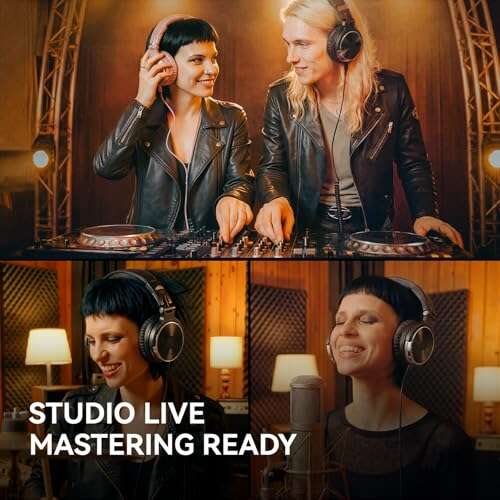
The OneOdio wired headphones are a strong low-cost choice for podcast hosts who need full ear coverage and a simple cable connection. Their closed-back design helps reduce room noise while you record. The large drivers give speech enough body to catch changes in tone and volume. I also like the generous earcups because they help keep outside sounds from pulling your focus away.
This model is mainly a monitoring headphone, not a complete headset with a built-in boom microphone. You will need a separate mic for your voice, such as a USB or XLR podcast mic. That setup can sound better than many basic gaming headsets because the mic and headphone jobs stay separate. The wired design also avoids Bluetooth delay, which helps when you monitor your own voice.
Pros:
- Closed-back earcups help block common room noise
- Wired connection avoids wireless audio delay
- Large earcups feel comfortable for many users
- Strong value for first-time podcasters
- Useful for music, editing, and voice monitoring
- Does not require battery charging
Cons:
- No built-in boom microphone
- Cable may feel less tidy than a wireless setup
- DJ-style bass can color very detailed mixes
My Recommendation
I recommend the OneOdio for a new podcaster who already owns, or plans to buy, a separate microphone. It works well for remote interviews, basic editing, and live monitoring at a desk. It is also a smart backup pair because the cable does not depend on battery life or wireless pairing. If your goal is the best headphones with mic for podcasting in one device, this is not the complete answer, but it is an excellent headphone half of a clean recording setup.
Zoom ZDM-1 Podcast Mic Pack
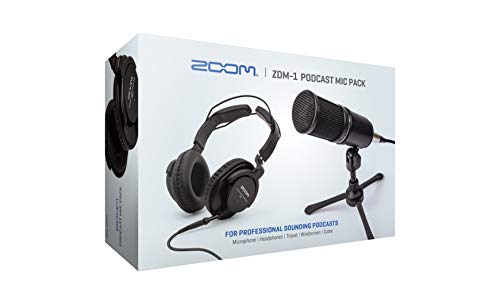
The Zoom ZDM-1 Podcast Mic Pack makes sense for buyers who want a matched mic and headphone setup. It includes the ZDM-1 dynamic microphone and monitoring headphones, so you can start with fewer guesswork moments. A dynamic mic can help reject some room sound when you speak close to it. That trait is useful in bedrooms, offices, and other rooms without acoustic treatment.
The headphones let you hear your voice and your guest while recording. The pack follows a traditional podcast approach: put the microphone close, speak across it, and keep the headphone level comfortable. You may still need an audio interface or compatible recorder, depending on how you plan to connect the mic. I would check the required cable and input before ordering, since this is not the same as a simple USB headset.
Pros:
- Matched microphone and headphone package
- Dynamic mic suits many untreated rooms
- Good starting point for spoken-word recording
- Headphones support real-time monitoring
- More focused setup than buying random parts
- Useful for podcasts, voice work, and streaming
Cons:
- May need extra hardware for computer recording
- Not a wireless headset
- Requires correct mic placement for the best result
My Recommendation
The Zoom pack is best for a serious beginner who wants to learn a proper podcast workflow. It is a better fit than a casual headset if you care about mic technique and clean monitoring. I especially like it for a two-person show where each person can use a consistent recording setup. For buyers searching for the best headphones with mic for podcasting, this pack offers strong value when a dedicated mic matters more than all-in-one convenience.
MAONO AU-A04H USB Mic Kit
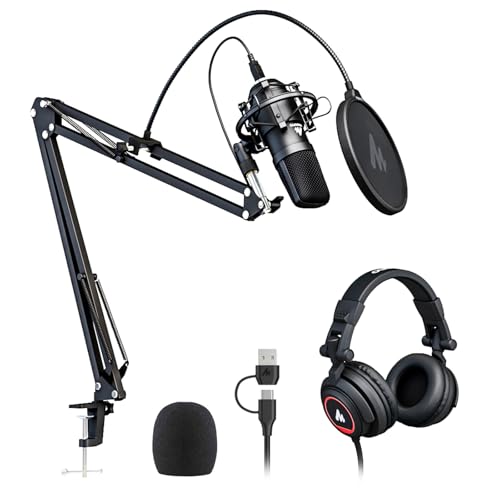
The MAONO AU-A04H is built for people who want a USB podcast kit without assembling every piece on their own. The package combines a USB microphone with headphones and useful desk accessories. A USB connection keeps the first setup simple for a computer-based show. You can plug in, select the mic in your recording app, and begin testing levels.
This kit is more of a microphone package with headphones than a headset with an attached mic. That distinction is important, but it is also the reason the voice quality can be more focused than a small headset mic. The included headphones help you monitor playback and catch clicks, hum, or room noise. Before a live show, I would record a short sample and listen for keyboard noise and fan noise from your room.
Pros:
- USB setup is friendly for new podcasters
- Includes headphones for monitoring
- Useful accessories reduce extra shopping
- Good choice for computer-based recording
- Dedicated mic position can improve voice clarity
- Works for podcasts, calls, and basic streaming
Cons:
- Not a single headset with a boom mic
- USB limits use with some mixers and interfaces
- Included headphones may not suit every head shape
My Recommendation
I would choose the MAONO kit for a home podcaster who wants a complete first station at a sensible cost. It is especially useful for solo shows recorded on a laptop or desktop. The kit does not offer the freedom of a separate XLR chain, but it keeps the learning curve gentle. Among the best headphones with mic for podcasting, this is a practical pick for buyers who value an easy USB start.
talomen Studio Headphones With Boom Mic
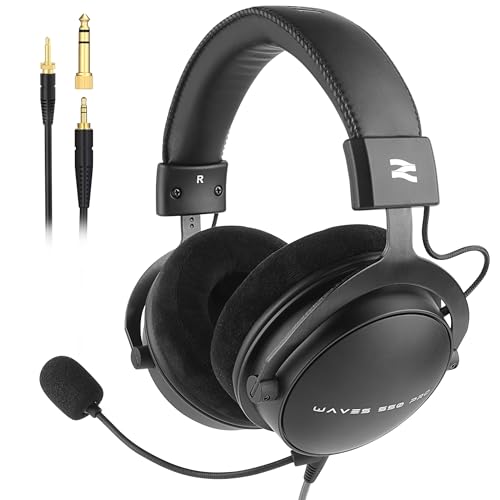
The talomen studio monitor headphones take a direct approach: they combine over-ear monitoring with a detachable boom microphone. This design suits podcasters who want one device for recording, editing, streaming, and calls. The closed earcups can help you focus on speech in a busy home. The detachable mic also gives the headset more flexibility when you only need headphone playback.
For podcasting, a boom mic gives you a closer voice source than the tiny mic found on many laptop earbuds. Still, placement matters. Keep the boom near the corner of your mouth, not directly in front of it, to reduce harsh breath sounds. I see this as a useful middle ground for creators who need speed but still want more control than a basic office headset.
Pros:
- Detachable boom mic adds all-in-one convenience
- Over-ear fit supports long recording sessions
- Works for podcasting and online meetings
- Headphones can support basic audio mixing
- One headset keeps a small desk less cluttered
- Wired use avoids Bluetooth monitoring delay
Cons:
- Boom mic will not match a quality XLR mic
- Studio sound may reveal flaws in poor recordings
- Fit and clamp can vary by user
My Recommendation
The talomen is best for a creator who records podcasts, streams, and joins video calls from the same desk. It is a good match for a small workspace where separate headphones and a microphone feel crowded. Choose it if fast setup matters and you want a removable mic. For many users, it comes close to the best headphones with mic for podcasting because it balances monitoring and voice capture in one affordable unit.
AOC USB Headset With Noise-Canceling Mic

The AOC USB headset targets clear communication in offices, call centers, meetings, and home studios. Its over-ear design and 40mm drivers give spoken audio a fuller feel than very small on-ear models. The noise-canceling boom microphone is made for close speech, which can help keep your voice ahead of light background noise. USB-A and USB-C support also makes it easier to move between newer and older computers.
This headset favors convenience over studio-level control. It can work for podcast planning, remote interviews, and live sessions, but I would not expect it to replace a dedicated broadcast microphone. The boom should sit close to your mouth for the best signal. I also suggest checking your computer’s input settings because noise reduction can sometimes change the natural texture of a voice.
Pros:
- Built-in boom mic keeps the setup simple
- Noise reduction helps with light background sound
- USB-A and USB-C compatibility adds flexibility
- Over-ear cups support focused listening
- 40mm drivers make voices easy to follow
- Useful for calls, meetings, and live podcasts
Cons:
- Not designed for high-end studio mixing
- USB cable limits movement around the room
- Noise processing may sound less natural on some voices
My Recommendation
I recommend the AOC headset for remote podcasters who record interviews through a computer. It is also a strong office-to-studio option for anyone who spends hours in online meetings. Buyers who need the best headphones with mic for podcasting should pick this model when connection flexibility and simple voice control rank high. It is less suitable for a polished music studio or a host who wants an XLR upgrade path.
Sony ZX110AP Wired Headphones With Mic

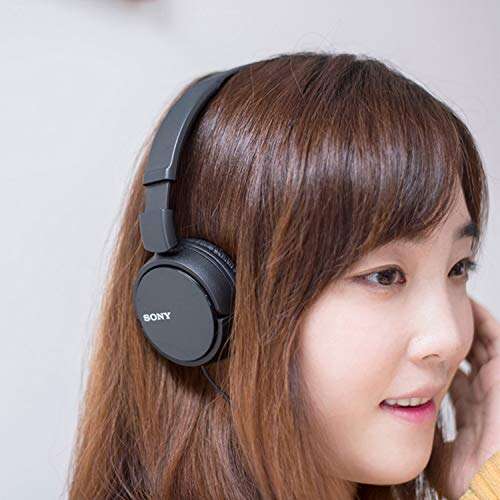
The Sony MDR-ZX110AP is a compact on-ear headphone with an in-line microphone. It is easy to carry, easy to store, and often a good fit for simple phone or laptop use. The wired 3.5mm connection does not need charging or software. For a new podcaster, that low-friction design can make quick test calls much less stressful.
The small in-line mic works best for casual conversations rather than polished podcast production. It sits farther from your mouth than a boom mic, so room noise and clothing movement may be easier to hear. The on-ear pads also provide less isolation than closed over-ear cups. I would use this model for guest calls, script review, or backup duty rather than as my main studio headset.
Pros:
- Lightweight design is easy to wear and carry
- In-line mic supports basic calls and interviews
- 3.5mm plug works with many devices
- No battery or app is needed
- Folding design saves bag space
- Affordable backup for podcast equipment
Cons:
- In-line mic is not ideal for studio voice work
- On-ear cups block less sound than over-ear models
- Some newer devices need a headphone adapter
My Recommendation
The Sony ZX110AP is best for beginners on a tight budget, mobile guests, and anyone who needs a spare pair. It can handle simple remote chats, but I would not choose it for a professional show’s main vocal track. If your definition of the best headphones with mic for podcasting includes low cost and easy travel, this Sony model is worth a look. Keep your expectations realistic, and it can be a useful tool.
Blue Yeti USB Podcast Microphone

The Logitech for Creators Blue Yeti is a well-known USB condenser microphone for podcasting, streaming, voice work, and video. It is not a headphone or headset, so you will need separate headphones for monitoring. Its main appeal is control: multiple pickup patterns let you adapt the mic for solo speech, interviews, and other recording layouts. Plug-and-play USB use also keeps the path from desk to computer simple.
Because it is a condenser mic, it can capture a detailed and lively voice. It can also hear more of your room, keyboard, air conditioner, and chair movement. Place it on a stable surface, keep it close enough for a clear voice, and lower the gain before background noise becomes obvious. The headphone output supports direct monitoring, which helps you catch echo and clipping before publishing.
Pros:
- Detailed voice capture for podcasts and streams
- USB plug-and-play setup is beginner friendly
- Multiple pickup patterns support varied formats
- Direct headphone monitoring helps catch mistakes
- Gain and mute controls speed up live recording
- Useful beyond podcasting, including video and gaming
Cons:
- Requires separate headphones
- Condenser design can pick up room noise
- Large body needs careful desk placement
My Recommendation
I recommend the Blue Yeti to solo hosts who want a recognizable USB mic and room to grow their recording skills. It is a better choice than a headset mic when you want a fuller, more detailed vocal sound. Pair it with closed-back headphones such as the OneOdio for a practical home setup. While it is not itself the best headphones with mic for podcasting, it can form the heart of a stronger system when audio quality comes first.
ZealSound USB Podcast Microphone

The ZealSound USB microphone focuses on easy control for podcasting, streaming, video, and online content. It includes a gain control, volume adjustment, mute button, and headphone monitoring features. Those controls matter when you need to react fast during a live show. A USB design also helps people record with a computer, tablet, or supported mobile device without buying a full audio interface.
This is another dedicated microphone, not headphones with an attached mic. You will need a separate pair of headphones to hear your voice and guests. The monitoring output can help reduce the delay that makes speakers feel disconnected from their own voice. I would still test compatibility with your exact phone or tablet, since mobile recording may require the proper adapter or power arrangement.
Pros:
- Physical gain control makes level changes easy
- Mute button helps during live recording
- Headphone monitoring supports better timing
- USB setup suits new creators
- Useful for podcasts, TikTok, and streaming
- Compact controls keep the workflow simple
Cons:
- Separate headphones are required
- USB use may need an adapter on mobile devices
- Room noise can affect close voice recording
My Recommendation
The ZealSound is best for creators who want hands-on controls without a mixer. It fits a solo show, gaming stream, or short-form video desk well. Pair it with closed-back headphones if you want to monitor without sound leaking into the mic. For shoppers comparing the best headphones with mic for podcasting, this is a good alternative when a separate mic gives you more control than a headset.
FIFINE AmpliGame AM8T USB/XLR Mic

The FIFINE AmpliGame AM8T is a dynamic microphone set with both USB and XLR connectivity. That dual connection gives it a useful upgrade path. You can begin with USB on a computer, then move to an audio interface or mixer later. A dynamic capsule can also be forgiving in a normal room when you keep the mic close to your mouth.
The AM8T includes controls aimed at gaming and live use, but those controls also help podcast hosts. A mute function can save a recording when a doorbell rings or a cough arrives. You still need separate headphones because this product is a mic, not a headset. Use closed-back headphones and a boom arm or stable stand to keep the mic in a steady position.
Pros:
- USB and XLR outputs support future upgrades
- Dynamic design can reduce some room sound
- Mute control is useful during live shows
- Good fit for podcasts and streaming
- Easy USB starting point for new users
- XLR option suits a more advanced setup
Cons:
- Separate headphones and stand may be needed
- Dynamic mics need close speaking technique
- Extra XLR gear adds cost later
My Recommendation
I would choose the AM8T for a creator who wants to start simple but does not want to replace the mic after gaining experience. It is especially useful for a podcast that may later add a mixer or several microphones. The sound depends on distance, room setup, and gain, so spend time on a short test first. It is not the best headphones with mic for podcasting by itself, but it is one of the most flexible mic choices in this group.
FIFINE HD8W Studio Monitor Headphones
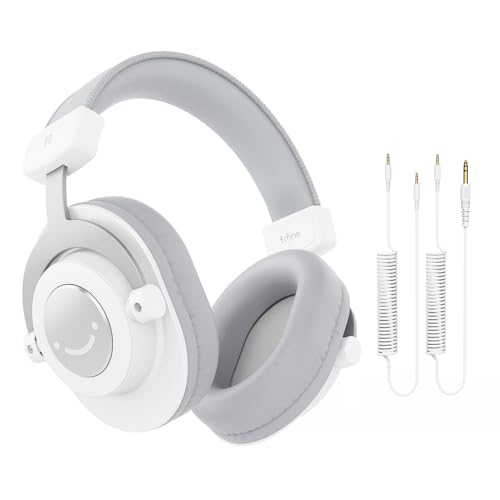
The FIFINE HD8W is a studio monitor headphone made for vocal recording and detailed listening. Its 50mm drivers aim to provide a broad sound that helps you hear speech, music beds, and editing changes. This model does not include a microphone, so it works best beside a dedicated USB or XLR mic. The wired design keeps the monitoring path direct and avoids the delay that can trouble Bluetooth recording.
Good monitoring headphones should not make every voice sound exciting or overly bassy. They should help you notice clicks, hum, sibilance, and uneven volume. The HD8W can serve that role for a home studio, though you should learn how your room and headphones sound before making final mix choices. For podcast editing, a quiet listening space still matters as much as the driver size.
Pros:
- 50mm drivers support detailed monitoring
- Useful for vocal recording and editing
- Wired connection avoids wireless delay
- Works well with dedicated podcast microphones
- Can reveal noise and editing problems
- No battery charging is required
Cons:
- No built-in microphone
- Needs a separate mic and recording setup
- Monitor sound may take time to learn
My Recommendation
The HD8W is best for podcast editors and vocalists who care about hearing small changes in a track. It pairs naturally with the Blue Yeti, ZealSound, or FIFINE AM8T. I would choose it over a casual headset when your main task is editing rather than chatting. For the best headphones with mic for podcasting, remember that a dedicated monitoring pair can improve results when matched with the right microphone.
How I Choose Podcast Headphones With a Mic
Podcast headphones do more than play sound. They show you what the microphone hears. That makes them a safety net between your mouth and the final file. I judge a pair by how well it supports monitoring, not just by how loud or exciting it sounds.
I also separate a true headset from a headphone-and-microphone kit. A headset puts the mic on the earcup or a boom. A kit gives you headphones plus a separate microphone. Both can work, but they solve different problems. A headset is quick and neat. A separate mic usually gives you more control over voice tone, distance, and future upgrades.
Microphone Type
Headset mics usually sit close to your mouth. That helps keep the voice level steady when you move your head. Boom mics can also reject some room sound because they use a close pickup position. Still, no mic can remove every fan, keyboard, or barking dog.
Dynamic microphones often suit untreated rooms. They normally need close placement and enough gain. Condenser mics can sound open and detailed, but they may capture more of the room. Neither type is always best. Your room, voice, and recording style decide the result.
Wired or Wireless?
I prefer wired headphones for podcast recording. A cable gives stable sound and avoids battery worries. It also removes the Bluetooth delay that can make your own voice feel late in your ears. That delay can make natural conversation harder.
Wireless models can still help when you move around or conduct casual interviews. Check for a wired monitoring mode if you plan to record. Also check the connector. A 3.5mm plug, USB-A plug, USB-C plug, and XLR cable serve different jobs.
Closed-Back Versus Open-Back
Closed-back headphones are usually the safer podcast choice. Their cups reduce outside sound and help prevent your playback from leaking into a microphone. This matters when the mic sits close to your headphones.
Open-back headphones can feel wide and natural. They also let more sound escape. I would reserve them for quiet editing, not for live vocal recording. If you record in a shared room, closed-back cups act like a small wall around your attention.
Comfort for Long Shows
A podcast can last 30 minutes or three hours. A tight headband may feel fine in a store and painful during a long interview. Look for soft pads, a flexible band, and enough room around your ears. Glasses wearers should pay close attention to clamp pressure.
Heat is another quiet problem. Thick closed pads block sound well, but they can grow warm. Take short breaks during long sessions. Comfort affects focus, and focus affects the quality of your questions and edits.
Monitoring and Volume Control
Direct monitoring lets you hear your voice with little or no delay. This feature is valuable with USB microphones. It can help you catch clipping, cable noise, and sudden volume changes before they become part of the show.
Keep monitoring volume at a safe, comfortable level. Louder does not mean more accurate. If your ears feel tired, take a break and return with a fresh listen. Good podcast work depends on judgment, not volume.
Device Compatibility
Check your recording device before you buy. Some laptops still offer a 3.5mm jack. Others use USB-C. Phones may need an adapter. A USB microphone may work on a computer but need extra power or a compatible connection on a mobile device.
For XLR microphones, plan for an interface, mixer, or recorder. XLR can offer a strong long-term path, but it is not plug-and-play by itself. The cheapest setup is not always the cheapest after you add missing cables and hardware.
Best Features at a Glance
| Best for | Why |
|---|---|
| Fast all-in-one recording | A boom headset such as the talomen keeps monitoring and voice capture in one device. |
| Highest upgrade potential | The FIFINE AM8T supports USB now and XLR later with compatible equipment. |
| Low-cost beginner setup | The MAONO kit includes a USB mic and headphones, reducing the need for separate purchases. |
Podcast Headphone Setup Tips
Start with a short test. Record 20 seconds of normal speech, then listen with headphones. Check for echo, hiss, breath noise, and a voice that sounds too far away. This small test can save an entire episode.
Keep a boom mic near the side of your mouth. Do not point it straight at your lips. Speak at a steady distance, and avoid touching the cable. These simple habits often matter more than a small difference in driver size.
For a separate microphone, use closed-back headphones. This limits sound spill. Set your computer to use the correct input and output device. Then disable extra audio effects unless you know what each effect does.