The best wired headphones for Chromebook are comfortable, clear, durable, and easy to use without pairing.
A Chromebook is ready for class, work, music, and calls in seconds, but its built-in speakers often sound thin. A wired headset solves that problem with a simple plug, steady audio, and no battery to charge. I tested these picks with comfort, cable quality, microphone use, volume control, and Chromebook fit in mind. Whether you need a school headset for a child or a USB headset for daily calls, this guide will help you find the best wired headphones for Chromebook use.
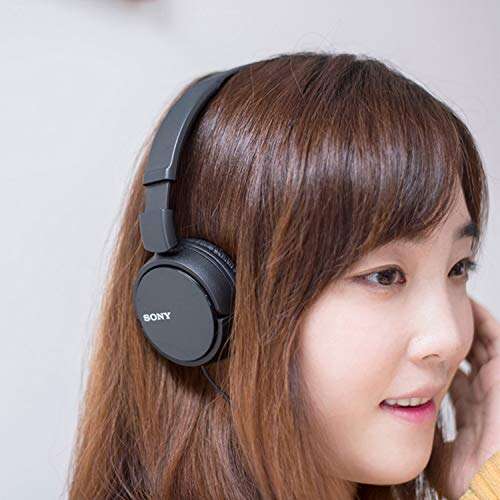
Sony ZX Series On-Ear Headphones

The Sony ZX Series MDR-ZX110 is a simple, light on-ear headset for Chromebook users who want familiar Sony sound at a low cost. It uses a standard 3.5mm plug, so it works with many Chromebooks without pairing, software, or charging. The closed-back design helps keep music focused while reducing some outside noise. I also like the folding design because it takes up little room in a school bag or desk drawer.
This model makes sense for music, videos, online lessons, and quiet work. The sound has enough bass for casual listening, while voices remain easy to follow in classes and calls. It does not include an inline microphone, so it is not my first choice for frequent video meetings. Still, for dependable headphone audio, this Sony is one of the easiest budget options to recommend.
Pros:
- Lightweight design feels easy to wear for daily Chromebook use
- Standard 3.5mm plug works with compatible Chromebook headphone ports
- Folding earcups make storage simple
- Closed-back cups help keep sound directed toward the listener
- Sony brand offers a familiar and proven audio design
- Low cost makes it useful as a spare or school headset
Cons:
- No built-in microphone for Chromebook video calls
- On-ear pads may feel less comfortable than over-ear cups during long sessions
- Passive design does not offer active noise cancellation
My Recommendation
I recommend the Sony ZX Series to students, travelers, and home users who mainly need clear audio for videos, music, and lessons. It is especially useful when you want the best wired headphones for Chromebook without paying for features you may never use. Choose another model if a built-in mic is essential. For simple listening, this headphone delivers strong value and is usually easy to find.
EarFun K1 Kids Headphones

The EarFun K1 is made for young Chromebook users who need a wired headset for school, games, videos, and online lessons. Its 3.5mm cable avoids Bluetooth pairing, which is helpful when a child needs to start work quickly. The built-in microphone supports basic voice chat and classroom calls. Its kid-focused design also makes it a better fit than many full-size adult headphones.
A key benefit is the volume-limiting feature, which helps reduce the chance of very loud playback. Parents should still teach children to keep volume at a safe level and take listening breaks. The soft fit and simple controls make this a practical choice for remote learning. I would choose it when comfort and hearing awareness matter more than deep bass or studio detail.
Pros:
- Volume-limiting design supports safer listening for children
- Built-in microphone helps with school calls and basic voice chat
- 3.5mm wired connection is simple for compatible Chromebooks
- Kid-sized design is more suitable for smaller heads
- Works without batteries or wireless setup
- Useful for lessons, stories, games, and travel
Cons:
- Sound output may not satisfy older users who want strong bass
- Children can still listen for too long even with a volume limit
- Smaller fit may not suit teens or adults
My Recommendation
The EarFun K1 is best for elementary students and younger children using a Chromebook for school. The microphone, wired connection, and volume limit address the three concerns I hear most from parents: easy setup, clear communication, and safer volume. It is not the best wired headphones for Chromebook if you need adult sizing or premium music detail. For young learners, however, it offers useful protection and solid everyday value.
AILIHEN C8 Kids Headphones

The AILIHEN C8 is a colorful, school-friendly wired headset with a microphone and a standard 3.5mm jack. It is designed for children who use laptops, tablets, and Chromebooks for classwork. The adjustable headband helps the headset grow with a child, while the padded cups make daily lessons less tiring. The cable keeps the setup direct and avoids the distractions that can come with wireless pairing.
In use, this type of headset is best for speech, video lessons, audiobooks, and light entertainment. The microphone is convenient for basic calls, though it is not designed to replace a dedicated desktop microphone. The compact shape fits easily into a backpack. If your child needs an affordable headset for school, the C8 balances comfort, function, and a playful look.
Pros:
- Built-in microphone supports online classes and voice calls
- Standard 3.5mm jack suits many Chromebook models
- Adjustable headband improves fit for growing children
- Padded earcups help during longer school sessions
- Light design is easy for children to wear and carry
- Bright color makes it easy to identify in a shared classroom
Cons:
- Microphone quality is suitable for school use, not professional recording
- On-ear fit may not block much classroom noise
- Small child-focused sizing may feel tight for adults
My Recommendation
I recommend the AILIHEN C8 for younger students who need the best wired headphones for Chromebook-based learning. It gives children a microphone, adjustable fit, and a simple plug at a family-friendly price. Pick it for homework, Google Meet lessons, and travel rather than critical music listening. Its school-ready design makes it a sensible value when a child needs a personal headset.
Beige School Headphones With Mic

These beige wired school headphones focus on everyday classroom use rather than flashy extras. The 3.5mm cord connects to a compatible Chromebook with little effort, and the built-in microphone helps students speak during online lessons. The neutral beige color looks calm and discreet in a classroom or library. For families who want a basic headset that does its job, this model deserves attention.
The main strength is convenience. A student can plug it in, open a lesson, and hear the teacher without checking battery status or Bluetooth settings. The corded design also keeps latency low for speech and video. I would use it for school portals, reading programs, calls, and casual listening, while keeping expectations realistic about premium sound and advanced noise control.
Pros:
- Microphone supports remote learning and Chromebook calls
- 3.5mm plug offers quick connection on compatible devices
- Neutral color suits school, office, and library settings
- No battery means the headset is always ready
- Simple design is easy for students to understand
- Lightweight build is practical for carrying between classes
Cons:
- Passive earcups provide limited protection from loud surroundings
- Basic sound may not suit serious music fans
- The cable can tangle if stored loosely
My Recommendation
This headset is best for students, teachers, and home users who need an affordable Chromebook headset with a mic. It is a good choice when appearance matters and you prefer a quiet, neutral color. Although it may not be the best wired headphones for Chromebook audiophiles, it handles school tasks well. Its simple design and no-charge setup offer dependable value for daily use.
COOSII AC01 Over-Ear Headphones

The COOSII AC01 takes a more comfortable over-ear approach than small on-ear school headsets. Its wired design includes a microphone and volume control, which can make Chromebook calls and video lessons easier to manage. The larger cups help surround the ears and can reduce some outside sound without electronic noise cancellation. This is helpful for students who work near family members or in a busy room.
The volume control sits on the cable, so you can make quick changes without reaching for the Chromebook keyboard. The over-ear shape may also feel better during long videos and study sessions. Like any wired headset, the cable needs care around chairs and desk edges. I see this as a strong middle-ground choice for users who want comfort, a mic, and simple control in one affordable package.
Pros:
- Over-ear design can feel more comfortable during long sessions
- In-line volume control makes adjustments fast
- Built-in mic helps with classes, calls, and voice chat
- 3.5mm connection avoids charging and pairing
- Larger earcups help reduce some room noise
- Useful for music, videos, study, and gaming
Cons:
- Over-ear cups may feel warm after extended wear
- Long cable can catch on furniture or clothing
- Passive isolation cannot match active noise cancellation
My Recommendation
I recommend the COOSII AC01 for Chromebook users who value comfort and quick volume changes. It is especially suitable for older children, teens, and adults who find small on-ear pads tiring. For many people, it may be the best wired headphones for Chromebook when calls and long study sessions matter equally. Its comfort-focused design gives it better daily appeal than a very basic headset.
ASKUBSKU Headphones for Chromebook

The ASKUBSKU wired headphones are built around the needs of school and computer users. The product name directly lists laptops, PCs, and Chromebooks, and its wired connection keeps setup simple. A small, light design makes it easy to place in a desk, backpack, or shared technology cart. This is the kind of headset I would consider for students who need a straightforward audio tool rather than a premium music accessory.
Its black finish looks professional and hides everyday marks better than light colors. The compact style should work well for lessons, online reading, videos, and basic calls when the microphone is included in the package design. Users should check their Chromebook port before ordering, especially on newer models with USB-C only. When the port matches, this headset offers a clean, low-fuss way to add private audio.
Pros:
- Designed with school laptops and Chromebooks in mind
- Wired setup avoids Bluetooth menus and battery checks
- Black finish looks neat and professional
- Compact shape stores easily in a school bag
- Useful for lessons, videos, and quiet study
- Usually more affordable than wireless alternatives
Cons:
- Compatibility depends on the Chromebook having the matching audio port
- Compact ear pieces may not suit users who prefer over-ear comfort
- Basic construction may need gentle cable handling
My Recommendation
The ASKUBSKU is best for students and families seeking the best wired headphones for Chromebook at a simple, practical price. It fits shared homes, school bags, and computer labs where users need easy private listening. I would not choose it for studio work or rich, highly detailed music. For school audio and everyday Chromebook tasks, it is a useful low-cost option.
Black School Headphones With Mic

This black school headset is a sensible pick for students who need a mic and a 3.5mm cord. The dark finish works in classrooms, offices, and homes, while the wired format keeps the controls familiar. It can support lessons, video playback, language practice, and simple voice calls. I appreciate this type of design because it does not make a child manage an app or remember to charge a battery.
The headset is also a practical spare for families with more than one Chromebook user. Its cable can provide a direct audio path with no wireless delay, which helps keep speech and video in sync. Sound quality is aimed at normal school use rather than high-end listening. If you want a basic black headset for routine computer work, this model is easy to understand and easy to use.
Pros:
- Built-in microphone supports school communication
- 3.5mm cord provides quick plug-and-play use
- Black color looks clean and works for many age groups
- No charging is required before a lesson
- Suitable for classes, calls, videos, and reading apps
- Can serve as an inexpensive backup headset
Cons:
- May offer only modest noise blocking in loud rooms
- Sound presentation is aimed at basic use, not critical listening
- Cable storage requires care to prevent knots
My Recommendation
I recommend this black model for schools, families, and Chromebook owners who want a plain headset that covers the basics. It can be the best wired headphones for Chromebook when a microphone and a neutral look are more important than premium materials. It is a smart backup for a damaged or misplaced headset. The low-maintenance design gives it good everyday value.
AILIHEN Kids Headphones Rose Gold

The AILIHEN kids headset in rose gold combines a child-friendly fit with a standard wired connection. It includes a microphone for school calls, making it more useful than headphones made only for listening. The adjustable structure helps parents find a better fit as a child grows. Its bright finish may also help a child spot the headset quickly among classroom supplies.
This headset is a good match for remote school, audiobooks, travel, and educational games. The cord means a child can use it with a compatible Chromebook right away. It will not provide the deep, open sound of a larger music headset, but that is not its main goal. I would choose it for simple communication and comfortable private audio for a young learner.
Pros:
- Kid-oriented sizing helps improve comfort for smaller users
- Microphone works for classroom calls and online activities
- 3.5mm jack is simple on compatible Chromebook computers
- Adjustable band can accommodate growth
- Rose-gold finish gives the headset a distinct personal style
- Wired use means no battery or pairing concerns
Cons:
- Not ideal for adult-sized heads
- Small cups may provide limited outside-noise reduction
- Children still need reminders about safe volume and breaks
My Recommendation
The rose-gold AILIHEN is best for younger students who want a personal headset that feels fun and works with school technology. It is a strong candidate for the best wired headphones for Chromebook when a child needs a mic, a light fit, and easy setup. I would choose the EarFun K1 instead when volume limiting is the top concern. Otherwise, this AILIHEN model offers useful school value.
Logitech H390 USB Headset

The Logitech H390 is the most office-focused option in this group. Instead of a 3.5mm plug, it uses USB-A, which can deliver both audio and microphone input through one connection. Its boom microphone sits close to the mouth and is designed for calls, classes, and voice chat. The padded headband and earcups also make it a better choice for people who spend many hours at a computer.
Inline controls let you adjust volume and mute the microphone without reaching across the desk. That small feature can save time during meetings and online lessons. The important compatibility point is the USB-A plug: some newer Chromebooks use only USB-C, so you may need a suitable adapter or dock. If your Chromebook has USB-A, the H390 is among the most complete wired choices here.
Pros:
- USB-A connection carries sound and microphone input together
- Boom mic is convenient for meetings and online classes
- Inline volume and mute controls speed up call management
- Padded earcups support longer work sessions
- Known Logitech design suits home and office use
- Good choice for voice calls, lessons, and customer support work
Cons:
- USB-A plug may need an adapter on USB-C-only Chromebooks
- Not compatible with standard 3.5mm headphone-only ports without extra hardware
- USB cable ties the user to the computer
My Recommendation
The Logitech H390 is best for remote workers, teachers, students, and anyone who spends much of the day on calls. It may be the best wired headphones for Chromebook if clear voice communication, mute control, and a padded fit matter most. Check your Chromebook ports before buying. With a compatible USB-A port, its call-focused design offers excellent practical value.
How to Choose the Best Wired Headphones for Chromebook
Choosing the best wired headphones for Chromebook starts with the port. Many models in this guide use a 3.5mm plug, often called a headphone jack. Some newer Chromebook computers use USB-C, while others still include USB-A or a 3.5mm port. Check the side of your computer before you order. A small adapter can solve a port mismatch, but it adds cost and another item to carry.
A wired headset does not always mean the same thing. Headphones may provide sound only, while a headset adds a microphone. If you attend Google Meet classes, work from home, or play games with voice chat, choose a model with a mic. For music and videos alone, a simple headphone may be enough. I always match the features to the way the user will spend time on the Chromebook.
3.5mm or USB: Which Connection Is Better?
A 3.5mm connection is usually the easiest option. It works with many Chromebooks, tablets, phones, and older computers. It does not need a driver, app, battery, or wireless setup. The main drawback is that some thin Chromebook models remove the headphone port.
USB headsets can offer a strong microphone and easy mute controls. The Logitech H390 is a good example. USB-A works well on a Chromebook with that port, but USB-C-only computers may require an adapter. Before buying, look at your Chromebook model and confirm the available connection type.
Why Choose Wired Headphones Instead of Bluetooth?
Wired headphones are ready when you plug them in. They do not need charging, and they avoid pairing problems. That matters in a classroom, library, or work call when every minute counts. A wired connection can also reduce audio delay during videos and games.
Bluetooth headphones are useful for movement, but they add another battery to manage. Wireless signals can also become confusing in a room with many devices. For a child or a shared school computer, wired headphones are often like a light switch: connect them and get sound at once.
Comfort and Fit Matter More Than Most Buyers Think
A headset that sounds good but hurts after ten minutes is not a good purchase. For children, look for a light frame and an adjustable band. For adults, over-ear cups may feel better during long work sessions. On-ear models are often lighter and easier to store, but they can press on the ears.
Soft padding helps, but heat can build up inside large cups. Take short breaks during long listening sessions. I also recommend placing the headset on a desk instead of pulling it by the cable. Small care habits can extend the life of an affordable headset.
Microphone Quality for Chromebook Calls
Most built-in headset microphones are designed for speech, not professional recording. That is fine for online class answers, casual calls, and voice chat. A boom mic placed near the mouth often captures speech more clearly than a small cable mic. The Logitech H390 stands out here because its boom and mute control target regular calls.
After connecting a headset, open Chromebook settings and check the audio input. Select the headset microphone if the computer does not choose it automatically. Run a short test before an important class or meeting. This quick step prevents the common problem of speaking while the Chromebook uses its built-in microphone.
How I Evaluated These Chromebook Headphones
I focused on the features that affect daily use instead of judging a headset by its box or color. I looked at connection type, fit, microphone usefulness, cable handling, controls, and the likely age of the user. I also considered how each model fits a real need, such as schoolwork, music, calls, or travel.
Compatibility remains the most important test. A headset cannot be the best wired headphones for Chromebook if its plug does not match the computer. I also separated child models from adult models because head size, comfort, and volume needs can differ. My recommendations reflect practical use, not just a list of technical claims.
Best For Comparison
| Best for | Why |
|---|---|
| School calls and remote work | Logitech H390 adds a USB connection, boom mic, mute control, and padded comfort. |
| Young children | EarFun K1 offers a child-focused fit, microphone, and volume-limiting design. |
| Simple music and video listening | Sony ZX Series provides light, folding comfort and a dependable 3.5mm connection. |
Tips for Better Chromebook Audio
First, plug the headset in before opening your lesson or meeting. ChromeOS often switches audio automatically, but checking the speaker and microphone menus takes only a moment. Keep the volume near a comfortable level, and lower it if the sound feels sharp or loud. Clear speech does not require maximum volume.
Keep the cable away from wheels, chair legs, and doorways. Coil it in loose loops rather than tight bends. If a child uses the headset, teach them to hold the plug instead of pulling the wire. These small steps protect the connection and help a low-cost headset last longer.
For a USB headset, connect directly to the Chromebook when possible. A loose hub can cause dropouts or prevent the microphone from working. If your device has only USB-C, use a reliable USB-C-to-USB-A adapter and make sure the adapter supports data, not only charging. This is especially important for the Logitech H390.
FAQs Of best wired headphones for chromebook
Do wired headphones work with every Chromebook?
No. Most 3.5mm headphones work with Chromebooks that have a matching audio jack. USB headsets need the correct USB-A or USB-C port. Check your Chromebook before buying, and use a compatible adapter if needed.
Are wired headphones better than Bluetooth for school?
They can be. Wired headphones need no charging or pairing, so students can start lessons quickly. They also avoid many wireless connection problems. The trade-off is that the cable can snag or limit movement.
Can I use headphones with a Chromebook Google Meet call?
Yes. Connect the headset, then select its speaker and microphone in Chromebook or Google Meet settings. A model with a built-in mic is the better choice for two-way conversations.
What is the best wired headphones for Chromebook connection?
A 3.5mm plug is the simplest choice when your Chromebook has a headphone jack. USB-A can work well for call-focused headsets such as the Logitech H390. USB-C headphones or an adapter may be needed on newer models.
Are volume-limiting headphones safer for children?
They can help reduce very loud playback, but they do not replace supervision. Keep listening levels moderate and encourage regular breaks. Parents should also check that the headset fits well and that the child can hear instructions around them.
Final Verdict: Which Should You Buy?
For most users, the Sony ZX Series is the best wired headphones for Chromebook for simple listening. For calls, choose the Logitech H390. For young children, the EarFun K1 is the stronger school pick.
Check your Chromebook port before ordering. The right wired headset delivers clear sound, easy setup, and reliable daily value without charging or pairing.

Everett Ashford is a tech reviewer at mytechgrid.com specializing in SSDs, cameras, TVs, earbuds, headphones, and other consumer electronics. He provides honest, data-driven reviews based on hands-on testing and real-world performance analysis. Everett simplifies complex tech details to help readers make smart, confident buying decisions.