You cannot turn basic earbuds into true ANC, but you can greatly reduce noise with fit, settings, and smart accessories.
If you are asking, “how do I make my earbuds noise cancelling,” the answer depends on your earbuds’ hardware. Active noise cancellation, or ANC, needs microphones, processing chips, and special speakers. Still, even simple earbuds can feel much quieter when they seal your ears well and use the right audio settings. This guide explains what works, what does not, and how to improve comfort, sound, and safety without wasting money.
Understand the difference between noise isolation and noise cancellation
Noise isolation and noise cancellation are not the same thing.
Noise isolation blocks sound with a physical barrier. Silicone ear tips fill the space around your ear canal, much like earplugs. This method works well against voices, traffic, fans, and other steady sounds.
Active noise cancellation uses microphones to hear outside noise. A small processor then creates an opposite sound wave. The two waves reduce each other before the noise reaches your ears.
Basic earbuds usually offer passive noise isolation only. They may block some sound, but they cannot create true ANC without the required microphones and processing hardware.
Noise cancellation works best with steady, low sounds, such as:
• Airplane engine noise
• Bus and train rumble
• Air conditioners
• Computer fans
• Office machinery
ANC is less effective against sudden sounds, such as claps, loud voices, barking dogs, or a dropped object. These sounds change too quickly for the system to cancel fully.

How do I make my earbuds noise cancelling with a better fit?
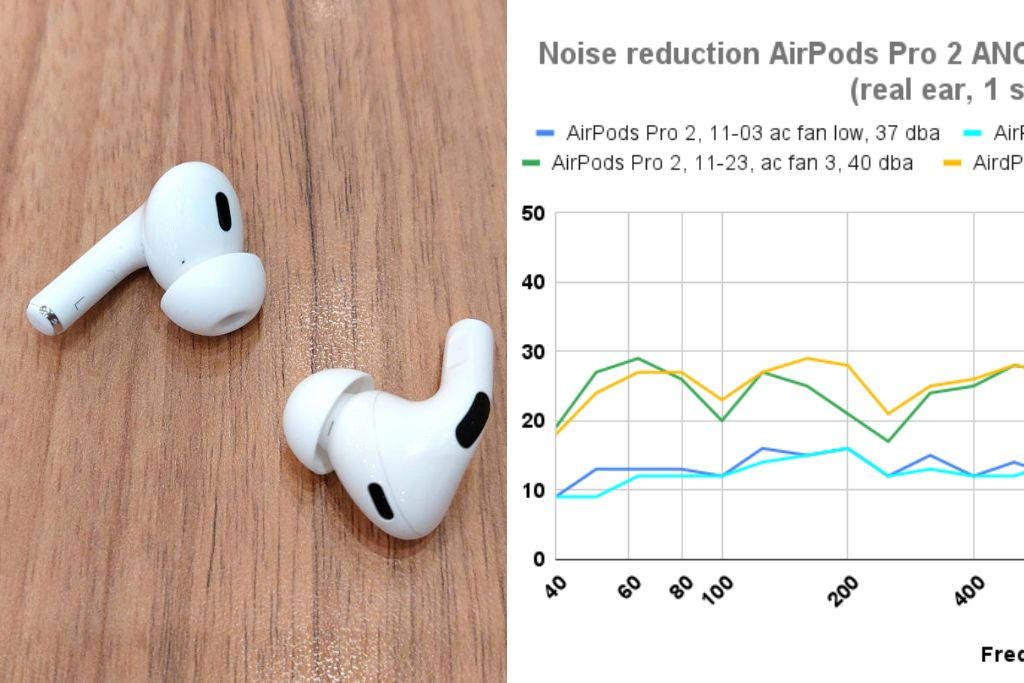
The easiest way to make earbuds quieter is to improve the seal in your ear canal. A poor seal lets outside sound enter from the sides. It also makes music sound thin and quiet.
Try these steps:
- Clean the earbuds and ear tips with a dry, soft cloth.
- Choose the correct ear tip size for each ear.
- Insert the earbud gently while twisting it into place.
- Hold it still for a few seconds so the tip can form a seal.
- Walk around and speak to test whether the earbuds move.
- Try memory foam tips if silicone tips do not stay in place.
Your left and right ears may need different tip sizes. That is normal. Many people use medium tips in one ear and small or large tips in the other.
A good seal should feel secure, but it should not hurt. If your ears feel sore after a short time, the tips may be too large or inserted too deeply.
In my experience testing different earbud fits, the ear tip often matters more than the brand. A modest pair with the right tips can block more sound than an expensive pair that sits loosely.
Try memory foam ear tips
Memory foam tips compress as you insert them. They then expand to match the shape of your ear canal. This can improve passive noise isolation and bass response.
To use them correctly:
• Roll the foam tip gently between your fingers.
• Insert the earbud while the foam is compressed.
• Keep the earbud in place for about 10 to 15 seconds.
• Avoid pushing the earbud too far into your ear.
Foam tips wear out faster than silicone tips. Replace them when they become dirty, loose, cracked, or unable to expand.
How do I make my earbuds noise cancelling through settings?
If your earbuds already support ANC, you can turn it on through the earbuds’ controls or companion app. Look for settings named:
• Noise Control
• Active Noise Cancellation
• ANC
• Quiet Mode
• Noise Canceling
Some earbuds have three modes:
• Noise cancellation reduces outside sound.
• Transparency or ambient mode lets outside sound in.
• Off mode disables both features.
Make sure ANC is active rather than transparency mode. A common mistake is changing the mode by tapping the earbud without noticing the voice prompt.
Open the companion app and check for these useful options:
• ANC strength
• Adaptive noise cancellation
• Wind reduction
• Ear tip fit test
• Custom sound profiles
• Firmware updates
An ear tip fit test can show whether the seal is strong. If the app says the fit is poor, switch tips before increasing the volume.
Some earbuds use adaptive ANC. This feature changes the level of cancellation based on your surroundings. It can sound smoother, but it may not block every sound as strongly as the maximum setting.
If your earbuds support an equalizer, avoid boosting every frequency. Excessive bass or treble can make you raise the volume, which increases hearing risk without improving noise cancellation.
Can an app turn regular earbuds into ANC earbuds?
Usually, no. A phone app cannot create true active noise cancellation if the earbuds lack external microphones and ANC processing hardware.
An app may still make your earbuds seem quieter through other methods. It can play masking sounds, adjust the equalizer, or improve the sound balance. White noise, pink noise, rain sounds, and low music can cover mild background noise.
This method is called sound masking. It does not remove noise. It adds a controlled sound that makes unwanted noise less noticeable.
Sound masking can help during:
• Studying
• Office work
• Travel
• Light exercise
• Falling asleep
Use masking audio at a low level. The World Health Organization and hearing specialists warn that long exposure to loud sound can damage hearing. If you need loud audio to cover background noise, improve the earbud seal or choose earbuds with real ANC instead.
Some apps claim to add ANC to any headphones. Treat these claims carefully. Without microphones that measure outside noise, software cannot create the same real-time cancellation found in ANC earbuds.
Use external accessories carefully
If you have wired earbuds, you can improve isolation with better ear tips or ear hooks. You can also wear certified hearing protection over earbuds in very loud places, but this may be uncomfortable and can make it hard to hear important warnings.
Do not place tape, glue, cotton, or homemade material over the earbud microphones or speaker openings. These changes can damage the earbuds, trap moisture, or reduce sound quality.
There are also Bluetooth adapters and headphone amplifiers that include noise control. These devices may help some wired headphones, but compatibility varies. Check whether the adapter supports ANC and whether it works with your particular earbuds.
For frequent travel or loud commutes, buying earbuds with built-in ANC is often the most practical solution. Look for:
• A secure in-ear fit
• Adjustable ANC
• A transparency mode
• Good microphone placement
• Long battery life
• Replacement ear tips
• A comfortable design
• A clear return policy
Do not choose based on the words “noise canceling” alone. Some products use that phrase to describe passive isolation rather than active noise cancellation.
How do I make my earbuds noise cancelling on an iPhone or Android phone?
Your phone cannot add hardware ANC, but it can help you use existing features correctly.
On an iPhone, open the earbud settings from Bluetooth or the manufacturer’s app. On Android, use the Bluetooth device settings or the brand’s companion app. The exact menu names vary by brand and operating system.
Check these settings:
- Confirm that the earbuds are connected to the correct phone.
- Open the earbud control app.
- Select ANC or noise cancellation.
- Run the ear tip fit test.
- Install available firmware updates.
- Turn off transparency mode if you want maximum isolation.
- Test the earbuds with steady background noise.
If the earbuds disconnect or ANC stops working, place them in the charging case for a few seconds. Then reconnect them. Restarting the phone and resetting the earbuds can also fix software problems.
Firmware updates may improve ANC performance, battery use, or microphone behavior. They cannot add ANC to earbuds that were not designed for it.

Why is my noise cancellation not working?
Several problems can reduce noise cancellation.
The ear tips do not seal
This is the most common cause. Try another size, clean the tips, and insert the earbuds again.
The microphones are blocked
Dust, earwax, skin oil, or a protective cover can block the small microphone openings. Clean them gently with a dry brush. Do not use water or sharp tools.
Wind is hitting the microphones
ANC may struggle outdoors because wind creates strong pressure changes around the microphones. Use a wind reduction setting if your earbuds offer one.
The battery is low
Some earbuds reduce features when the battery is nearly empty. Charge both earbuds and the case before testing ANC again.
The wrong mode is active
Transparency mode can make it seem as if ANC has failed. Check the mode in the companion app or by using the earbud touch control.
The earbud design does not fit you
Even good ANC earbuds may work poorly if their shape does not match your ears. A different model may provide better results.
A useful test is to play the same low-volume audio in the same room with ANC off and on. Listen for fan or engine noise, not voices. If the difference is small, check the seal and microphone openings first.
Is it safe to use noise cancelling earbuds?
ANC itself is not known to damage hearing. The main risk comes from playing audio too loudly for too long.
Noise cancellation may actually help some listeners keep the volume lower because they do not need to overpower background noise. However, ANC does not make loud listening safe.
Use these habits:
• Keep the volume at a comfortable level.
• Take regular breaks.
• Remove earbuds when someone needs to speak with you.
• Avoid using strong isolation near traffic or emergency vehicles.
• Use transparency mode outdoors when you need awareness.
• Stop if you notice ringing, pain, pressure, or muffled hearing.
Do not use tightly sealed earbuds as a replacement for certified hearing protection at concerts, construction sites, or shooting ranges. Use hearing protection made for those environments.
Noise cancellation can reduce awareness of alarms, vehicles, cyclists, and other hazards. Comfort should never come before safety.
Common mistakes to avoid
Many people try to solve poor isolation by turning up the volume. This is the wrong fix. It may hide background noise for a short time, but it can expose your ears to harmful sound levels.
Avoid these mistakes:
• Assuming every earbud labeled “noise reducing” has ANC
• Wearing the wrong ear tip size
• Cleaning microphone openings with a pin
• Covering vents with tape or foam
• Using maximum volume on a noisy train
• Wearing ANC earbuds near traffic without awareness
• Expecting an app to add hardware-based ANC
• Ignoring pain or pressure in the ear
• Buying replacement tips that do not fit the earbud nozzle
The best approach is simple: improve the fit, activate the correct mode, keep the microphones clean, and use safe listening levels.
Frequently Asked Questions About How Do I Make My Earbuds Noise Cancelling
Can I make normal earbuds have active noise cancellation?
No. True ANC requires microphones, signal processing, and speakers designed to create an opposing sound wave. You can improve passive noise isolation with better ear tips, but an app cannot add real ANC to ordinary earbuds.
Do foam tips make earbuds noise cancelling?
Foam tips can improve passive noise isolation by creating a tighter seal. They do not create active noise cancellation, but they may make earbuds feel much quieter in daily use.
Why do my earbuds still let voices through with ANC on?
ANC is better at reducing steady, low sounds than changing sounds such as speech. A stronger ear tip seal may reduce voices, but no consumer ANC system blocks every sound completely.
Does noise cancellation work without music playing?
Yes. ANC can reduce outside noise even when no music is playing, as long as the earbuds have enough battery and ANC is enabled. You may still hear voices, sharp sounds, and some higher-pitched noise.
Can I use noise cancellation on one earbud?
Some earbuds support ANC in one ear, while others require both earbuds to be worn. Check the manufacturer’s app and instructions because using one earbud may change the available noise control modes.
Is it safe to sleep with noise cancelling earbuds?
It is usually better to avoid sleeping with in-ear earbuds because pressure, moisture, and friction can irritate the ear canal. If you need sound at night, use a low-volume speaker or sleep headphones designed for that purpose.
Conclusion
The answer to “how do I make my earbuds noise cancelling” starts with knowing whether they have ANC hardware. If they do, choose the correct mode, improve the ear tip seal, clean the microphones, and update the companion app. If they do not, memory foam tips and low-volume sound masking can improve isolation, but they cannot create true active noise cancellation.
Start by trying a different ear tip size today. Test the fit in a noisy room, keep the volume comfortable, and use transparency mode whenever you need to hear your surroundings. If you still want stronger results, compare earbuds with built-in ANC and a secure fit, then share your experience or explore more headphone guides.

Everett Ashford is a tech reviewer at mytechgrid.com specializing in SSDs, cameras, TVs, earbuds, headphones, and other consumer electronics. He provides honest, data-driven reviews based on hands-on testing and real-world performance analysis. Everett simplifies complex tech details to help readers make smart, confident buying decisions.