Open the JBL Headphones app, select your earbuds, and choose Noise Cancelling under Ambient Sound Control.
Knowing how to turn on noise cancelling on JBL earbuds can make travel, work, and daily listening much calmer. Most JBL models use the JBL Headphones app, while some also let you switch modes by touching and holding an earbud. The exact control can vary by model, so this guide explains both methods, common problems, useful settings, and safe ways to use ANC.
How to turn on noise cancelling on JBL earbuds
The most reliable way to turn on noise cancelling on JBL earbuds is through the JBL Headphones app. This method works well for many models, including the JBL Live Pro 2, JBL Tune Beam, JBL Tour Pro 2, JBL Live Buds 3, and other compatible earbuds.
Follow these steps:
- Charge both earbuds and place them in your ears.
- Turn on Bluetooth on your iPhone or Android phone.
- Pair the earbuds with your phone.
- Install or open the JBL Headphones app.
- Select your connected JBL earbuds.
- Find the section called Ambient Sound Control, Smart Ambient, or Noise Control.
- Select Noise Cancelling or ANC.
- Play audio and adjust the strength if your model offers an ANC slider.
Noise cancelling may not turn on if only one earbud is connected. Check that both earbuds appear in the app and that the battery level is high enough.

How to turn on ANC with the earbud touch controls
Many JBL earbuds let you change sound modes without opening the app. This is useful on a bus, at the gym, or when your phone is in a bag.
To turn on noise cancelling using the earbuds:
- Put both earbuds in your ears.
- Locate the touch panel on the left or right earbud.
- Press and hold the touch panel for about two seconds.
- Listen for a voice prompt or tone.
- Continue pressing and holding to cycle through Noise Cancelling, Ambient Aware, and Off.
The control may be assigned to either earbud. Some JBL models use the left earbud for sound mode changes, while others let you choose the control in the JBL Headphones app.
If pressing and holding does nothing, open the app and check the touch-control settings. The gesture may be assigned to Google Assistant, volume control, playback, or TalkThru instead.

Use the JBL Headphones app for better control
The JBL Headphones app gives you more control than the basic touch gesture. It can also help when you are learning how to turn on noise cancelling on JBL earbuds for the first time.
Depending on your model, the app may let you:
• Switch between Noise Cancelling, Ambient Aware, and TalkThru
• Change the level of background noise reduction
• Adjust left and right earbud touch controls
• Install firmware updates
• Change the equalizer
• Turn on or adjust Personi-Fi hearing profiles
• Set automatic play and pause
• Check battery levels
The app interface may look different after an update. Look for terms such as ANC, Noise Control, Ambient Sound Control, or Smart Ambient. These labels all relate to how your earbuds manage outside sound.
A useful setup is to assign press and hold to noise control. This gives you a fast way to switch modes without unlocking your phone.

What noise cancelling does on JBL earbuds
Active noise cancelling, or ANC, uses microphones to listen to outside sound. The earbuds then create a matching sound wave that reduces steady low sounds, such as airplane engines, air conditioners, fans, and bus noise.
Think of ANC as a sound shield rather than a sealed wall. It works best against constant sounds. It is less effective against sudden sounds, voices, alarms, clapping, and nearby conversations.
Learning how to turn on noise cancelling on JBL earbuds is only part of getting good results. A proper ear tip seal matters just as much. If outside air can pass around the ear tip, sound can leak in and the earbuds cannot reduce it well.
ANC also does not make earbuds safe for every situation. Keep Ambient Aware or Off enabled near traffic, bike lanes, train platforms, and busy streets. You need to hear warning sounds in those places.

Improve ANC performance with the right ear tips
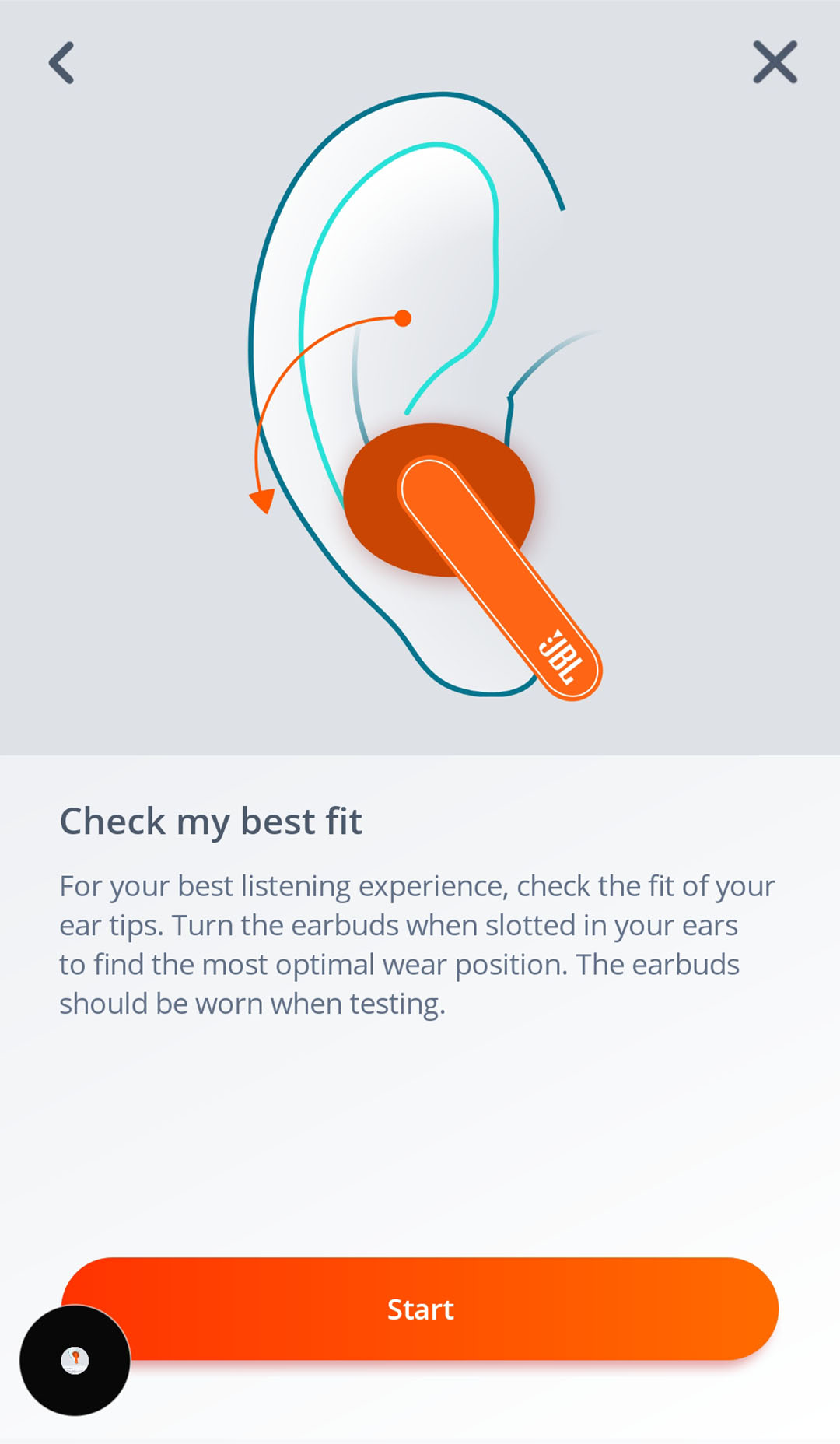
A poor fit is one of the most common reasons people think noise cancelling is broken. JBL earbuds usually include several ear tip sizes. Try each size and choose the one that feels secure without creating painful pressure.
Use this simple fit test:
- Insert the earbuds and gently twist them into place.
- Play music at a low volume.
- Turn on ANC.
- Compare the sound with each ear tip size.
- Choose the tip that gives a stable fit and clearer bass.
The correct tip should stay in place when you walk. It should also create a light seal without hurting your ear canal.
One practical lesson from testing wireless earbuds is that users often increase the volume when the fit is poor. That can make listening tiring and may expose your ears to more sound than needed. Fix the fit before raising the volume.
Clean the ear tips and speaker grilles often. Earwax, dust, and skin oil can block sound and affect how ANC feels. Use a dry, soft cloth or a clean cotton swab around the outside. Do not push debris into the grille or soak the earbuds.

What to do when noise cancelling does not work
If you follow the steps for how to turn on noise cancelling on JBL earbuds but hear no change, work through these checks.
Confirm the correct mode
The earbuds may be in Ambient Aware, TalkThru, or Off mode. Open the app and select Noise Cancelling again. A voice prompt or app indicator should confirm the selected mode.
Check the connection
Bluetooth problems can prevent the app from controlling the earbuds. Turn Bluetooth off and back on, then reconnect. If needed, remove the earbuds from your phone’s Bluetooth list and pair them again.
Update the JBL Headphones app
An old app version may not work correctly with newer firmware. Update the app through the Apple App Store or Google Play Store. Then check for an earbud firmware update inside the app.
Charge the earbuds
Low battery can limit features or cause one earbud to disconnect. Charge the case and both earbuds for at least 15 to 30 minutes before testing ANC again.
Clean the microphones
ANC depends on small microphones located on the earbuds. Dirt or moisture can affect their performance. Wipe the outer microphone openings gently and allow wet earbuds to dry fully.
Reset the earbuds
A reset can fix a stuck control or failed connection. The reset process differs by model, so use the guide for your exact JBL earbuds. A reset usually deletes pairing information, so you will need to connect the earbuds again.
Why ANC may sound different from one model to another
JBL uses ANC technology across many product lines, but the result is not identical on every pair. Premium models may offer adaptive noise cancelling, which changes the level based on the surrounding sound. Basic models may use a simpler fixed ANC setting.
Some earbuds also offer manual controls. For example, the JBL Headphones app may include an adjustable noise-control slider or an option to balance comfort and noise reduction. Stronger ANC can reduce more steady noise, but it may also create a feeling of pressure for some listeners.
That pressure is not caused by actual air pressure inside the ear. It is often the result of reduced low-frequency sound and the brain noticing the change. If ANC feels uncomfortable, try a lower setting, use Ambient Aware, or take a short listening break.
The microphone design, ear tip seal, firmware, and fit all affect results. This is why two people can use the same JBL earbuds and report different ANC performance.
Noise cancelling tips for travel, work, and exercise
The best ANC setting depends on what you are doing.
On an airplane
Use ANC to reduce the steady engine rumble. Keep the volume moderate and take breaks during long flights. Some travelers prefer foam-style ear tips, but make sure they are compatible with your JBL earbuds.
In an office
ANC can reduce fans, air conditioning, and keyboard noise. Use Ambient Aware when you need to hear a coworker or a phone notification.
On public transport
ANC works well against bus and train noise. Keep one earbud out or use Ambient Aware when announcements matter.
While walking outdoors
Do not use strong ANC near roads or crowded areas. Ambient Aware is usually the safer choice because it allows more environmental sound through.
At the gym
A secure fit matters more than maximum ANC. Sweat can affect touch controls and microphones, so wipe the earbuds after exercise and check the water-resistance rating before exposing them to moisture.
How to manage transparency and Ambient Aware modes
Noise cancelling is not the only sound mode on JBL earbuds. Ambient Aware lets outside sound enter through the microphones. TalkThru usually lowers music volume and emphasizes nearby speech.
These modes are useful when you need awareness without removing the earbuds. You can often switch between them by pressing and holding the assigned touch panel.
A simple daily setup might look like this:
• Noise Cancelling for flights, trains, and focused work
• Ambient Aware for walking and shopping
• TalkThru for short conversations
• Off for maximum battery life
When learning how to turn on noise cancelling on JBL earbuds, also learn how to turn it off quickly. This habit can prevent missed announcements and help you stay aware in changing environments.
Battery life and noise cancelling
Using ANC usually consumes more power than listening with ANC disabled. The exact battery difference depends on the JBL model, volume, Bluetooth features, adaptive processing, and firmware.
To extend battery life:
• Turn ANC off when you do not need it.
• Keep the earbuds in the charging case when not in use.
• Reduce extra features that you do not use.
• Keep the JBL Headphones app and earbud firmware updated.
• Avoid very high volume.
• Charge the case before long trips.
Do not assume that ANC always produces the same battery result. Check the specifications for your model, and remember that real use can vary from laboratory testing.
Common mistakes to avoid
People often make the same mistakes when trying to turn on noise cancelling on JBL earbuds. Avoiding them can save time.
• Selecting TalkThru instead of Noise Cancelling in the app
• Pressing the wrong earbud
• Using an ear tip that is too small
• Testing ANC without playing any background sound
• Forgetting to connect both earbuds
• Ignoring firmware updates
• Covering the microphones with dirt or a case
• Expecting ANC to remove every voice and sharp sound
• Using strong ANC near traffic
One helpful test is to stand near a steady fan. Turn the fan on, switch between Off and Noise Cancelling, and listen at a safe volume. You should notice a clear reduction in the low fan sound if ANC is active and the earbuds fit well.
Frequently asked questions about how to turn on noise cancelling on JBL earbuds
How do I turn on noise cancelling on JBL earbuds without the app?
Put the earbuds in your ears and press and hold the assigned touch panel for about two seconds. The earbuds should cycle through Noise Cancelling, Ambient Aware, and Off, although the exact gesture depends on the model.
Why can’t I find noise cancelling in the JBL Headphones app?
Your JBL earbuds may not support ANC, or they may not be connected correctly. Confirm the model, update the app, and make sure both earbuds are connected before checking Ambient Sound Control.
Does noise cancelling work when no music is playing?
Yes, ANC can work without music. It can reduce steady background noise, but the effect may be easier to notice when a fan, engine, or other constant sound is nearby.
How do I turn off noise cancelling on JBL earbuds?
Open the JBL Headphones app and select Off under Ambient Sound Control. You can also press and hold the assigned touch control to cycle from Noise Cancelling to another sound mode.
Why does ANC sound weak on my JBL earbuds?
A poor ear tip seal, blocked microphone, low battery, old firmware, or a loud and changing environment can reduce the effect. Try another ear tip, clean the earbuds, update the software, and test them near a steady low sound.
Is it safe to use noise cancelling all day?
ANC itself does not damage hearing, but high volume can. Keep the volume comfortable, take listening breaks, and use Ambient Aware in places where you need to hear vehicles, alarms, or announcements.
Conclusion
The easiest way to turn on noise cancelling on JBL earbuds is to connect them to the JBL Headphones app and select Noise Cancelling under Ambient Sound Control. You can also use the assigned touch-and-hold gesture on many models. If ANC seems weak, check the ear tip seal, battery, firmware, connection, and microphone openings.
Use Noise Cancelling for steady background sound, but switch to Ambient Aware when safety and conversation matter. Try these steps with your JBL model today, and explore the app’s control settings to create a setup that fits your routine.

Everett Ashford is a tech reviewer at mytechgrid.com specializing in SSDs, cameras, TVs, earbuds, headphones, and other consumer electronics. He provides honest, data-driven reviews based on hands-on testing and real-world performance analysis. Everett simplifies complex tech details to help readers make smart, confident buying decisions.