For laptop shoppers in the United States, the main difference between Intel Core i5 and Core i7 laptops is performance level. Core i7 chips usually offer more cores, higher speeds, more cache, or stronger graphics than similar Core i5 chips. They can handle demanding work faster, but they often cost more and may use more power.
That does not make every Core i7 laptop better than every Core i5 laptop. Intel changes its designs by generation, chip type, and laptop size. A newer Core i5 laptop can outperform an older Core i7 model.
The best choice depends on your work, budget, battery needs, and the full laptop design—not the “i5” or “i7” label alone.

Core i5 vs. Core i7: The Quick Answer
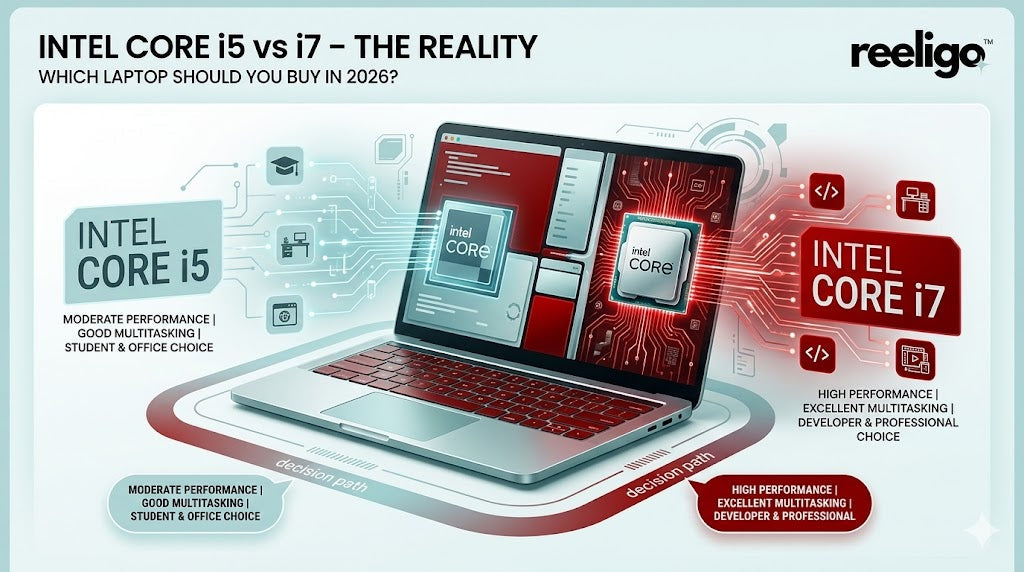
A Core i5 laptop is usually the better value for school, office work, web browsing, streaming, and light creative tasks. A Core i7 laptop makes more sense for video editing, software development, large spreadsheets, 3D work, heavy multitasking, and other demanding tasks.
| Feature | Intel Core i5 laptop | Intel Core i7 laptop |
|---|---|---|
| General speed | Strong for daily use | Usually faster in demanding tasks |
| Price | Usually lower | Usually higher |
| Battery life | May be better in similar designs | May be lower, but not always |
| Cores and threads | Varies by model | Often more, but varies by model |
| Turbo speed | Often lower | Often higher |
| Cache | Often smaller | Often larger |
| Graphics | Basic to mid-level integrated graphics | May have stronger integrated graphics |
| Best for | Work, school, browsing, light editing | Heavy multitasking and demanding software |
These are general patterns, not fixed rules. Intel makes low-power, performance, and gaming versions of both Core i5 and Core i7 processors.
What Do Intel Core i5 and Core i7 Mean?
Intel Core i5 and Core i7 are processor families. The processor, or CPU, is the main chip that runs Windows and your apps.
The “i5” and “i7” names show the general market position of the chip. Core i7 is placed above Core i5 in Intel’s product range. However, the name does not tell you the full specification.
For example, a laptop may use:
- A recent Core i5 with many performance cores
- An older Core i7 with fewer cores
- A low-power Core i7 designed for thin laptops
- A high-power Core i5 designed for gaming laptops
Those chips may perform very differently.
Read the full processor name
A model name gives more useful information than “i5” or “i7” alone. Consider a name such as:
Intel Core i7-13700H
- Core i7: The processor family
- 13: The 13th-generation family
- 700: The model level within that family
- H: A higher-power mobile processor class
Another example is:
Intel Core i5-1335U
- Core i5: The processor family
- 13: The 13th-generation family
- 35: The model level
- U: A low-power mobile processor class
Intel has also moved newer products to names such as Intel Core Ultra 5 and Intel Core Ultra 7. These are newer branding families and should not be compared with older Core i5 and i7 models by name alone.

Performance: How Much Faster Is Core i7?
Core i7 laptops are often faster when the two chips come from the same generation and use similar power limits. The advantage may appear in tasks that can use several cores at once, such as video exports, code builds, 3D rendering, and large data work.
For simple tasks, the difference may be hard to notice. Opening a web page, writing an email, or watching a video does not need the full power of a modern Core i5 or i7 processor.
What affects CPU speed?
Several processor features affect laptop performance:
- Core count: A core is a processing unit. More cores can help with heavy multitasking.
- Thread count: Threads let the CPU manage more work at the same time.
- Clock speed: Measured in gigahertz, or GHz. A higher speed can help some tasks.
- Turbo speed: The short-term top speed the chip may reach under suitable conditions.
- Cache: Fast memory built into the processor. More cache can help some workloads.
- Power limits: The laptop maker decides how much power and cooling the chip can use.
- Cooling: A well-cooled laptop can sustain high speed longer.
The last two points are often overlooked. A Core i7 in a thin laptop may slow down during a long export because it has less cooling room. A well-cooled Core i5 in a larger laptop may maintain its speed more consistently.
Single-core and multi-core work
Single-core tasks depend heavily on the speed of one or a few cores. Many everyday apps fall into this group. A newer Core i5 may feel just as quick as a Core i7 in these tasks.
Multi-core tasks use several cores. Examples include:
- Rendering a video
- Compressing a large folder
- Compiling software
- Running virtual machines
- Processing large photo batches
- Rendering 3D scenes
Core i7 models often have an advantage in these workloads, but the exact gain depends on the chip and laptop. There is no reliable rule that says a Core i7 is always a certain percentage faster.

Cores, Threads, and Intel Performance Cores
Modern Intel laptop processors can use different types of CPU cores. Many recent models combine:
- Performance cores, or P-cores: Built for demanding work
- Efficient cores, or E-cores: Built for lighter work with lower power use
A processor with more total cores may handle more tasks at once. But total core count alone is not enough. You should check how many P-cores and E-cores the chip has, along with its power class.
Intel’s Thread Director technology helps supported operating systems place tasks on suitable cores. Windows 11 can use this information to manage workloads more effectively on compatible processors.
A Core i7 often includes more cores or a higher core configuration than a Core i5 from the same product group. Still, this varies by generation. Check the exact model on Intel ARK before buying.
Why core count matters in daily use
More cores help most when you run several demanding tasks together. For example, you may edit a video while exporting another file and keeping many browser tabs open.
More cores have less effect when you only browse the web, write documents, or stream video. In those cases, memory, storage speed, and software quality can matter more than moving from Core i5 to Core i7.

Graphics: Is Intel Core i7 Better for Gaming?
A Core i7 laptop may have better integrated graphics than a Core i5 laptop, but the processor name does not guarantee better gaming performance.
Integrated graphics share system memory with the CPU. They work well for everyday graphics, video playback, casual games, and some lighter games. They are usually not a replacement for a dedicated graphics processing unit, or GPU, in a gaming laptop.
Gaming performance depends heavily on:
- The exact integrated graphics model
- System memory capacity and speed
- Screen resolution
- Game settings
- Cooling
- Whether the laptop includes a dedicated NVIDIA or AMD GPU
For gaming, a Core i5 laptop with a strong dedicated GPU can be much faster than a Core i7 laptop with only integrated graphics. If both laptops have the same dedicated GPU, the difference between the CPUs may be small in many games, especially at higher resolutions.
Check the GPU first when gaming is your main goal. A stronger graphics card often matters more than upgrading from Core i5 to Core i7.
Battery Life and Heat: Which One Is Better?
A Core i5 laptop does not automatically last longer on battery than a Core i7 laptop. Battery life depends on the full system, including the battery size, display, cooling system, power settings, memory, storage, and software.
Still, a similar Core i5 model may use less power than a similar Core i7 model. A lower-power chip can also produce less heat. That may allow a thinner design or quieter fan operation.
The processor suffix gives useful clues:
- U-series: Designed for lower power use and thin laptops
- P-series: A middle ground between thin designs and higher performance
- H-series: Designed for higher performance
- HX-series: Usually the highest-power mobile class
These letters do not provide a complete battery prediction. A laptop with a bright high-resolution display can use more power than the CPU during light work. A larger battery may also offset a more powerful processor.
For the best estimate, read independent battery tests for the exact laptop model. Intel’s specifications can describe the chip, but they do not measure the battery life of every laptop that uses it.

Price: Is a Core i7 Laptop Worth the Extra Cost?
A Core i7 laptop is worth the extra cost when your software can use its added performance and you expect to keep the laptop for several years.
The upgrade may be useful if you regularly:
- Edit 4K video
- Build large software projects
- Use 3D design or engineering software
- Run several virtual machines
- Work with large datasets
- Use demanding professional applications
The upgrade may not be worth it if you mainly:
- Browse the web
- Use Microsoft Word or Google Docs
- Attend video meetings
- Stream movies
- Manage email
- Use basic school apps
In many cases, spending the price difference on 16 GB or 32 GB of RAM, a larger SSD, or a better display creates a more noticeable improvement than choosing Core i7. Some laptops also make memory upgrades difficult or impossible, so check the specifications before buying.

Core i5 vs. Core i7 for Common Laptop Uses
School and college
A current Core i5 laptop is enough for most students. It can handle web research, documents, presentations, video calls, and common education software.
A Core i7 may help students in engineering, computer science, architecture, film, or other fields that use demanding programs. The required software matters more than the processor label.
Office work
Core i5 is usually the sensible choice for email, office apps, browser-based work, and video meetings. Choose Core i7 if you work with very large spreadsheets, complex data tools, or many demanding apps at once.
Programming
Core i5 works well for web development, scripting, and most general programming. Core i7 can reduce build times for large projects and help when you run several development tools, containers, emulators, or virtual machines.
Memory is also important. A developer may benefit more from 16 GB or 32 GB of RAM than from a small CPU upgrade.
Photo and video editing
Both processors can edit photos and video. Core i7 is more useful for long exports, high-resolution footage, effects, and multi-layer projects.
For video work, also check the graphics processor, media encoders, RAM, storage speed, and display quality. A fast CPU cannot fix a weak GPU or a small, slow drive.
Gaming
A Core i5 is enough for many gaming laptops, especially when the system has a strong dedicated GPU. Core i7 may help with high refresh rate gaming, simulation games, streaming, and background tasks.
Do not buy a Core i7 gaming laptop with a weak GPU when a Core i5 model offers a much stronger GPU at the same price.
Which Matters More: Processor, RAM, SSD, or GPU?
The right part to prioritize depends on your task.
| Main activity | First priorities |
|---|---|
| Web, school, and office work | 16 GB RAM, SSD, comfortable display |
| Gaming | Dedicated GPU, cooling, screen refresh rate |
| Video editing | CPU, GPU, RAM, fast and large SSD |
| Programming | CPU, RAM, SSD |
| Photo editing | Display quality, RAM, CPU, GPU support |
| Travel and battery use | Battery size, low-power CPU, display efficiency |
| 3D and engineering work | Dedicated GPU, CPU, RAM, cooling |
A laptop needs balance. A powerful Core i7 paired with 8 GB of RAM may feel worse in real use than a Core i5 system with 16 GB of RAM. A large SSD also helps because it gives Windows and apps more room for updates, temporary files, and projects.
How to Compare Two Specific Intel Laptops
Use this process before buying.
1. Write down the full CPU model
Do not compare only “Core i5” and “Core i7.” Record the generation, model number, and suffix.
For example, compare the full names:
- Intel Core i5-1335U
- Intel Core i7-1355U
This is a more useful comparison than simply comparing i5 with i7.
2. Compare the processor specifications
Use Intel ARK or the laptop maker’s specification page to check:
- P-core and E-core count
- Thread count
- Maximum turbo frequency
- Processor base power
- Maximum turbo power
- Cache size
- Integrated graphics
- Supported memory
- Media features
3. Check the laptop’s cooling design
Look for reviews of the exact model. A laptop’s sustained speed depends on its ability to remove heat.
A short benchmark may show peak performance. A long export or repeated test is more useful for workloads that last many minutes.
4. Compare RAM and storage
For a general Windows laptop, 16 GB of RAM is a practical target for many buyers. Heavy creative or technical work may justify 32 GB or more.
Choose an SSD rather than a hard disk drive when possible. Check the capacity too. A 512 GB SSD gives much more working room than a 256 GB SSD.
5. Check the display, ports, and keyboard
These parts affect daily use. Look at:
- Screen size and resolution
- Brightness
- Refresh rate
- Color coverage
- USB ports
- HDMI or other display outputs
- Webcam quality
- Keyboard comfort
- Weight
- Warranty and repair options
6. Read independent reviews
Use tests for the exact laptop, not just the processor family. Reviews can reveal fan noise, heat, battery life, screen quality, and sustained performance.
Manufacturer specifications are useful for documented features. They do not tell you how every laptop behaves under real workloads.

Common Mistakes When Choosing Between Core i5 and Core i7
Mistake 1: Assuming every i7 beats every i5
Generation and power class matter. An older high-end i7 may still be useful, but a newer i5 can beat it in efficiency or performance.
Mistake 2: Ignoring the suffix
A U-series chip and an H-series chip serve different laptop designs. The H-series model will often offer more sustained performance, while the U-series model may suit a thin laptop with longer battery life.
Mistake 3: Looking only at maximum turbo speed
Turbo speed is not a guaranteed continuous speed. It depends on temperature, power limits, workload, and cooling.
Mistake 4: Buying CPU power you will not use
A Core i7 does not make email or video streaming twice as fast. It may add cost without improving your experience.
Mistake 5: Forgetting RAM and the GPU
A laptop can have a strong processor and still perform poorly for your needs if it has too little memory or a weak graphics chip.
Mistake 6: Comparing benchmark results from different laptops
Benchmarks can vary because of cooling, power settings, firmware, memory, and the test version. Use results as guidance, not as an exact promise of your own performance.

Frequently Asked Questions
Is Intel Core i7 always better than Core i5?
No. Core i7 is generally a higher tier, but the exact generation, core layout, power class, and laptop cooling matter more than the label alone.
Is Core i5 good enough for everyday use?
Yes. A current Core i5 laptop is usually suitable for browsing, office apps, video calls, streaming, school work, and many light creative tasks.
Does Core i7 use more battery?
It can, especially when the i7 has more cores or a higher power limit. Battery life also depends on the laptop’s battery, screen, cooling, software, and power settings.
Is Core i5 or i7 better for gaming?
The answer depends mainly on the graphics card. For a gaming laptop with the same GPU, Core i5 often provides good value. Core i7 can help with demanding games, high frame rates, streaming, and background tasks.
How much RAM should an i5 or i7 laptop have?
For many Windows users, 16 GB is a sensible target. Consider 32 GB for video editing, software development with virtual machines, 3D work, or other heavy tasks.
Should I buy Intel Core Ultra instead?
Core Ultra is a newer Intel branding family with different platform features, including certain models with built-in neural processing units. Compare the full chip model, laptop design, software needs, battery tests, and price rather than assuming Core Ultra 5 or 7 is directly equal to an older Core i5 or i7.

Key Takeaways
- Core i5 laptops usually offer the best value for everyday work.
- Core i7 laptops generally provide more performance for demanding workloads.
- The full processor model matters more than the i5 or i7 label.
- Generation, suffix, core layout, cooling, RAM, and GPU can change the result.
- A strong Core i5 laptop can be a better buy than a poorly designed Core i7 laptop.
- For gaming, check the dedicated GPU before upgrading the CPU.
- For most buyers, 16 GB of RAM and a suitable SSD may matter more than moving from i5 to i7.
Conclusion
The difference between Intel Core i5 and i7 laptops is mainly a difference in performance tier. Core i7 usually wins in heavy multi-core work, while Core i5 often delivers enough speed for everyday tasks at a lower price.
Choose Core i5 when you want a balanced laptop for school, office work, browsing, streaming, and light editing. Choose Core i7 when your regular workload includes demanding software, long exports, large projects, or serious multitasking.
Before you buy, compare the exact processor model, generation, suffix, RAM, SSD, GPU, battery, display, and cooling system. Those details provide a much clearer answer than “i5 versus i7” by itself.

Everett Ashford is a tech reviewer at mytechgrid.com specializing in SSDs, cameras, TVs, earbuds, headphones, and other consumer electronics. He provides honest, data-driven reviews based on hands-on testing and real-world performance analysis. Everett simplifies complex tech details to help readers make smart, confident buying decisions.