For laptop buyers in the United States, a dedicated graphics card can make a major difference in gaming, video editing, 3D work, and other graphics-heavy tasks. It gives the computer a separate graphics processor and its own video memory, called VRAM.
The main advantages are higher graphics performance, smoother gameplay, faster creative work, and better support for demanding software. The trade-offs are higher cost, more heat, greater weight, louder fans, and often shorter battery life.
A dedicated GPU is not needed for every laptop user. It makes the most sense when your work or entertainment depends on fast visual processing.
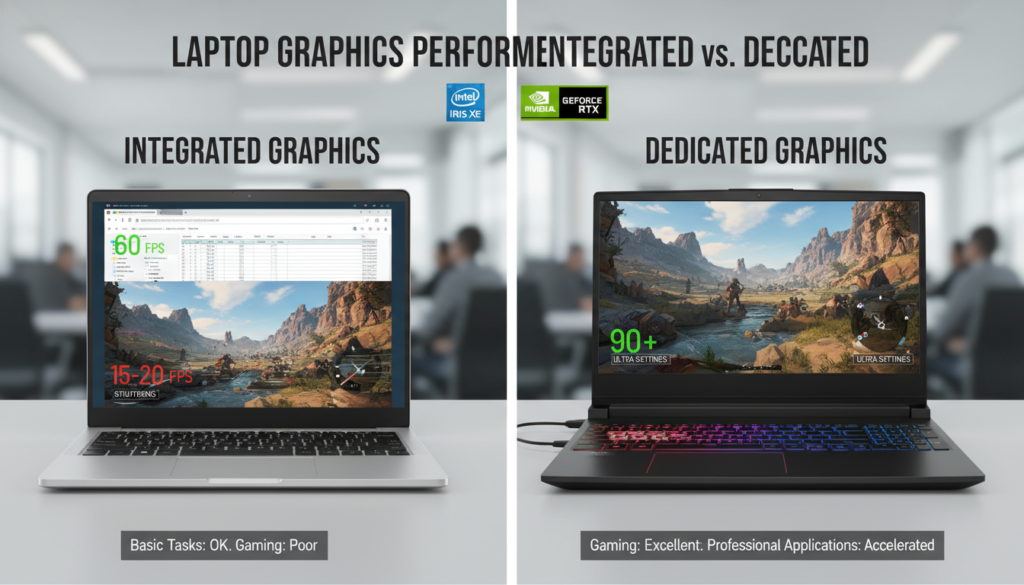


What Is a Dedicated Graphics Card?
A dedicated graphics card, also called a discrete GPU, is a separate graphics processor installed in a laptop. It is different from integrated graphics, which are built into the CPU and usually share system memory with the rest of the computer.
A dedicated GPU has its own processor cores, cooling system, and VRAM. Common examples include NVIDIA GeForce RTX and AMD Radeon graphics for laptops.
Integrated vs. dedicated graphics
| Feature | Integrated graphics | Dedicated graphics |
|---|---|---|
| Location | Built into the CPU | Separate graphics chip |
| Memory | Shares system RAM | Uses dedicated VRAM |
| Power use | Usually lower | Usually higher |
| Heat output | Usually lower | Usually higher |
| Graphics performance | Good for basic use | Better for demanding tasks |
| Typical cost | Lower | Higher |
Integrated graphics work well for web browsing, office apps, streaming, video calls, and many school tasks. A dedicated GPU adds value when the laptop must process complex 3D scenes, high-resolution video, visual effects, or modern games.
The GPU does not replace the CPU. The CPU handles general system tasks, while the GPU specializes in parallel graphics and compute work. Many apps use both.

What Are the Main Advantages of a Dedicated GPU?
A laptop with a dedicated graphics card offers several practical benefits.


1. Better gaming performance
The clearest advantage is stronger gaming performance. A dedicated GPU can render more frames, handle higher image quality, and support more detailed game worlds than basic integrated graphics.
Performance depends on the exact GPU, laptop power limits, cooling system, game settings, display resolution, and processor. Still, a dedicated graphics card is often the difference between low settings and high settings in demanding games.
A dedicated GPU can help with:
- Higher frame rates
- Higher texture quality
- Better lighting and shadows
- Ray tracing on supported hardware
- Higher resolutions
- More stable performance during busy scenes
- Support for high-refresh-rate displays
NVIDIA’s GeForce technology documentation explains features such as hardware ray tracing and DLSS. AMD also documents similar graphics and upscaling features for Radeon products.
A high-refresh-rate screen only helps when the GPU can produce enough frames. For example, a 144Hz display may feel smoother than a 60Hz display, but the benefit depends on the game and the laptop’s actual performance.
2. Faster video editing and content creation
Video editing software can use the GPU to speed up effects, playback, encoding, and export tasks. This is useful for creators who work with 4K footage, large projects, color effects, motion graphics, or multiple video layers.
A dedicated GPU may improve:
- Timeline playback
- Video previews
- Export times
- Color correction
- Motion effects
- Noise reduction
- 3D transitions
- Video encoding
Adobe documents GPU acceleration in applications such as Premiere Pro and After Effects. Its GPU acceleration guidance also shows why supported effects and codecs matter.
A dedicated GPU does not guarantee faster exports in every project. Some tasks depend more on the CPU, storage, software settings, or hardware video encoders. The benefit is strongest when the application supports GPU acceleration.
3. Better 3D modeling and rendering
Architects, engineers, product designers, and 3D artists can benefit from a dedicated graphics card. Programs such as Blender, Autodesk applications, and many computer-aided design tools use the GPU for viewport rendering or final rendering.
The GPU can help display:
- Detailed models
- Large assemblies
- Real-time materials
- Shadows and reflections
- Particle effects
- Virtual environments
- High-resolution textures
A dedicated GPU is especially useful when a project contains many objects or complex materials. It can make the viewport more responsive while you rotate, zoom, and edit a model.
However, software support varies. Some renderers work best with NVIDIA CUDA or OptiX. Others support AMD technologies or use the CPU. Check the software maker’s hardware requirements before choosing a laptop.
4. More VRAM for large visual workloads
Dedicated graphics cards have their own VRAM. This memory stores textures, frame data, models, and other graphics information.
More VRAM can help with:


- Large game textures
- 4K video projects
- 3D scenes
- Multiple high-resolution monitors
- Machine learning workloads
- Large design files
VRAM is not the same as system RAM. A laptop with 8 GB of system memory cannot turn that memory into equal-quality GPU memory. Dedicated VRAM is designed for fast access by the graphics processor.
More VRAM does not automatically make a weak GPU fast. The graphics processor, memory speed, cooling, and software support still matter. VRAM is one part of the performance picture.
5. Support for GPU-accelerated AI and technical work
Many AI, data science, engineering, and scientific applications can use a GPU to process large numbers of calculations at once. A dedicated graphics card may reduce processing time for supported tasks.
Possible uses include:
- Local AI image generation
- Model training and testing
- Video enhancement
- Speech processing
- Simulation
- Data visualization
- Computer vision
Support depends on the software framework and GPU platform. NVIDIA GPUs often use CUDA-based tools, while other software may support DirectML, Vulkan, OpenCL, or AMD technologies.
Before buying, check the application’s official requirements. A laptop GPU may also have less VRAM and lower power than a desktop GPU with a similar name.
6. Better support for external displays
A dedicated GPU can help drive one or more external monitors, especially at high resolution or high refresh rates. This matters for gaming, design, video editing, trading workstations, and multi-screen office setups.
The actual limit depends on:
- The GPU
- The laptop’s ports
- USB-C or Thunderbolt support
- HDMI or DisplayPort version
- Display resolution
- Refresh rate
- Whether the port connects to the dedicated GPU
The presence of a dedicated GPU does not guarantee that every port supports every display feature. Check the laptop manual and port specifications.
7. Longer usefulness for demanding software
A dedicated GPU may help a laptop remain useful as games and creative apps become more demanding. It can provide more performance headroom than entry-level integrated graphics.
This does not mean the laptop will never feel slow. A future application may need more VRAM, a newer graphics feature, or a faster CPU. Most laptop GPUs also cannot be upgraded after purchase.
Buying enough performance for your current needs is safer than buying based only on a promise of future-proofing.

How Much Performance Do You Need?
The right GPU depends on the task, display, and settings you expect to use. A basic dedicated GPU may be enough for light gaming and creative work. A stronger model is needed for demanding games, 3D rendering, or local AI.
| Main use | Suitable graphics level |
|---|---|
| Office work and streaming | Integrated graphics may be enough |
| Casual or older games | Entry-level dedicated GPU or strong integrated graphics |
| Modern games at 1080p | Midrange dedicated GPU |
| High-refresh-rate gaming | Strong midrange or high-end dedicated GPU |
| 4K video editing | Dedicated GPU with suitable VRAM and encoder support |
| 3D rendering | GPU selected for the specific renderer |
| Local AI work | GPU with enough VRAM for the chosen model |
| Multiple high-resolution displays | GPU and ports must support the required outputs |
These are broad guidelines, not guarantees. Laptop versions of the same GPU name can perform differently because manufacturers set different power limits and cooling systems.


Check more than the GPU name
Before you buy, compare:
-
GPU model and laptop power limit
A higher-power version may perform better than a lower-power version with the same name. -
VRAM capacity
More demanding games and creative projects often need more graphics memory. -
Cooling design
A thin laptop may reduce performance to control heat and noise. -
CPU pairing
A weak CPU can limit performance in some games and professional apps. -
Display resolution and refresh rate
A high-end GPU is less useful if the laptop has a low-quality display. -
Power adapter
Some laptops cannot reach full performance on battery power. -
Software support
Confirm that your main applications support the GPU’s features.
A product page may list a GPU but omit important details such as its power limit. For a careful comparison, consult the manufacturer’s specifications and independent testing of the exact laptop model.

What Are the Disadvantages of a Dedicated Graphics Card?
A dedicated GPU provides more performance, but it also creates costs and limits.
Higher purchase price
Laptops with dedicated graphics usually cost more than models with integrated graphics. You may also pay for stronger cooling, a larger power adapter, and a faster display.
If you only browse the web, write documents, attend video calls, and stream media, that extra cost may not improve your daily experience.
Shorter battery life
A dedicated GPU can use much more power than integrated graphics. Many laptops switch to integrated graphics for light tasks and activate the dedicated GPU only when needed.
This automatic switching can reduce power use, but it does not remove the trade-off. Gaming and rendering on battery power often drain the battery quickly. Some laptops also limit performance when unplugged.


More heat and fan noise
Graphics work produces heat. The laptop may use faster fans, larger vents, or a thicker chassis to remove it.
Heat and noise vary by model. A powerful GPU in a thin laptop may run louder than the same GPU in a larger laptop with better cooling.
Keep air vents clear and use the laptop on a hard, flat surface during demanding work. Avoid blocking vents with bedding or soft furniture.
Greater size and weight
Gaming and creator laptops often weigh more because they need:
- Larger cooling systems
- Bigger batteries
- Stronger power adapters
- More durable hinges or chassis parts
A dedicated GPU may not suit someone who carries a laptop across a college campus, travels often, or values low weight above graphics performance.
Limited upgrade options
Most laptop GPUs are soldered to the motherboard. You usually cannot replace them later.
External GPU enclosures can provide an upgrade path on some laptops, but they need compatible ports and add cost. They also may not match the performance of a built-in GPU.
Possible driver and software issues
GPU drivers can affect games, creative programs, displays, and power use. Most users can rely on automatic updates, but unusual problems may require a driver rollback or a clean installation.
Use drivers from the laptop maker or GPU maker. Avoid random driver downloads from unknown websites.
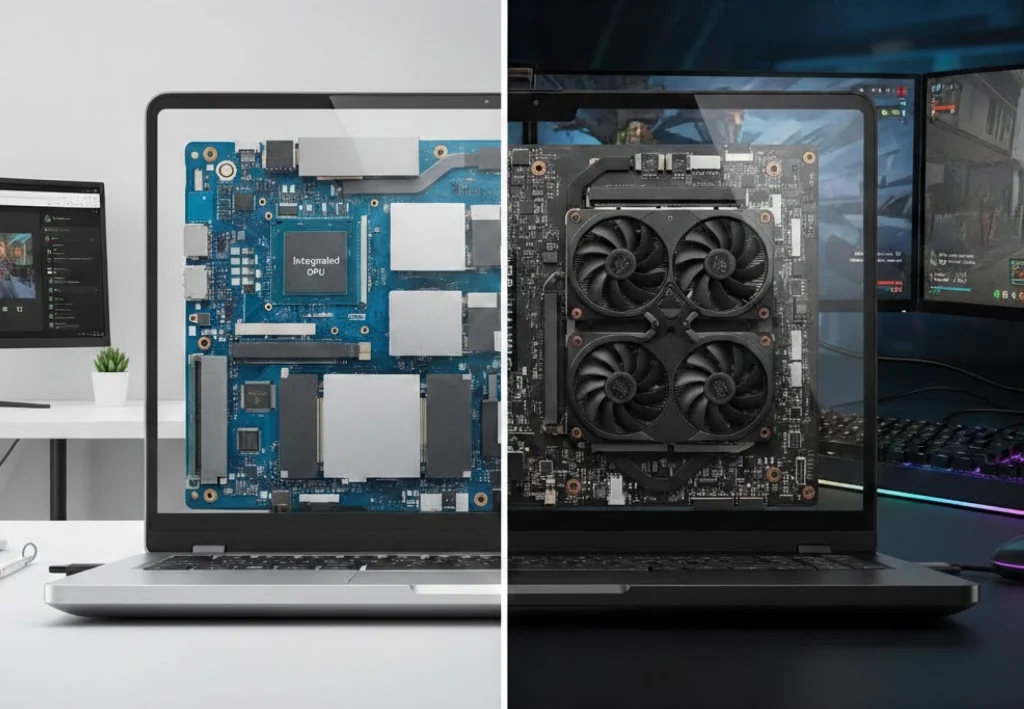
Dedicated GPU vs. Integrated Graphics: Which Is Better?
Neither option is always better. The right choice depends on your workload.
Choose integrated graphics when you mainly:
- Browse the web
- Use Microsoft Office or Google Workspace
- Stream video
- Attend video meetings
- Write and study
- Play simple or older games
- Prefer low weight and long battery life
Choose a dedicated graphics card when you regularly:
- Play demanding PC games
- Edit 4K video
- Work with 3D models
- Use real-time rendering
- Run GPU-supported AI tools
- Connect several high-resolution displays
- Use professional software with GPU acceleration
A laptop with integrated graphics can still feel fast for normal work. A dedicated GPU becomes valuable when the workload is graphics-heavy or when smoother visual performance matters.
A simple decision rule
Ask this question:
Will I regularly use software that lists a dedicated GPU as recommended or required?
If the answer is no, integrated graphics may be the better value. If the answer is yes, compare the software’s recommended GPU, VRAM, operating system support, and driver requirements.

Common Buying Mistakes to Avoid
A few mistakes can lead to disappointing performance.
Mistake 1: Choosing by GPU name alone
The same GPU family can perform differently in different laptops. Check power limits, cooling, and independent tests of the exact model.
Mistake 2: Ignoring VRAM
A fast GPU with too little VRAM may struggle with large textures, high-resolution video, or complex scenes. Check the memory requirement for your main software.
Mistake 3: Assuming every game will run at the same speed
Frame rates change with resolution, graphics settings, ray tracing, driver versions, and game updates. Look for tests that match your preferred games.
Mistake 4: Forgetting the screen
A strong GPU paired with a dim, low-resolution screen may not suit creative work. For gaming, also check response time, refresh rate, adaptive sync, and color quality.
Mistake 5: Expecting desktop-level performance
Laptop GPUs use less power and face tighter cooling limits than desktop graphics cards. A laptop GPU with a familiar name may not match its desktop counterpart.
Mistake 6: Believing a dedicated GPU always improves battery life
It does not. A dedicated GPU generally increases power use when active. Hybrid graphics modes can help, but battery performance still depends on the screen, CPU, battery size, software, and settings.

Frequently Asked Questions
Is a dedicated graphics card worth it in a laptop?
It is worth the added cost when you play demanding games, edit video, create 3D work, or use GPU-accelerated applications. It may not be worthwhile for office work, web use, streaming, and basic school tasks.
Does a dedicated GPU make a laptop faster overall?
It improves graphics and supported compute tasks. It does not automatically make every task faster. Web browsing, file management, and many office apps depend more on the CPU, memory, storage, and software.
Can I add a dedicated graphics card to a laptop later?
Usually, no. Most laptop GPUs are soldered to the motherboard. Some laptops support an external GPU through a compatible high-speed port, but this costs more and may have performance limits.
Is more VRAM always better?
No. More VRAM helps when an application needs it, but it cannot fix a weak GPU, slow CPU, poor cooling, or unsupported software. Match VRAM to your games and applications.
Does a dedicated graphics card improve video quality?
It can improve performance during playback, editing, effects, and encoding. It does not automatically improve the quality of a video file. Final quality depends on the source, settings, codec, display, and editing process.
Conclusion: Who Should Buy a Laptop With a Dedicated GPU?
A laptop with a dedicated graphics card is a strong choice for gaming, video editing, 3D design, rendering, local AI work, and other demanding visual tasks. Its separate processor and VRAM can deliver smoother graphics and faster results in supported software.
The trade-off is higher cost, more heat, more fan noise, greater weight, and often shorter battery life. If your daily work is mostly documents, web browsing, video calls, and streaming, integrated graphics may offer better value.
Before buying, compare the exact GPU, VRAM, power limit, cooling system, display, ports, battery, and software requirements. Choose the graphics performance that matches your real workload—not simply the largest number on the product page.

Everett Ashford is a tech reviewer at mytechgrid.com specializing in SSDs, cameras, TVs, earbuds, headphones, and other consumer electronics. He provides honest, data-driven reviews based on hands-on testing and real-world performance analysis. Everett simplifies complex tech details to help readers make smart, confident buying decisions.