For most people in the United States, the Asus Zenbook 14 OLED is the best OLED laptop overall. It offers a sharp 14-inch display, strong battery life, a light body, and enough power for office work, school, travel, photo editing, and streaming.
The best choice changes with your needs. The Lenovo Yoga Pro 9i is better for creative work. The Dell XPS 16 OLED suits buyers who want a large premium laptop. The Samsung Galaxy Book4 Pro is a strong pick for people who use a Galaxy phone. Gamers should look at the Razer Blade 14 OLED or another laptop with a high-refresh OLED panel.
This guide focuses on models sold in the US market. Prices, stock, ports, processor choices, and warranty terms can change by configuration and retailer.

Quick answer: Which OLED laptop is best?
The Asus Zenbook 14 OLED is the best fit for the widest range of US buyers.
It balances:
- A bright OLED screen with deep blacks
- A compact and light design
- Modern Intel Core Ultra processor options
- Good battery potential for daily work
- Useful ports, including USB-C and USB-A on many versions
- A lower price than many large premium laptops
It is not the best choice for every person. A larger laptop gives more screen space. A gaming laptop offers faster graphics. A Windows workstation may provide more upgrade room and sustained power.
Best OLED laptops by user
| Best for | Recommended laptop | Why it stands out |
|---|---|---|
| Most people | Asus Zenbook 14 OLED | Strong mix of screen, size, price, and battery |
| Creative work | Lenovo Yoga Pro 9i | High-end display and stronger graphics options |
| Large screen | Dell XPS 16 OLED | Spacious 16-inch design and premium build |
| Samsung phone users | Samsung Galaxy Book4 Pro | Good Windows and Galaxy device integration |
| Gaming | Razer Blade 14 OLED | Fast OLED panel and powerful graphics |
| Business use | Lenovo ThinkPad X1 Carbon with OLED option | Excellent keyboard and business features |
| Low-cost OLED | Asus Vivobook 15 OLED | Large OLED screen at a lower entry price |
The exact screen and processor can differ between configurations. Always check the full model number before buying.

What makes an OLED laptop display different?
An OLED display uses self-lit pixels. Each pixel can turn off on its own. This lets the screen show very dark blacks without the glow seen on many LCD panels.
An LCD uses a backlight behind the screen. Even when an LCD shows black, some light can still pass through. OLED can therefore produce stronger contrast and richer dark scenes.
Main OLED benefits
An OLED laptop can provide:
- Deep black levels
- High contrast
- Rich color
- Fast pixel response
- Clear motion in games and video
- A slim display panel
These traits help with films, games, image editing, and general use. Text can also look sharp when the laptop uses a high pixel density.
OLED limits
OLED is not automatically better in every way.
Common trade-offs include:
- Higher purchase prices
- More battery use at high brightness
– Glossy screens on many models - Possible image retention over long periods
- Lower brightness in some full-screen scenes
- Fewer low-cost repair options
Image retention means a faint remnant of a static image may remain for a time. Permanent burn-in is a separate and more serious issue. Modern laptops use screen savers, pixel shifting, dimming, and other tools to reduce risk, but no display type removes all risk.

The best OLED laptops in the US
1. Asus Zenbook 14 OLED: best overall
The Asus Zenbook 14 OLED is the safest recommendation for most buyers.
Its 14-inch size gives you more room than a small 13-inch laptop without making the computer hard to carry. Many versions use a 3K OLED panel with a 120Hz refresh rate. A higher refresh rate can make scrolling and supported games look smoother than a standard 60Hz screen.
The Zenbook line also tends to offer a useful set of ports. Depending on the exact model, you may get Thunderbolt or USB-C, USB-A, HDMI, and a headphone jack.
Best for: Students, office workers, travelers, and home users.
Watch for: Some configurations have different processors, memory, storage, and screen brightness. Choose at least 16GB of RAM if you plan to keep the laptop for several years.
2. Lenovo Yoga Pro 9i: best for creative work
The Lenovo Yoga Pro 9i is a better fit for video editors, photographers, designers, and other creative users who need more power.
It is larger and heavier than the Zenbook 14. That extra size can support better cooling, a larger display, and optional dedicated graphics. A dedicated GPU helps with many video, 3D, and photo tasks.
The Yoga Pro 9i may be available with a high-resolution PureSight Pro display. Some versions use OLED, while others use a different panel type. Check the exact screen before ordering.
Best for: Creative work, large projects, and users who want more graphics power.
Watch for: Higher cost, greater weight, and shorter battery life under heavy workloads.
3. Dell XPS 16 OLED: best large OLED laptop
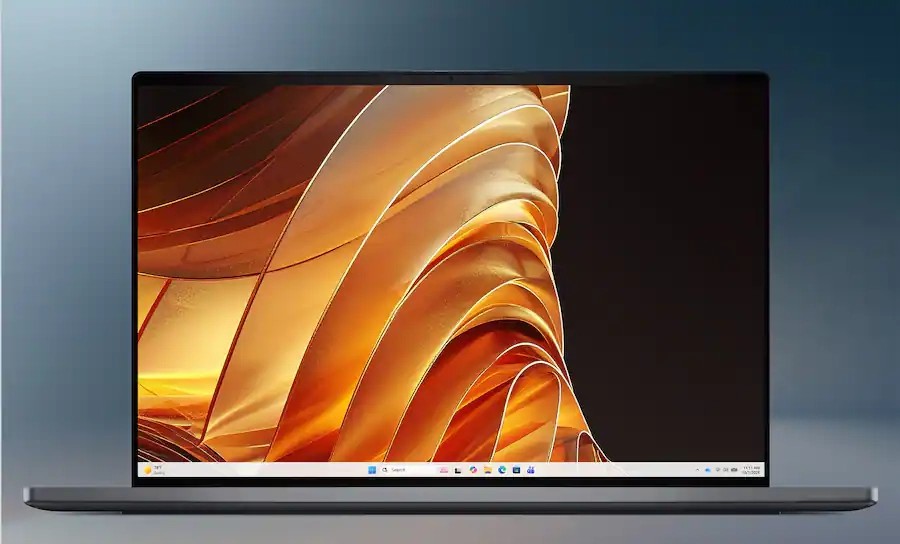
The Dell XPS 16 offers a large 16.3-inch OLED option in a premium Windows design.
A large screen is useful for timelines, spreadsheets, split-screen work, and detailed editing. The XPS 16 can also be configured with powerful Intel processors and dedicated NVIDIA graphics.
Its clean design is appealing, but the minimalist layout may not suit everyone. Some users prefer traditional function keys and more built-in ports. A USB-C hub or dock may be useful.
Best for: Buyers who want a large screen in a high-end laptop.
Watch for: Weight, price, port limits, and the need to compare OLED and non-OLED configurations.
4. Samsung Galaxy Book4 Pro: best for Galaxy users
The Samsung Galaxy Book4 Pro is a thin Windows laptop with an AMOLED display.
It makes the most sense for people who already use Samsung phones, tablets, earbuds, or watches. Samsung software can add features for file sharing, device control, and cross-device work. These features depend on the devices, apps, account, and software versions involved.
The laptop is light and easy to carry. It is a strong choice for writing, browsing, video calls, and media.
Best for: Samsung device owners and mobile professionals.
Watch for: Samsung software may add value only if you already use its ecosystem. Check the keyboard layout and included charger for the US configuration.
5. Razer Blade 14 OLED: best OLED gaming laptop
The Razer Blade 14 is designed for buyers who want gaming power in a smaller body.
OLED helps games look vivid and can offer fast response times. The Blade 14 also uses powerful AMD processors and NVIDIA GeForce RTX graphics in selected configurations.
Gaming laptops use more power than thin office laptops. They can also become warm and loud during demanding games. For the best results, plug the laptop into its charger while gaming.
Best for: PC gaming, esports, and demanding graphics work.
Watch for: High cost, fan noise, heat, and shorter battery life during games.
6. Asus Vivobook 15 OLED: best lower-cost option
The Asus Vivobook 15 OLED brings OLED contrast to a more affordable laptop class.
It can be a good choice for school work, web use, streaming, and basic office tasks. It usually costs less than premium Zenbook models.
The lower price may come with limits. Some configurations have less memory, a slower processor, a basic webcam, or a 60Hz display. For long-term use, look for 16GB of RAM and at least 512GB of storage when the price difference is reasonable.
Best for: Buyers who want OLED quality without paying for a premium design.
Watch for: Build quality, battery capacity, webcam quality, and upgrade limits.

How to choose the right OLED laptop
Start with the work you do most often. A beautiful screen cannot fix a weak processor, poor battery life, or a keyboard you dislike.
Choose the right screen size
- 13 to 14 inches: Best for travel, school, and small desks.
- 15 to 16 inches: Better for editing, spreadsheets, and split-screen work.
- 17 inches or more: Best for a desk-based setup, but less portable.
A 14-inch laptop is often the best middle ground. A 16-inch model can feel much more comfortable for creative work, but it may weigh more.
Check resolution and refresh rate
A laptop may use a Full HD, 2.8K, 3K, or 4K OLED screen.
Higher resolution can improve sharpness, but it may also use more power. For most buyers, a 2.8K or 3K panel offers a useful balance.
A 120Hz refresh rate can make motion smoother. It matters most for gaming, fast scrolling, and animation. It is less important for email and word processing.
Look at brightness, not just contrast
OLED screens have excellent black levels, but brightness still matters.
A brighter screen is easier to see in a sunny room or near a window. Check whether the manufacturer lists:
- Typical brightness
- Peak HDR brightness
- Full-screen brightness
- Outdoor or sunlight mode
Peak brightness is not the same as brightness across the whole screen. A panel may reach a high peak level in a small HDR highlight but appear less bright during normal work.
Pick enough memory and storage
For most US buyers in 2025-era laptop lines, 16GB of RAM is a sensible starting point. Choose 32GB if you edit large video files, use virtual machines, work with large images, or want more long-term headroom.
A 512GB SSD is enough for many people. Choose 1TB if you keep games, photos, or video files on the laptop.
RAM is often soldered and cannot be upgraded. Confirm this before buying.
Check battery claims carefully
Manufacturers often report battery life under set test conditions. Real use varies with brightness, web tabs, video calls, apps, and processor load.
OLED screens may use more power when much of the display is bright white. Dark themes can reduce screen power use in some conditions, but they will not solve a weak battery or inefficient workload.
For travel, compare:
- Battery capacity in watt-hours
- USB-C charging support
- Charger size
- Manufacturer test method
- Independent battery tests for the exact model
Check ports and wireless features
A thin laptop may have fewer ports. Before buying, confirm that it includes what you need:
- USB-C charging
- USB-A for older devices
- HDMI for a monitor or TV
- Headphone jack
- SD or microSD card slot
- Wi-Fi 6E or Wi-Fi 7, if needed
- Bluetooth version
A USB-C port does not always support the same functions. Some support charging only. Others support video output, fast data, or Thunderbolt.

OLED laptop comparison: which one should you buy?
Use this table as a starting point. It compares product roles, not one fixed configuration.
| Laptop | Main strength | Main weakness | Best buyer |
|---|---|---|---|
| Asus Zenbook 14 OLED | Balance of size, price, and features | Not ideal for heavy GPU work | Most people |
| Lenovo Yoga Pro 9i | Creative performance | Larger and more costly | Editors and designers |
| Dell XPS 16 OLED | Large premium screen | Price and limited ports | Premium buyers |
| Samsung Galaxy Book4 Pro | Samsung device features | Best value depends on owning Galaxy products | Galaxy users |
| Razer Blade 14 OLED | Gaming power in a compact body | Heat, noise, and cost | Gamers |
| Asus Vivobook 15 OLED | Lower entry price | More basic hardware in some versions | Budget buyers |
The Zenbook 14 OLED is the best default choice. Move to the Yoga Pro 9i or Dell XPS 16 if you need a larger screen or stronger graphics. Choose the Razer Blade 14 for gaming rather than general office use.
Common OLED laptop mistakes to avoid
Buying by screen type alone
OLED improves contrast and color, but it does not tell you how good the whole laptop is. A good purchase also needs a suitable processor, enough RAM, solid cooling, a comfortable keyboard, and useful ports.
Confusing OLED with HDR quality
An OLED panel can support HDR, but the laptop still needs suitable brightness and software support. Check the complete display specification.
Ignoring glossy reflections
Many OLED laptop screens use a glossy finish. It can make colors look rich, but nearby lights and windows may reflect on the screen.
If you work near a bright window, look for a brighter panel or plan to use a different desk position.
Choosing too little RAM
If memory is soldered, you may not be able to add more later. For a new Windows laptop, 16GB is a safer starting point than 8GB for most users.
Forgetting the charger
Powerful OLED laptops may include large chargers. Check the charger weight if you travel often. A USB-C charger may work, but it must provide enough wattage for the laptop.
Treating burn-in risk as either impossible or guaranteed
Static images can create risk over long periods, but normal varied use does not mean every OLED panel will burn in. Use sleep settings, avoid leaving static images on screen for hours, and keep the laptop's display protection features enabled.
Are OLED laptops good for work and school?
Yes. OLED laptops are very good for documents, web browsing, video calls, and media.
The main concerns are battery life, screen glare, and cost. A bright white document can use more power than a dark scene. A glossy screen may also cause reflections in a classroom or office.
For school or office use, prioritize:
- A comfortable keyboard.
- At least 16GB of RAM.
- A reliable webcam and microphone.
- Good battery capacity.
- A matte or bright screen if you work near windows.
- A warranty that covers your US purchase.

Are OLED laptops good for gaming?
OLED laptops can be excellent for gaming because they offer fast response times, strong contrast, and vivid color.
The laptop still needs enough graphics power. An OLED display will not make a low-power integrated GPU run demanding games well.
For gaming, check:
- GPU model and power limit
- Refresh rate
- Response time
- Cooling system
- Fan noise
- Battery performance away from the charger
- Game resolution supported by the GPU
A 14-inch gaming laptop is easier to carry. A 16-inch model may cool better and provide a more immersive view.
Frequently asked questions
What is the best OLED laptop for most people?
The Asus Zenbook 14 OLED is the best general choice for most people. It combines a high-quality screen, portable size, modern performance, and a broad set of features. Confirm the exact RAM, storage, and display configuration before buying.
Is OLED better than IPS for a laptop?
OLED is better for contrast, black levels, and pixel response. IPS can be better for lower cost, long static work, matte finishes, and some battery-focused designs. The better choice depends on your work and room lighting.
Do OLED laptop screens burn in?
They can develop permanent image retention, but the risk varies with panel design and use. Avoid leaving a fixed image on screen for long periods. Use automatic sleep, screen savers, and built-in OLED care tools.
Is a 4K OLED laptop worth it?
Usually, a 2.8K or 3K OLED screen is a better balance for a laptop. It can look very sharp while using less power than 4K. A 4K panel makes more sense for detailed photo or video work when battery life is less important.
How much RAM should an OLED laptop have?
Choose 16GB for general work, school, and everyday use. Choose 32GB for serious editing, software development with large projects, virtual machines, or longer service life.
Can an OLED laptop connect to an external monitor?
Yes, if the laptop has a suitable USB-C, Thunderbolt, HDMI, or DisplayPort connection. Check the port's video-output support. Some USB-C ports do not send video.
Final recommendation
Buy the Asus Zenbook 14 OLED if you want one OLED laptop that handles most US school, work, travel, and entertainment needs.
Choose the Lenovo Yoga Pro 9i for creative workloads, the Dell XPS 16 OLED for a large premium screen, the Samsung Galaxy Book4 Pro for Galaxy device integration, and the Razer Blade 14 OLED for gaming.
Before checkout, compare the exact screen, RAM, SSD, battery size, ports, charger, warranty, and return policy. Those details can matter more than the OLED label itself.

Everett Ashford is a tech reviewer at mytechgrid.com specializing in SSDs, cameras, TVs, earbuds, headphones, and other consumer electronics. He provides honest, data-driven reviews based on hands-on testing and real-world performance analysis. Everett simplifies complex tech details to help readers make smart, confident buying decisions.