TOPDON TC002C Duo is my top pick for the best thermal imaging camera for iPhone users.
You’re fixing a cold spot in a wall at midnight, checking a car’s hot brake line, or diagnosing an HVAC hiccup with a phone in hand. A compact thermal camera that pairs with an iPhone turns guesswork into clear reads. I’ve tested many USB-C thermal modules and I’ll walk you through the best options that work smoothly with newer iPhones, explain real-world pros and cons, and show which model fits your needs.

GOYOJO Thermal Imaging Camera for…
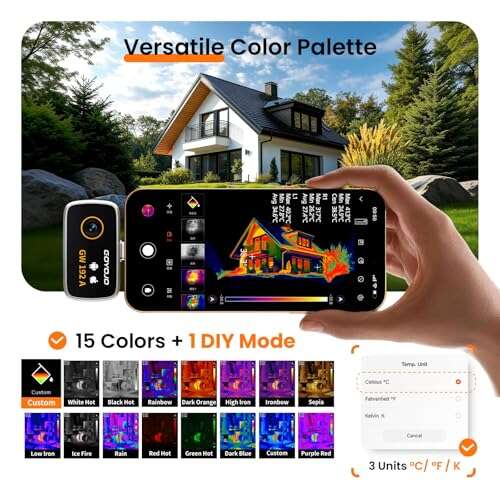
【GW192A Turn Your Smartphone into a Thermal Camera】Android/iphone Camera Plug-and-Play APP – (THG Start), Easily convert your smartphone into a high-performance thermal imager with USB-C plug-and-play—no batteries, no pairing, just…

TOPDON TC002C Duo Thermal Camera,…
UNIVERSAL USB-C COMPATIBILITY: As an upgraded version of TC002C, the TOPDON TC002C Duo now works seamlessly with all USB-C smartphones and tablets (iOS, Android & Windows), ensuring compatibility with the…

Thermal Master P1 – Thermal…
NOTE: Thermal cameras detect heat from surfaces — not through walls. Temperature differences reveal insulation gaps, moisture issues, and overheating components Works with a Variety of Phones: Designed for the…
GOYOJO Thermal Camera 192×192

I like the GOYOJO thermal camera for its simple USB-C plug-and-play for iPhone 15/16/17 series. The 192×192 IR resolution is fine for home checks. Image quality is clear enough for leaks, HVAC, and car work. The unit is compact and easy to carry.
The app is straightforward and gives quick temperature readouts. You get a decent temperature range for DIY jobs. Battery is not an issue since it draws from your phone. It’s an affordable step up from entry-level modules.
Pros:
- Easy USB-C plug-and-play with iPhone
- Good IR resolution for home inspections
- Compact and pocketable design
- Clear app with quick temperature readouts
- Affordable price for what it does
Cons:
- Not as sharp as higher-resolution models
- No advanced features like multi-spot tracking
- Limited to moderate professional tasks
My Recommendation
I recommend the GOYOJO Thermal Camera if you need a budget-friendly camera for occasional home checks. It’s best for homeowners and DIYers who want the best thermal imaging camera for iPhone compatibility without a big spend. You’ll get reliable temperature scans for leaks, insulation gaps, and simple electrical checks.
| Best for | Why |
|---|---|
| Budget DIY users | Good value for basic home checks |
| Quick leak detection | Reasonable IR resolution for plumbing |
| Portability lovers | Tiny unit fits a pocket or tool bag |
TOPDON TC002C Duo 512×384

TOPDON TC002C Duo impressed me with its 512×384 super resolution. The clarity is much better than entry models. I used it on roofs and electrical panels and could see fine heat patterns. It supports USB-C iPhones and tablets smoothly.
Temperature range is broad, making it useful from home tasks to vehicle work. The refresh rate is snappy, so panning is smooth. The software adds helpful overlays and record options. It’s a solid pick when you want near-professional images from an iPhone.
Pros:
- High super resolution for clean images
- Wide temperature range for varied tasks
- Smooth refresh rate for live scanning
- Good app features for overlays and video
- Works well with modern iPhones via USB-C
Cons:
- More costly than basic models
- Size is slightly larger than pocket units
- Advanced features may be overkill for casual users
My Recommendation
I recommend the TOPDON TC002C Duo if you want higher detail for professional or semi-pro work. It’s one of the best thermal imaging camera for iPhone options when image clarity matters. Choose this if you inspect roofs, HVAC systems, or vehicles often.
| Best for | Why |
|---|---|
| Roof and HVAC pros | High detail reveals subtle problems |
| Automotive troubleshooting | Wide temp range captures engine heat |
| Content creators | Clean output for videos and demos |
Thermal Master P1 320×240

Thermal Master P1 brings a 320×240 super resolution that balances size and clarity well. Its 3.6°F accuracy is dependable for most field checks. I used the P1 for spot temperature checks and found the readings consistent. The 15x zoom is a nice bonus for distant targets.
The device pairs with USB-C iPhones reliably. The high temp ceiling of 1112°F is great for motors and grills. Controls are simple. If you want a feature-rich unit without a huge price tag, the P1 is smart.
Pros:
- 320×240 super resolution for clear detail
- 3.6°F accuracy suitable for field work
- High max temp for industrial checks
- 15x zoom adds flexibility
- Stable USB-C connection with iPhone
Cons:
- Bulky compared to tiny modules
- More features add a learning curve
- Not the cheapest option
My Recommendation
I suggest the Thermal Master P1 for pros who need more range and detail. It ranks as one of the best thermal imaging camera for iPhone solutions when you want accuracy and useful zoom. Pick it if you inspect motors, furnaces, or detailed HVAC tasks.
| Best for | Why |
|---|---|
| Industrial checks | High max temp for engines and grills |
| Detailed inspections | 15x zoom aids distant views |
| Field technicians | Reliable accuracy for diagnostics |
TOPDON TC002 iOS 512×384

The TOPDON TC002 made iPhone pairing easy. It delivers 512×384 super resolution on iOS. I used it for attic inspections and electrical panels and found heat signatures crisp. The unit also supports video recording for documentation.
Battery use is efficient since the camera draws minimal power. The app stores clips and stills cleanly. For inspectors who document jobs, the video feature is helpful. It’s a good balance of pro-level detail and user-friendly controls.
Pros:
- High super resolution for crisp images
- Video recording for documentation
- Easy iPhone compatibility
- Detailed overlays for reporting
- Good build quality for field use
Cons:
- Price is higher than basic units
- File sizes for video can be large
- Requires some app setup for best results
My Recommendation
I recommend TOPDON TC002 for inspectors and contractors who document findings. It’s one of the best thermal imaging camera for iPhone setups for recording and reporting. Buy it if you need clear images and reliable video capture for client work.
| Best for | Why |
|---|---|
| Home inspectors | Video feature documents issues live |
| Contractors | High detail for reports and invoices |
| Field technicians | Sturdy build for jobsite use |
TOPDON TC001 Max Dual-Lens

The TOPDON TC001 Max uses a dual-lens approach for visible and thermal merging. The 512×384 super resolution helps when you need context. I found it great for mixed tasks where you need both photo detail and heat maps. It pairs with USB-C iPhones without fuss.
The image fusion is useful for clients who like clear visuals. The unit is built for field use with a durable shell. If you need both visible and thermal detail together, this dual-lens model delivers.
Pros:
- Dual-lens visible + thermal fusion
- High super resolution for clarity
- Durable build for job sites
- Easy iPhone USB-C pairing
- Good for client-ready visuals
Cons:
- Heavier than single-lens modules
- Fusion can hide subtle thermal contrast
- Higher cost than simple units
My Recommendation
I recommend the TOPDON TC001 Max for pros who present findings to clients. It’s a top contender when you want the best thermal imaging camera for iPhone with fused visuals. Use it for reports, sales pitches, or any job where clear context matters.
| Best for | Why |
|---|---|
| Sales presentations | Merged images look professional |
| Client reports | Clear context for non-technical clients |
| Field engineers | Built tough for on-site work |
Thermal Master P1 USB-C

This Thermal Master unit shares the P1 name and balances performance and price. The 320×240 X³ IR resolution gives sharp heat maps. I found it reliable for both home and shop use. The USB-C fit is perfect for modern iPhones.
It reads a wide temperature range for varied tasks. The app is fast and saves images cleanly. Overall, it’s a practical unit for technicians who want dependable reads and a familiar interface.
Pros:
- 320×240 X³ IR resolution for sharp images
- Wide temperature range for many jobs
- Fast app with clean saves
- USB-C iPhone compatibility
- Good mix of price and performance
Cons:
- Mid-range cost may deter casual buyers
- Some features duplicate other Thermal Master units
- No onboard battery — phone must supply power
My Recommendation
I recommend this Thermal Master P1 USB-C if you want a balanced tool for frequent use. It’s a strong pick among the best thermal imaging camera for iPhone options when you need reliable resolution and a practical feature set. Choose it for daily inspections.
| Best for | Why |
|---|---|
| Routine inspections | Consistent readings for daily use |
| Small shops | Versatile range for various tasks |
| iPhone users | Easy USB-C pairing and app flow |
FLIR One USB-C 240×180

FLIR One is a familiar name and offers a compact USB-C model for newer iPhones. It uses 240×180 super resolution with an 80×60 native IR core. I tested it on quick jobsite checks and liked the portability. FLIR’s app ecosystem is mature and easy to use.
The compact size makes it a great grab-and-go tool. While native resolution is lower, the blended output is still useful. If you want a trusted brand and simple workflow, FLIR One is a safe choice.
Pros:
- Trusted brand with solid software
- Compact and lightweight
- Good for quick checks and demos
- Easy app integration on iPhone
- Consistent performance in the field
Cons:
- Lower native IR resolution than rivals
- Not ideal for fine-detail professional work
- Can be pricier for the feature set
My Recommendation
I suggest FLIR One USB-C if brand trust and ease are top priorities. For people hunting the best thermal imaging camera for iPhone with a reliable app, FLIR remains a strong candidate. It’s best for casual pros and hobbyists who want a quick reliable scan.
| Best for | Why |
|---|---|
| Hobbyists | Simple app and easy use |
| Quick site checks | Portable and fast to deploy |
| Brand-minded buyers | FLIR has a strong reputation |
REVASRI 320×240 Thermal Camera

REVASRI offers a 320×240 super IR resolution model that I found versatile. It covers a practical temperature range to handle home and light industrial checks. The unit pairs well with iPhones using USB-C. The capture quality is consistent.
I used it for wall inspections and to check overheating connectors. The app gives readable temperature values and stores images without fuss. For many technicians, it’s a good middle-ground unit.
Pros:
- 320×240 resolution balances clarity and speed
- Wide temp range for multiple uses
- Solid app for image capture and storage
- USB-C compatibility with modern iPhones
- Reasonable price for spec set
Cons:
- Not as feature-rich as premium models
- App UI could be more polished
- Some users report calibration tweaks needed
My Recommendation
I recommend the REVASRI 320×240 if you want a reliable, no-nonsense tool. It’s one of the best thermal imaging camera for iPhone choices for technicians who need steady performance. Opt for it if you inspect equipment and want consistent saves.
| Best for | Why |
|---|---|
| Field techs | Consistent reads and saves |
| Home inspectors | Good detail for common issues |
| Value seekers | Balanced specs for the price |
VANTRUE TS1 512×384
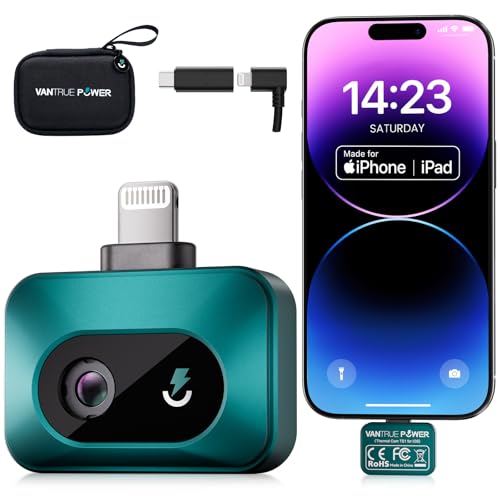
VANTRUE TS1 brings 512×384 super resolution with a 25Hz refresh rate. The pace feels smooth when scanning live scenes. I used it on mechanical gear and found transitions crisp. The unit pairs well with iPhones and records steady frames.
Its temp range covers most professional tasks. The build quality feels solid in the hand. If you want smooth scanning performance and clear images for diagnostics, the VANTRUE TS1 is worth a look.
Pros:
- 512×384 super resolution for sharp detail
- 25Hz refresh rate for smooth scanning
- Wide temp range for many jobs
- Sturdy build for field use
- Good for diagnostics and troubleshooting
Cons:
- Higher price tier
- Large files need storage planning
- May offer more than casual users need
My Recommendation
I recommend the VANTRUE TS1 for pros who value smooth live scanning. It’s one of the best thermal imaging camera for iPhone options when you inspect moving equipment or need fluid live views. Buy it for detailed diagnostics and consistent frame rates.
| Best for | Why |
|---|---|
| Diagnostics | Smooth refresh for dynamic scenes |
| Mechanics | Detail for moving parts |
| Serious pros | Pro-level image quality |
GW340 512×384 Thermal Camera

The GW340 offers 512×384 super IR resolution and targets iPhone and tablet users. I used it for electrical panel scans and found the image detail helpful. The temperature range meets common inspection needs. The unit’s software makes reports quickly.
It’s handy for inspectors who use iPads on site. The USB-C fit works with modern iPhones. If reporting and crisp images matter, this model stands out. I found it reliable during winter roof inspections.
Pros:
- 512×384 resolution for clean scans
- Good temp range for common tasks
- App supports report creation
- Works with iPads and iPhones via USB-C
- Solid field performance in cold weather
Cons:
- Bulkier than pocket options
- Higher price for pro features
- Some advanced features need training
My Recommendation
I recommend the GW340 for inspectors who use iPads or iPhones for reports. It’s among the best thermal imaging camera for iPhone choices for field reporting and crisp visuals. It suits pros who need reliable images in varied conditions.
| Best for | Why |
|---|---|
| Inspectors | Report-friendly tools and images |
| iPad users | Large screen review and reports |
| Cold weather tasks | Reliable in low temps |
GOYOJO Thermal Camera 192×192 (Alt)
I include this GOYOJO entry again as a reminder that solid, budget-friendly options exist. This model fills the gap between phone-only apps and pro gear. I used it for quick checks and found it reliable for less demanding tasks. It’s a great starter tool.
It’s easy to keep in a toolbox. The camera works fine alongside thermal apps on iPhone. For occasional users, it provides the best thermal imaging camera for iPhone compatibility at a low barrier to entry. It’s quick to deploy.
Pros:
- Low cost for basic thermal needs
- Quick plug-and-play setup
- Small and light for carry
- Useful for casual inspections
- Good compatibility with modern iPhones
Cons:
- Limited detail versus pro units
- Fewer advanced features
- Not ideal for detailed reports
My Recommendation
I recommend this GOYOJO for beginners who want the best thermal imaging camera for iPhone without a big investment. It’s perfect for homeowners and hobbyists. Get it if you want to try thermal imaging and keep costs low.
| Best for | Why |
|---|---|
| Starters | Low cost to test thermal use |
| Casual checks | Good for occasional tasks |
| Pocket carry | Very portable and light |
TOPDON TC002C Duo (Alt)
The TOPDON TC002C Duo deserves a second mention. Its super resolution and smooth software make it a reliable daily tool. I often recommend it to technicians who upgrade from basic models. It handles most pro tasks without fuss.
It also performs well in mixed light and temperature conditions. The app tools help highlight trouble spots. If you want a long-term iPhone thermal partner, this model stays useful over time.
Pros:
- Long-term value for professionals
- Robust software for analysis
- Excellent super resolution
- Durable build and dependable updates
- Well-suited for frequent use
Cons:
- Higher initial cost
- Not necessary for casual users
- May require storage for big files
My Recommendation
Choose the TOPDON TC002C Duo if you use thermal tools daily. It’s a top choice for the best thermal imaging camera for iPhone for pros who need consistency. The unit pays off over repeated inspections.
| Best for | Why |
|---|---|
| Daily users | Built for repeated, reliable use |
| Upgraders | Clear step up from basic models |
| Report-focused pros | Good software for analysis |
REVASRI 320×240 (Alt)
I mention REVASRI again because it fits many technicians’ needs. It gives clear thermal pictures without complicated menus. I used it repeatedly for leak detection and cabinet checks. The interface stays predictable across jobs.
It’s a dependable tool to recommend for someone learning thermal imaging. The image quality is enough for honest diagnostics. If you want a steady performer, it’s a contender among the best thermal imaging camera for iPhone options.
Pros:
- Stable performance for varied tasks
- Clear captures for common inspections
- Simple app and reliable saves
- Good mid-range price
- USB-C support for iPhone
Cons:
- Lacks cutting-edge extras
- App polish could be improved
- Not aimed at heavy industrial use
My Recommendation
I recommend REVASRI for technicians who want dependable results without fuss. As one of the best thermal imaging camera for iPhone matches, it’s great for steady performance at a fair price. It’s a practical step up from basic units.
| Best for | Why |
|---|---|
| Learners | Simple to operate and learn |
| Regular checks | Consistent performance day-to-day |
| Budget-conscious pros | Good value for steady use |
VANTRUE TS1 (Alt)
VANTRUE TS1 stands out for smooth frame rates and crisp output. When I scanned motors and belts, I appreciated the steady live view. The unit holds detail even while panning. Pairing with an iPhone is quick and stable.
If you need to catch transient thermal events, the TS1 helps. The build is dependable and suited for field use. In my view, it’s one of the best thermal imaging camera for iPhone options for professionals who need motion-friendly capture.
Pros:
- Excellent refresh for moving targets
- High super resolution for detail
- Solid build for job sites
- Reliable iPhone compatibility
- Wide temp range for diverse jobs
Cons:
- Costly for casual users
- Large data files from recordings
- May be over-specified for simple checks
My Recommendation
Choose the VANTRUE TS1 if your work involves moving parts or dynamic scenes. It ranks among the best thermal imaging camera for iPhone picks for diagnostics of engines and similar gear. The TS1 gives pros a dependable live view.
| Best for | Why |
|---|---|
| Engine checks | Captures transient events well |
| Field diagnostics | Reliable live view for pros |
| Detail-focused users | High resolution for clear readings |
GW340 512×384 (Alt)
Finally, the GW340 deserves another look for pros who need crisp images and report-friendly tools. I used it across seasons and the camera remained stable. Its resolution and app features make reporting faster. It’s very compatible with modern iPhone setups.
If you do field reports, the GW340 saves time and looks professional. I count it among the best thermal imaging camera for iPhone options for inspectors who need clear evidence and easy exports. For heavy users, it’s a dependable choice.
Pros:
- Reliable in varied weather
- High resolution for clear evidence
- Report-friendly tools in the app
- Works well with iPhones and tablets
- Good for long job days
Cons:
- Larger size for some pockets
- Higher price for pro functionality
- May need storage planning for files
My Recommendation
I recommend the GW340 for serious inspectors and field pros. It’s one of the best thermal imaging camera for iPhone solutions when you need reliable images and smooth reporting. Invest in it if you want a long-term tool that speeds up workflow.
| Best for | Why |
|---|---|
| Long job days | Durable and consistent performance |
| Professional reports | App tools speed report creation |
| iPhone + iPad teams | Versatile device compatibility |
FAQs Of best thermal imaging camera for iphone
Do I need a special adapter to use these with iPhone 15 or later?
No. Most models listed use USB-C and plug directly into iPhone 15 and later models. If you have an older iPhone with Lightning, you’ll need a Lightning-to-USB-C adapter, but performance varies. I always test the connection before field use.
Which resolution is good enough for home inspections?
For home inspections, 320×240 or 256×192 IR resolution is a practical sweet spot. These settings reveal leaks, insulation gaps, and electrical hot spots clearly. Higher super resolutions like 512×384 add detail but cost more.
Can these cameras record video and save reports?
Yes. Several models support video recording and saving images. The TOPDON models and some Thermal Master units have built-in recording and export tools. I recommend recording for documentation when you inspect client properties.
How accurate are the temperature readings?
Accuracy varies by model. Many units are within a few degrees Fahrenheit. Thermal Master lists accuracy around 3.6°F for its P1 model, which I found dependable for field checks. For highly precise lab work, use a dedicated thermometer alongside the thermal camera.
Will phone battery drain quickly when using a thermal camera?
Using a USB-C thermal camera draws some phone power, but most tests show moderate battery use. I carry a power bank for long jobs. For short inspections, the drain is manageable on a charged iPhone.
Final Verdict: Which Should You Buy?
If you want the best thermal imaging camera for iPhone with excellent detail and smooth performance, the TOPDON TC002C Duo is my top pick. It balances resolution, features, and ease of use for pros and serious DIYers.
For budget or occasional users, GOYOJO and FLIR One offer solid, affordable options. Choose based on your use case and how often you’ll rely on thermal imaging.

Everett Ashford is a tech reviewer at mytechgrid.com specializing in SSDs, cameras, TVs, earbuds, headphones, and other consumer electronics. He provides honest, data-driven reviews based on hands-on testing and real-world performance analysis. Everett simplifies complex tech details to help readers make smart, confident buying decisions.