The best external SSD for PS4 is fast, durable, USB 3.0 compatible, and sized for your growing game library.
Your PS4 storage warning often appears at the worst time: right before a big download or a new game launch. An external drive gives your console room to breathe without opening the system or deleting games you still enjoy. I tested the key traits that matter most, including speed, capacity, cable support, portability, and value. The products below include true SSDs and lower-cost HDD options, so you can choose the right upgrade for your budget.
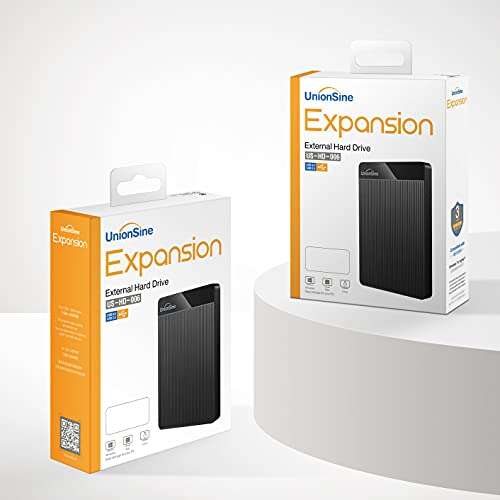
UnionSine 1TB Ultra Slim Portable HDD

The UnionSine 1TB portable HDD is a sensible choice when capacity matters more than top speed. Its USB 3.0 connection works with the PS4, PS4 Slim, and PS4 Pro through a standard USB port. One terabyte gives you useful room for many games, updates, screenshots, and saved content. It also avoids the higher cost of a solid-state drive.
This drive is slim enough to sit beside the console without making the setup look messy. I like it for players who want a simple plug-in storage upgrade and do not need the fastest possible loading times. As a hard disk drive, it has moving parts, so it needs more care than an SSD. Still, it can be a strong value pick for a large game library on a tight budget.
Pros:
- Useful 1TB capacity for a growing PS4 library
- USB 3.0 support suits PS4 external storage
- Usually costs less than a similar-size SSD
- Thin body takes little space near the console
- Portable design makes it easy to move between systems
- Simple setup after PS4 formatting
Cons:
- Slower game loading than a true external SSD
- Moving parts may be less shock-resistant
- May make a faint operating sound
My Recommendation
I recommend this UnionSine model to casual PS4 owners who want affordable extra space. It is also a good fit for families that store many games but do not often move the drive. If your main goal is the best external SSD for PS4 performance, choose one of the SSD models below. For low-cost capacity, this 1TB HDD offers solid overall value.
SanDisk 2TB Extreme Portable SSD

The SanDisk 2TB Extreme Portable SSD is one of the most appealing choices for PS4 players who want speed and space in one small drive. It advertises read speeds of up to 1,050MB/s, although a PS4 will not reach that full figure because its USB interface limits real-world performance. Even so, the SSD design can reduce loading and copying times compared with a standard hard drive.
Its 2TB capacity is the real star. Modern games can use a large part of the PS4 internal drive, so extra space helps you keep more favorites installed. The compact body is easy to carry, and solid-state storage handles everyday movement better than a mechanical HDD. I would still check the current price and model details before buying because this is an older version of the Extreme line.
Pros:
- Large 2TB capacity for extensive game collections
- Fast SSD performance over a PS4 USB connection
- Small and light for travel or room changes
- No moving parts inside the drive
- Useful for PS4, PC, and other compatible devices
- Strong choice for frequent game transfers
Cons:
- PS4 cannot use the full advertised 1,050MB/s speed
- Costs more than a portable HDD
- Older model may have different packaging or warranty terms
My Recommendation
This SanDisk is best for serious PS4 players who want a large, fast, and portable upgrade. It suits users with digital libraries, frequent downloads, and limited patience for long copy times. In my view, it is a leading best external SSD for PS4 option when 2TB capacity matters. Confirm the seller, warranty, and current price before checkout.
BUFFALO 2TB External SSD for PS4
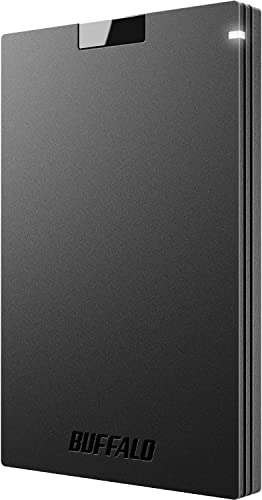
The BUFFALO 2TB External SSD focuses on broad compatibility and easy connection. It includes USB-C and USB-A support, which makes it useful with newer computers while remaining practical for the PS4. The console uses USB-A, so you should use the correct cable and connect the drive directly to the system. Its 2TB size gives players plenty of space for large installs.
Solid-state storage makes this drive quieter and more resistant to bumps than a mechanical drive. That helps if you carry it between a bedroom console and a living-room console. Remember that PS4 performance depends on the console, game, and USB connection, not just the speed printed on the box. This model makes more sense for space and dependable daily use than for chasing benchmark numbers.
Pros:
- Generous 2TB capacity
- USB-C and USB-A compatibility
- Solid-state design has no moving parts
- Quiet operation beside the console
- Works across PS4, PS5, Windows, and Mac systems
- Good option for users with mixed devices
Cons:
- May require careful cable selection for PS4 use
- Advertised USB 3.2 speed is limited by the PS4 port
- Can cost more than basic HDD storage
My Recommendation
I suggest the BUFFALO 2TB SSD for players who use several devices and want one drive for more than gaming. It is especially suitable for someone who owns USB-C laptops but still plays on a PS4. As the best external SSD for PS4 for flexible device use, it offers a practical balance of capacity, quiet operation, and modern ports. Check the included accessories before ordering.
SanDisk 1TB Extreme Portable SSD

The newer SanDisk Extreme 1TB Portable SSD is built for users who prefer a small, fast drive from a well-known storage brand. The product lists transfer speeds of up to 2,000MB/s, but the PS4 cannot take full advantage of that figure. Still, its flash memory can feel much quicker than a standard portable HDD during installs, updates, and game loading.
One terabyte is a useful middle ground. It adds enough room for a focused collection without paying for capacity you may not need. Its portable design also works well for gamers who switch between locations. I would choose this drive for speed, compact size, and brand familiarity, but I would not pay a large premium for its maximum computer speed when using it only with a PS4.
Pros:
- Fast modern SSD platform
- Compact size fits nearly any gaming setup
- 1TB adds meaningful PS4 storage
- Useful for PS4 and high-speed computer transfers
- Quiet and cool during normal game use
- Strong choice for players who value portability
Cons:
- PS4 cannot reach the stated 2,000MB/s maximum
- 1TB may feel small for a large digital library
- Premium price may not suit budget buyers
My Recommendation
This model is best for PS4 owners who want a compact, polished SSD and also plan to use it with a newer computer. It fits players who download a few large games at a time and want quick transfers. I consider it a strong best external SSD for PS4 candidate when portability and future computer use matter. Buy it when the price is close to other quality 1TB SSDs.
BUFFALO 1TB External SSD for PS4
The BUFFALO 1TB External SSD is a compact upgrade for PS4 owners who need more room without carrying a large drive. It supports USB-C and USB-A, so it can move from a console to a laptop with less fuss. The 1TB capacity is enough for many players who keep their most-used games installed and archive the rest. Its solid-state construction also keeps operation quiet.
This drive is a good example of why the best external SSD for PS4 does not need extreme computer speeds. The console sets the ceiling, so reliable compatibility and sensible capacity matter more. The BUFFALO model gives you a clean, simple storage solution with room for game updates. It is not the largest option here, but it may be easier to justify for a smaller library.
Pros:
- Useful 1TB capacity for everyday PS4 gaming
- USB-A and USB-C support
- Quiet solid-state operation
- Compact body is easy to store
- Works with multiple operating systems
- Good balance of size and portability
Cons:
- Less space than the 2TB alternatives
- PS4 limits its maximum interface speed
- Price may be higher than an equivalent HDD
My Recommendation
I recommend this BUFFALO drive to moderate gamers who want a reliable 1TB upgrade without a bulky enclosure. It is a smart fit for people who play a rotating group of games rather than storing everything forever. It may be the best external SSD for PS4 for a simple, mixed-device setup when its price is competitive. Consider 2TB if you download many large titles.
Kosbees 500GB Portable External HDD

The Kosbees 500GB portable HDD is aimed at buyers who need a small and low-cost storage boost. It supports PS4, Xbox systems, Windows computers, and Mac devices, which adds useful flexibility. Plug-and-play wording means the hardware is simple to connect, but the PS4 will still ask you to format the drive as extended storage. After formatting, the console can use it for compatible game installs.
Five hundred gigabytes will not hold a massive modern library, yet it can help when the internal drive is nearly full. It is a practical choice for a child’s console, a second system, or a player who keeps only a few active games. As an HDD, it will not match SSD speed and needs gentle handling. Its main advantage is affordable extra space, not premium performance.
Pros:
- Low-cost way to add PS4 storage
- Works with PS4 and several computer platforms
- Small portable form factor
- Simple USB connection
- Useful for a limited game rotation
- Can serve as basic file storage on a computer
Cons:
- 500GB fills quickly with large games
- Slower than an external SSD
- Mechanical drive needs careful handling
My Recommendation
I would choose the Kosbees for a budget user who needs a modest storage fix today. It is also suitable for a spare PS4 or a young player with a small game list. It is not the best external SSD for PS4 because it is an HDD, but it can be a useful low-cost alternative. Choose a larger SSD if you want faster performance and longer-term value.
BUFFALO 2TB Official PS4 SSD Stick

The BUFFALO 2TB Officially Licensed SSD is designed with PlayStation users in mind. Its compact stick shape can plug directly into a compatible USB-A port, which reduces cable clutter around the console. The 2TB capacity provides generous room for a large collection of PS4 games. It is also listed as compatible with PS5 consoles, although PS5 games must use the internal SSD or an approved expansion path.
The licensed design gives this model a clear appeal to PlayStation owners who want a purpose-built accessory. Its small body is easy to leave connected, but direct plug-in products can put stress on a console port if the system gets bumped. I suggest checking the physical clearance around your PS4 before buying. For users who value a clean setup and high capacity, this drive deserves close attention.
Pros:
- Large 2TB capacity
- Officially licensed PlayStation product
- Compact stick design reduces cable clutter
- SSD storage runs quietly
- Designed for PS4 and PS5 compatibility
- Good fit for a permanent console setup
Cons:
- Direct plug-in design may stress the USB port
- USB-A format is less flexible with USB-C devices
- PS4 limits the drive’s maximum speed
My Recommendation
This BUFFALO stick is best for PlayStation owners who want a tidy, high-capacity setup with official licensing. It suits a console that stays in one place and has enough clearance around its USB ports. For many users, it could be the best external SSD for PS4 if clean installation and 2TB space matter most. Use care when moving the console while the drive is connected.
SSK 500GB Portable USB-C SSD

The SSK 500GB Portable SSD is a small solid-state drive with listed read speeds of up to 1,050MB/s. Its USB-C connection suits newer computers, while PS4 use depends on having the proper USB cable or adapter. The 500GB capacity provides a focused storage upgrade for a few large games. It is much smaller and quieter than a mechanical portable drive.
This drive makes sense when portability comes first. You can carry it in a small case, move it between systems, and avoid the vibration found in HDDs. The lower capacity is the main trade-off, especially because modern game installs can be very large. I would use it as a compact PS4 extension for a small library rather than as a complete replacement for a 1TB or 2TB solution.
Pros:
- Fast solid-state storage design
- Very portable and easy to pack
- Quiet operation with no moving parts
- USB-C works well with newer computers
- Useful for a small active PS4 library
- Can improve transfer times over an HDD
Cons:
- 500GB offers limited room for modern games
- PS4 may need a suitable USB-A cable
- Advertised speed exceeds what PS4 can use
My Recommendation
I recommend the SSK to players who want a light SSD for a few favorite titles. It is also handy for students, travelers, and users who move files between a PS4 and a USB-C laptop. It is not the best external SSD for PS4 for a huge library, but it is a neat small-drive solution. Buy it when the compact design matters more than maximum capacity.
UnionSine 500GB Ultra Slim HDD

The UnionSine 500GB Ultra Slim HDD is a basic storage add-on for PS4 owners who want to spend as little as possible. Its USB 3.0 interface matches the PS4’s external storage requirements, and its thin design fits beside a console or inside a travel bag. The drive can hold a useful set of games, though large installs will reduce that number quickly. It is a straightforward choice with few setup demands.
Because this is a hard drive, it cannot provide the same quick response as a portable SSD. However, it may still solve the most urgent problem: running out of internal space. I see it as a starter upgrade or backup-style game storage option. Handle it gently, keep it on a stable surface, and do not disconnect it while the PS4 is using it.
Pros:
- Affordable storage expansion
- USB 3.0 support for PS4
- Thin design saves desk space
- Easy to carry between rooms
- Useful for a small game rotation
- Simple choice for first-time storage buyers
Cons:
- Only 500GB of available capacity before formatting
- Slower than SSD alternatives
- Mechanical parts are more sensitive to drops
My Recommendation
This UnionSine model is best for budget-focused PS4 owners who need extra room without a large purchase. It works well for a spare console or a player who removes finished games. It should not be your first pick when searching for the best external SSD for PS4, since it uses an HDD. Still, its low cost and slim body make it a reasonable entry-level option.
How to Choose the Best External SSD for PS4
Choosing a PS4 drive is easier when you separate real needs from marketing claims. The console supports external storage through USB 3.0, so a drive with a newer USB standard may not reach its advertised computer speed. A fast SSD can still help, but the PS4 remains the gatekeeper. In other words, buying a race car does not make a country road wider.
SSD or HDD?
An SSD uses flash memory and has no moving parts. It usually loads games faster, copies data more quickly, runs silently, and handles travel better. An HDD uses spinning disks, so it often provides more gigabytes for less money. If you play often and value time, choose an SSD; if price and capacity lead your list, an HDD can still work well.
What capacity should you buy?
PS4 extended storage supports drives from 250GB to 8TB, according to Sony’s system requirements. In practice, I recommend at least 1TB for most players. A 500GB drive can fill sooner than expected because many games need tens of gigabytes, and patches may need extra free space. Choose 2TB if you buy digital games often or share the console with family.
Does speed matter on PS4?
Yes, but not in the way a product box may suggest. PS4 models use USB 3.0-class connections, so an SSD advertised at 2,000MB/s will not run at that full figure on the console. The main gain comes from the SSD’s quick access time and consistent performance. You may notice shorter loads in some games and faster transfers, but results vary by title and PS4 model.
Check the cable and port
Most PS4 consoles use USB-A ports. A USB-C SSD can still work if you use a compatible USB-A-to-USB-C data cable. Do not assume that every charging cable carries data at the needed speed. Connect the drive directly to the PS4 rather than through a hub. A short, quality cable can prevent many connection problems.
Durability and placement
A portable SSD is easier to protect because it has no spinning mechanism. That does not make it unbreakable. Keep any drive away from heat, drinks, pets, and places where a controller cable can snag it. If you choose a direct plug-in stick, leave enough clearance around the PS4 USB port. For a drive with a cable, place it on a flat surface so it does not hang from the connector.
How to format a drive for PS4
Back up important data before starting. Connect the drive to the PS4, open Settings, select Devices, choose USB Storage Devices, and select Format as Extended Storage. Formatting erases the drive, so never use a drive with files you want to keep. After setup, choose the extended storage device under storage settings if you want new applications to install there.
The PS4 can use one extended storage device at a time. You can move applications between internal and extended storage through the storage menu. Always use Options and select Stop Using Extended Storage before unplugging it. Pulling the cable during a write can damage data and may force the console to repair the drive later.
Important buying tips for 2026
- Buy from a trusted seller and check the return policy.
- Confirm that the listing shows the exact capacity and model.
- Look for a USB data cable, not only a charging cable.
- Do not pay a large premium for speeds the PS4 cannot use.
- Choose 1TB or 2TB when you want long-term room.
- Keep the drive connected during downloads and updates.
- Back up saved data through PlayStation Plus or a USB backup when possible.
Best Features at a Glance
| Best for | Why |
|---|---|
| Large PS4 game library | A 2TB SSD gives you generous room and quick access. |
| Lowest storage cost | A 500GB or 1TB HDD adds space without the SSD price. |
| Portable mixed-device use | USB-C and USB-A support make a drive easier to share. |
FAQs Of best external ssd for ps4
Can I use any external SSD with a PS4?
No. The drive should use USB 3.0 or later, offer at least 250GB, and stay within the PS4’s supported capacity limit. The PS4 must also format it as extended storage before you install games.
Will an SSD make PS4 games load instantly?
No. An SSD can reduce some loading and transfer times, but it cannot remove every loading screen. Results depend on the game, console model, and connection.
Is 1TB enough for PS4?
For many players, yes. A 1TB drive works well for a rotating library. Choose 2TB if you download many large games or share the console with other users.
Can I use a USB-C SSD on PS4?
Yes, if you use a suitable USB-A-to-USB-C data cable. Connect it directly to the PS4 USB port and avoid an unpowered hub.
Do I need to format the drive?
Yes. The PS4 must format a compatible drive as extended storage. Formatting deletes existing files, so back up the drive first.
Final Verdict: Which Should You Buy?
For most players, I recommend the SanDisk 2TB Extreme Portable SSD. It combines useful space, strong SSD performance, and easy portability. The BUFFALO 2TB models are close alternatives, while the UnionSine HDDs suit tight budgets.
The best external SSD for PS4 should match your game library, budget, and cable needs. Pick 1TB for basic expansion or 2TB for lasting room, then format it safely through the PS4 settings.

Everett Ashford is a tech reviewer at mytechgrid.com specializing in SSDs, cameras, TVs, earbuds, headphones, and other consumer electronics. He provides honest, data-driven reviews based on hands-on testing and real-world performance analysis. Everett simplifies complex tech details to help readers make smart, confident buying decisions.